Service Mode/ disable ignition on shut off

Disclaimer: Links on this page pointing to Amazon, eBay and other sites may include affiliate code. If you click them and make a purchase, we may earn a small commission.

VBreithaupt

Full Access Members
Joined
Jan 1, 2022
Posts
158
Reaction score
97
Location
Michigan
Hello Forum
Does anyone know if there is a Service Mode you can place the 2020 Limited Expedition in? Reason I ask is I run the hotspot from the vehicle up north at my lodge for my laptop. I usually push ignition on, make sure everything else is shut off and all is well until around 30-50 minutes when the car shuts off. I had a Suburban I would hold the start button in for 10 sec. and it would go into service mode and would not shut off. Does Ford have something like that for the Expedition? Any insight would be appreciated. thanks
 

PNWExpy

Well-Known Member
Joined
Mar 26, 2019
Posts
59
Reaction score
56
Location
Oregon
Hello Forum
Does anyone know if there is a Service Mode you can place the 2020 Limited Expedition in? Reason I ask is I run the hotspot from the vehicle up north at my lodge for my laptop. I usually push ignition on, make sure everything else is shut off and all is well until around 30-50 minutes when the car shuts off. I had a Suburban I would hold the start button in for 10 sec. and it would go into service mode and would not shut off. Does Ford have something like that for the Expedition? Any insight would be appreciated. thanks
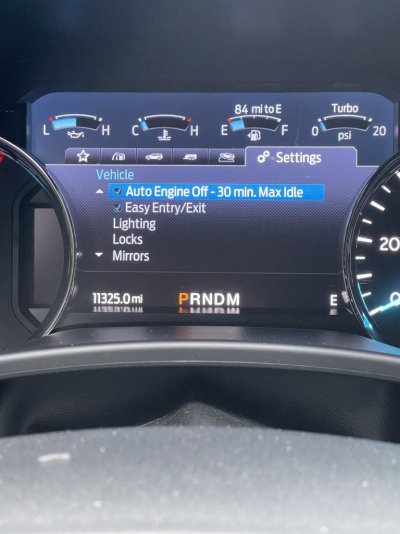
If you go settings and then advanced settings you can disable the auto off feature.
 

Attachments

  • 6D380FFB-F6B7-4A5C-9E47-BAC32E1CCB71.jpeg
    6D380FFB-F6B7-4A5C-9E47-BAC32E1CCB71.jpeg
    105.9 KB · Views: 11
OP
OP
VBreithaupt

VBreithaupt

Full Access Members
Joined
Jan 1, 2022
Posts
158
Reaction score
97
Location
Michigan
thanks PNWExpy
Is that just for if the car is running? I need something that will keep it from shutting down when the engine is off and the acc is just on.
 

PNWExpy

Well-Known Member
Joined
Mar 26, 2019
Posts
59
Reaction score
56
Location
Oregon
@VBreithaupt Ahh I gotcha. I didn’t realize that’s what you meant. The truck is still relatively new to me so I couldn’t give you an answer on that, sorry!
 

apex96

Full Access Members
Joined
Jul 11, 2021
Posts
350
Reaction score
254
Location
PA
I believe this is something you can configure in forscan. Members have been able to extend the time for their accessories to stay powered up once the ignition has been turned off. I briefly recall seeing the option when I was making other modifications in forscan.
 

bryz_expy

Well-Known Member
Joined
Sep 27, 2020
Posts
95
Reaction score
43
Location
Denver, CO
I’m not sure if the hotspot is powered by the PowerPoint(12v) timeout settings. I extended my PowerPoint settings for my older rear dash cam because it doesn’t have its own battery. I extended it to 2 hours after ignition off via Forscan. If the hotspot is tied to that, then you may be able to accomplish what you are asking.
 

wakeboarder

Full Access Members
Joined
Nov 16, 2019
Posts
811
Reaction score
468
Location
Fort Lauderdale, FL
There is an engineering test mode. I’m not sure if it does what you want, but it may be worth a try. I used it to correct my fuel mileage readout. You can google how to get it into the mode.
 
OP
OP
VBreithaupt

VBreithaupt

Full Access Members
Joined
Jan 1, 2022
Posts
158
Reaction score
97
Location
Michigan
thanks for ideas guys. I will report back. I assume you need to plug car into computer to extend time? or is that in menu of settings somewhere?
 
OP
OP
VBreithaupt

VBreithaupt

Full Access Members
Joined
Jan 1, 2022
Posts
158
Reaction score
97
Location
Michigan
I googled the engineering test mode and couldn't get any of the sequences to work on my 2020? I called the dealer to ask how to place it in it and they played dumb and said they were unaware of this mode. I told them what I was trying to do and they didn't have any ideas.
Has anyone else figured out how to put the 2020 in engineering mode? I going to look into finding someone to hook up forscan to see if extending the time as suggested would help.
 
OP
OP
VBreithaupt

VBreithaupt

Full Access Members
Joined
Jan 1, 2022
Posts
158
Reaction score
97
Location
Michigan
I figured it out! To put your expedition in to engineer mode. While holding down OK button on left of steering wheel, push start button. Your accessory lights will come on, hold down until you see ET pop up next to battery symbol then let up on OK button. I assume this works for the 2018 up and to get out of it you hit the ignition button again to turn vehicle off. I don't know if it bypasses the shutoff timer. I'm testing it now. I will update when I find out.
 
OP
OP
VBreithaupt

VBreithaupt

Full Access Members
Joined
Jan 1, 2022
Posts
158
Reaction score
97
Location
Michigan
Putting it in Engineer mode does disable the accessory time out feature. so if you are running your hot spot or radio for longer periods of time then here is your solution. Haven't seen a lot of threads on navigating the E.M. but it pulls up some cool things.
 
Top