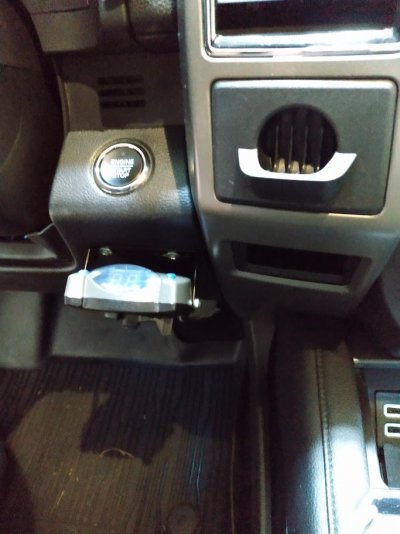
So, no responses....so I spent some time googling on line using different phrases and found the following.....
This pertains to my 2019, but I imagine it is the same for all 4th generations.......
If you have a tow package and/or the FX4, but no factory brake control, and you want a control, but an aftermarket like my Tekonsha the following will help....you DO NOT have to tare your dash apart...
The factory plug is attached to the back of the cubby, and all the on-line data says you have to tear the das apart as the cubby is attached to the dash from the rear...you cannot pry it out from the front....
BUT....
Drop the knee bolster, the plastic panel under the steering wheel. It can be pried from the top edge....held by clips, and will swing down....you do not have to remove it or unplug anything. You will see a metal brace held on by 4 bolts, either 10 or 11 mm....remove the bolts and the brace comes right out.
Once its removed, you will see a hole (hole is big enough to get your entire hand in) in the console panel adjacent to the cubby.....shine a flashlight and you will see the back of the cubby and the factory plug. It is just clipped to the back of the cubby like any plugged in electrical plug. Press down on the clip retainer and the plug comes right out. Feed the plug out of the hole....plenty of excess wire.
On my Tekonsha, Tekonsha makes a conversion plug/wire that plugs right in to the Ford plug and connects right to the Tekonsha controller....it is a simple plug-n-play.
Tekonsha part #303600, for Ford.....$14.00 on Amazon.
I ran the plug wire under the dash and reassembled everything, mounted the controller to the dash, plugged the connector in, and everything works.
The entire job took 30 minutes, and works perfectly.....and, no need for Ford to program the controller. And, most important, no need to pry all the dash panels apart !!!
I went this route as I had a Tekonsha P2 controller removed from my previous Ranger, and no way was I going to spend the big $$$$ Ford wants for their part, plus programing.