Rear Entertainment System

Disclaimer: Links on this page pointing to Amazon, eBay and other sites may include affiliate code. If you click them and make a purchase, we may earn a small commission.

NukeLife

Full Access Members
Joined
Nov 2, 2019
Posts
288
Reaction score
270
Location
Charlotte
I find it highly unlikely Ford has improved anything with the RES on the 2022. In fact, they are doubling down on stupid.

In the 2018’s they still have a DVD slot up front—however, they made it audio only (unlike the earlier vehicles like the QX80 and countless others where you could actually put a movie into the DVD slot of the center console and play it on the back screens).

Then they removed the DVD slot entirely for the 2020 ? Model.

They have (incorrectly) made the assumption that any video entertainment happening in the rear of the vehicle is of no interest or concern for anyone in the front of the vehicle. And, BTW, there will always be somebody back there that is savvy enough to run the entertainment for the kids… right??

I mean, ffs, just install a BluRay slot on the center stack right under the climate controls. Make it selectable to feed either, or both, rear screens. Do the same with an HDMI port and a USB port, right beside it. Then on the Audio screen of the Sync system, make RES a “source” of audio to listen to. Done. For all the lawyers out there, you can interlock the center stack RES control panel with the passenger seat detection system ALREADY INSTALLED in the vehicle that lets the BCM know a person is in the passenger seat to enable the airbag on that side. That way the driver won’t be fiddling with those controls while moving down the road. Although, if you can navigate through all the other Sync screens while driving I would think you would be able to start a movie for the kids.

It makes you wonder if they are are really that stupid in the R&D department, or is it a conscious effort to isolate the RES from the rest of the vehicle. It actually has the stench of a government-induced knee-jerk response to some frivolous regulation or lawsuit.
 

Tgreen48

Member
Joined
Nov 15, 2021
Posts
22
Reaction score
1
Location
Michigan
I just asked dealer if he can get in touch with Ford and have the RES removed from my order. I'll post here with his findings, and whether or not it expedites my scheduling.
Update: Dealer was able to get RES removed. Looking like I am now scheduled for first week of April.
 

ExpyStealth

Member
Joined
Nov 12, 2021
Posts
19
Reaction score
8
Location
Charlotte NC
What was your original build date? Just wondering how far that set you back.
…never mind….lack of sleep moment haha. I think everyone with the RES was saying they did not have a build week/date yet correct? That’s great that they were able to remove and get you scheduled!!
 

SublimeHiPpOs

Well-Known Member
Joined
Apr 16, 2020
Posts
73
Reaction score
25
Location
Omaha, NE
I’m pretty sure I covered all this in an old thread from a year or two ago, but here it is in a nutshell:

The RES as it comes from Ford is poorly implemented.
There are really nice ones out there, and Ford could have looked to any of those examples (QX80). But they cheaped out.

The major complaints: no ability to control from the front seats, and no hard-wired audio input to the vehicles surround sound. The Bluetooth interface is laughable—even assuming you can get the audio delay set correctly.

There are solutions—some more complex, and some more costly, but if you intend to use the system for whole family enjoyment you may want to explore them.

One solution (that I went with) was to install a module from Naviks that allows an HDMI input directly to the car‘s audio system, and front screen if the front passenger wishes to watch also.

What this looks like is a pluggable module that you install inside the center console (center stack and console must come out) and route the HDMI receptacle wherever you want. I ran my cable to the inside of the cavernous armrest bin. Once this module is installed, you install a small USB thumbdrive (formatted—but nothing on it.) into one of the USB ports in the center console and select that USB input for audio. This is just a way to tell the car to pull audio from the HDMI input, since there is no HDMI option to select from Ford’s menu Then depress and hold the left thumb pad on the steering wheel for 2 seconds and magically anything plugged into that HDMI port plays through the car’s audio system, and is displayed on the center console screen.

Perfect right? Well, no, you’re not quite done yet. That gives you glorious surround sound TV up front—but what about the rear screens?
Well, turns out the rear screens also have an HDMI input. So I installed an HDMI splitter in the center console bin also, and my “source” (which is sometimes a BluRay player, and most times my Roku streaming stick) just sends TV to front and back simultaneously. And yes that requires running a HDMI cable (DON’T BUY A CHEAP ONE!!) from inside the console bin, under the carpet and up through the driver’s seat to the headrest screen.

A weekend of work to be sure once you get all the pieces parts and panel tools you need, but the result is how it should have come from the factory. HDMI video and audio from streaming TV or BluRay on all three screens simultaneously with seamless, effortless, HD surround sound. Still not a perfect solution, but it at least makes it useable. And to toggle the front screen back and forth from “TV” mode to Ford Sync mode, just hit the left arrow on the left D-pad again.
Great information, thanks for sharing! Do you happen to know the specific parts used to make this happen? We have a 2018 Plati and have the same frustrations with the RES. Our kids are little, so I just have about 50 movies on an SD card and the systems just loops through those and they're generally happy. But I'd love the ability to do more up front and I'm sure sometimes it would be nice to have it going through all screens.
 

Stacy

New Member
Joined
Jul 11, 2022
Posts
1
Reaction score
1
Location
Arizona
I just picked up my 22 with the REC. No DVD player and I can’t control the back screen output from the giant-a$$ screen. My three and six year old can’t navigate the fireTV remotes and I also can’t get them to mirror.
I called Amazon and they said that the 22 exp and the Lincoln Navigator are the only ones with the FireTV REC that don’t allow control from the front screen panel. I also found out that since FireTVs are not iOS, I can’t mirror my iPhone to them. The audio for the tablets won’t sync with the car system so you have to wear headphones to hear it. They provided 2 pairs, but it seats 6 people back there. I tried to pair my own BT headphones with it and it only allowed me to pair one device per screen. So 3 of my kids have to watch the show in silence. I guess I can turn on subtitles and count that as their reading.

I’m with you, give me a DVD player and access to control it from the front. We also live in the BFE and don’t have cellular service sometimes, so the wifi/streaming doesn’t work and I have to crawl back there to figure it out and restart it for my younger kids. First world problems, but if we pay this much for a vehicle I want it to work!
 

MattG

Full Access Members
Joined
Feb 15, 2021
Posts
259
Reaction score
125
Location
Toronto
^^^ based upon my experience with our '20 RSE, I declined the option in our '22.
Ford RSE seems to be something they just don't care to, or have not yet, invested in to make much user friendly and reliable.
 

dgq68

Active Member
Joined
Nov 14, 2021
Posts
36
Reaction score
16
Location
New York
Just got my 2022 with the RES and it is a little disappointing. I'm seeing the same as Stacy above. No syncing and seats for 6 but only two people can listen. How can there be no audio output other than the headphones? Also, seems you can't connect more than one bluetooth device to each at a time (if you could, i could buy more headphones). Big waste of money in my opinion, could have bought 10 tablets for the price of these two.
 

Elise

Member
Joined
Nov 17, 2022
Posts
8
Reaction score
0
Location
saskatchewan
I have found that it’s a lot of fun to have on College Football Game Day or March Madness playing on all screens when road-tripping to a game. Kind of gets everybody amped up on the way there. And then they can still mess around on the iPad or phone while watching TV at the same time. It’s like a mobile surround sound living room on wheels.

I also installed a direct HDMI input in my console, and a motion-lockout override, so we can watch up front too. (Naviks). Three screens in surround sound.
Is this on a 2022? Because my 2022 has no external speakers or in cabin sound. I have only 2 headsets so there’s no way all 6 of my passengers would be able to have this surround sound. Ford disappointed hugely by going with a these Amazon/Voxx “tv’s”
 

Elise

Member
Joined
Nov 17, 2022
Posts
8
Reaction score
0
Location
saskatchewan
Just got my 2022 with the RES and it is a little disappointing. I'm seeing the same as Stacy above. No syncing and seats for 6 but only two people can listen. How can there be no audio output other than the headphones? Also, seems you can't connect more than one bluetooth device to each at a time (if you could, i could buy more headphones). Big waste of money in my opinion, could have bought 10 tablets for the price of these two.
Can you stream? Mine are not streaming for Disney plus, Netflix or YouTube and my dealership is trying to tell me that is normal and they are only for mirroring from your phone or tablet. Horrible experience trying to work with ford for this Amazon/Voxx system.
 

Elise

Member
Joined
Nov 17, 2022
Posts
8
Reaction score
0
Location
saskatchewan
I just picked up my 22 with the REC. No DVD player and I can’t control the back screen output from the giant-a$$ screen. My three and six year old can’t navigate the fireTV remotes and I also can’t get them to mirror.
I called Amazon and they said that the 22 exp and the Lincoln Navigator are the only ones with the FireTV REC that don’t allow control from the front screen panel. I also found out that since FireTVs are not iOS, I can’t mirror my iPhone to them. The audio for the tablets won’t sync with the car system so you have to wear headphones to hear it. They provided 2 pairs, but it seats 6 people back there. I tried to pair my own BT headphones with it and it only allowed me to pair one device per screen. So 3 of my kids have to watch the show in silence. I guess I can turn on subtitles and count that as their reading.

I’m with you, give me a DVD player and access to control it from the front. We also live in the BFE and don’t have cellular service sometimes, so the wifi/streaming doesn’t work and I have to crawl back there to figure it out and restart it for my younger kids. First world problems, but if we pay this much for a vehicle I want it to work!
I am having the exact same issues!! I had no idea when we ordered that ford had decided to get rid of DVD’s and go with a $75 tablet glorified as an entertainment system. I am furious at my dealer and they are telling me that it is not supposed to stream (my screens won’t stream Netflix or prime) and it’s only for mirroring. And why can’t there be external speakers and in cabin sound?? My 07 explorer was better equipped and guess what, the DVD player STILL works 16 years later and the kids can hear the sound or choose headphones. This is a HUGE step back for families. I have three kids and two headphones…wtf ford??
 

maxlim2022

Full Access Members
Joined
Nov 2, 2021
Posts
126
Reaction score
59
Location
Illinois
Can you stream? Mine are not streaming for Disney plus, Netflix or YouTube and my dealership is trying to tell me that is normal and they are only for mirroring from your phone or tablet. Horrible experience trying to work with ford for this Amazon/Voxx system.
they can stream. you have to set them with wifi -either the car's if you still are within your 3 months of purchase or to a cell phone. My car is connected to my cell phone as hotspot when I turn on Wifi sharing on my phone. the problem with that option is that I cannot use Android Auto at the same time. On long trips, we would use Ford Nav or Waze/Google on my wife Iphone while my device serves as a hotspot with Bluetooth connection to the car if not using the iphone for maps. It still remains a stupid worthless system in that you cannot play video sound in high definition in the car. You can connect each headset via bluetooth as a phone to the car and the Screen's content would be piped through the car's speakers but there is the usual low quality Bluetooth sound lag and poor sound quality.
 

Elise

Member
Joined
Nov 17, 2022
Posts
8
Reaction score
0
Location
saskatchewan
they can stream. you have to set them with wifi -either the car's if you still are within your 3 months of purchase or to a cell phone. My car is connected to my cell phone as hotspot when I turn on Wifi sharing on my phone. the problem with that option is that I cannot use Android Auto at the same time. On long trips, we would use Ford Nav or Waze/Google on my wife Iphone while my device serves as a hotspot with Bluetooth connection to the car if not using the iphone for maps. It still remains a stupid worthless system in that you cannot play video sound in high definition in the car. You can connect each headset via bluetooth as a phone to the car and the Screen's content would be piped through the car's speakers but there is the usual low quality Bluetooth sound lag and poor sound quality.
I have my expedition on a data plan and my screens can go on it’s wifi and will be able to play the games and watch tubi and kidoodle but unable to stream any of the major services. Then I hotspot off of my phone and it works fine and the screens can stream everything. So it makes me think ford’s wifi isn’t working properly or the screens do not have the proper licensing maybe for whatever reason when using my truck as a wifi?

My dealership has even less of a clue than I do and I cannot believe how hard this has been to get a straight answer from ford Canada and my dealer about what what this system is supposed to do.
 

expegino

New Member
Joined
Mar 5, 2023
Posts
3
Reaction score
0
Location
Memphis, TN
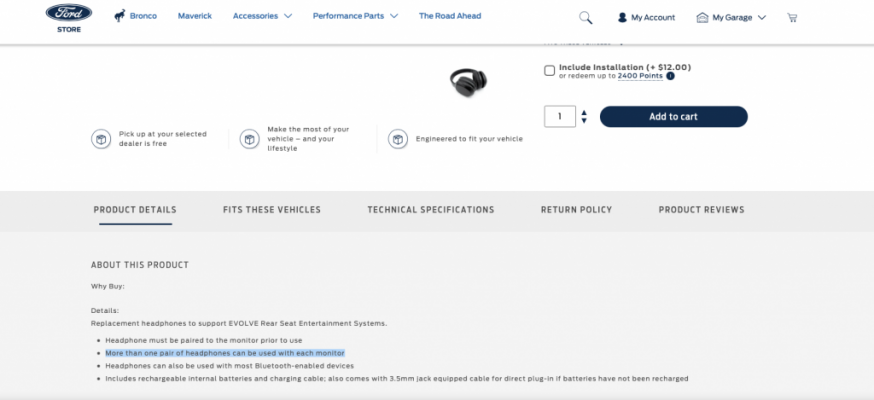
Joining in with the frustration about not being able to pair more than one BT headset/screen to the 2022 Evolve RES. I find it even more frustrating since on the Ford accessories page, one can buy a replacement headset (VOXXBT19) and in the product's details, it clearly says that more than one headset can be linked....I have a couple of spare ones at home, given to me by mistake by the dealer, and they don't work together, it's either one or the other. Also, I found out that I can't have a headset hardwired and the other one playing via BT: it's only one or the other.

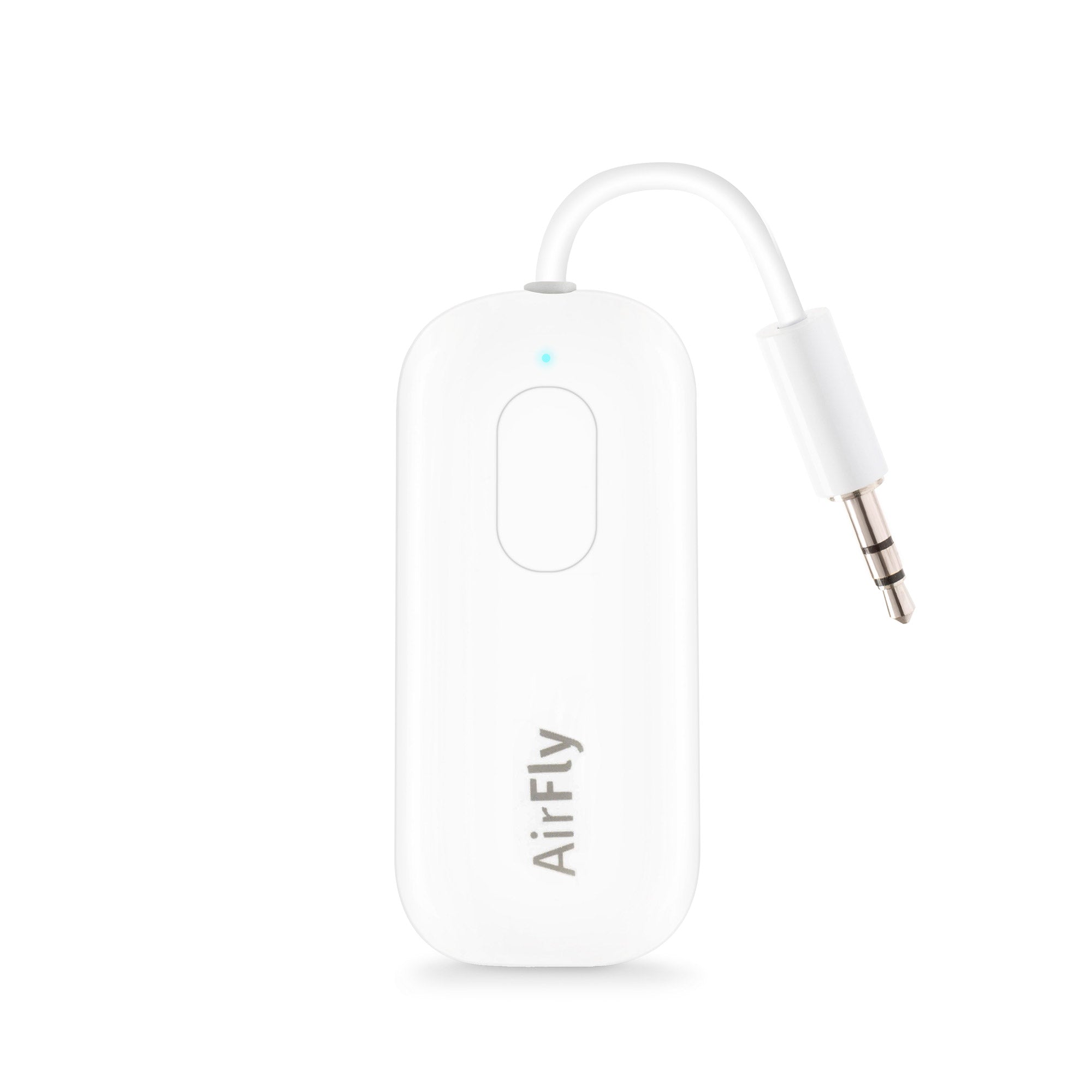
So I was thinking, has anybody contemplated using this:


2 per screen x 2 headsets/airpods = 4 happy passengers...I guess the other passenger/s will have to read!
 

Attachments

  • headset.png
    headset.png
    187.2 KB · Views: 7
Top