2011 Remote Start

Disclaimer: Links on this page pointing to Amazon, eBay and other sites may include affiliate code. If you click them and make a purchase, we may earn a small commission.

Wes1

Full Access Members
Joined
Jun 20, 2011
Posts
133
Reaction score
22
Location
Alexandria, LA
Does anyone know how to override the computer to keep the engine started once you open the door after starting the engine with the remote start? On the 2008 model, I know for sure, the engine will stay running even after the door is opened.

Thoughts?

Wes
 

bugbitten

Member
Joined
Nov 6, 2009
Posts
6
Reaction score
0
Location
W KY
Please pm me if you get a reply. I suspect it is just programming or a default of the my key system. Bugs me.
 

Johnny Law

Active Member
Joined
Aug 30, 2011
Posts
32
Reaction score
6
Location
Western Washington
Wes, I posted this on another forum...

I took my new 2011 to the dealer as this is definitely not the way a remote start should work. They said the same as others have posted on this site. Can't be changed...

Well it can. Doing so will bypass the MyKey Feature of the used key. So if you are concerned about it you can set the remote start key to a restricted key. This will leave the car in the restricted mode when it is started using the Remote.

Here is the way to change it: This was posted by another user (Mustang46) on another forum.


It is easily programmed to change this behavior. You can do it at home. You can change the run time to 15 minutes and turn off the horn chirps at start, if you want.

To change the stop engine "feature", you need to set option 7 in Bank 2...

http://techservices.codesystems.com/

This apparently is the supplier of the Ford remote start systems. Just create a Login and then click Ford at the top of the page. The PDF that you are looking for is titled
'PROGRAMMING - GEN2 BRONZE WITH OR WITHOUT "MYKEY"'. It details the programming process.

Interestingly, there is also a document titled 'NEW 2010 MODEL YEAR SECURITY ENHANCEMENTS FOR MYKE', which is a memo to dealers stating not to reprogram this for customers even if they complain about the issue in this thread...


It only takes 4-5 minutes to do this.

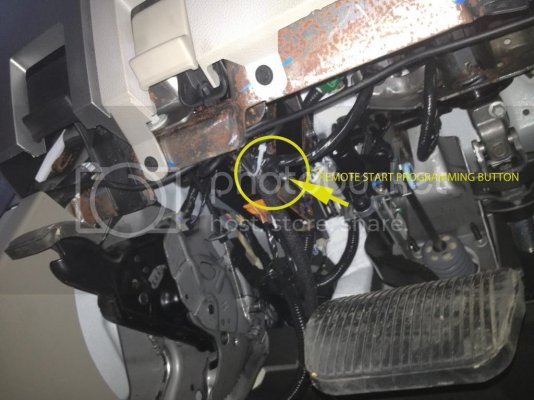
The button you need to get into programming mode is located under your dash and is taped under there. Mine was close to the OBDC jack.

Johnny
 
Last edited:

JaxTC

New Member
Joined
Jan 22, 2011
Posts
1
Reaction score
0
Location
Jacksonville
2011 Remote Start Options

I'm debating whether to get the factory remote start or an after-market (Viper) system on my 2011 Expy Ltd. I've heard that the Viper can be run from the factory key (multiple presses of the unlock button), but I believe that the factory system requires a separate fob. Is that correct, or can the factory system be used without an extra fob?
 
OP
OP
Wes1

Wes1

Full Access Members
Joined
Jun 20, 2011
Posts
133
Reaction score
22
Location
Alexandria, LA
Johnny,
Thanks so much for the info. I will be checking into this!!

Wes
 

Johnny Law

Active Member
Joined
Aug 30, 2011
Posts
32
Reaction score
6
Location
Western Washington
Solismo, thanks for making this a Sticky. In my opinion FORD is not helping their customers by leaving a convenience option so inconvenient for their customers, especially when it can be by design.

JexTC,

2011 Factory Remote Start does have a second Key FOB. If you can find a aftermarket that works on the same as the original key that is definitely an advantage.

That said, factory remote starts can be tough to beat as long as they work properly in the first place.

Since we are making this a sticky, I do think people should be aware that the dealerships will say it can't be done (at least the one I took it to did, you also have to know that they certainly know it can be done as this programming is part of the installation package). I suspect that their position is based on the fact that the remote start by default is a master (unrestricted) key in the MyKey world. For those that are not familiar with the MyKey it is a security system that seems to be designed for families that have driving teenagers and it provides some form of control for the parents over the key given to the kid. It can programmically limit top speed, radio volume level, keep traction control on all the time etc... (my personal belief is if you don't trust your teenager to drive you should probably hang on to the keys in the first place, but that is not something to debate here). Anyhow if you are concerned about this, you can program the remote start (virtual key) as a MyKey so that all the restrictions are in place when the car is started using the remote start.

I did try it (setting the remote start as a restricted MyKey) but quickly found out it was not for me. I use my Expedition to tow a boat. So many times I will remote start the truck when getting the trailer to load the boat. Once remote started, I could not turn off the rear sensing system (beeping) as the truck thinks I will be backing into my trailer. I find it very distracting. So my remote start is left as un restricted virtual key.

This sort of by-passing of the MyKey security system is the only think I can think of that could keep FORD from embracing the change to the remote start. If anybody can think of another reason why they will not set it properly at the dealerships please let me know.

Johnny
 
Last edited:

jrb007

New Member
Joined
Jan 18, 2012
Posts
2
Reaction score
2
Location
Wisconsin
I just took delivery on a 2012 Expedition yesterday. I ordered it with the remote starter installed at the factory. When I began using it I was surprised to find it turn the engine off as soon as I opened the door. So Ford forces this on us? Not cool.

I was thrilled to find there was a fix. Thanks for posting this guys. The only question I have is what does the button look like? I searched under the dash and couldn't find anything. I'm not sure if it's located somewhere else when it's installed at the factory vs. the dealer. Any ideas guys? Thanks.

-Jim
 

jrb007

New Member
Joined
Jan 18, 2012
Posts
2
Reaction score
2
Location
Wisconsin
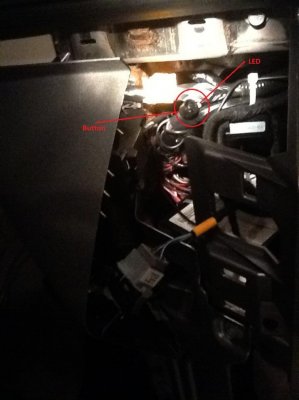
After doing some research on other sites I was able to get a better idea of what I was looking for. I found the button/LED after removing the left side of the dash - the piece that surrounds the emergency brake release.

I believe my location was most likely different due to the fact that the option was installed at the factory. From what I've seen this is usually a dealer-installled accessory and as the previous posters mentioned, can usually be found taped near the OBD port. I've attached a photo of what the button and LED look like. I apologize for the quality - I only had my iPad on me and this was the best it could do.

Another note - after changing the settings (to 15 minutes idle from 10 and no-shut off when the door opens) I went to test it. It failed to start and gave a 3-beep signal. I looked it up and found that 3 beeps means that a door is open. I open/closed all the doors and still 3 beeps. As I was doing this in a dark garage, I had the interior lights turned on through the dial on the dash. On a lark I thought this MIGHT have something to do with it. I turned them off and sure enough, started right up.

Thanks to the previous posters for posting the how-to. The door open shut off was driving me nuts.

-Jim

2012 Expedition Remote Start Programming Button and LED.jpg
 

wingrider

Well-Known Member
Joined
Nov 9, 2011
Posts
79
Reaction score
19
Location
Calif.
Hi Jim,

Thanks for doing the legwork! I also have a 2012 with factory installed remote start and couldn't find the switch when I looked. I just assumed this info was just not current for 2012's.

Would you be willing to share the steps and what you did? We can go PM if you want. Thanks in advance?

-Wingrider


After doing some research on other sites I was able to get a better idea of what I was looking for. I found the button/LED after removing the left side of the dash - the piece that surrounds the emergency brake release.

I believe my location was most likely different due to the fact that the option was installed at the factory. From what I've seen this is usually a dealer-installled accessory and as the previous posters mentioned, can usually be found taped near the OBD port. I've attached a photo of what the button and LED look like. I apologize for the quality - I only had my iPad on me and this was the best it could do.

Another note - after changing the settings (to 15 minutes idle from 10 and no-shut off when the door opens) I went to test it. It failed to start and gave a 3-beep signal. I looked it up and found that 3 beeps means that a door is open. I open/closed all the doors and still 3 beeps. As I was doing this in a dark garage, I had the interior lights turned on through the dial on the dash. On a lark I thought this MIGHT have something to do with it. I turned them off and sure enough, started right up.

Thanks to the previous posters for posting the how-to. The door open shut off was driving me nuts.

-Jim
 
Last edited:

tphford

Well-Known Member
Joined
Mar 27, 2012
Posts
56
Reaction score
7
Location
Utah
I'm new to this forum. Just purchased my 1rst Expedition. A 2012 Limited which has the remote start. I've had it for about a week now. Up until last night the remote start functioned exactly as you guys have described. As soon as I would open the door the engine would shut off. OK, that seems normal as installed at the factory. What is strange though is that last night when I started it and then opened the door it did NOT shut off! It only shut off when I put the key in the ignition. I thought it was just a fluke and tried is several times and sure enough it stays running when I open the door. The ONLY thing that I have done prior to this is to run the vehichle health report app on the SYNC to see how it works. Other than that, I haven't done a thing. Weird isn't it? Anybody have any thoughts?

Thanks
 

wingrider

Well-Known Member
Joined
Nov 9, 2011
Posts
79
Reaction score
19
Location
Calif.
Funny you should say that because before I first got mine I had read about the open door engine stop issue. I was disappointed that could be the case. When I first walked up to our new Expy at the dealership eager to try out the remote start. I fired it up with the remote and it didn't shut the engine off when I opened the door! I was thrilled and thought "well they must have changed it for the 2012's." Well the next time I used it it was back to killing the engine on door open. I spent the next day trying various combinations of having another door open, window down, dopey stuff trying to replicate keeping the engine going but never could.

Then I couldn't find the button/LED under the dash to try and reset the settings so I gave up.

I'm new to this forum. Just purchased my 1rst Expedition. A 2012 Limited which has the remote start. I've had it for about a week now. Up until last night the remote start functioned exactly as you guys have described. As soon as I would open the door the engine would shut off. OK, that seems normal as installed at the factory. What is strange though is that last night when I started it and then opened the door it did NOT shut off! It only shut off when I put the key in the ignition. I thought it was just a fluke and tried is several times and sure enough it stays running when I open the door. The ONLY thing that I have done prior to this is to run the vehichle health report app on the SYNC to see how it works. Other than that, I haven't done a thing. Weird isn't it? Anybody have any thoughts?

Thanks
 

Johnny Law

Active Member
Joined
Aug 30, 2011
Posts
32
Reaction score
6
Location
Western Washington
Mine only went off when the key went into the ignition. Not when the door opened. This will fix it.

It's a 2011 Limited Expedition.

Johnny
 

mtondreo

Full Access Members
Joined
Jan 22, 2010
Posts
186
Reaction score
5
Location
Florida
Hoping I do not have ya'lls issues. i am getting remote start installed this weekend and the dealer actually recommended using their guy with an aftermarket system and that way I can keep my standard key fobs also. It is actually cheaper too. I will let you know how it goes and what the system is after it is done. Thanks, Mike
 

wingrider

Well-Known Member
Joined
Nov 9, 2011
Posts
79
Reaction score
19
Location
Calif.
Can somebody name the right document to refer to for the 2012? There are a couple docs on the site and reference like F150 and Navigator.
 

Johnny Law

Active Member
Joined
Aug 30, 2011
Posts
32
Reaction score
6
Location
Western Washington
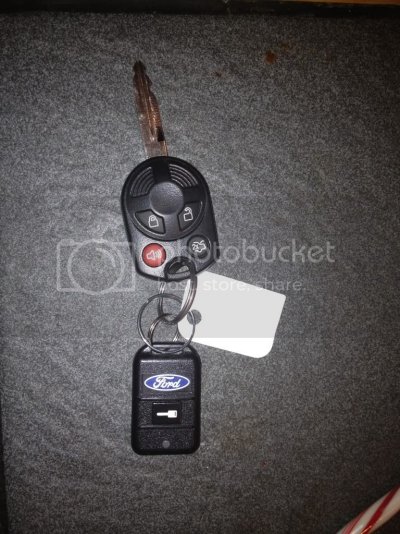
If you have the remote key fob that looks like this then you need the document I suggested in the 3rd post or so. 'PROGRAMMING - GEN2 BRONZE WITH OR WITHOUT "MYKEY"'

20Dec11023.jpg

To find it you need to create a login for http://techservices.codesystems.com/

Then Choose "Ford" option which is between "Manuals" and "Chrysler" then in the drop down box choose "OEM FORD AND LOT SYSTEMS - Programming Tips and Instructions" then choose the "PROGRAMMING - GEN2 BRONZE WITH OR WITHOUT "MYKEY"" it's a pdf. I am pretty sure the 2012 uses the same remote start keyfob which is the same system as mine.

It took me about 20 minutes from finding this to printing to reprogramming the car. The hardest thing was finding the button under the dash. In my case it was not totally covered by electrical tape but still there's a bunch of stuff under there.

Good luck.

Johnny
 

wingrider

Well-Known Member
Joined
Nov 9, 2011
Posts
79
Reaction score
19
Location
Calif.
Yes you did post info before but for some reason this doc escaped me. That's the fob I have and that doc looks great. Now all I need to do is wait for the weather to improve and go get it done!

I'll add some feedback as soon as I complete this.

Thanks again.


If you have the remote key fob that looks like this then you need the document I suggested in the 3rd post or so. 'PROGRAMMING - GEN2 BRONZE WITH OR WITHOUT "MYKEY"'
<SNIP>
It took me about 20 minutes from finding this to printing to reprogramming the car. The hardest thing was finding the button under the dash. In my case it was not totally covered by electrical tape but still there's a bunch of stuff under there.

Good luck.

Johnny
 

yuk067

Member
Joined
Apr 19, 2012
Posts
12
Reaction score
2
Location
New York
Hello everyone!!!! I just purchased a 2012 expedition xlt loaded , i've had a 2005 and a 1999 previously , i'm having the same issue with my factory installed remote starter. This thread is very helpful but i seem to be having a problem logging into the code system web page to access it. Has anyone else had this problem ? Thanks in advance..


Gene
 
Top