

You are using an out of date browser. It may not display this or other websites correctly.
You should upgrade or use an alternative browser.
You should upgrade or use an alternative browser.
Update all versions of Ford Sync 3 to the latest Sync 3.4
- Thread starter AAOO
- Start date
Disclaimer: Links on this page pointing to Amazon, eBay and other sites may include affiliate code. If you click them and make a purchase, we may earn a small commission.
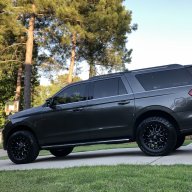
I upgraded from sync 3.0 19205 to sync 3.4 20136 w/ maps 19 (NA region) using the cyanlab usb w/o issue. All working great even switching songs loaded on a USB flash-drive. Process took 38 mins.
Last edited:


I upgraded from sync 3.0 19205 to sync 3.4 20136 w/ NAV 19 using the cyanlab usb w/o issue. All working great even switching songs loaded on a usb flash drive. Process took 38 mins.
Did you have Nav In Motion(European Locality) set before the update?
Sent from my iPhone using Tapatalk Pro
Did you have Nav In Motion(European Locality) set before the update?
Sent from my iPhone using Tapatalk Pro
Not that I am aware. I bought my Expy 2 wks ago (Jul 12th) in Nashville, TN. It lives in GA now. The region it had pre/post upgrade = NA. 2>dev/null (bash syntax aka Linux/Unix)
Last edited:
5280tunage
Full Access Members
Same issue for me. Now I can't browse them unless I'm stopped and parked. STUPID.I upgraded from sync 3.0 19205 to sync 3.4 20136 w/ maps 19 (NA region) using the cyanlab usb w/o issue. All working great even switching songs loaded on a USB flash-drive. Process took 38 mins.
5280tunage
Full Access Members
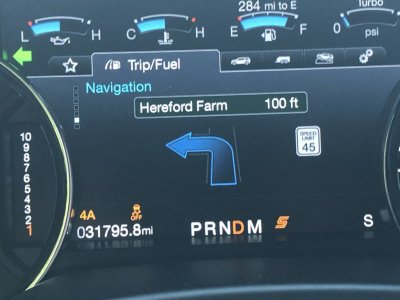
Posted SPEED LIMIT displayed in IP set to compass when using NAV with a Destination set.
After I upgraded to sync 3.4 201306
Yeah, I like this feature for sure.

Highlightreel
Well-Known Member
Ok, I'm wanting to upgrade from 3.0 19025 to 3.4 20021 before a trip tomorrow. I used the cyanlabs installer and downloaded to the point where the pop up showed telling me to pull out USB and put in car. I put in car and it says it notices the usb but that's it. Never says it's updating.
I had this issue with the NA 18 maps 'free' update but eventually figured it out.
What simple thing am I missing? I had the folders in the usb closed. Then I tried opening SyncMyRide folder and same. Nada.
Thanks in advance!
Stay Classy!
For those that care, I used a different USB stick and it worked. I did do the Loki reboot prior to as well. So today I looked and they updated the cyanlab downloader and removed the version I had 2.1.1.0 and I used 2.1.1.1. Took 28 minutes. Sweet. Seems better so far.
Thanks all!
I think he was saying he was able to browse music...so the opposite of you.Same issue for me. Now I can't browse them unless I'm stopped and parked. STUPID.
5280tunage
Full Access Members
Wait, you can browse the USB media folders while driving? Wtf, mine is locked out, tells me the feature is unavailable while driving or something to that effect.True, I CAN browse music in different folders.

wakeboarder
Full Access Members
Wait, you can browse the USB media folders while driving? Wtf, mine is locked out, tells me the feature is unavailable while driving or something to that effect.
Could there be a difference in your Forscan settings that is allowing it on one, but not the other? Maybe it could also be file types or usb drive formatting? The usb navigation is presented like it is a bug. Usually a bug requires a specific set of triggers.
I have my USBs formatted in exfat. That format can be read by Windows, Linux & MAC/Unix. I’m positive these media head units are Linux OS.
Not really Linux. QNX written by Blackberry. It more closely resembles Unix and is designed for embedded devices.
Sent from my iPhone using Tapatalk Pro
5280tunage
Full Access Members
I just checked my usb thumbdrive and region codes. Currently, my region codes are all set to "0" or NA. My usb drive is actually formatted as fat32 so I'll change that to exfat and see if it helps. But it would be really weird for formatting to only not work in certain situations, in most a cases it either works or it doesn't with formatting. I may just try going from 19200 to the version you tried.
5280tunage
Full Access Members
I have my USBs formatted in exfat. That format can be read by Windows, Linux & MAC/Unix. I’m positive these media head units are Linux OS.
Hey DWs-TTEB, any chance you can check your region settings using forscan? I believe it's ACM-727-04-01, but I also see docs saying its FCIM-7A7-01-01.
Regardless, I tried this today, would be curious what others are seeing, as I'd love to find a solution to this. After these two attempts, I still get the "For your safety, some features have been disabled while your vehicle is in motion." message when trying to browse folders on a usb drive, by clicking on the new search button in the top right of the screen. Clicking that prior to 3.4 used to allow me to select folders, artists, albums, etc.
This afternoon I tried two different things to see if I could get the "browse USB media" functions back, so far to no avail. First, I reformatted my USB to exFAT. Second I upgrade to 3.4.20136. Still no work-e-y.
Hey DWs-TTEB, any chance you can check your region settings using forscan? I believe it's ACM-727-04-01, but I also see docs saying its FCIM-7A7-01-01.
Regardless, I tried this today, would be curious what others are seeing, as I'd love to find a solution to this. After these two attempts, I still get the "For your safety, some features have been disabled while your vehicle is in motion." message when trying to browse folders on a usb drive, by clicking on the new search button in the top right of the screen. Clicking that prior to 3.4 used to allow me to select folders, artists, albums, etc.
This afternoon I tried two different things to see if I could get the "browse USB media" functions back, so far to no avail. First, I reformatted my USB to exFAT. Second I upgrade to 3.4.20136. Still no work-e-y.
I am ordering my OBD2 to forscan reader this week. I’ll look into when I can.
@5280tunage other options you can try, load the music on an MP3 player or downgrade sync until a fix is made in an Sync 3.4 update.
5280tunage
Full Access Members
I get it, I mean I have lots of my music on my phone but nothing beats the simplicity of putting over 100GB of music, some of which I've been collecting for 20+ years, on a simple usb thumbdrive. And more over, the fact that it used to work just fine, until the 3.4 upgrade, its mostly annoying that Ford might have taken that functionality away.
Jon F
Member
Ready to update to 3.4 and I can't seem to find the location of the latest download and directions. I've been reading this for over an hour.... can someone point me in the right direction? Thank you!
Similar threads
- Replies
- 0
- Views
- 3K

- Replies
- 23
- Views
- 10K
- Replies
- 1
- Views
- 3K
- Replies
- 0
- Views
- 2K


