2022 Limited rear climate controls not showing up on front screen

Disclaimer: Links on this page pointing to Amazon, eBay and other sites may include affiliate code. If you click them and make a purchase, we may earn a small commission.

texsn95

Full Access Members
Marine Corps
Joined
Oct 30, 2024
Posts
100
Reaction score
40
Location
Houston
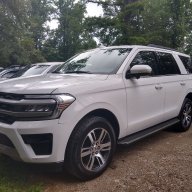
G'day all, we just got a 22 Limited about 10 days ago and are still geting used to it. Build date 01/20/22 with 302A, so it's got the tri-zone climate controls.

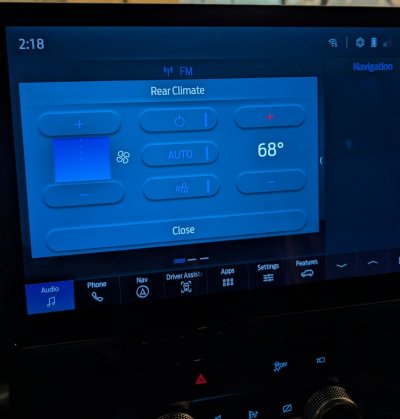
I noticed the "rear" hard button doesn't do anything and doesn't show the rear controls on the screen like it should. I have the same screen setup as this guy https://www.youtube.com/shorts/V127zXLGY2Q

The only way to get the rear AC to work is to hit the hard power button from the 2nd row. When I do that, the small LED in the rear hard button illuminates, but still no controls pop up on the front when you push it. AC controls work fine from the rear hard buttons.

Suggestions? I do have Forscan and an active license. The only thing I've done so far is to remove that stupid double-honk and installed a 4D-tech start-stop eliminator.
 
Last edited:
rugedraw

Full Access Members
Joined
Aug 14, 2024
Posts
142
Reaction score
64
Location
Miami, FL
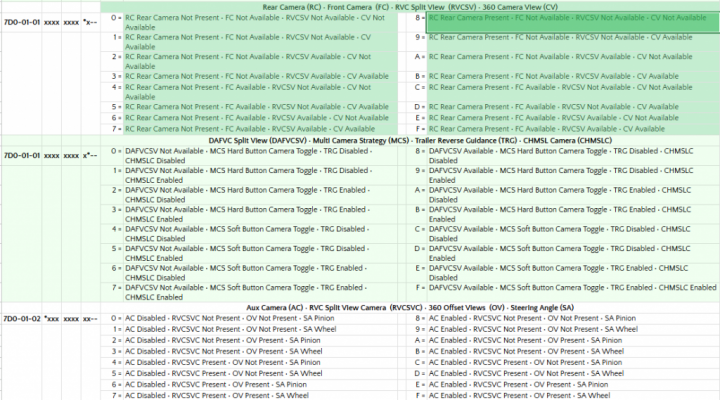
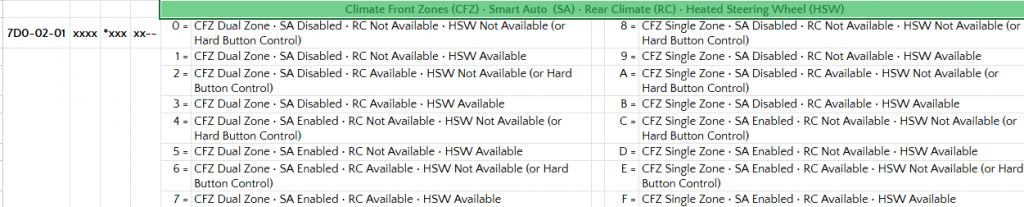
Could possibly be bad config in the APIM. I would start by checking what you show here. In this location: 7D0-02-01 xxxx ?*** xx--

If whatever you are showing there reflects "RC not available", I would change that digit to whatever coincides with leaving the other three things as they are and making RC available.

1732049164612.png
 
OP
OP
T

texsn95

Full Access Members
Marine Corps
Joined
Oct 30, 2024
Posts
100
Reaction score
40
Location
Houston
Cool thanks...2nd block is 7A2A. So I guess it's coded right, off to the dealer I guess. Can you send me that spreadsheet you're referencing?
 

rugedraw

Full Access Members
Joined
Aug 14, 2024
Posts
142
Reaction score
64
Location
Miami, FL
Cool thanks...2nd block is 7A2A. So I guess it's coded right, off to the dealer I guess. Can you send me that spreadsheet you're referencing?

It's the one Livnitup came up with for the F150, but I have found it is very similar in architecture to the newer Expo's and Lightning's, too.


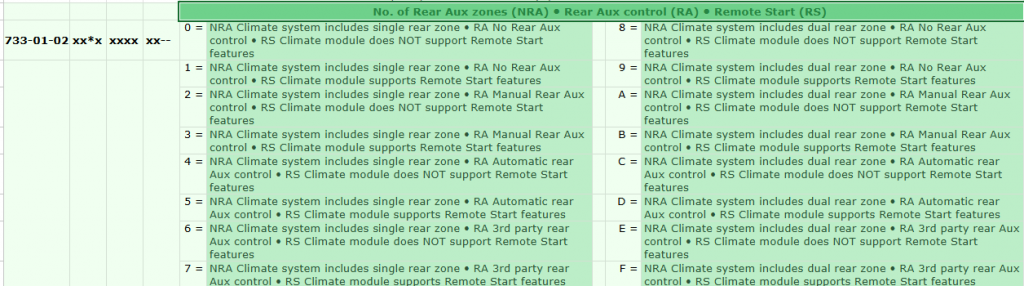
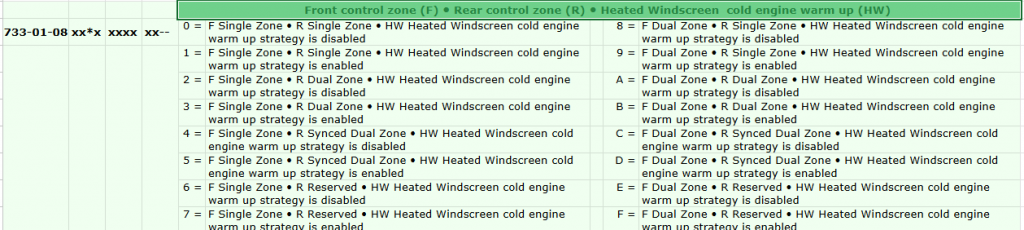
Try looking through the HVAC tab. I found this there that seems to have something to do with it:

1732058008454.png
1732058123472.png
 
OP
OP
T

texsn95

Full Access Members
Marine Corps
Joined
Oct 30, 2024
Posts
100
Reaction score
40
Location
Houston
First block is a 5, second is an 8. Seems like the should match right?
 

rugedraw

Full Access Members
Joined
Aug 14, 2024
Posts
142
Reaction score
64
Location
Miami, FL
First block is a 5, second is an 8. Seems like the should match right?

It seems right. Not sure about RA automatic control.....maybe try manual to see if it works? It is very improbable that the config on the HVAC module got wiped. I've seen APIM config get changed by OTA's, but never on the HVAC.
 
OP
OP
T

texsn95

Full Access Members
Marine Corps
Joined
Oct 30, 2024
Posts
100
Reaction score
40
Location
Houston
Is it worth doing an APIM reset with Forscan, or does the power / seek right reset do the same thing? I don't want to dive to much into it since it's still under b2b warranty. I hope it's not an unintended side effect of having the 4d tech autostart eliminator installed, I guess I could pull it just to make sure.
 

Mr Big

Full Access Members
Joined
May 29, 2023
Posts
1,012
Reaction score
588
Location
Tampa Bay, Florida USA
A master reset solves a lot of issues. However, it will erase all information stored on the SYNC system, including Bluetooth devices, contact lists, and navigation information.
A PCM reset will put your Ex back to factory settings.
When needed, I perform PCM and TCM reset. It removes all the stored driving habits which include performance, steering, transmission, suspension, (if you have CCD), etc.
Every time I do it, my Ex feels brand new, has better performance, shifts better, steers better and rides better.
 
OP
OP
T

texsn95

Full Access Members
Marine Corps
Joined
Oct 30, 2024
Posts
100
Reaction score
40
Location
Houston
I may do that, since we just got the vehicle and haven't driven it much yet. No nav points or contacts yet either, not even XM activated.
 

Mr Big

Full Access Members
Joined
May 29, 2023
Posts
1,012
Reaction score
588
Location
Tampa Bay, Florida USA
I may do that, since we just got the vehicle and haven't driven it much yet. No nav points or contacts yet either, not even XM activated.
If you purchased it used, all driving habits of previous owners are stored. It would probably help across the board if you did it.
I purchased mine used and complained that I did not like the way it performed. My dealer 's service department actually performed it, the first time.
 
OP
OP
T

texsn95

Full Access Members
Marine Corps
Joined
Oct 30, 2024
Posts
100
Reaction score
40
Location
Houston
Just did the master reset, still no luck.
Changed APIM "dual climate overlay" from disabled to enabled, no go. Do you think it could be a side-effect of the 4d tech add on?
 
OP
OP
T

texsn95

Full Access Members
Marine Corps
Joined
Oct 30, 2024
Posts
100
Reaction score
40
Location
Houston
And is there a way to default the rearview camera to the whole screen, or does it have to stay on the truncated screen with the panoramic on the right?
 

rugedraw

Full Access Members
Joined
Aug 14, 2024
Posts
142
Reaction score
64
Location
Miami, FL
Just did the master reset, still no luck.
Changed APIM "dual climate overlay" from disabled to enabled, no go. Do you think it could be a side-effect of the 4d tech add on?

Very unlikely, but I'm not sure what the 4D tech device does, but I would have just turned auto start/stop off with FORScan. I would try rebooting the GWM with FORScan. I've seen it get hung up in a funky state and cause weird issues. Not sure if the master reset reboots the GWM, so I would try it anyway.

And is there a way to default the rearview camera to the whole screen, or does it have to stay on the truncated screen with the panoramic on the right?

Check here. It would require some tinkering to see what works and what doesn't. What you want to accomplish may render your 360 cams useless. If you don't have a MCS button enabled, try turning on a soft MCS button and look for it to appear somewhere on your touchscreen. Maybe you could cycle camera views until you get to rear only? I've never tried it, but I have no problems tinkering with this kinda stuff to see what works and what doesn't. Just make your back-up first and go to town.

1732123002994.png

Maybe check this out, too. If your current 360 cam view is set to stretched, it takes up more real estate on the screen. Maybe by changing the position of where the 360 cam view is placed might make the rear camera view appear bigger. You'd just have to play with it.

1732123285933.png
 

Mr Big

Full Access Members
Joined
May 29, 2023
Posts
1,012
Reaction score
588
Location
Tampa Bay, Florida USA
Thanks for the info. Apparently the ASS off via Forscan creates some other bugs in the 22+, and I believe eventually reverts back, which is why 4d tech came up with a totally different part and interface to disable it. Near the fuse box. https://www.4dtech.com/expedition-22-24-start-stop-eliminator/
It creates bugs in other years as well. But before I pay $99 to disable the auto start stop, I'll just keep pressing the button, like I do with traction control.
 
OP
OP
T

texsn95

Full Access Members
Marine Corps
Joined
Oct 30, 2024
Posts
100
Reaction score
40
Location
Houston
Well it's my wife's vehicle, and she'd probably remember to press it 1/3 of the time, haha. I just pulled the 4d out, re-tried it and still no go, so at least we can eliminate 1 suspect.
 

rugedraw

Full Access Members
Joined
Aug 14, 2024
Posts
142
Reaction score
64
Location
Miami, FL
Thanks for the info. Apparently the ASS off via Forscan creates some other bugs in the 22+, and I believe eventually reverts back, which is why 4d tech came up with a totally different part and interface to disable it. Near the fuse box. https://www.4dtech.com/expedition-22-24-start-stop-eliminator/
It creates bugs in other years as well. But before I pay $99 to disable the auto start stop, I'll just keep pressing the button, like I do with traction control.
Interesting. I just found the thread about it. Seems like it didn't report any codes to give a clue as to what to do to fix it.
 
OP
OP
T

texsn95

Full Access Members
Marine Corps
Joined
Oct 30, 2024
Posts
100
Reaction score
40
Location
Houston
Can anyone with the smaller screen post a video or a photo showing that the rear HVAC controls pop up on the front screen like this one? The dealership is saying they aren't supposed to, but I don't agree. This XLT is showing that they do. https://www.youtube.com/shorts/V127zXLGY2Q
 
Last edited:

AJ82

Full Access Members
Joined
Feb 1, 2022
Posts
270
Reaction score
184
Location
Michigan
Can anyone with the smaller screen post a video or a photo showing that the rear HVAC controls pop up on the front screen like this one? The dealership is saying they aren't supposed to, but I don't agree. This XLT is showing that they do. https://www.youtube.com/shorts/V127zXLGY2Q
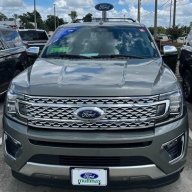
The rear controls 100% do pop up on the screen just like in that video. I use it all the time on my 22 XLT. They are lying to you and you are correct.
 

Attachments

  • PXL_20241220_191813467.jpg
    PXL_20241220_191813467.jpg
    72.5 KB · Views: 4
Last edited:
Top