Is there an updated FORScan spreadsheet file for Expeditions? In particular I need 2023. I used FORScan a year ago and basically was working from an F-150 spreadsheet. The Expo is similar but not exactly the same...which worries me. At some point some of my settings went away. I want to go in and do some programing, but I was hoping there would be a better spreadsheet to work from.


You are using an out of date browser. It may not display this or other websites correctly.
You should upgrade or use an alternative browser.
You should upgrade or use an alternative browser.
4th Gen FORScan spreadsheet???
- Thread starter zeecarr
- Start date
Disclaimer: Links on this page pointing to Amazon, eBay and other sites may include affiliate code. If you click them and make a purchase, we may earn a small commission.
HILLY
Full Access Members
AFAIK, there is no "official" spreadsheet for the Expeditions. Most of what we started with are the F-150 spreadsheets highlighting modifiable features and then verified by trial and error by fellow users. This is pretty much how I've done it.
Mr Big
Full Access Members
There is an updated version of Forscan to download, if you haven't already. It supports higher years, so th as built section may have what you are looking for. As far as new spreadsheets, you'll have to do a search to see if anyone has posted any updated spreadsheets.Is there an updated FORScan spreadsheet file for Expeditions? In particular I need 2023. I used FORScan a year ago and basically was working from an F-150 spreadsheet. The Expo is similar but not exactly the same...which worries me. At some point some of my settings went away. I want to go in and do some programing, but I was hoping there would be a better spreadsheet to work from.
The file I attached is for 23-25 super duty. It may have some mods that will help.
Attachments
Last edited:
Is there an updated FORScan spreadsheet file for Expeditions? In particular I need 2023. I used FORScan a year ago and basically was working from an F-150 spreadsheet. The Expo is similar but not exactly the same...which worries me. At some point some of my settings went away. I want to go in and do some programing, but I was hoping there would be a better spreadsheet to work from.
Livnitup did make one off of a 2024 Expo, but this may differ from the 2023, too.

Livnitup's 2024 Expedition
Wow that is great. I'm a bit scared to mess around and find something that is different on 2023, so I need to read up on saving and bringing back settings. It has been over a year since the last time I used FORScan. I mostly want to re-do the running board delays and set the mirror retract modes, but I would love to permanently disable the motion sensing on the alarm. Also, would love to completely disable the horn unless I push it myself. It loves to scare the crap out of me by honking when I get out of the truck when it is running or whatever other stupid reason it thinks it needs to alert me. The horn also makes every dog in the neighborhood start barking...
The double horn honk disable is the same to disable it across 2021-2025 F150's, so that should be the same on the Expo's. You can always just revert back to what was there if you don't get the desired result, so it is safe to try.Wow that is great. I'm a bit scared to mess around and find something that is different on 2023, so I need to read up on saving and bringing back settings. It has been over a year since the last time I used FORScan. I mostly want to re-do the running board delays and set the mirror retract modes, but I would love to permanently disable the motion sensing on the alarm. Also, would love to completely disable the horn unless I push it myself. It loves to scare the crap out of me by honking when I get out of the truck when it is running or whatever other stupid reason it thinks it needs to alert me. The horn also makes every dog in the neighborhood start barking...

On the F150, there was a change in the module architecture between the 2023 and the 2024; I am not sure if the same thing happened with the Expo, but both being on Sync 4, I would say most of the stuff would be compatible between 23 & 24 model years on the Expos.
Last edited:
Mr Big
Full Access Members
The safest way to use Forscan is to back up your system and then use the AS-BUILT mode. You can use the code method, just back up before each attempt or write down your original setting for the item you are attempting to change.Wow that is great. I'm a bit scared to mess around and find something that is different on 2023, so I need to read up on saving and bringing back settings. It has been over a year since the last time I used FORScan. I mostly want to re-do the running board delays and set the mirror retract modes, but I would love to permanently disable the motion sensing on the alarm. Also, would love to completely disable the horn unless I push it myself. It loves to scare the crap out of me by honking when I get out of the truck when it is running or whatever other stupid reason it thinks it needs to alert me. The horn also makes every dog in the neighborhood start barking...

Livnitup's FORScan - 2021-25 F150
I have enabled the temps above gauges. Camera @ any speed, Trans temp, disable belt chime..... all using the common tab on the doc.... '22 SPP

DieselMonk
Full Access Members
The safety belt chime can be disabled without Forscan. It a combination of ignition turn on, parking brake set, wait for airbag light to go off, 4 times buckle and unbuckle the safety belt, seat belt light will flash rapidly, then buckle and unbuckle one more time. You can do this for each individual seat.
Works on my 24 Expedition and on a 25 Explorer 100%.
Works on my 24 Expedition and on a 25 Explorer 100%.
bryz_expy
Well-Known Member

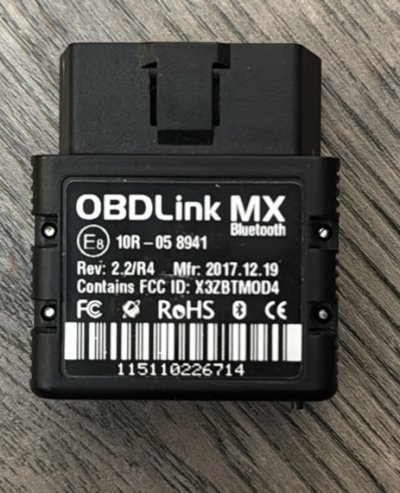
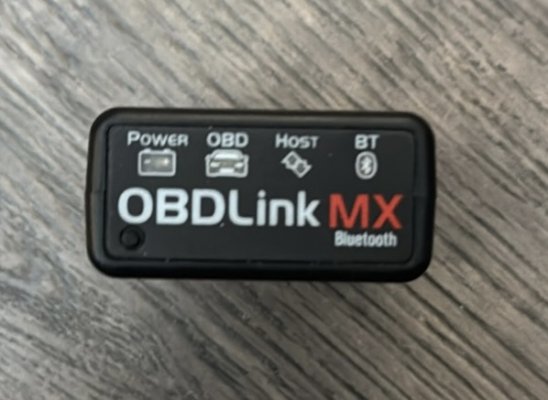
Maybe a dumb question, is there a way with Forscan to turn off the fake exhaust noise on a '22 SPP?
Check this setting in your ACM. ANC is active noise cancelation and the fake engine noise is ESE. If what you have in this bit shows ESE is enabled, change it to disable ESE.


You should be able to disable that feature. This is from the 2024 manual and it does work on my Expedition:Sure would be nice to be able to disable the motion sensor in the alarm permanently instead of having to remember to do it every time I leave the dog in the car.


You should be able to disable that feature. This is from the 2024 manual and it does work on my Expedition:
That doesn't work because the car defaults to motion sensors "On" the next time you start the car and now you don't even get asked a choice when you turn the car off. Its just like the "out" position on the stupid running boards. You can only disable it for that one time and it going back to default the next time you start the car.
Works fine on my 2024 Limited. The only time I get asked about those sensors is after a software download.That doesn't work because the car defaults to motion sensors "On" the next time you start the car and now you don't even get asked a choice when you turn the car off.
Sure would be nice to be able to disable the motion sensor in the alarm permanently instead of having to remember to do it every time I leave the dog in the car.
Pulled the ab data off a random 2023 Expo Limited. It shows this in the BCM:

Based on the F150 spreadsheet which is very similar, this would indicated the perimeter alarm is enabled and disabled in the same location on these trucks:

You can try disabling just the chime in the 4th bit or the alarm itself in the 2nd bit. It won't hurt to try and you can always just change it back if you do not get the desired results.
Similar threads
- Replies
- 4
- Views
- 2K


- Replies
- 2
- Views
- 2K

- Replies
- 1
- Views
- 1K


Staff online
-
bb37Well-Known Member
Members online
Total: 3,450 (members: 13, guests: 3,437)