How to turn off A.S.S. system

Disclaimer: Links on this page pointing to Amazon, eBay and other sites may include affiliate code. If you click them and make a purchase, we may earn a small commission.

Mike Wolfe

Full Access Members
Joined
Jul 9, 2017
Posts
479
Reaction score
174
Location
Tonopah AZ
There was a thread on here somewhere using a WIFI OBDII adapter & a special software to disable the ASS system & other features
Trying to find it but cannoto_Oo_O
 

st381183

Full Access Members
Joined
Mar 7, 2018
Posts
263
Reaction score
125
Location
New Mexico
Look up FORScan, that’s the name of the software being used. There are threads on how to use it. Once off, always off. It’s nice to have control that Ford should have given us.
 

Uturn

Full Access Members
Joined
Jul 12, 2018
Posts
294
Reaction score
140
Location
Texas
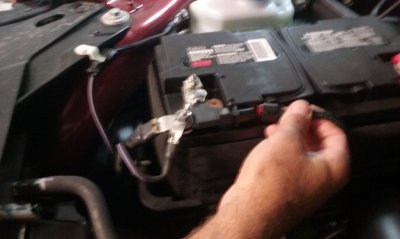
There is a simple way. Under the hood on the front battery terminal is a connector. It supplies power to the Auto Start Stop. Unplug it and no more Auto Start Stop and no having to look at the light on the dash. You will still get the indicator on the dash when you stop at a light showing A S S is not available when it would normally kick in. Actually was told how to disable it from my salesman, who'd have thought. Disconnected mine before I even left the dealership.
 

st381183

Full Access Members
Joined
Mar 7, 2018
Posts
263
Reaction score
125
Location
New Mexico
There is a simple way. Under the hood on the front battery terminal is a connector. It supplies power to the Auto Start Stop. Unplug it and no more Auto Start Stop and no having to look at the light on the dash. You will still get the indicator on the dash when you stop at a light showing A S S is not available when it would normally kick in. Actually was told how to disable it from my salesman, who'd have thought. Disconnected mine before I even left the dealership.
Can you post pics for those of us that or not mechanically minded?
 

Uturn

Full Access Members
Joined
Jul 12, 2018
Posts
294
Reaction score
140
Location
Texas
20180712_125733.jpg
Unplug this connector and tuck it down in the battery tray.
 

rob4092xx

Full Access Members
Joined
Aug 1, 2005
Posts
356
Reaction score
94
Location
Phoenix, AZ
Has anyone had luck with this? Did it stop the "Auto Stop-Auto Start" system? Any negative effects like backing alarm gone, etc.?
 

Uturn

Full Access Members
Joined
Jul 12, 2018
Posts
294
Reaction score
140
Location
Texas
I haven't got close enough to anything to trip the backup sensors, but the side traffic alert still works. Time to check it.
 

Uturn

Full Access Members
Joined
Jul 12, 2018
Posts
294
Reaction score
140
Location
Texas
Latest on unplugging the battery connector to disable A.S.S.. Mike Wolfe is correct, it does disable the audible warning for the backup sensors, but the visual warning, backup camera, and the audible warning for side traffic still work. It will be a matter of preference to disable the A.S.S. using this method or actually programming the system to deactivate.
 

sanman28

Full Access Members
Joined
Jun 24, 2019
Posts
346
Reaction score
248
Location
SW MO
Any new ways to disable this feature? The cylinder deactivation was the first thing i did to my GMC when i got it. Cant stand this crap.
 

ETC13

Full Access Members
Joined
Feb 20, 2019
Posts
174
Reaction score
64
Location
TN
Use Forscan and change the code to off...Simple, cheap and nothing comes up on the dash, etc... I did mine and it is like auto start stop isn't anything that was ever even part of this truck.

Sent from my moto g(7) using Tapatalk
 
Top