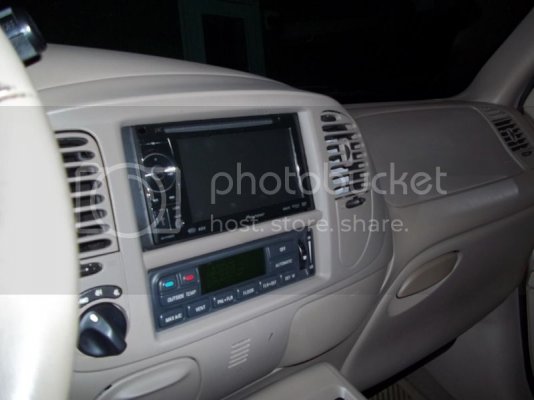
Just bought a new radio

Disclaimer: Links on this page pointing to Amazon, eBay and other sites may include affiliate code. If you click them and make a purchase, we may earn a small commission.

mazdaparts

Full Access Members
Joined
Oct 5, 2012
Posts
65
Reaction score
8
Location
Missouri
Just bought a new radio !!PICS ADDED 10-22-12!!

Purchased a Pioneer AVH-P1400DVD. It has some awesome reviews, a lot of cool features, and its upgradeable. Should be a big improvement over the stock radio with non-functioning 6 disc changer. I don't plan on doing a full system, maybe some replacement speakers eventually. I'm searching for a backup camera now. If anyone has any recommendations let me know.
 
Last edited:
OP
OP
M

mazdaparts

Full Access Members
Joined
Oct 5, 2012
Posts
65
Reaction score
8
Location
Missouri
Found a backup camera. Decided to go with one of the license plate mount one. I thought about removing the lock cylinder and putting one in its place but that is more work that I am looking for and it is getting colder out. Hopefully I will get some pics when everything shows up and I get a free weekend to work on it.
 
OP
OP
M

mazdaparts

Full Access Members
Joined
Oct 5, 2012
Posts
65
Reaction score
8
Location
Missouri
Got the radio installed today. And what a pain in the ass it was. Here is my story:
Started this morning about 9:30 gathering tools and stuff needed to trim the dash and start this install. I have read most post about installing a double din radio in a 97-03 ford truck I could find. So I had a pretty good idea of what I was up against. I removed the dash panel and removed the radio with minor difficulty (didn't bring the radio removal tools home from work so I used clothes hanger wire). Set the new radio in the hole and traced what needed to be cut. Got the dremel tool out with a 90 degree adapter (big help on this job) and made my first horizontal cut with the reinforced cut off wheel. All of the sudden the dremel quits. I figure I tripped a breaker or something and had the wife check. She said they are all in the on position. After scratching my head for a minute or two double checking the breakers, my daughter said the tv and wii quit working. A quick look at the stove clock and I notice its off. I call my parents house and ask if they have power, they don't.:banghead: Its 10:39 by now and I have made 1 cut.
Out comes the hand tools. I used a coping saw to finish the the cuts on the black plastic, and a file to clean them up. Radio fit great with the exception of depth, more trimming needed with dremel. I was stuck till the power came back on. It's almost noon, lunch time, no power, and I need some longer screw to bolt the radio in. So we head to town for some lunch and light shopping. Get home around 2 and the power is back on. The power came back on shortly after we left, (insert colorful outburst here).
So back at it with the dremel hacking away at the dash to make room. Got it cut out and found a little black box on a metal bracket sitting in the way. How I didn't cut it in half is beyond me. I tried bending the tab up to get more clearance but it wasn't budging. So I took it off the bracket and relocated it with zip ties. Finally I had all the depth I needed.
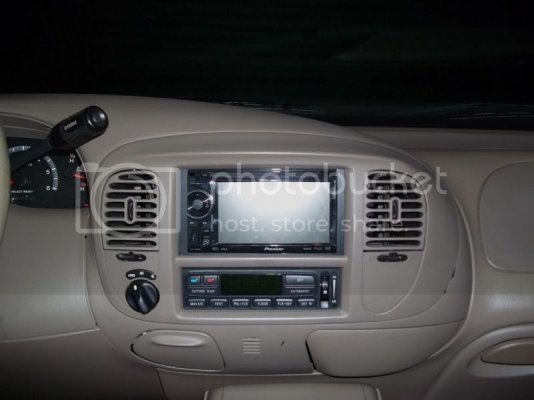
I assembled the mounting kit and attached it to the radio. Had to use a best kit as it was the only one in stock at the time. Guess what? I forgot to account for the side plates when I figured the width and now have to grind some more. Or do I. I started to look at the depth the radio would be mounted with the kit with the dash panel in place. It was way to deep in the dash and have a 1/4"+ around the sides and bottom of the radio. Unacceptable. The radio came with a trim ring plate but would not help. The dash trim had to be trimmed. So after getting over my fears of screwing it up I went for it. It actually turned out as I planned and the trim ring fit very nicely. I had to hold the radio out of the dash a bit and mark it with a sharpie so I could drill holes in the black plastic to mount into the side of the radio. I used the best kit side panels as a template (at least I didn't completely waste $16). Drilled my holes, made holes a little larger for adjustment, cut my 2" screws down that I just bought. And wouldn't you know it I cut them too freaking short.:Stupid Me: Luckily I had some 1" screws that were just right in my misc. screw box. Lined up the holes and screwed it in tight. Finished up at 5:00. It is a very clean looking install with the radio more flush with the dash, and it is removable to add the backup camera and dvd bypass I am still waiting for.
I love the features of this radio, and the sound is so much better than stock. I can actually feel the bass with the stock mach system. I don't think you could pay me enough to do another one, but I'm glad I did this one myself. I'll try to get pics tomorrow.

 

GAINMOB

Full Access Members
Joined
May 19, 2010
Posts
14,565
Reaction score
893
Location
Newport News, VA
Look forward to pics... funny story (for us, you - not so much!).

hahaha....yulp...funny story for us...bet you were very frustrated throughout this process...but seeing what you've done is well worth it now...lol

PICS????
 
OP
OP
M

mazdaparts

Full Access Members
Joined
Oct 5, 2012
Posts
65
Reaction score
8
Location
Missouri
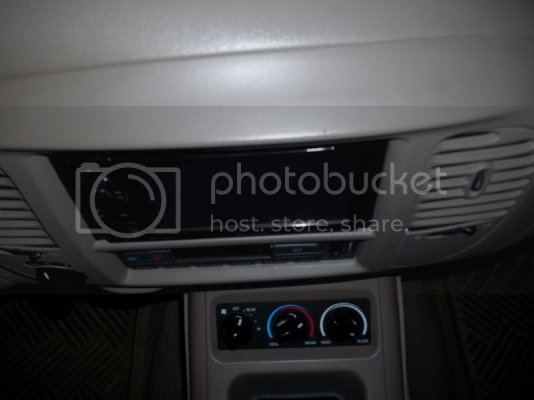
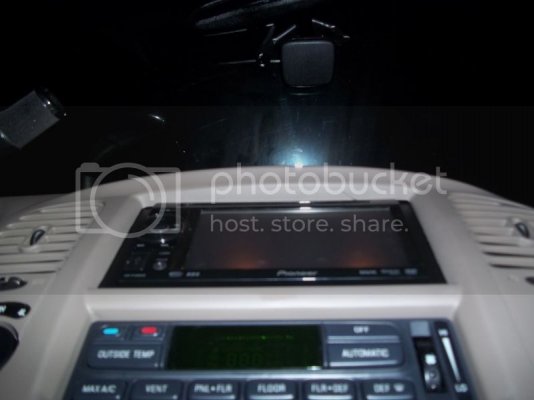
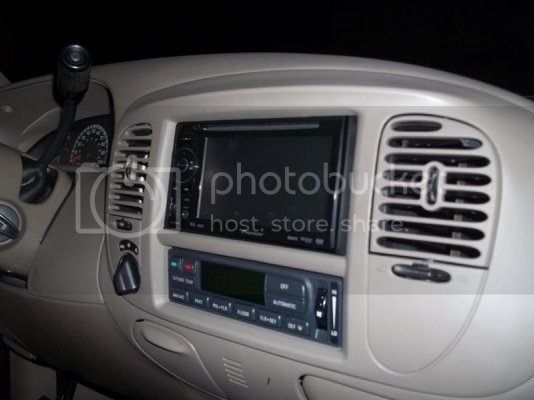
Pics as promised. Sorry for the pic quality it got dark before I knew it. I had a terrible headache all day and after supper fell asleep on the couch and the wife woke me at 8:30 after 2.5 hours. Hopefully you can notice how the radio sits more flush with the dash piece, more like the factory radio did. When my other parts get here I'll snap some pics of behind the dash.

Straight on
expedition001.jpg

Top looking down
expedition004.jpg

Bottom looking up
expedition005.jpg

Right looking left
expedition002.jpg

Left looking right
expedition003.jpg
 
OP
OP
M

mazdaparts

Full Access Members
Joined
Oct 5, 2012
Posts
65
Reaction score
8
Location
Missouri
...if so how did you figure out the wiring skeem?
I don't have a rear DVD system, might add a monitor later though.

Thanks for the kind words guys. It was a pain, I lost count of how many times I bumped my head on the passenger grab handle. But it was worth it. DVD bypass came in today still waiting on backup camera. Might put in the bypass tonight and run the backup camera wire to the rear.
Is there a resource on here or online that I can look at the wiring to find the reverse wire to trigger the video input on the radio. My first thought was to run a wire to the backup light with the video cable and be done with it. But I am certain there is a wire under the dash somewhere.
 
OP
OP
M

mazdaparts

Full Access Members
Joined
Oct 5, 2012
Posts
65
Reaction score
8
Location
Missouri
It is all done. Might get to take her out for a spin tomorrow or Friday. Still need to adjust the angle of the camera. I didn't get any pics but have a vivid memory of what took place and where I ran wires if anyone needs help.
I answered my own question about the wire for the backup light circuit. I forgot I have access to alldatapro and it has lots of wiring diagrams and other helpful information.
Now comes the best part of any install. The enjoy it part.
 

02redexpo4x4

New Member
Joined
Oct 11, 2012
Posts
3
Reaction score
0
Location
Thompsons Station, TN
I don't have a rear DVD system, might add a monitor later though.

Thanks for the kind words guys. It was a pain, I lost count of how many times I bumped my head on the passenger grab handle. But it was worth it. DVD bypass came in today still waiting on backup camera. Might put in the bypass tonight and run the backup camera wire to the rear.
Is there a resource on here or online that I can look at the wiring to find the reverse wire to trigger the video input on the radio. My first thought was to run a wire to the backup light with the video cable and be done with it. But I am certain there is a wire under the dash somewhere.

I hope you took the easy way, for back up camera. I tied it into the reverse lamp wiring in the rear, then I ran just the video wire to the head unit and the backup power wire from the head unit back to the tail light tie in.
 
OP
OP
M

mazdaparts

Full Access Members
Joined
Oct 5, 2012
Posts
65
Reaction score
8
Location
Missouri
I did take the easy way for the camera, but the radio required a trigger as well. I found the black w/ pink tracer in the wire harness behind the kick panel in the left foot well and used that for the radio. It works great.
I made up my own video cable for the camera out of some RG6 cable and a couple of solder on rca ends. Made it 25' long and it had about 2'-3' extra.
 

qcksnake

Full Access Members
Joined
Jan 29, 2012
Posts
78
Reaction score
2
Location
north carolina
Nice write up! Wish i had read this before i bought the cheaper line of the pioneer radio! I would went ahead and got one of these and did it like you and put a camera in!
 
OP
OP
M

mazdaparts

Full Access Members
Joined
Oct 5, 2012
Posts
65
Reaction score
8
Location
Missouri
Thanks, I really like this radio. Sometimes I wish I would have went with the 2400BT but I can add blue tooth later. My only real complaint is I don't get to drive it as much as I would like to since my Mazda 6 gets 2x the MPG's.
 

Johnymalangi

Member
Joined
Nov 7, 2012
Posts
5
Reaction score
0
Location
USA
Awesome job! Probably one of the CleEnest & the nice self-installs I've seen.... @nd all of the work done so perfectly i don't really believe that has been installed by self seems like to be fitted by the car FacTory itself........
 
Last edited:

GAINMOB

Full Access Members
Joined
May 19, 2010
Posts
14,565
Reaction score
893
Location
Newport News, VA
Awesome job! Probably one of the CleEnest & the nice self-installs I've seen.... @nd all of the work done so perfectly i don't really believe that has been installed by self seems like to be fitted by the car FacTory itself........

i dont follow the last part....the highlighted
 
Top