Key fob replacement.

Disclaimer: Links on this page pointing to Amazon, eBay and other sites may include affiliate code. If you click them and make a purchase, we may earn a small commission.

James McCracken

Active Member
Joined
May 27, 2019
Posts
36
Reaction score
4
Location
Tennessee
04 model has the crap key fobs and the tab where you mount it to a key ring always cracks and breaks.

looking for a different replacement that works. I’ve seen come fobs on eBay that look like the newer Ford fobs we have on the 2016 explorer. That should work but not sure now reliable those are. Plus I’d have to have it programmed somewhere since the key is built into the fob.

If their is a way to keep the stock style from breaking I’m open to that also.

Ford no longer has them available so only option is the Chinese junk replacements.
 

Ozzy

Well-Known Member
Joined
Jan 12, 2020
Posts
49
Reaction score
10
Location
Illinois
I can’t speak for alternative replacements, but I had that issue on my 05. Key ring part broke but the FOB still works. I had an old one lying around from an 02 Explorer, and I was able to program it in no problem. It lacks the lift glass button, but I never used that much anyway so no loss.

If you can look up YouTube videos, you can program yourself as well. No tools needed. Just both FOBs and your keys.

Good luck on your project.


Sent from my iPhone using Tapatalk
 

RichardH

Full Access Members
Joined
Nov 20, 2015
Posts
284
Reaction score
72
Location
TX
I replaced FOBs for my '01 from Amazon. Inexpensive, easy to program. I really don't use the FOB that much though since I have a small electrical gremlin and it screws up my side view mirror settings. Really only use it to pop open rear glass, but rarely.

I found this one on Amazon however for $25 - type you are looking for. I'll still stick with the aftermarket FOB for $14.

https://www.amazon.com/Beefunny-Replacement-Upgraded-Lincoln-CWTWB1U331/dp/B07QBYQS7C/ref=sr_1_15?crid=2MPVS6BWBQORE&dchild=1&keywords=2004+expedition+key+fob&qid=1602949433&replacementKeywords=key+fob&sprefix=2004+expedition+key+,aps,210&sr=8-15&vehicle=2004-54-662------------&vehicleName=2004+Ford+Expedition
 
As an Amazon Associate we earn from qualifying purchases.

Gary Waugh

Full Access Members
Joined
Jun 27, 2017
Posts
572
Reaction score
308
Location
Princeton, TX
I bought the cheap chinese copies and swapped the internals over (it was only the case that was damaged, this cost $5 and has worked fine for a number of years, if its only your case that is broken you might want to do the same thing.

Gary
 

Hamfisted

Full Access Members
Joined
Nov 20, 2012
Posts
2,895
Reaction score
1,798
Location
Ft Lauderdale
I use this one on my '03 Expy. Works well, has good range. Seems pretty durable. Just wanted to use a one piece FOB/key vs. two separate things on my key chain. I posted the programming directions on previous posts, or you can use ForScan if you don't have the original keys.

https://www.ebay.com/itm/Fits-Lincoln-6U5T-191316-AE-OEM-4-Button-Key-Fob/251997795257?ssPageName=STRK:MEBIDX:IT&_trksid=p2057872.m2749.l2649


RichardH, if your mirrors are acting wonky when you unlock your Expy try programming the mirrors to the FOB. The procedure is below.


Programming Ford Key and FOB

Step-by-Step Ford Key Fob Programming Instructions
  1. Close the car doors, then open the driver-side door. Press the UNLOCK button on the driver-side door.

  2. Next, turn the ignition from OFF to RUN 8 times. Do this within 10 seconds, making sure the 8th time ends on RUN. When you’ve entered programming mode, the door locks will lock and unlock. (Note: If the door locks don’t cycle, turn the key on/off faster.)

  3. Press any button on the Ford remote to be programmed. Do this within 8 seconds. The door locks will cycle again to confirm the keyless entry remote is programmed and ready to use.

  4. Have a second remote key fob? Again, press any button on the remote within 8 seconds to cycle the door locks. Repeat this step for any additional key fobs.

  5. Finally, turn the ignition to OFF. The locks will again cycle to confirm programming is complete.

Transponder Key Programming


If you don't have the ForScan program on a laptop. You must have 2 original keys that start your engine to perform this procedure. If you only have one working key or none at all it must be programmed by a dealer or locksmith! ( ForScan also works for this....) Your New third (unprogrammed) key must also be cut prior to performing this procedure.

Please Note: If one of your keys is a cloned key from a hardware store this procedure will NOT work. This procedure requires original programmed keys.
1. Insert an existing (working) key into the ignition cylinder.
2. Turn the ignition cylinder ON (just shy of starting the car Without cranking the engine) and back to OFF. Ignition should stay in ON position for at least one second.
3. Remove the existing key and WITHIN TEN SECONDS, insert a second working key and turn to ON and then back to OFF. Ignition must be on for at least one second but no more than ten seconds. Remove key.
4. Insert the New (unprogrammed) key before twenty seconds have elapsed and turn to ON. Leave it in the ON position for at least one second and turn back to OFF.
5. The security light will light up for THREE seconds to indicate the new key has been successfully programmed.


Setting Up Your Ford Memory Seats

Once you’ve got your seat, mirrors, telescopic steering column, and power pedals in the proper place, turn the key to put the ignition in the “On” position. Once you’ve got the power on, you’ll notice three buttons on the side panel of the driver’s side door. Press and hold the number 1 button for about five seconds until you hear a single chime. After the chime sounds, let go of the button and your seat settings have been saved! To test it out, simply move something a hair and press the button to watch it go back to your set position.


Setting Up Ford Key Fob Memory

For those times when you want your seat to be ready for you before you get inside your Ford vehicle, the key fob that you received with your vehicle can activate the memory seats for you! To sync your key fob with your memory seats, do everything we talked about earlier, except this time keep holding the appropriate memory button until you hear the chime twice. As soon as you hear the second chime, press the lock button on your key fob immediately. Now, every time you press the unlock button, your seat will automatically adjust to your preferred settings. This is especially helpful if you make use out of the easy entry and easy exit feature which moves the steering wheel and seat each time you get in and get out of your Ford.

 
Last edited:
As an eBay Associate we earn from qualifying purchases.

Yupster Dog

Staff member
Moderator
Joined
Dec 7, 2018
Posts
1,545
Reaction score
1,080
Location
Virginia
You can also just replace the key fob case. Cheaper than the whole fob. AutoZone has them, in different colors too.
 
OP
OP
J

James McCracken

Active Member
Joined
May 27, 2019
Posts
36
Reaction score
4
Location
Tennessee
I saw that one also. I may consider it. I do not have two keys so I’ll have to have one programmed for starting purposes. I also saw where some are taking a working key and using a zip tie to mount it under the cover by the ignition. Then a non chipped key will start the car. I can do that as long as it can still be programmed to lock and unlock the doors.


I use this one on my '03 Expy. Works well, has good range. Seems pretty durable. Just wanted to use a one piece FOB/key vs. two separate things on my key chain. I posted the programming directions on previous posts, or you can use ForScan if you don't have the original keys.

https://www.ebay.com/itm/Fits-Lincoln-6U5T-191316-AE-OEM-4-Button-Key-Fob/251997795257?ssPageName=STRK:MEBIDX:IT&_trksid=p2057872.m2749.l2649


RichardH, if your mirrors are acting wonky when you unlock your Expy try programming the mirrors to the FOB. The procedure is below.


Programming Ford Key and FOB

Step-by-Step Ford Key Fob Programming Instructions
  1. Close the car doors, then open the driver-side door. Press the UNLOCK button on the driver-side door.

  2. Next, turn the ignition from OFF to RUN 8 times. Do this within 10 seconds, making sure the 8th time ends on RUN. When you’ve entered programming mode, the door locks will lock and unlock. (Note: If the door locks don’t cycle, turn the key on/off faster.)

  3. Press any button on the Ford remote to be programmed. Do this within 8 seconds. The door locks will cycle again to confirm the keyless entry remote is programmed and ready to use.

  4. Have a second remote key fob? Again, press any button on the remote within 8 seconds to cycle the door locks. Repeat this step for any additional key fobs.

  5. Finally, turn the ignition to OFF. The locks will again cycle to confirm programming is complete.

Transponder Key Programming


You must have 2 original keys that start your engine to perform this procedure. If you only have one working key or none at all it must be programmed by a dealer or locksmith! ( ForScan also works for this....) Your New third (unprogrammed) key must also be cut prior to performing this procedure.

Please Note: If one of your keys is a cloned key from a hardware store this procedure will NOT work. This procedure requires original programmed keys.
1. Insert an existing (working) key into the ignition cylinder.
2. Turn the ignition cylinder ON (just shy of starting the car Without cranking the engine) and back to OFF. Ignition should stay in ON position for at least one second.
3. Remove the existing key and WITHIN TEN SECONDS, insert a second working key and turn to ON and then back to OFF. Ignition must be on for at least one second but no more than ten seconds. Remove key.
4. Insert the New (unprogrammed) key before twenty seconds have elapsed and turn to ON. Leave it in the ON position for at least one second and turn back to OFF.
5. The security light will light up for THREE seconds to indicate the new key has been successfully programmed.


Setting Up Your Ford Memory Seats

Once you’ve got your seat, mirrors, telescopic steering column, and power pedals in the proper place, turn the key to put the ignition in the “On” position. Once you’ve got the power on, you’ll notice three buttons on the side panel of the driver’s side door. Press and hold the number 1 button for about five seconds until you hear a single chime. After the chime sounds, let go of the button and your seat settings have been saved! To test it out, simply move something a hair and press the button to watch it go back to your set position.


Setting Up Ford Key Fob Memory

For those times when you want your seat to be ready for you before you get inside your Ford vehicle, the key fob that you received with your vehicle can activate the memory seats for you! To sync your key fob with your memory seats, do everything we talked about earlier, except this time keep holding the appropriate memory button until you hear the chime twice. As soon as you hear the second chime, press the lock button on your key fob immediately. Now, every time you press the unlock button, your seat will automatically adjust to your preferred settings. This is especially helpful if you make use out of the easy entry and easy exit feature which moves the steering wheel and seat each time you get in and get out of your Ford.

 
As an eBay Associate we earn from qualifying purchases.

RichardH

Full Access Members
Joined
Nov 20, 2015
Posts
284
Reaction score
72
Location
TX
I use this one on my '03 Expy. Works well, has good range. Seems pretty durable. Just wanted to use a one piece FOB/key vs. two separate things on my key chain. I posted the programming directions on previous posts, or you can use ForScan if you don't have the original keys.

https://www.ebay.com/itm/Fits-Lincoln-6U5T-191316-AE-OEM-4-Button-Key-Fob/251997795257?ssPageName=STRK:MEBIDX:IT&_trksid=p2057872.m2749.l2649


RichardH, if your mirrors are acting wonky when you unlock your Expy try programming the mirrors to the FOB. The procedure is below.


Programming Ford Key and FOB

Step-by-Step Ford Key Fob Programming Instructions

Hamfisted, thanks many times over. It also makes the driver's seat go back lol. (I also need to get a new L/R mirror switch but not too worried about that this week until I try the reprogram). I'll give this a shot tomorrow and report back. Thank you for the step-by-step instructions. I hope it works.

Not sure if worth noting, all functions (4 buttons) on the FOB work. Not sure if that makes a difference...
 
Last edited:
As an eBay Associate we earn from qualifying purchases.

nycnftm

Full Access Members
Joined
Jul 18, 2015
Posts
64
Reaction score
25
Location
Atlanta
mine kept breaking I’ve gone through three or four of them in the past year and now just gave up all together. Being old school and no remote. The actuator on my Honda went its $500 to repair (do it yourself job looks too hard for me) so now both cars I only use the key no remote
 

jparadee

Member
Joined
Jan 10, 2011
Posts
8
Reaction score
4
Location
Washington
If the push buttons still work, just buy a replacement plastic case and put your existing control board in the new case. Easy peasy. Did this with my 2000 EB and worked like a charm. Cheaper too.
 

Brandon K

Member
Joined
Aug 30, 2020
Posts
11
Reaction score
6
Location
98058
I tried these. They work fine EXCEPT for 2 big issues.

The lift glass button is huge, and right in the center. Meaning you will constantly unlock it without knowing.

Second, and this is huge to me. Pressing the lock button twice will NOT sound the horn!!!


I replaced FOBs for my '01 from Amazon. Inexpensive, easy to program. I really don't use the FOB that much though since I have a small electrical gremlin and it screws up my side view mirror settings. Really only use it to pop open rear glass, but rarely.

I found this one on Amazon however for $25 - type you are looking for. I'll still stick with the aftermarket FOB for $14.

https://www.amazon.com/Beefunny-Replacement-Upgraded-Lincoln-CWTWB1U331/dp/B07QBYQS7C/ref=sr_1_15?crid=2MPVS6BWBQORE&dchild=1&keywords=2004+expedition+key+fob&qid=1602949433&replacementKeywords=key+fob&sprefix=2004+expedition+key+,aps,210&sr=8-15&vehicle=2004-54-662------------&vehicleName=2004+Ford+Expedition
 
As an Amazon Associate we earn from qualifying purchases.

Plati

Well-Known Member
Joined
May 4, 2016
Posts
2,781
Reaction score
1,367
Location
.
04 model has the crap key fobs and the tab where you mount it to a key ring always cracks and breaks.

looking for a different replacement that works. I’ve seen come fobs on eBay that look like the newer Ford fobs we have on the 2016 explorer. That should work but not sure now reliable those are. Plus I’d have to have it programmed somewhere since the key is built into the fob.

If their is a way to keep the stock style from breaking I’m open to that also.

Ford no longer has them available so only option is the Chinese junk replacements.
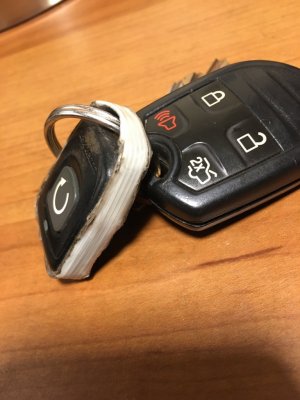
My tab broke also ... on an aftermarket remote start , lucky I didnt lose it.
I just did a wrap of that fibreglass reinforced tape around the whole thing and it's better than new. Doesn't look great but I dont care. Works great. Gets you back in the game.
IMG_2185.JPG
 

Trainmaster

Old School Member
Joined
Jun 17, 2017
Posts
3,636
Reaction score
2,130
Location
Rockaway Beach, NY
Most junk yards or wreckers have a bucket of the remotes and they'll give you all you want for nothing of next-to-nothing. I usually find the OEM ones there if I look.
 

Zach Dean

Member
Joined
Oct 13, 2020
Posts
22
Reaction score
2
Location
CA
I tried these. They work fine EXCEPT for 2 big issues.

The lift glass button is huge, and right in the center. Meaning you will constantly unlock it without knowing.

Second, and this is huge to me. Pressing the lock button twice will NOT sound the horn!!!

https://www.amazon.com/gp/product/B07B327F2W/ref=ppx_yo_dt_b_asin_title_o01_s00?ie=UTF8&psc=1 Just got these, I don't know why but the second push on the lock button not sounding the horn IS a big deal LOL
 
As an Amazon Associate we earn from qualifying purchases.

Brandon K

Member
Joined
Aug 30, 2020
Posts
11
Reaction score
6
Location
98058
As an Amazon Associate we earn from qualifying purchases.

Zach Dean

Member
Joined
Oct 13, 2020
Posts
22
Reaction score
2
Location
CA
Yeah i went back and bought the OEM style, now the horn sounds like it should.

Why is it important, because from 50 feet away the honk tells me it is locked.

Yeah I might have to do that, I still have the factory one so I didn't know that these don't sound! That second push with the horn is important to me too LOL
 
Top