Navigation issue driving me crazy!

Disclaimer: Links on this page pointing to Amazon, eBay and other sites may include affiliate code. If you click them and make a purchase, we may earn a small commission.

ChaseM

Member
Joined
Jul 26, 2020
Posts
11
Reaction score
8
Location
Logan, Utah
We have been using the on board navigation on our 2018 Expedition Limited on a few camping trips this year up in the mountains where there is no cell coverage and it works great. The issue is that whenever we plug in our phones to the charging ports up near the front of the center console (to charge our phones), the on board navigation quits working and it reverts to our cell phone's navigation (Apple maps or Google maps) which doesn't work at all because we have no service. Is there a way to make it so it will keep using the vehicle's navigation system even when one of our phones are plugged in? The wireless charger can only charge one phone at a time and does not charge very quickly. Thanks in advance

 

Robert McMillan

Full Access Members
Joined
May 8, 2020
Posts
201
Reaction score
68
Location
US
We have been using the on board navigation on our 2018 Expedition Limited on a few camping trips this year up in the mountains where there is no cell coverage and it works great. The issue is that whenever we plug in our phones to the charging ports up near the front of the center console (to charge our phones), the on board navigation quits working and it reverts to our cell phone's navigation (Apple maps or Google maps) which doesn't work at all because we have no service. Is there a way to make it so it will keep using the vehicle's navigation system even when one of our phones are plugged in? The wireless charger can only charge one phone at a time and does not charge very quickly. Thanks in advance
No, it’s bc of CarPlay, you either plug in and use google maps or unplug and use ford navigation. Only other option is to get a cigarette lighter outlet with a usb interface to charge your phone off that and use ford navigation. It’s either one or the other
 

DWs-TTEB

Full Access Members
Joined
Jul 19, 2020
Posts
746
Reaction score
449
Location
Evans, GA
The USB ports (x2 of them) for the 2nd row seats are inches away on the back of the center console. Using these ports will not sync your cells with carplay. You will be able to use the built-in navigation.

You could also disable carplay through the settings screens to include setting carplay to not "Show on connection".

Hope that helps. (from memory)
 

Robert McMillan

Full Access Members
Joined
May 8, 2020
Posts
201
Reaction score
68
Location
US
The USB ports (x2 of them) for the 2nd row seats are inches away on the back of the center console. Using these ports will not sync your cells with carplay/appleplay. You will be able to use the built-in navigation.

You could also disable carplay/appleplay through the settings screens to include setting carplay/appleplay to not "Show on connection".

Hope that helps. (from memory)
I’m thinking he wants the other CarPlay apps but to use ford navigation which I’m pretty sure is not possible
 
OP
OP
ChaseM

ChaseM

Member
Joined
Jul 26, 2020
Posts
11
Reaction score
8
Location
Logan, Utah
Thanks for the replies! We have resorted to using the usb ports on the back of the center console, but the kids want to use those too. I was hoping there was a way around it.
 

LokiWolf

Staff member
Moderator
Joined
Apr 2, 2016
Posts
3,971
Reaction score
2,834
Location
Richmond VA
No, it’s bc of CarPlay, you either plug in and use google maps or unplug and use ford navigation.

Not quite. CarPlay can be disabled per device in Settings. Phone can be connected charging,CarPlay disabled. You can then use the Sync Apps, or the built in Nav.

Apps like Pandora, iHeart Radio and several others work still via the Sync 3 App function with the Phone connected with CarPlay off.


Sent from my iPhone using Tapatalk Pro
 

StealthyBulldog

Full Access Members
Joined
Oct 5, 2019
Posts
198
Reaction score
120
Location
Manitoba Canada
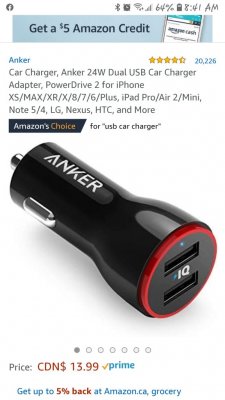
I just leave one of these plugged into the socket in the center console with a cord for wife's iphone, and one for my Samsung plugged in already Screenshot_20200801-084133_Chrome.jpg

There's even a notch by the passenger side to route the cords through. Then I usually throw my phone in the little storage part by my right leg.
 

carymccarr

Full Access Members
Joined
Aug 11, 2019
Posts
1,749
Reaction score
390
Location
Earth
I’m thinking he wants the other CarPlay apps but to use ford navigation which I’m pretty sure is not possible

Right. This is another maddening limitation of sync. I cannot fathom why they disable nav as well as apps that I pay for (XM apps specifically) the second I plug in my phone. Ridiculous.
 

scotthere

Well-Known Member
Joined
Jun 27, 2020
Posts
56
Reaction score
33
Location
Orlando
Just disable android auto in settings. Your phone will charge per normal plugged to the USB in front and let the passenger do the app navigation on the phone. connect phone via Bluetooth and select it as the source on the Audio display. you can even skip, pause etc. Tip on Amazon music you can download songs to listen offline. If you want to stream a news feed or any other internet audio source it will play through the speaker and the Ford Navigation will work at the same time. Confused a little though If you're out of cellular range your phone is now just an MP3 player and you don't need android auto for that????
 
OP
OP
ChaseM

ChaseM

Member
Joined
Jul 26, 2020
Posts
11
Reaction score
8
Location
Logan, Utah
Thanks for all the replies. I just wanted to be able to have my phones plugged in and still be able to use the Ford navigation. Thanks to you guys I figured out how to turn off Appleplay on the vehicle’s settings and now I’m getting what I wanted :)
 

Jamaican Cruiser

Well-Known Member
Joined
Aug 23, 2020
Posts
73
Reaction score
50
Location
Vienna, VA
I use the charging port in the center console or from the rear of the console to avoid this. I live in Northern Virginia and while navigating through the mountains on trips the using the cellphone to navigate is simple useless.
 

carymccarr

Full Access Members
Joined
Aug 11, 2019
Posts
1,749
Reaction score
390
Location
Earth
Just disable android auto in settings. Your phone will charge per normal plugged to the USB in front and let the passenger do the app navigation on the phone. connect phone via Bluetooth and select it as the source on the Audio display. you can even skip, pause etc. Tip on Amazon music you can download songs to listen offline. If you want to stream a news feed or any other internet audio source it will play through the speaker and the Ford Navigation will work at the same time. Confused a little though If you're out of cellular range your phone is now just an MP3 player and you don't need android auto for that????

Bluetooth audio blows.

It’s ridiculous they lock out native apps (including nav) just because you plug your phone in. Makes zero sense.

I download lots of Apple Music albums and Tidal albums so although it’s “just” a MP3 in no cell service areas it’s pretty nice to be able to use it.
 
Top