Stuck on old Sync 4 version 22277 - '23 Platinum

Disclaimer: Links on this page pointing to Amazon, eBay and other sites may include affiliate code. If you click them and make a purchase, we may earn a small commission.

rkoskier

New Member
Joined
Jul 2, 2025
Posts
3
Reaction score
0
Location
minnesota
Hi all, I have a '23 Platinum that still has the Sync 4.0.22277 version that I believe the truck was delivered with back in 2023 (I purchased this as a gold certified vehicle last summer). I have had auto updates enabled and wifi connected when in the garage. I chatted with Ford yesterday (and supposedly a sync expert was consulted), and the rep confirmed that this is the current software for my truck. This is clearly a lie since the 24127 version was specified as current at least on November 18, 2024. The rep indicated that a new update is close to release and I should get that when it comes out, but I don't believe anything at this point. Is there anything else I can do?

 

rugedraw

Full Access Members
Joined
Aug 14, 2024
Posts
138
Reaction score
63
Location
Miami, FL
Sync 22277 is software from 2022 and for sure is not the most current software. Unless your truck is affected by the attached SSM that was recently released to dealers, you should have more updates available for you. Message me the VIN and I can check, but chances are, it's just the unreliable and unpredictable OTA process not getting updates out in a timely matter.
 

Attachments

  • 53966.pdf
    73 KB · Views: 26

rugedraw

Full Access Members
Joined
Aug 14, 2024
Posts
138
Reaction score
63
Location
Miami, FL
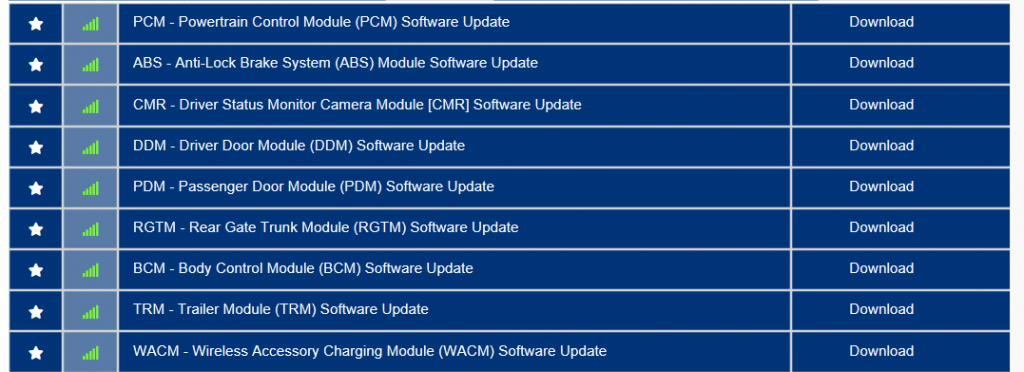
I got your message, but I am responding to you here because I cannot attach pictures in messages on this forum. It seems like your truck is affected by the SSM I posted above. Even though your Sync version is outdated, you do not show any pending updates for the Sync related modules. The dealer cannot help; the issue on on Ford's side. With the exception of the WACM, the other module in the list below can be updated via the OTA process, but Ford needs to release more updates for your VIN in order for you to be able to progress further along the OTA process.
 

Attachments

  • Untitled.png
    Untitled.png
    262.9 KB · Views: 16
OP
OP
R

rkoskier

New Member
Joined
Jul 2, 2025
Posts
3
Reaction score
0
Location
minnesota
Thank you so much for looking into this. It's nice to know what's going on, even if there's nothing to do about it. It's annoying when customer service flat out lies about the situation. Thanks again, I appreciate it!!!
 

rugedraw

Full Access Members
Joined
Aug 14, 2024
Posts
138
Reaction score
63
Location
Miami, FL
The guys that answer the phone when you call are clueless. Hopefully they fix whatever is holding certain vehicles back sooner than later.
 

rugedraw

Full Access Members
Joined
Aug 14, 2024
Posts
138
Reaction score
63
Location
Miami, FL
I know this is an old post but anyway you can check mine?

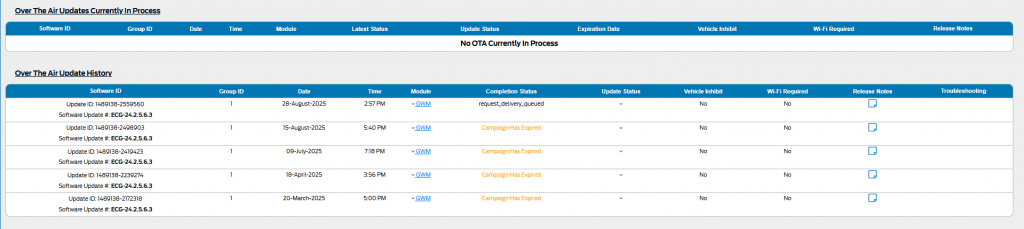
My FDRS license expired and I didn't renew it so I cannot check for pending updates. I still have limited PTS access. I can see you have been sent a GWM update several times, and every time, the OTA trigger expired because your truck didn't ping back the server to accept it. You actually have an active OTA trigger on the server for the GWM right now, but the same thing is happening. It also shows that auto-updates is not turned on even though you say it is.

When you check for updates, does the screen get hung up saying checking for updates with the pinwheel spinning, or does it actually check for updates?

1756914684614.png
 

sbuchanan813

Member
Joined
Nov 23, 2024
Posts
14
Reaction score
6
Location
tampa, fl
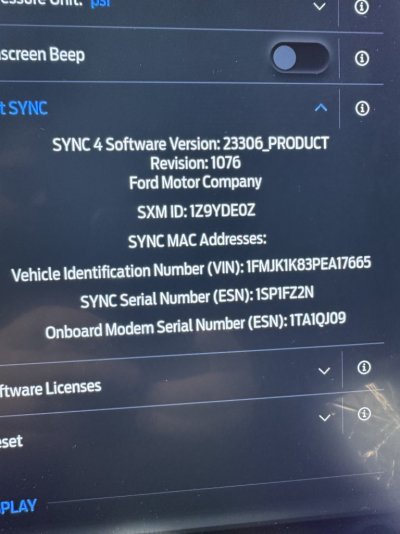
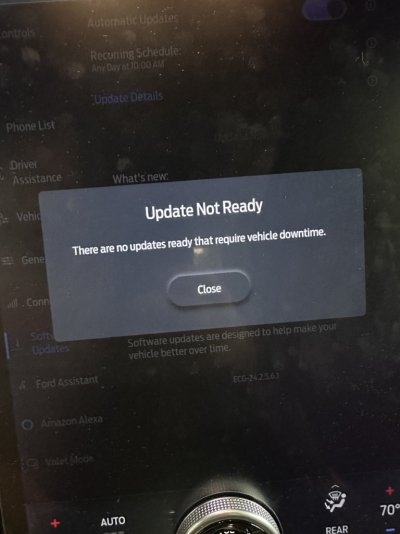
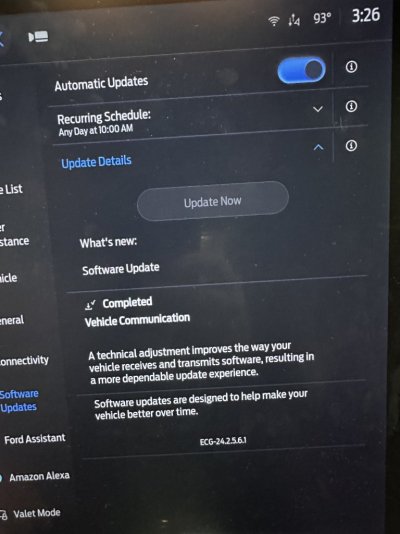
Here is my screen. I am on WiFi in the driveway . The update button is always greyed out. Not sure if I’m doing something wrong. I’ve set a time and also unset the time and still the same . Bought the vehicle in November of 2024 and never had an update.
 

Attachments

  • IMG_6554.jpeg
    IMG_6554.jpeg
    109.9 KB · Views: 5
  • IMG_6553.jpeg
    IMG_6553.jpeg
    108.8 KB · Views: 5

rugedraw

Full Access Members
Joined
Aug 14, 2024
Posts
138
Reaction score
63
Location
Miami, FL
Here is my screen. I am on WiFi in the driveway . The update button is always greyed out. Not sure if I’m doing something wrong. I’ve set a time and also unset the time and still the same . Bought the vehicle in November of 2024 and never had an update.

I would try disconnecting the negative cable from your 12v battery for 20 minutes and then checking for updates again.

I checked again and the OTA that was in queue went from an active OTA to part of OTA history. Seems like it timed out again. I would still do the 20 minute battery pull and hopefully it goes through the next time they send it. See if the update now button is no longer grayed out after the battery disconnect.

1757085789887.png
 

sbuchanan813

Member
Joined
Nov 23, 2024
Posts
14
Reaction score
6
Location
tampa, fl
Ok so did the negative pull from battery. Hooked back up and started vehicle. And still greyed out. Connected to WiFi at the home in driveway. Guess we will wait and see. The only other thing I can maybe think of is where I live cell service is bad and typically requires a WiFi signal at my home. Do we think maybe the signal to the vehicle is being compromised too? When I use my app I can still remote start and all that so idk.
 

Attachments

  • IMG_6556.jpeg
    IMG_6556.jpeg
    82.2 KB · Views: 3
  • IMG_6555.jpeg
    IMG_6555.jpeg
    97.8 KB · Views: 3

rugedraw

Full Access Members
Joined
Aug 14, 2024
Posts
138
Reaction score
63
Location
Miami, FL
Ok so did the negative pull from battery. Hooked back up and started vehicle. And still greyed out. Connected to WiFi at the home in driveway. Guess we will wait and see. The only other thing I can maybe think of is where I live cell service is bad and typically requires a WiFi signal at my home. Do we think maybe the signal to the vehicle is being compromised too? When I use my app I can still remote start and all that so idk.

Your truck is reporting itself to the cloud regularly, so I don't think the reception is bad enough to blame it on that. However, now that there is no active OTA trigger in queue, the button being grayed out is normal because there is no update pending to install. However, the fact that it was gray when you DID have a pending OTA in queue was not normal.

I agree.....at this point, it is wait-and-see for them to resend it to see if it goes through this time. It is not normal for the same OTA to fail 5 times over the course of 6 months. If it fails again, the dealer may have to install that problematic GWM update so the truck gets past it and opens the door for the next update you are due.
 
OP
OP
R

rkoskier

New Member
Joined
Jul 2, 2025
Posts
3
Reaction score
0
Location
minnesota
UPDATE: my expedition finally received updates to sync version 25255. It looks like Ford are re-enabled ota updates for at least some old versions of sync. I don't know if SSM 53966 has been officially resolved. Hopefully other people affected get resolved soon!
 

zultar

New Member
Joined
Jun 19, 2025
Posts
1
Reaction score
0
Location
Wisconsin
That's encouraging.. I am still stuck on Sync 4.0.22277 (23 limited) Have you noticed any improvements in performance/features/stability ?

Thanks
 
Top