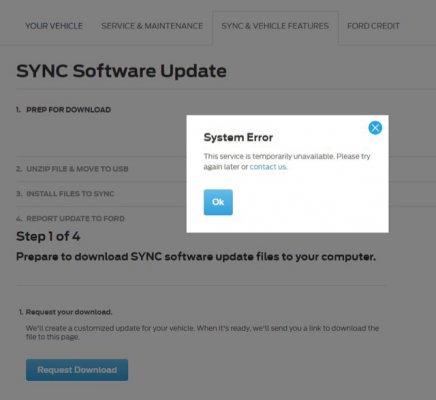
Sync download error message

Disclaimer: Links on this page pointing to Amazon, eBay and other sites may include affiliate code. If you click them and make a purchase, we may earn a small commission.

tbrawny

New Member
Joined
Jan 16, 2018
Posts
4
Reaction score
0
Location
Billerica, MA
I have followed several of your posts before I decided on an Expedition, and last wknd picked up a 2016 EL Limited. I’m excited for some ‘luxury’ car camping this summer.

For the last few days, I can’t seem to get past this error message on owner.ford.com when trying to download the sync update. On Twitter, @fordservice responded that their team is working to fix some server issues, and to try again in a few hours.

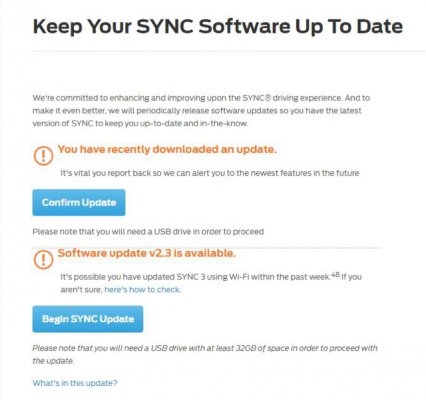
I setup the vehicle for auto updates over WiFi, and it says it checked for updates yesterday morning, but it’s still at V1.0.

Does anyone know another way to get the update?
bdea7bb725bcda24426f6e6708fc382c.jpgf87da930577bec53918e9694faa6379e.jpg


Sent from my iPhone using Tapatalk
 

East-TN

Full Access Members
Air Force
Joined
Jan 4, 2018
Posts
533
Reaction score
269
Location
TN
There is another thread on here about using WiFi to update our Sync...use the search function and I'm sure you will find it.

To summarize, the WiFi update may not show an update has been accomplished immediately...it may take a day or two before you notice the update has occurred. Usually the first way to tell if your system has been updated is by checking the ford.owner website (which you show above) and it will list the current version in your Expy.

If the update is large (yours may be since you are going from 1.0 to 2.3), the update will be processed in chunks...that's part of the reason that if you are connected to WiFi when you shutdown your vehicle, the update may continue for up to 30 minutes after you turn off your Expy.

Recommend you ensure your Sync is connected to WiFi as much as possible (at work, your house, or driving if your phone can act as a Hotspot), then give the Sync 2-3 days to complete the update.

Please post back your progress/completion and what worked for you...others may benefit as well.
 

jrc50

Full Access Members
Joined
Aug 28, 2017
Posts
82
Reaction score
21
Location
Mobile, Al.
Or just have your friendly Ford dealer do it! But allow 1-2 hours for that alone, apparently dealers have as much trouble downloading updates as we do off Ford "download websites" that are low tech to the point of being useless to the average owner.
And again, this is from a company preaching they will be making all electric, self driving cars soon!!
 

ynpmoose

Well-Known Member
Joined
Jan 27, 2017
Posts
97
Reaction score
32
Location
Berks County, PA
I had that service is unavailable message a few weeks back. They straightened it out after a few days.
 
OP
OP
tbrawny

tbrawny

New Member
Joined
Jan 16, 2018
Posts
4
Reaction score
0
Location
Billerica, MA
Thanks for pointing me the old forums on this topic. I had thought I read them all, then I found the one titled 2015/2016, which took a long time to read but had tons of great info. Also a big thanks to Lokiwolf, mdntblu, and expeditionandy for their contributions.

I had downloaded the upgrade from lokiwolf yesterday, when @fordservice messaged me to say they think the website had been fixed. I tried the download again and sure enough, it worked. Installed in the vehicle this morning without a hitch, took about 20-25 min.

Now I just need the upgraded USB hub mdntblu posted a video about installing, and I should have CarPlay working.

Thanks again, everyone.


Sent from my iPhone using Tapatalk
 

Dorzak

Full Access Members
Joined
Jan 28, 2018
Posts
450
Reaction score
123
Location
California
I had the same issue last week. Contacted support they said the website was having issues. Finally able to download on Friday. If using a Mac, use StuffIt not the built in unzip.
 
Top