2019 Expy Forscan

Disclaimer: Links on this page pointing to Amazon, eBay and other sites may include affiliate code. If you click them and make a purchase, we may earn a small commission.

LokiWolf

Staff member
Moderator
Joined
Apr 2, 2016
Posts
3,971
Reaction score
2,837
Location
Richmond VA
My apologies LokiWolf, I appreciate the feedback from you and Tracy Cook. I'm new here and while reading this thread saw some questions about 2020's, and posts from people that show to own 2020's, so I wrote it here hoping to find help from the right folks.

Sounds like we're in a waiting game now. I'll try to follow in the 4th Gen thread.

No problem. I just stumbled across this one. I will have more info later tonight. About to go do some work on mine! See if I can get some stuff straight.


Sent from my iPad using Tapatalk Pro
 

David Langenberg

New Member
Joined
Apr 30, 2020
Posts
1
Reaction score
1
Location
Houston, TX
Just an FYI (I don't THINK I've seen this in this thread yet), but after adding the Heated & Ventilated seat controls to SYNC screen, in ForScan, you will lose the rear control of the HVAC system. It removes the "Rear Lock" and locks it to front HVAC. Easy fix, just revert APIM 7D0-01-01 back to default.
 

bushpilot

Full Access Members
Joined
Feb 20, 2020
Posts
375
Reaction score
159
Location
Houston, Tx
Just an FYI (I don't THINK I've seen this in this thread yet), but after adding the Heated & Ventilated seat controls to SYNC screen, in ForScan, you will lose the rear control of the HVAC system. It removes the "Rear Lock" and locks it to front HVAC. Easy fix, just revert APIM 7D0-01-01 back to default.

must be something unique w/ the '19...cause mine still works ('20)

how long ago did you set it? maybe the new version of forscan is necessary?
 
OP
OP
B

Breaker

Well-Known Member
Joined
Aug 1, 2019
Posts
67
Reaction score
25
Location
Katy, Texas
Just an FYI (I don't THINK I've seen this in this thread yet), but after adding the Heated & Ventilated seat controls to SYNC screen, in ForScan, you will lose the rear control of the HVAC system. It removes the "Rear Lock" and locks it to front HVAC. Easy fix, just revert APIM 7D0-01-01 back to default.

I tried reverting back to stock as built code, sync would restart, then it would still be there. Then I would go check the code, and it would be different than what I put in it.
My wife wanted the rear control over the seat icons. Finally was able to get it after have to change in the non as built section, what I call the easy section, enabled rear controls and disabled the seat icons. Then had to go back in the as built section and change it again. They finally went away.

Now, the problem is the radio, after the channel it says MHZ. Wife does not like that. Any ideas?
 

Dice Roll

Full Access Members
Joined
Dec 19, 2019
Posts
833
Reaction score
359
Location
Craps Table
Anybody defeat the auto engine off? Wife is very concerned the expy shut down while loading the camper this past weekend. Hard to remember to always go through the menu to turn that nonsense off.

I’d be a great turbo timer to have that as a thing to turn on when wanted. To default to this is a bad idea. Any help on this front would be appreciated. I just ordered an obd link to use with forscan.
 

bushpilot

Full Access Members
Joined
Feb 20, 2020
Posts
375
Reaction score
159
Location
Houston, Tx
Anybody defeat the auto engine off? Wife is very concerned the expy shut down while loading the camper this past weekend. Hard to remember to always go through the menu to turn that nonsense off.

I’d be a great turbo timer to have that as a thing to turn on when wanted. To default to this is a bad idea. Any help on this front would be appreciated. I just ordered an obd link to use with forscan.


sounds like you have the idle time set. if your parked and idling (while loading) then thats not auto shut down.
 

Dice Roll

Full Access Members
Joined
Dec 19, 2019
Posts
833
Reaction score
359
Location
Craps Table
How do you turn that off? Only thing I’ve seen is the check box you have to do each time it’s started.
 

bushpilot

Full Access Members
Joined
Feb 20, 2020
Posts
375
Reaction score
159
Location
Houston, Tx
How do you turn that off? Only thing I’ve seen is the check box you have to do each time it’s started.

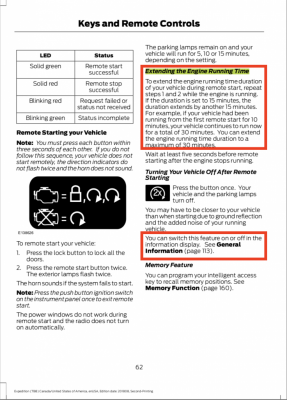
theres an advanced setting, remote start (iirc) set the remote start/idle time out to 5, 10 or 15 minutes.
you can not increase it more than 30 minutes (a restart will be required after 30min).

you can extend the idle time w/ the remote too.

Page 62 of the printed/pdf '19 Owners Manual


upload_2020-7-7_6-44-38.png
 

CGETX20

Member
Joined
Apr 21, 2020
Posts
14
Reaction score
6
Location
East TX
Anybody defeat the auto engine off? Wife is very concerned the expy shut down while loading the camper this past weekend. Hard to remember to always go through the menu to turn that nonsense off.

I’d be a great turbo timer to have that as a thing to turn on when wanted. To default to this is a bad idea. Any help on this front would be appreciated. I just ordered an obd link to use with forscan.

I first got into FORScan solely to learn how to turn the Auto S/S off. After some research, it seems like doing this within the vehicle’s code settings also turns off other necessary functions, most importantly the battery level sensor (Auto SS won’t activate if the battery is low).

I used forscan to do some other great stuff, but ended up buying an Auto S/S eliminator to hard wire a solution that can be easily installed or removed, and still functions if desired.

https://www.autostopeliminator.com/

use the code “F150FORUM” and you’ll get 15% off I believe.
 

LokiWolf

Staff member
Moderator
Joined
Apr 2, 2016
Posts
3,971
Reaction score
2,837
Location
Richmond VA
I first got into FORScan solely to learn how to turn the Auto S/S off. After some research, it seems like doing this within the vehicle’s code settings also turns off other necessary functions, most importantly the battery level sensor (Auto SS won’t activate if the battery is low).

I used forscan to do some other great stuff, but ended up buying an Auto S/S eliminator to hard wire a solution that can be easily installed or removed, and still functions if desired.

https://www.autostopeliminator.com/

use the code “F150FORUM” and you’ll get 15% off I believe.

CUDOs!!! Exactly the right way!
 

bushpilot

Full Access Members
Joined
Feb 20, 2020
Posts
375
Reaction score
159
Location
Houston, Tx
if youre idling in PARK for extended periods of time I dont believe the autostop eliminator or forscan will prevent the shut down....the shut down (while idling) is a timer.
 

CGETX20

Member
Joined
Apr 21, 2020
Posts
14
Reaction score
6
Location
East TX
if youre idling in PARK for extended periods of time I dont believe the autostop eliminator or forscan will prevent the shut down....the shut down (while idling) is a timer.

Yes, you’re right there. I thought his original question was about auto stop, but I think it was related to idle in his context like you’re saying. It won’t turn off if the ignition is on will it? Just when remotely started and the ignition is not yet turned on right?
 

LokiWolf

Staff member
Moderator
Joined
Apr 2, 2016
Posts
3,971
Reaction score
2,837
Location
Richmond VA
So for the Auto Off above that the wife is concerned about...

3 Things.

1) Remote Start - If it was remote started, 15 per remote start is the default factory setting, with a max of 30 minutes regardless of how many times you do it. So if your remote start is set at 5 minutes, you can extend it 6 times, to get to 30. This can be done via remote, or app. After the 30 is exceeded, you have to start it with key within range via button or ignition.

2) Idle Limit - Mine set at 60 minutes, but can't remember if it was stock set to that, or changed via FORSCAN. Vehicle shuts off after that amount of time idling. To reset that timer, place in drive or reverse for a sec and that clock starts again. You can also turn it off in settings per start up. Not sure if FORSCAN can turn it completely off, but pretty sure that is a yes.

3) Auto Start/Stop - Driving, come to a stop, engine turns off. Button can turn it off per start cycle. Sport Mode also turns it off. The AutoStopEliminator above makes the button setting hold across startups. It is the correct way to do it. Doing it in FORSCAN isn't really turning it off. It is turning off Battery Charge Management, which causes the battery to be charged at full voltage all the time(Not good). With that off the vehicle does not Auto Stop because it does not know the status of the battery there fore it won't turn it off for fear of not being able to start back up.

 

Dice Roll

Full Access Members
Joined
Dec 19, 2019
Posts
833
Reaction score
359
Location
Craps Table
theres an advanced setting, remote start (iirc) set the remote start/idle time out to 5, 10 or 15 minutes.
you can not increase it more than 30 minutes (a restart will be required after 30min).

you can extend the idle time w/ the remote too.

Page 62 of the printed/pdf '19 Owners Manual


View attachment 36873

I didn’t think that would solve this. It needs to be disabled for good so as to not bake a kid by accident. Wife wants to sell the car in fear of this.
 

Dice Roll

Full Access Members
Joined
Dec 19, 2019
Posts
833
Reaction score
359
Location
Craps Table
I first got into FORScan solely to learn how to turn the Auto S/S off. After some research, it seems like doing this within the vehicle’s code settings also turns off other necessary functions, most importantly the battery level sensor (Auto SS won’t activate if the battery is low).

I used forscan to do some other great stuff, but ended up buying an Auto S/S eliminator to hard wire a solution that can be easily installed or removed, and still functions if desired.

https://www.autostopeliminator.com/

use the code “F150FORUM” and you’ll get 15% off I believe.

does that turn off auto engine off? I don’t think it does. A start stop is a good feature anyway.
 

Dice Roll

Full Access Members
Joined
Dec 19, 2019
Posts
833
Reaction score
359
Location
Craps Table
So for the Auto Off above that the wife is concerned about...

3 Things.

1) Remote Start - If it was remote started, 15 per remote start is the default factory setting, with a max of 30 minutes regardless of how many times you do it. So if your remote start is set at 5 minutes, you can extend it 6 times, to get to 30. This can be done via remote, or app. After the 30 is exceeded, you have to start it with key within range via button or ignition.

2) Idle Limit - Mine set at 60 minutes, but can't remember if it was stock set to that, or changed via FORSCAN. Vehicle shuts off after that amount of time idling. To reset that timer, place in drive or reverse for a sec and that clock starts again. You can also turn it off in settings per start up. Not sure if FORSCAN can turn it completely off, but pretty sure that is a yes.

3) Auto Start/Stop - Driving, come to a stop, engine turns off. Button can turn it off per start cycle. Sport Mode also turns it off. The AutoStopEliminator above makes the button setting hold across startups. It is the correct way to do it. Doing it in FORSCAN isn't really turning it off. It is turning off Battery Charge Management, which causes the battery to be charged at full voltage all the time(Not good). With that off the vehicle does not Auto Stop because it does not know the status of the battery there fore it won't turn it off for fear of not being able to start back up.


I haven’t seen an idle limit selection so I bet you found a line of code to change. At least 60 minutes would probably make this a tiny chance of a real tragedy.

was reading elsewhere that the manual override will actually only bring up a prompt to extend the time, not turn the ******** off for good on that cycle. Damn.
 

bushpilot

Full Access Members
Joined
Feb 20, 2020
Posts
375
Reaction score
159
Location
Houston, Tx
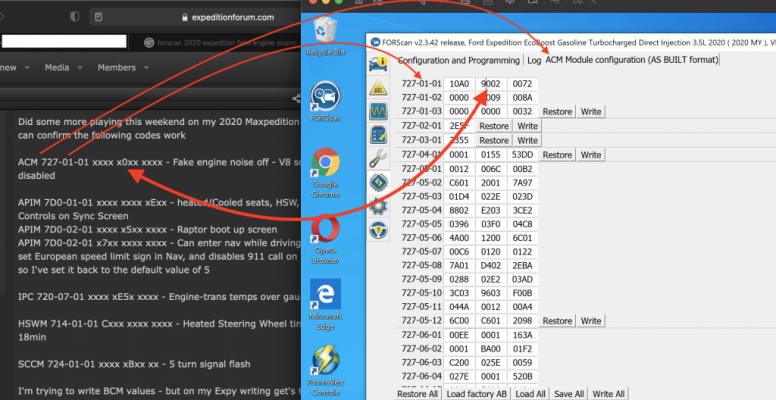
anyone have an updated code to turn the fake engine noise off in version 2.3.42? mine 727-01-01 is already set to "0"

1631905003069.png
 
Last edited:

techdude99

Full Access Members
Joined
Nov 25, 2019
Posts
367
Reaction score
140
Location
US
This thread is for 2019. There should be a 2020 thread.
 

Fastcar

Full Access Members
Army
Joined
Dec 14, 2013
Posts
1,115
Reaction score
707
Location
FL
I've started updating mine. Some codes have worked, some I have not tried yet - when looking at the default values and some of the google spread sheets put out by others, some default values don't line up. so have been hesitant to change too many things.

So far Coolant and trans temperature over gauges,and disable fake engine noise has worked.
IPC 720-07-01 xxxx xE5x xxxx
ACM 727-01-01 xxxx x0xx ***


Stock value for heated/cooled seats with HSW isn't what I expected, or documented as a normal value in spread sheets - so I have not changed that. Next time around I'll be looking at doing 3 ding at start up, panic alarm set to two pressens, and bambi mode.
I'm referencing - https://docs.google.com/spreadsheets/d/1qf2gYgkhmsX-dnFO3Ki0nYUvr7aeLKsHsA0WxhDns1s/edit#gid=0
https://docs.google.com/spreadsheet...iVSlDFGFHnfeuhb3RTMVz95730/edit#gid=815852466
https://docs.google.com/spreadsheet...TKARDo2Y7lfSOMFj6Gott8g7yg/edit#gid=756156726
Disable Fake Engine Noise??? WTF!
 

Amamas2010

New Member
Joined
Oct 19, 2021
Posts
4
Reaction score
3
Location
KSA
Which code is which?


on my '17 super duty -

I disabled:
Double horn honk (occurs when you exit running truck w/ key in pocket).
Drivers seatbelt warning (left all other seat belt warnings on)

I ENABLED:
Numbers over Gauges
Bambi mode (driving/fog lights on w/ high beams)
Remove Sirus Option from infotainment (the day the free trial ran out)

Lower TPMS pressure (i run 55psi, factory minimum was 65psi)
Heated & Cooled Seat Icons on Home Screen (infotainment system / center of dash).
Increased power point time out after engine off (was 15min) to 4 hours (can make them hot all the time)
Turn signal flash increase to 5 flashes (quick lane change/short press of turn signal) - was 3 flashes

These items aren't necessary on the Expy but I also enabled:

Heated Steering Wheel control on Home Screen
Global Window Close (can close windows w/ remote/fob)
Add DPF filter % full (gauge)
Can I get videos for these configurations or learning videos . Because I bought OBDlink EX but I cant apply these Mod
 

Members online

No members online now.

Forum statistics

Threads
57,013
Posts
535,878
Members
54,708
Latest member
Landsbutter
Top