Software Update for Camera Functionality???

Disclaimer: Links on this page pointing to Amazon, eBay and other sites may include affiliate code. If you click them and make a purchase, we may earn a small commission.

CharPatton

Well-Known Member
Joined
Jan 20, 2023
Posts
45
Reaction score
19
Location
CO
I love our 2023 Timberline, but I wonder if one software upgrade is possible.

Our 2015 BMW X5 had nice functionality with the camera: The camera system would automatically turn on at slow forward speeds. In our Ford, when parking (to check painted ground lines to center the truck), one has to do two touch presses of the "iPad" screen: the first brings one to the Tow screen (which we rarely use), and the second turns on the camera.

Is there any way to automatically turn on the camera at a given slow forward speed and not get distracted by making two touchscreen presses? If not, can one at least have the camera come up as the first option when tapping the touchscreen?

Thank you.
 

GunnerRetz

Member
Joined
Mar 2, 2019
Posts
7
Reaction score
1
Location
Republic of Bye God Texas
The single button selection for the forward camera is exactly what I’m looking for as well. Is there a way to set a default for cameras that would turn on the front camera, like the back camera coming on when placed in reverse?
 

BSarchet

Full Access Members
Joined
Mar 30, 2022
Posts
197
Reaction score
121
Location
Little Flock, AR
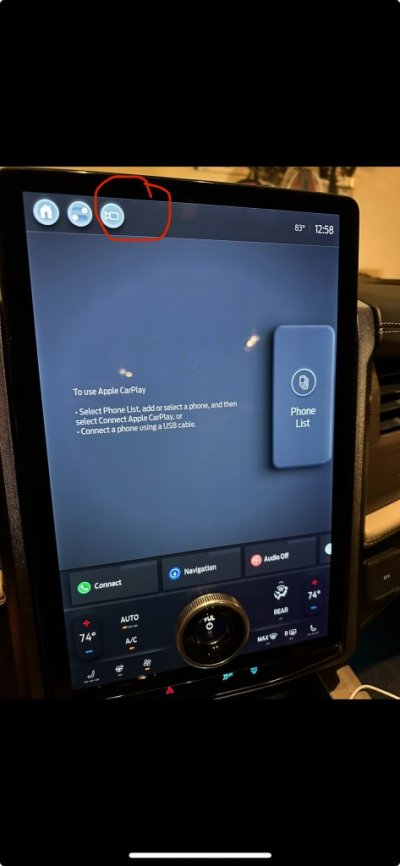
The newest Sync updates for the 4a system add a one touch camera to the main screen. May help with what you are looking for.
 

AJ82

Full Access Members
Joined
Feb 1, 2022
Posts
270
Reaction score
184
Location
Michigan
To add to the above, the front camera does automatically turn on at slow speeds when the front parking sensors detect an object. I realize that may not suffice for every parking situation but is better than nothing. Also on the smaller touchscreen model there is a dedicated hard button for the front camera on the dash. Good to hear the larger screen got a software button as well now.
 

Password

Full Access Members
Joined
Mar 29, 2013
Posts
180
Reaction score
39
Location
USA
To add to the above, the front camera does automatically turn on at slow speeds when the front parking sensors detect an object. I realize that may not suffice for every parking situation but is better than nothing. Also on the smaller touchscreen model there is a dedicated hard button for the front camera on the dash. Good to hear the larger screen got a software button as well now.
It does?
 

Password

Full Access Members
Joined
Mar 29, 2013
Posts
180
Reaction score
39
Location
USA
Yes. I know this because that is what I use every time I park it in the garage. Comes on when it detects the wall in front of me.
Must be a '22 and newer feature. Doesn't do that on my '18.
Congratulations lol.
 

AJ82

Full Access Members
Joined
Feb 1, 2022
Posts
270
Reaction score
184
Location
Michigan
Must be a '22 and newer feature. Doesn't do that on my '18.
Congratulations lol.
Interesting. I thought the pre-refresh we test drove had it as well, though it might have been a 2020 I think. Regardless it wouldn't be hard to implement it though Ford would never go back and do it. At least the 18s have a lot more other features that weren't de-contented in the layer model years!
 

mpc11

Well-Known Member
Joined
Dec 12, 2018
Posts
97
Reaction score
37
Location
MI
Interesting. I thought the pre-refresh we test drove had it as well, though it might have been a 2020 I think. Regardless it wouldn't be hard to implement it though Ford would never go back and do it. At least the 18s have a lot more other features that weren't de-contented in the layer model years!
It does not do this in my '21. I have to manually press the button no matter the speed or sensor reading. Would be great if it automatically came on though!
 

AJ82

Full Access Members
Joined
Feb 1, 2022
Posts
270
Reaction score
184
Location
Michigan
Must have been a refresh update. I won't lie, it is nice. Since the OP has a 23 it should operate like my 22 at least.
 

mwar99

Full Access Members
Joined
Jan 2, 2023
Posts
127
Reaction score
71
Location
NJ
Mine comes on automatically when you get close. Now with the SYNC update there is the camera icon so much easier to turn on now.
 

dlcorbett

Full Access Members
Air Force
Joined
Mar 26, 2014
Posts
3,086
Reaction score
1,149
Location
tx
Yea my wife's cx9 turns on the front camera as low speeds. I wish my nav did this as well.
 

JimmyM

Full Access Members
Joined
May 5, 2014
Posts
283
Reaction score
63
Location
Boston, MA
I have the 4.2.2.1 update and I don't see a soft button for the camera. Where would it be?
 

Raposa

Member
Joined
Nov 17, 2022
Posts
12
Reaction score
1
Location
Middletown NJ
The camera functions are a gripe of mine. My 19' Land Cruiser was much better. They would automatically show forward and sides at low speeds.
 

m3olsen

Full Access Members
Joined
Jun 8, 2018
Posts
263
Reaction score
94
Location
CNY
I have the 4.2.2.1 update and I don't see a soft button for the camera. Where would it be?
Upper left corner of screen, 3rd soft button in from the left, after Home and Settings.
 

Aboudi

New Member
Joined
Sep 30, 2023
Posts
3
Reaction score
1
Location
Muscat
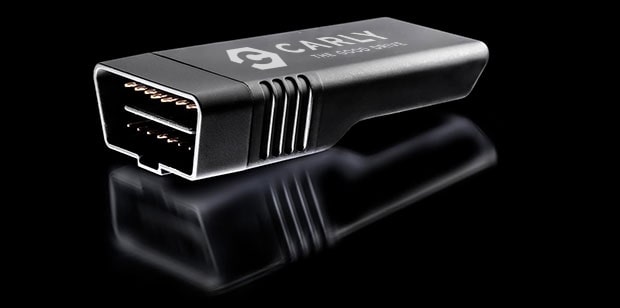
I would get a Carly OBD2 reader, the associated software is vehicle specific and lets you adjust the code for various functions check it out below:

 
OP
OP
C

CharPatton

Well-Known Member
Joined
Jan 20, 2023
Posts
45
Reaction score
19
Location
CO
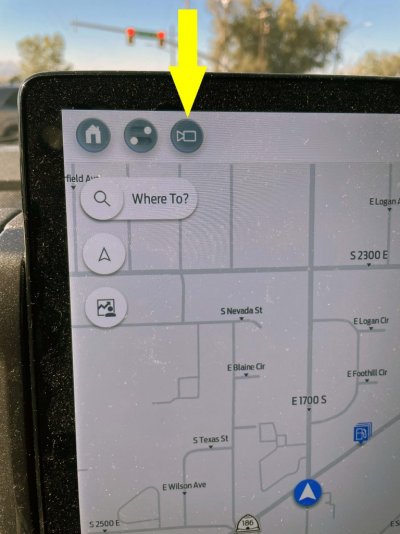
Partial success! As mentioned above, with the automatic software update (Ford Power-Up 4.2.2.2, SYNC 4 Software Version: 23223_PRODUCT Revision: 969) that showed up automatically this week, there is now a 1 touch camera button (yellow arrow). It would be nice to get the camera system to turn on automatically at some low forward speed, but at least this is a step in the correct direction!
 

Attachments

  • Camera Button.jpg
    Camera Button.jpg
    123.2 KB · Views: 3

mwar99

Full Access Members
Joined
Jan 2, 2023
Posts
127
Reaction score
71
Location
NJ
It turns on automatically when you are about 1-2 feet from something.
 
Top