My vehicle was updated on 09/19, 09/24 and 10/17, respectively. Now my Sync 4 (not 4A) version is 24127_PRODUCT Revision: 1270. It seems a great success. After all these updates, the Sync works silk smooth with iOS 18.0.1.


You are using an out of date browser. It may not display this or other websites correctly.
You should upgrade or use an alternative browser.
You should upgrade or use an alternative browser.
Ford updated software three times recently
- Thread starter Hellwig
- Start date
Disclaimer: Links on this page pointing to Amazon, eBay and other sites may include affiliate code. If you click them and make a purchase, we may earn a small commission.
BSarchet
Full Access Members
How do you check your sync version? I have the 4a and the “software update” section doesn’t have anything like that I can find.My vehicle was updated on 09/19, 09/24 and 10/17, respectively. Now my Sync 4 (not 4A) version is 24127_PRODUCT Revision: 1270. It seems a great success. After all these updates, the Sync works silk smooth with iOS 18.0.1.
To find your SYNC 4A software version, you can:How do you check your sync version? I have the 4a and the “software update” section doesn’t have anything like that I can find.
- Go to the Settings menu on your vehicle's SYNC screen
- Select General
- Tap About SYNC
BSarchet
Full Access Members
Thank you! I’m interested to know what other people with the 4a are on right now. I have 23202 Revision 956 and it feels like I’ve been stuck there for quite a while. Ford makes it very difficult to find out what the latest version available is I feel like. Probably because they don’t want to get a bunch of questions from people like us who all want the latest and greatest.To find your SYNC 4A software version, you can:
- Go to the Settings menu on your vehicle's SYNC screen
- Select General
- Tap About SYNC
Thank you! I’m interested to know what other people with the 4a are on right now. I have 23202 Revision 956 and it feels like I’ve been stuck there for quite a while. Ford makes it very difficult to find out what the latest version available is I feel like. Probably because they don’t want to get a bunch of questions from people like us who all want the latest and greatest.
See attached.
Attachments
BSarchet
Full Access Members
Thank you! So based on this there is update 23306 that I don’t have for some reason. Appreciate the info.See attached.
Thank you! So based on this there is update 23306 that I don’t have for some reason. Appreciate the info.
From my experience on my truck and several forums I follow, GWM update ECG-24.2.5.6.1 is a prerequisite for this APIM update.
BSarchet
Full Access Members
Ok so how do I do that? Ha, I seriously don’t even know what that means!
Ok so how do I do that? Ha, I seriously don’t even know what that means!
Unfortunately, the OTA process is unpredictable and unreliable. There is no way to force an update to be sent to your vehicle via OTA. You can do the updates yourself, but it would require investing in about $700 worth of equipment, a windows based laptop, and paid access to Ford's FDRS software. This is a route only a small percentage of owners are willing to take.
TonyR0206
Well-Known Member
I’m waiting for an update that will let you have the navigation screen in the digital instrument display. It’ll never happen, but it would be a great feature!
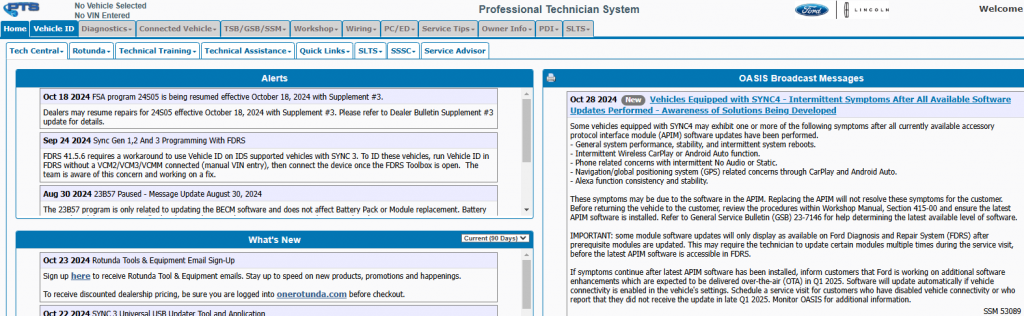
I am not on this forum much, so I am not sure if there is a thread dedicated to this or not, so I will just post it here. Ford had released an SSM months ago advising of an APIM update that would be coming in Q4 of this year. As of this morning, they posted a new SSM in PTS saying it was pushed back until Q1 of 2025. To those of you with Sync and phone connectivity issues, there is no fix yet.
I'm assuming you mean the whole map, right? At least if you use Apple maps with and iPhone you can get the major turns coming up ahead in the instrument display.I’m waiting for an update that will let you have the navigation screen in the digital instrument display. It’ll never happen, but it would be a great feature!
TonyR0206
Well-Known Member
Yes. I meant the whole map. Not just the arrows in the stock nav or Apple Maps.I'm assuming you mean the whole map, right? At least if you use Apple maps with and iPhone you can get the major turns coming up ahead in the instrument display.
Hellwig
Full Access Members
I am afraid the instrument screen doesn't support that. You need a new vehicle from model year 2025.Yes. I meant the whole map. Not just the arrows in the stock nav or Apple Maps.
TonyR0206
Well-Known Member
I'm sure with a little programming on Ford's end, they could make it happen. It's a screen, so it can display whatever signal is sent to it. I get what you're saying, and they'd definitely not do it to try to get you to buy a 2025...but I believe if they wanted to, it could be done.I am afraid the instrument screen doesn't support that. You need a new vehicle from model year 2025.

Looked at FordPass app this morning and it says "Update Available" so I guess I have to learn about this--I am a brand-new owner having had this vehicle only a few weeks. Is it possible that after three weeks of ownership it is telling me it rolled-off the dealer lot out-of-date? Or is there truly some brand-new software that I am the first to post about here?
Looked at FordPass app this morning and it says "Update Available" so I guess I have to learn about this--I am a brand-new owner having had this vehicle only a few weeks. Is it possible that after three weeks of ownership it is telling me it rolled-off the dealer lot out-of-date? Or is there truly some brand-new software that I am the first to post about here?
100% possible and extremely likely it was on the lot with outdated software on several modules. This is completely normal with all manufacturers; not just Ford.
As it happens my "Update Available" was to "ensure future software updates are transmitted seamlessly..." and just took a few minutes, so I guess the SYNC4 et al were just fine.
ECG-24.2.5.6.3
That's a GWM update that was first reported on the F150 forum in November, so it is fairly new. That was the last OTA that was sent to the F150s and Lightnings before the started getting the new IPMA update for BC 1.4. However, the Expos seem to be getting 1.3 whenever it starts being pushed out to you guys.
A couple weeks later now and my vehicle said "Update Available" again. I clicked "UPDATE" and it said "Downloading..." for some hours w/o completion and so I decided to set a Schedule for "after 1AM" and also set "Automatically Update" to ON. Well, this morning sez "Update Successful" and it's reported that this update to SYNC4 10.1.0 changed my truck's software from 24058 Revision 1197 to now 24127 Revision 1270. So am I now updated to latest?
Having read @rugedraw your posts about "can't predict when Ford will send updates" I guess I shouldn't be shocked that it took this long but still.
I had left Auto Update OFF because I WANT TO KNOW when updates appear and what they are and I like to check online if folks have probs and etc but it seems Ford is foiling me. In the end I remain disturbed that their system does not 1. ALERT me to the need for an update, and then 2. That it doesn't ADVISE me that the update has occurred successfully i.e. via email or app notification.
EDIT: Now I see on ford.com the following: "Important: If Automatic Updates and Notifications are off, your vehicle will not receive any updates. This means your vehicle will not receive any new features or critical updates via Software Updates." which may explain why it didn't Update when I first asked for same. Still, the display stayed at "Downloading..." and should have instead said TURN ME ON DAMMIT.
Having read @rugedraw your posts about "can't predict when Ford will send updates" I guess I shouldn't be shocked that it took this long but still.
I had left Auto Update OFF because I WANT TO KNOW when updates appear and what they are and I like to check online if folks have probs and etc but it seems Ford is foiling me. In the end I remain disturbed that their system does not 1. ALERT me to the need for an update, and then 2. That it doesn't ADVISE me that the update has occurred successfully i.e. via email or app notification.
EDIT: Now I see on ford.com the following: "Important: If Automatic Updates and Notifications are off, your vehicle will not receive any updates. This means your vehicle will not receive any new features or critical updates via Software Updates." which may explain why it didn't Update when I first asked for same. Still, the display stayed at "Downloading..." and should have instead said TURN ME ON DAMMIT.
Last edited:
Similar threads
- Replies
- 14
- Views
- 3K

- Replies
- 1
- Views
- 2K
- Replies
- 26
- Views
- 3K
- Replies
- 8
- Views
- 5K


