2025+ Expedition "Spreadsheet"

Disclaimer: Links on this page pointing to Amazon, eBay and other sites may include affiliate code. If you click them and make a purchase, we may earn a small commission.

BT-152

Member
Joined
Jun 2, 2026
Posts
5
Reaction score
2
Location
Henderson, Nevada
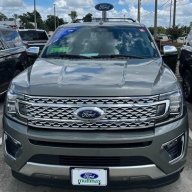
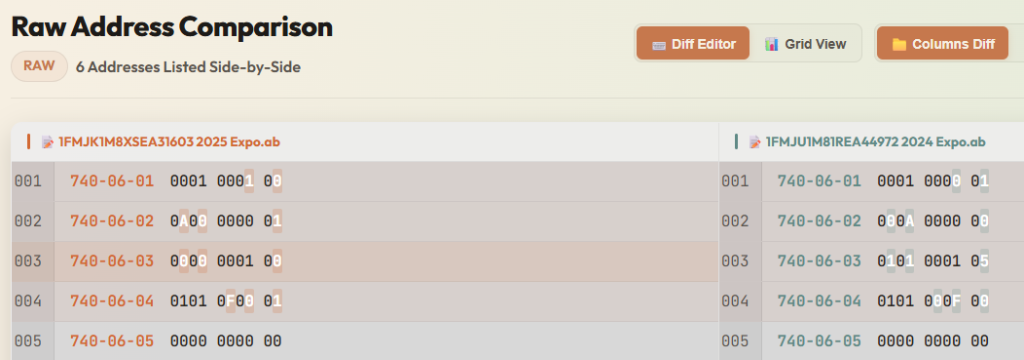
Hello, all. Got myself a new (to me) 2025 Expedition Active 4x4, and came looking FORScan guidance. Sadly, there seems to be very little. I have had several Fords before and have dealt with FORScan quite a bit - I helped find a bunch of the 2020 Explorer stuff when it first came out since I was lucky enough to get one early. There is no spreadsheet that I can find for the platform as of yet, so I am setting up a documentation page with what I have found:


If we actually start finding enough stuff to justify a spreadsheet, I'll work on getting it into a normal Google doc, but for now, this was a ton easier considering the relatively minor amount of info that exists. It also has a handy checksum calculator on it just in case FORScan balks like it sometimes does.

If anyone knows of anything not listed, or can confirm anything listed, please let me know on here or by e-mail, and I'll update the page.
 
OP
OP
BT-152

BT-152

Member
Joined
Jun 2, 2026
Posts
5
Reaction score
2
Location
Henderson, Nevada
I tried to get global close to work tonight by modifying the APIM, no luck.

Found a bunch of toggles in the BCM also for global close, turned them all on in conjunction with the APIM change, still no luck.

Someone named Myckel Wiggers on Facebook says he got it to work here:


Unfortunately, he left no information about how. So still unverified that it can work as of now, but just changing the APIM value alone certainly didn't work for me.

Also got an error about unknown vehicle a few times. By the time I thought to take a picture of it, of course, it behaved. It wanted me to enter a part number for the computer installed and contact FORScan. Power cycling the truck a few times got that to go away and recognize it again. Weird. Never had that on any of my previous vehicles.
 

Mr Big

Full Access Members
Joined
May 29, 2023
Posts
1,012
Reaction score
588
Location
Tampa Bay, Florida USA
I tried to get global close to work tonight by modifying the APIM, no luck.
Global close works on mine using instructions from manual:
  1. Press and hold the lock button on the remote control.
  1. Release the button when the windows start to close.
Press the lock or the unlock button on the remote control to stop global closing.
Note: When closing your windows the global closing feature, the bounce-back protection is enabled.See Window Bounce-Back .
 
OP
OP
BT-152

BT-152

Member
Joined
Jun 2, 2026
Posts
5
Reaction score
2
Location
Henderson, Nevada
Global close works on mine using instructions from manual:
  1. Press and hold the lock button on the remote control.
  2. Release the button when the windows start to close.
Press the lock or the unlock button on the remote control to stop global closing.
Note: When closing your windows the global closing feature, the bounce-back protection is enabled.See Window Bounce-Back .
Was this after making the APIM mod? Or another combination of mods? I'm not with my truck today to try.

What I did try was what I had seen in the manual I pulled up, which was press lock once, then hold lock for three seconds. I tried that in all conditions with no luck. I can't remember if I tried holding the lock button without tapping it once, but I'd assume the truck would respond the same way anyway.
 

Mr Big

Full Access Members
Joined
May 29, 2023
Posts
1,012
Reaction score
588
Location
Tampa Bay, Florida USA
I
Was this after making the APIM mod? Or another combination of mods? I'm not with my truck today to try.

What I did try was what I had seen in the manual I pulled up, which was press lock once, then hold lock for three seconds. I tried that in all conditions with no luck. I can't remember if I tried holding the lock button without tapping it once, but I'd assume the truck would respond the same way anyway.
I didn't make any Forscan mods before I used this feature. When I first got the EX, I went through the manual and learned and set all the features, like driver name, seat, wheel, pedal settings, memory set, A/C settings, steering wheel buttons, B&O Unleashed settings, etc.
My method to successfully roll all the windows down with remote:
1: I press the unlock button once then let go.
2: I then press and hold the unlock button for 5 seconds or until all the windows roll down.

My method to successfully roll windows all the windows up with remote:
1: I press the lock button once then let go.
2: I then press and hold the unlock button until all the windows roll down.
* The manual does not say to press unlock once, it just says press and hold until.
The manual also mentions "If equipped"
 
Last edited:
Top