

SYNC Update Question

Disclaimer: Links on this page pointing to Amazon, eBay and other sites may include affiliate code. If you click them and make a purchase, we may earn a small commission.

TonyR0206

Well-Known Member
Joined
Jan 15, 2023
Posts
89
Reaction score
56
Location
Souther Tier NY
For the past week, whenever I start my Expy, I get a notification at the top of my screen saying that SYNC is updating and certain features may not be available. I've seen this in the past, but it would come up only once and go away. This has been happening for the past week, now and I'm wondering if anybody else has had this happen in theirs. I haven't noticed anything not loading, or working. It's just a small annoyance at this point.
 

brbrazzell

Member
Joined
Jun 15, 2022
Posts
7
Reaction score
4
Location
Rowlett, TX
I'm experiencing the same thing. I have a 2023 Limited Max with 82,000 miles. I went onto the Ford website yesterday and looked up my Expeditions profile and tried to open the Sync update history of my Expedition and I got a message telling me that they apologize for the error and are working to correct it and suggest that I try again later. So, I tried that same procedure again today and got the same message. The 'virtual assistant' knew virtually nothing, so I'll call Ford after America's birthday and see what the problem is.
 

brbrazzell

Member
Joined
Jun 15, 2022
Posts
7
Reaction score
4
Location
Rowlett, TX
Hi, Rugedraw. My vin is 1FMJK1K82PEA15342 Thanks for your help. I'm definitely curious to find out what the problem is. Thanks again!
 

rugedraw

Full Access Members
Joined
Aug 14, 2024
Posts
164
Reaction score
70
Location
Miami, FL
Hi, Rugedraw. My vin is Thanks for your help. I'm definitely curious to find out what the problem is. Thanks again!
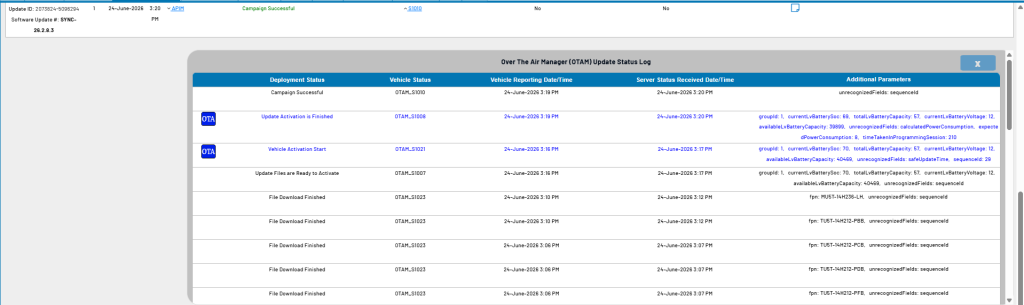
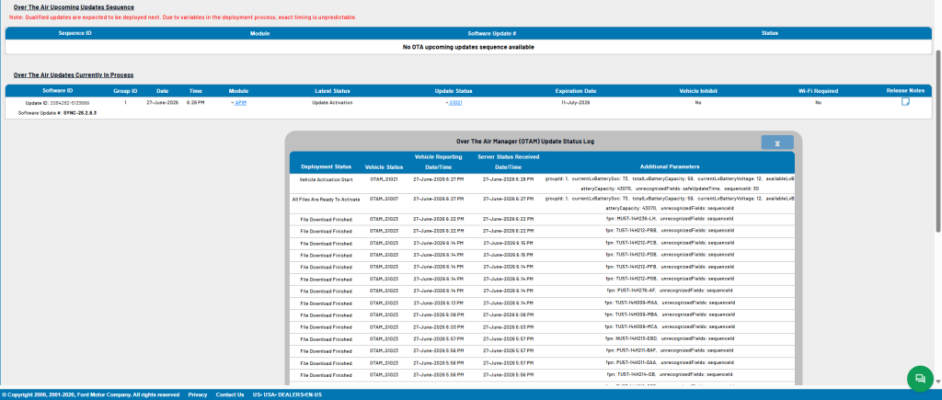
In your case, there is no info as to why it is not installing. The files were downloaded on 6/27 and it shows "vehicle activation start" which is when it is supposed to install, but it didn't and now it seems like the OTA trigger is hung up. There is nothing you can really do other than to try disconnecting the negative cable from the 12v battery to force a hard reset of all the modules. This process may or may not do anything help. It is also possible that doing this will cancel the OTA trigger and you will have to wait for it to be resent. However, it has been a week and nothing has happened, so I would try it.

1783109161201.png
 

rugedraw

Full Access Members
Joined
Aug 14, 2024
Posts
164
Reaction score
70
Location
Miami, FL
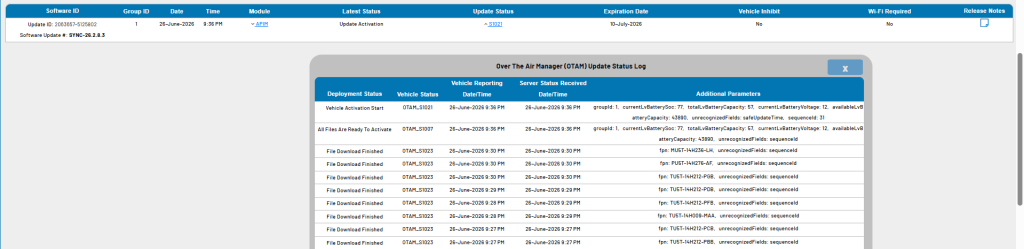
Same exact thing.....same exact date. This also happened on an F150 on the gen14 forum with the same update. One is a coincidence, but 3 different vehicles tell me the issue is on Ford's side. I highly doubt the battery disconnect will work, but it won't hurt to try.

1783112748463.png
 

rugedraw

Full Access Members
Joined
Aug 14, 2024
Posts
164
Reaction score
70
Location
Miami, FL
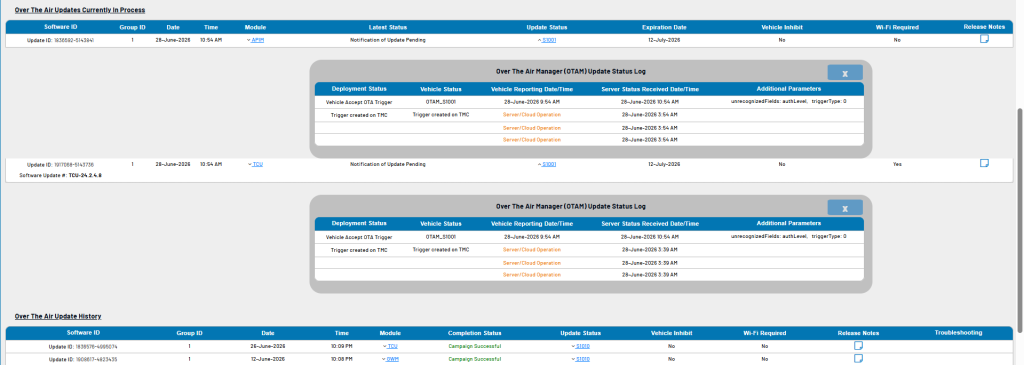
In both cases, the OTA trigger expires on 7/11, so it still has a chance to install. However, and OTA trigger getting hung up on the installation part for a week after the files dowloaded is not normal. This is what same update looks like when my truck got it. I was watching the update in real time. Once the files downloaded, I went out to my truck and started it 6 minutes later and the update installed in 3 minutes. This is what your trucks should have done by now.

1783113014891.png
 

brbrazzell

Member
Joined
Jun 15, 2022
Posts
7
Reaction score
4
Location
Rowlett, TX
Wow. That is interesting. Frustrating, but interesting. I'll try disconnecting the negative battery cable over the weekend and see what that does. Will let you know what happens. Have a great 4th!
 

texsn95

Full Access Members
Marine Corps
Joined
Oct 30, 2024
Posts
103
Reaction score
40
Location
Houston
1FMJU2AT2NEA09446 Thanks Draw
We kept getting the nag screen to install an update, so June 27 or 28, I went ahead and tried it. Left it running for awhile, ~30min later and no go, so I connected to home Wifi and it said it completeed shortly after. Then the next day got the same nag screen again, but I left town and didn't try again. So no idea if the first one took or not. I was wary about doing it, b/c ours was at Ford for almost 70 days trying to figure out some software bugs after we bought it, and it turned out to be a bad OTA from the previous owner.
 

md540i

Member
Joined
Jul 25, 2024
Posts
6
Reaction score
0
Location
New York
Ive been dealing with the same issue it seems, 23 max platinum...VIN 1FMJK1M83PEA52168

I read online that you can download the update to a USB stick and do it manually, is that a good idea?
 
Last edited:

brbrazzell

Member
Joined
Jun 15, 2022
Posts
7
Reaction score
4
Location
Rowlett, TX
I didn't see anywhere on the Ford website where there was an option for downloading this particular update to a USB stick. I disconnected the negative battery cable for about 20 minutes, reconnected it and still had the same problem. So, I called Ford for help and the customer service rep walked me through the steps of resetting the update schedule in the update menu on the car. After we did that, the update went right through and took about 7 minutes. It ended up being frustratingly easy.
 

Danm355

Well-Known Member
Joined
Mar 22, 2023
Posts
75
Reaction score
26
Location
Rochester, NY
I didn't see anywhere on the Ford website where there was an option for downloading this particular update to a USB stick. I disconnected the negative battery cable for about 20 minutes, reconnected it and still had the same problem. So, I called Ford for help and the customer service rep walked me through the steps of resetting the update schedule in the update menu on the car. After we did that, the update went right through and took about 7 minutes. It ended up being frustratingly easy.
Can you put those steps on here if you remember.
 

Coach

Member
Joined
Jun 15, 2023
Posts
13
Reaction score
5
Location
San Antonio
For the past week, whenever I start my Expy, I get a notification at the top of my screen saying that SYNC is updating and certain features may not be available. I've seen this in the past, but it would come up only once and go away. This has been happening for the past week, now and I'm wondering if anybody else has had this happen in theirs. I haven't noticed anything not loading, or working. It's just a small annoyance at this point.
Same here. 2023 Timberline, 23k miles. It’s annoying because I have to wait upon start a good 60 seconds for the white sync screen and following pop ups to go away after touching all the close buttons. I connected my vehicle to wifi and went to software updates and it says there are no updates and that it is current. I’m hoping this eventually clears itself out.
 

rugedraw

Full Access Members
Joined
Aug 14, 2024
Posts
164
Reaction score
70
Location
Miami, FL
Ive been dealing with the same issue it seems, 23 max platinum...VIN 1FMJK1M83PEA52168

I read online that you can download the update to a USB stick and do it manually, is that a good idea?

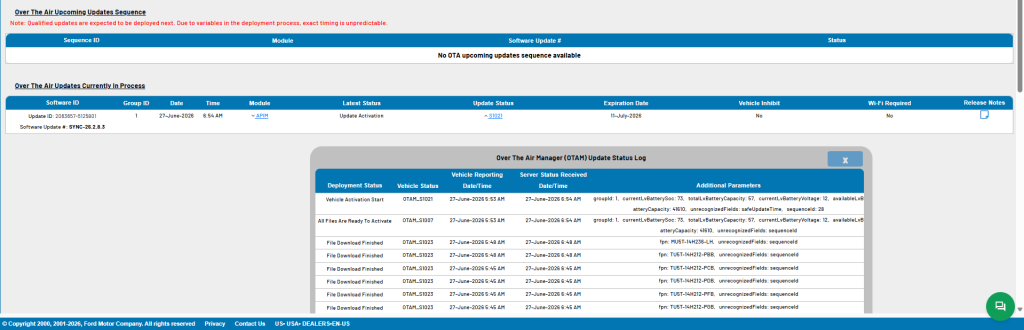
Same issue as the other trucks. Files downloaded, but install isn't kicking off.

1783356325950.png


1FMJU2AT2NEA09446 Thanks Draw
We kept getting the nag screen to install an update, so June 27 or 28, I went ahead and tried it. Left it running for awhile, ~30min later and no go, so I connected to home Wifi and it said it completeed shortly after. Then the next day got the same nag screen again, but I left town and didn't try again. So no idea if the first one took or not. I was wary about doing it, b/c ours was at Ford for almost 70 days trying to figure out some software bugs after we bought it, and it turned out to be a bad OTA from the previous owner.

You have two active OTA's in queue, but the truck is not pinging the server back to accept them. OTA dashboard shows auto updates is off. Have you given permission for the OTA to install on the touchscreen? In your case, the truck has not downloaded anything. The OTA needs consent to try to install like the ones in June. That one does show it installed successfully. Once that one installed, the "nag screen" came back because there was another OTA waiting to install right after it. Give it permission, and the TCU will mostly likely go first. After that, the APIM update will queue up and that is the one everyone is having issues with.

1783356380972.png
 

rugedraw

Full Access Members
Joined
Aug 14, 2024
Posts
164
Reaction score
70
Location
Miami, FL
I didn't see anywhere on the Ford website where there was an option for downloading this particular update to a USB stick. I disconnected the negative battery cable for about 20 minutes, reconnected it and still had the same problem. So, I called Ford for help and the customer service rep walked me through the steps of resetting the update schedule in the update menu on the car. After we did that, the update went right through and took about 7 minutes. It ended up being frustratingly easy.

Interesting, because this update installs while the truck is on and running and not when you set the OTA auto-updates time for, but maybe updating the time release the module from some kind of logic-lock that allows it to install. Not sure, but whatever it takes to make it work.
 

brbrazzell

Member
Joined
Jun 15, 2022
Posts
7
Reaction score
4
Location
Rowlett, TX
So, the steps that the Ford customer service rep had me do were: from main menu, go to settings, then go to software updates. Make sure automatic updates is turned on. Go to recurring schedule - this is where my problem was as recurring schedule was set to none. It needs to be set to any day or Monday to Thursday or use the custom schedule and pick your own day and time. After we did that, he had me push in the volume knob and the skip forward button to the bottom left of the tune knob at the same time until the center screen went black then release them both. After that reset, go back and confirm that the changes you made are still there then after a key cycle your update should go through.
 
Top