ExpeditionAndy
Full Access Members
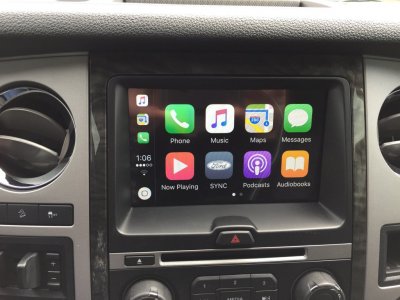
This is what my screen looks like when connected to the iPhone.


Disclaimer: Links on this page pointing to Amazon, eBay and other sites may include affiliate code. If you click them and make a purchase, we may earn a small commission.

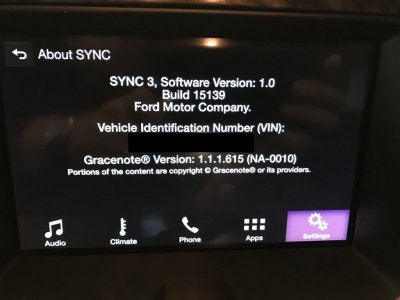
Meant to say 1.0...stupid Cell phone browser! When I am done with you, you will be at 2.2...Yes 1.0 actually. I can't figure out how to get 1.2.

Yes, it will work to go from 2.0 to 2.2. I did it on my 17 and on a 17 Edge. Both worked without issue. Jason didn't officially test it, so therefore he doesn't certify it, hence the statement in the text file. Like I said before, there are small fixes between 2.0 and 2.2. No major features added. Personally I noticed a slight improvement in voice prompts in the Sync Voice Command. Not as big of a change as there is when going 1.0/1.1 to 2.2.Will that upgrade from 2.0 to 2.2? From what I read this will not work for me.
I downloaded the file and the readme.txt says:
READ ME
THIS UPGRADE IS FOR NORTH AMERICAN 2016 FORD/LINCOLN MODELS WITH SYNC3 V1.0 OR V 1.1 FACTORY NAVIGATION ONLY.
THIS WILL UPGRADE FROM VERSIONS 1.0/1.1 TO VERSION 2.2
YOU WILL NEED A FAT32 OR EXFAT FORMATTED 2GB OR MORE USB FLASH DRIVE
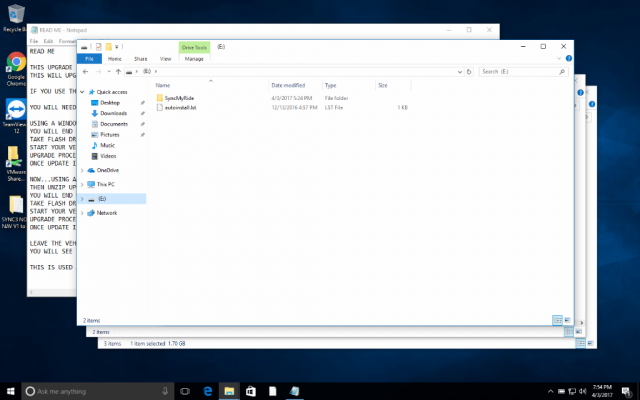
USING A WINDOWS BASED COMPUTER UNZIP THE UPGRADE FILE TO THE ROOT FOLDER OF FLASH DRIVE
YOU WILL END UP WITH AUTOINSTALL FILE AND SYNCMYRIDE FOLDER IN THE ROOT OF THE USB DRIVE
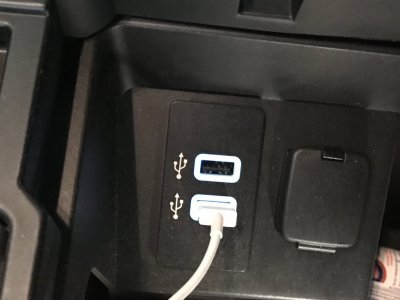
TAKE FLASH DRIVE TO YOUR VEHICLE AND REMOVE ANYTHING PLUGGED INTO THE USB PORTS
START YOUR VEHICLE AND INSERT UPGRADE FLASH DRIVE
UPGRADE PROCESS WILL BEGIN AND TAKE APPROXIMATELY 15-20 MINUTES
ONCE UPDATE IS DONE (A MESSAGE WILL APPEAR) YOU MAY REMOVE THE FLASH DRIVE AND TURN THE VEHICLE OFF
LEAVE THE VEHCILE OFF FOR APPROXIMATELY 5 MINUTES AND RESTART
YOU WILL SEE THAT YOU NOW ARE RUNNING VERSION 2.2
THE BUILT IN NAVIGATION MAY TAKE SEVERAL MINUTES TO START BACK UP
THIS IS USED AT YOUR OWN RISK AND YOU TAKE ALL RESPONSBILITY FOR ITS USE
NAVIGATION MAPS DO NOT GET UPGRADED WITH THIS UPDATE
Please take a picture of your radio and post it. The Non-Nav's can be a little more tricky. Need to confirm what radio you have before I can give you the correct info.Forgive me for this. I just bought a 2016 Expedition with 1.0 (no navigation). How do I go about getting CarPlay on it? Thanks so much. I've searched and think that I am just missing some information.
Please take a picture of your radio and post it. The Non-Nav's can be a little more tricky. Need to confirm what radio you have before I can give you the correct info.
Also, there is a possibility you might need a new hub. That has not been confirmed yet. Waiting to see what mdntblu's results are after his update.

Please take a picture of your radio and post it. The Non-Nav's can be a little more tricky. Need to confirm what radio you have before I can give you the correct info.
Also, there is a possibility you might need a new hub. That has not been confirmed yet. Waiting to see what mdntblu's results are after his update.
gblakeb, welcome to the forum!Forgive me for this. I just bought a 2016 Expedition with 1.0 (no navigation). How do I go about getting CarPlay on it? Thanks so much. I've searched and think that I am just missing some information.
Also, there is a possibility you might need a new hub. That has not been confirmed yet. Waiting to see what mdntblu's results are after his update.
DO NOT USE THE DOWNLOAD I posted above if you do not have Nav. It is for NAV only equipped vehicles. Sorry, I assumed NAV because you said Limited. Most Limited have NAV that I have seen. My bad.
Several people have had no issues doing it from a Mac, but far more people have done it from PC's. Same stuff applies. Must format FAT32. Read the Text file.
Sync 3 2.2 NON-Nav Update Install::
https://drive.google.com/file/d/0Bxlap1Uv4Q55NGRBaHBDTTJsYU0/view?usp=sharing
I have 1.0 as well 2016
Ok so the file above for non-nav? And even if I don't have this "hub" you mentioned installed in my car isn't going to mess anything up?
I put statements above the links. Also, you will notice in the file name of the file you download, it will say NAV vs Non-NAV. If you have no Navigation you need to use the Non-NAV version, and if you have Navigation, the NAV version.
So after you do the update, plug in your iPhone to the cars USB plugs, and if it works, you will not need to replace the Hub. If CarPlay does not come up, then we are going to have to figure out the part number of the Hub you need, and see how Hard/Easy it will be to swap. On my Edge it was easy, but it's location is different.
Wife has the Expedition today, and won't be home until after Dark, so I will get a chance to poke and prod tomorrow or Wednesday to see if the hub is an easy swap.

As requested.
Also when reading the read me file attached to the download, it says to use a windows based computer. Is this possible to use with a mac?
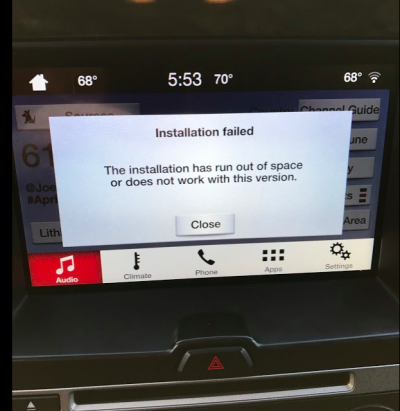
After following the instructions this is what I got for the first update. Didn't even try second since first failed.
Trying nowDo a master reset on the radio, then try the update immediately after.
Do a master reset on the radio, then try the update immediately after.
That looks perfect. Let me do a little homework. Done a ton of these, but most have been Nav. The nav units have MUCH more space. Never done a Expy Non-Nav. Will get back to you.That's what my Flash drive looks like