
2015/2016

Disclaimer: Links on this page pointing to Amazon, eBay and other sites may include affiliate code. If you click them and make a purchase, we may earn a small commission.

OP
OP
mdntblu

mdntblu

Full Access Members
Joined
Oct 10, 2007
Posts
106
Reaction score
18
Location
Corona, CA USA
Posting the following in case it helps someone else.

I kept getting an error message that the installation failed, that it ran out of disk space or does not work with this version. This is after a Master Reset, formatting the 128GB SD card as exFAT, and using the Sync update from owners.ford.com. As a test, I tried the Nav version so kindly provided by LokiWolf next and that resulted in the same error message.

I went online in a chat with Ford's Sync support to see if they could help me, and she told me to use a 32GB USB stick. I had tried the 128GB stick because (a) I couldn't find one of 32GB and (b) more storage has to be better, right? Well, I found a 32GB stick, formatted it, copied the update to it and it worked. My Expy is now updated to V2.2.

So the moral of the story is:
  • Use a 32GB USB stick for the upgrade, as the unit seems to have problems reading larger sizes.

I was getting that same error and was finding that it wasn't about the size of the flash drive it was the type of flash drive. If it was USB 3.0 it seemed to not work but a USB 2.0 Flash drive worked just fine.

 

ExpeditionAndy

Full Access Members
Joined
Aug 31, 2013
Posts
3,708
Reaction score
1,130
Location
Fort Wayne, Indiana
So the moral of the story is:
  • Use a 32GB USB stick for the upgrade, as the unit seems to have problems reading larger sizes.
I'm glad you got it working. I didn't get a notification of the posting here or I would have jumped in earlier. Further up in the thread it was determined that we needed to use older USB 2.0 drives and not USB 3.0 drives which are the newer ones. So the difference between your drives us probably your 128GB stick was 3.0 and the 32GB was 2.0. I used a 64GB stick to update mine.
 

5x10

Well-Known Member
Joined
May 13, 2017
Posts
62
Reaction score
25
Location
Houston
Thanks for all the info fellas
Upgraded from 1.0 to 2.2 just now
Ordered the new hardware/hub for carplay
 

5x10

Well-Known Member
Joined
May 13, 2017
Posts
62
Reaction score
25
Location
Houston
Welcome to the Forum.
Thanks Andy
Quick question, my wife's friend came over shortly after I upgraded my wife's software.
The friend has a 15 limited expedition
I went to see what software version she had the interface was completely different than the 1.0 in my wife's 16 model.
I couldn't even find the version when I went to the settings/general info tab

Did the 15s have a different version than the 16s?

I didn't try to update the 15 until I confirmed it could be done
She did have nav on it

Edit: never mind, thought u had a 15 model, misread
 
Last edited:

ElliottM

Active Member
Joined
May 11, 2017
Posts
42
Reaction score
10
Location
East Wenatchee, WA
I'm glad you got it working. I didn't get a notification of the posting here or I would have jumped in earlier. Further up in the thread it was determined that we needed to use older USB 2.0 drives and not USB 3.0 drives which are the newer ones. So the difference between your drives us probably your 128GB stick was 3.0 and the 32GB was 2.0. I used a 64GB stick to update mine.
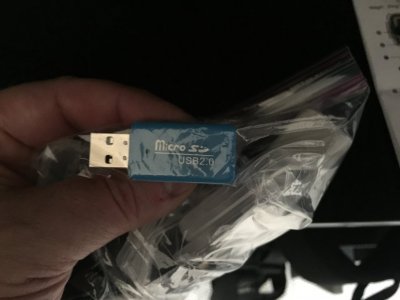
Actually, FWIW, I was using a USB 2.0 adapter in which you slip a micro SD card, as shown in the photo. I used the same adapter when I first tried the 128GB card and then the 32GB card, so it appears the issue was with using a 128GB card. IMG_0081.JPG
 

ExpeditionAndy

Full Access Members
Joined
Aug 31, 2013
Posts
3,708
Reaction score
1,130
Location
Fort Wayne, Indiana
Thanks Andy
Quick question, my wife's friend came over shortly after I upgraded my wife's software.
The friend has a 15 limited expedition
I went to see what software version she had the interface was completely different than the 1.0 in my wife's 16 model.
I couldn't even find the version when I went to the settings/general info tab

Did the 15s have a different version than the 16s?

I didn't try to update the 15 until I confirmed it could be done
She did have nav on it

Edit: never mind, thought u had a 15 model, misread
Does she just have the Sync? Sync has a 4 pane home screen instead of the three panes like the Sync 3. My son's 14 Flex has Sync.
 

LokiWolf

Staff member
Moderator
Joined
Apr 2, 2016
Posts
3,971
Reaction score
2,834
Location
Richmond VA
It might and if LokiWolf checks in here he may know. He has some good connections.
Thanks for the mention!

The 15's have Sync 2, or Sync Touch(Basically the same thing). There are some updates available for these, but the updates we have talked about in this thread will not work. best way to see if you have the most current on a 15, is to go to Owner.ford.com. Go to update my Sync, and follow the instructions. Basically it will say whether you need an update, and will run you through some steps to verify.
 

5x10

Well-Known Member
Joined
May 13, 2017
Posts
62
Reaction score
25
Location
Houston
Got the module in, easy install, followed a video a few pages back(thanks for that)

I did notice that amazon music wouldn't show on CarPlay

On my other car, I have an after market deck that is CarPlay enabled, and shows amazon music

Do you know why my ford car play isn't showing it?
Thanks


Edit: nevermind, just needed to update the app
 
Last edited:

ashad0509

New Member
Joined
May 27, 2017
Posts
2
Reaction score
0
Location
Cincinnati
2017 Expedition Limited.
Performed upgrade from 2.0 to 2.2 and lost CarPlay option. (CarPlay was working fine before going from 2.0 to 2.2.)
Also, the option to turn on mobile apps in Sync 3 settings will not turn on.

Seems the 2.2 update broke these things. :(
 

ExpeditionAndy

Full Access Members
Joined
Aug 31, 2013
Posts
3,708
Reaction score
1,130
Location
Fort Wayne, Indiana
2017 Expedition Limited.
Performed upgrade from 2.0 to 2.2 and lost CarPlay option. (CarPlay was working fine before going from 2.0 to 2.2.)
Also, the option to turn on mobile apps in Sync 3 settings will not turn on.

Seems the 2.2 update broke these things. :(
I would try to reinstall the update to see if anything changes.
 

ashad0509

New Member
Joined
May 27, 2017
Posts
2
Reaction score
0
Location
Cincinnati
I would try to reinstall the update to see if anything changes.

Unfortunately, a re-install didn't fix. I also removed the USB hub and re-connected wondering if it wasn't be recognized properly. No luck.

CarPlay option is gone.
Android Auto option is there, but slider will not turn on, goes right back off.
Mobile Apps is grayed out and cannot be turned on.

(2017 Expedition EL Limited w/ NAV)
 

ExpeditionAndy

Full Access Members
Joined
Aug 31, 2013
Posts
3,708
Reaction score
1,130
Location
Fort Wayne, Indiana
Unfortunately, a re-install didn't fix. I also removed the USB hub and re-connected wondering if it wasn't be recognized properly. No luck.

CarPlay option is gone.
Android Auto option is there, but slider will not turn on, goes right back off.
Mobile Apps is grayed out and cannot be turned on.

(2017 Expedition EL Limited w/ NAV)
I think @LokiWolf needs to chime in on this one. He might have some additional insight to share. It seems very odd that you would lose just that part of the radio apps. I updated from 2.1. to 2.2 with no problem
 

Bigbadbull

Full Access Members
Joined
May 16, 2017
Posts
58
Reaction score
6
Location
Hoover Al
So I got the 2.2 nav update installed.
I have a Dec 15 build 2016 Kingranch , after installing it shows up with Andriod apps, but no Apple carplay in the apps. Im assuming I need the new usb module in the center console for carplay to show up in the apps on the Sync 3. Os went from 1.0xxx to 2.2.

This sound correct?
 

5x10

Well-Known Member
Joined
May 13, 2017
Posts
62
Reaction score
25
Location
Houston
So I got the 2.2 nav update installed.
I have a Dec 15 build 2016 Kingranch , after installing it shows up with Andriod apps, but no Apple carplay in the apps. Im assuming I need the new usb module in the center console for carplay to show up in the apps on the Sync 3. Os went from 1.0xxx to 2.2.

This sound correct?
It does
 

LokiWolf

Staff member
Moderator
Joined
Apr 2, 2016
Posts
3,971
Reaction score
2,834
Location
Richmond VA
So I got the 2.2 nav update installed.
I have a Dec 15 build 2016 Kingranch , after installing it shows up with Andriod apps, but no Apple carplay in the apps. Im assuming I need the new usb module in the center console for carplay to show up in the apps on the Sync 3. Os went from 1.0xxx to 2.2.

This sound correct?
Yea, you need the newer hub. I have only run across one 2016 that had the newer hub, and it was a VERY late 2016.
 

LokiWolf

Staff member
Moderator
Joined
Apr 2, 2016
Posts
3,971
Reaction score
2,834
Location
Richmond VA
Unfortunately, a re-install didn't fix. I also removed the USB hub and re-connected wondering if it wasn't be recognized properly. No luck.

CarPlay option is gone.
Android Auto option is there, but slider will not turn on, goes right back off.
Mobile Apps is grayed out and cannot be turned on.

(2017 Expedition EL Limited w/ NAV)

So a few things.

1) Remove all devices/phones from the Car, as in delete them from BT, and do not plug it in via USB.
2) Reset the unit to factory in the General Menu.
3) See if you can plug one device in to USB, and turn on whichever that phone corresponds to, whether it by CarPlay or Android Auto.
4) If it works, disconnect the cable and repair via BT.
5) Reconnect cable and see if it still works for CP, or AA.

Post up your results.

I think @LokiWolf needs to chime in on this one. He might have some additional insight to share. It seems very odd that you would lose just that part of the radio apps. I updated from 2.1. to 2.2 with no problem

Thanks Andy, sorry for the delay!
 
Top