

Hi there! 
Well unfortunately my truck didn't come with an Owner's manual (of course I didn't realize that till I got home). What the heck would someone do with a manual? Anyway....I'm going to order one from Ebay.
So I've been able to figure out a lot of things by going online. However, there's one thing I can't get to work.
My kids were watching a DVD the other day and we had forgotten the headphones - so we just played it through the radio. They kept saying they couldn't hear it. I was so frustrated and sure enough, you can't really hear it in the back (same with the radio). I have the Navigation Radio system. I went in to try to change the settings - maybe it was up front for some reason. In the online manual, it says to select "Menu" then choose "Audio Options" (makes sense.)
That works fine until I get to "Audio Options" - it doesn't work. Here's a shot of the menu:
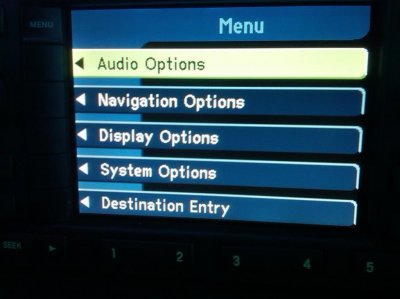
The manual online says to push the soft key for Audio Options and the options to change bass, treble, fade, etc. come up. When I push the soft key (or even try to push in on the cursor control button) it just goes right back to my radio screen. I am unable to change any of those things.
GRRRRRR!!!!!
Has anyone experienced this or have any suggestions? I'm so frustrated that my kids can't hear in the back. A truck of this caliber should have great speakers in the back.
Thanks in advance for any help!!
Vicki
Well unfortunately my truck didn't come with an Owner's manual (of course I didn't realize that till I got home).
What the heck would someone do with a manual? Anyway....I'm going to order one from Ebay. So I've been able to figure out a lot of things by going online. However, there's one thing I can't get to work.
My kids were watching a DVD the other day and we had forgotten the headphones - so we just played it through the radio. They kept saying they couldn't hear it. I was so frustrated and sure enough, you can't really hear it in the back (same with the radio). I have the Navigation Radio system. I went in to try to change the settings - maybe it was up front for some reason. In the online manual, it says to select "Menu" then choose "Audio Options" (makes sense.)
That works fine until I get to "Audio Options" - it doesn't work. Here's a shot of the menu:
The manual online says to push the soft key for Audio Options and the options to change bass, treble, fade, etc. come up. When I push the soft key (or even try to push in on the cursor control button) it just goes right back to my radio screen. I am unable to change any of those things.
GRRRRRR!!!!!
Has anyone experienced this or have any suggestions? I'm so frustrated that my kids can't hear in the back. A truck of this caliber should have great speakers in the back.
Thanks in advance for any help!!
Vicki