Blind Spot Checking (BLIS) not enabled with Trailer

Disclaimer: Links on this page pointing to Amazon, eBay and other sites may include affiliate code. If you click them and make a purchase, we may earn a small commission.

RANDAL CHAO

Well-Known Member
Joined
Nov 5, 2020
Posts
45
Reaction score
44
Location
Orlando Florida
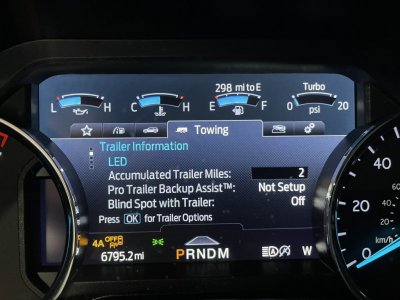
Any body have successfully programmed Blind Spot system with trailer? I have input the trailer length, and save the blind spot measurement. But when trailer is connected, BLIS is always off, and I can't seem to enable it.

Here is the ford info video:
 

ETC13

Full Access Members
Joined
Feb 20, 2019
Posts
174
Reaction score
64
Location
TN
Set mine with the trailer length and it has "worked" fine. I say "worked" as it isn't anything I rely on at all with a trailer. If you can't see based off your mirrors with a trailer I wouldn't trust this to cover such.

Sent from my moto g(7) using Tapatalk
 

ETC13

Full Access Members
Joined
Feb 20, 2019
Posts
174
Reaction score
64
Location
TN
I assume it is working without a trailer connected? Cause if so nothing special you should have to do outside of setting the length and connecting the trailer wiring harness to the truck.

Sent from my moto g(7) using Tapatalk
 
OP
OP
RANDAL CHAO

RANDAL CHAO

Well-Known Member
Joined
Nov 5, 2020
Posts
45
Reaction score
44
Location
Orlando Florida
Yeah it is working without trailer harness connected. But when I connect trailer harness (with the measurement entered), it just says trailer connected, BLIS deactivated.
 

Soliyou

Full Access Members
Joined
Jun 15, 2019
Posts
473
Reaction score
277
Location
OK
BLIS doesn’t work if the trailer dimensions exceed certain values. Make sure your dimensions are within these limits or try to define a new trailer profile.

I made a mistake once while selecting the trailer dimensions and was getting the same message.
 

wakeboarder

Full Access Members
Joined
Nov 16, 2019
Posts
811
Reaction score
468
Location
Fort Lauderdale, FL
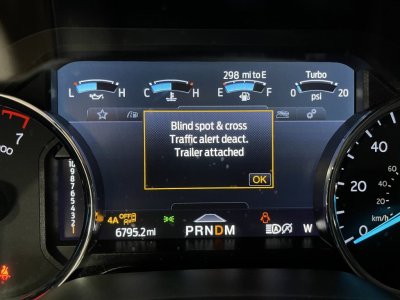
Are you sure it isn’t the BLIS cross traffic alert that is being disabled? Can you post a picture of the message?

Are you going by messages or actual on road experience?
 

ETC13

Full Access Members
Joined
Feb 20, 2019
Posts
174
Reaction score
64
Location
TN
Are you sure it isn’t the BLIS cross traffic alert that is being disabled? Can you post a picture of the message?

Are you going by messages or actual on road experience?
Very good point. I forgot myself that the cross traffic feature gets disabled and probably the message being displayed.

OP in case you aren't aware of the difference cross traffic is when you are backing out of a parking space and a car is coming down the road behind you from the side.

Sent from my moto g(7) using Tapatalk
 
OP
OP
RANDAL CHAO

RANDAL CHAO

Well-Known Member
Joined
Nov 5, 2020
Posts
45
Reaction score
44
Location
Orlando Florida
Both blis and cross traffic disabled. Tried different length settings, 3ft, 9ft. None worked. Bring it to dealer and the service guy seems not sure either.

CF0C1E55-A7BA-4FAE-B867-29C22B5FC152.jpeg
 
OP
OP
RANDAL CHAO

RANDAL CHAO

Well-Known Member
Joined
Nov 5, 2020
Posts
45
Reaction score
44
Location
Orlando Florida
The service guy somehow got it “ready” status. So it probably will work now.

Seems a software glitch that unset blind spot check mark in towing even it is checked when not towing.
 
Last edited:

ETC13

Full Access Members
Joined
Feb 20, 2019
Posts
174
Reaction score
64
Location
TN
The service guy somehow got it “ready” status. So it probably will work now.

Seems a software glitch that unset blind spot check mark in towing even it is checked when not towing.
Hmmm.... Guess thru have no details of what he did to get it back working?

Sent from my moto g(7) using Tapatalk
 
OP
OP
RANDAL CHAO

RANDAL CHAO

Well-Known Member
Joined
Nov 5, 2020
Posts
45
Reaction score
44
Location
Orlando Florida
He had me disconnect harness, unchecked and checked blind spot option. Then reconnected harness.

Update: Confirmed it works now.
 
Last edited:

Lou Hamilton

Full Access Members
Joined
Nov 28, 2019
Posts
939
Reaction score
640
Location
Maryland
I think there is a setting somewhere on the last tab with the gears for BLIS with Trailer.

If I remember correctly, I had the same issue when I first set mine up. I think I resolved it with that menu.


Sent from my iPad using Tapatalk
 

Fozzy

Full Access Members
Joined
Sep 5, 2019
Posts
1,199
Reaction score
1,161
Location
Riverton
I wonder if it’s off in the menu by default until you set the trailer setup. I picked up a small utility trailer this week. First time it has been towed by my Expy. The dash said everything was disabled. I know my other trailers the blind spot works fine. They are named and setup. I haven’t had time to set this one up.


Sent from my iPhone using Tapatalk
 

PhrogPilot

Member
Joined
Jun 21, 2018
Posts
22
Reaction score
15
Location
San Antonio
I'm having the same issue ..... everything says I have done it all correctly but it doesn't work when the trailer is hooked up and selected - sometimes.
 

aukevin

New Member
Joined
Feb 15, 2024
Posts
3
Reaction score
2
Location
Alabama
He had me disconnect harness, unchecked and checked blind spot option. Then reconnected harness.

Update: Confirmed it works now.

Circling back around to this issue because it has come up for me. I had been towing my travel trailer with my 2021 Expedition Limited MAX since September 2023 and the blindspot was working. But about a month ago after getting my trailer out of month-long storage I got the message saying blind spot is deactivated with my trailer attached (works fine without trailer). I'm getting the exact same messages that are pictured in this thread. I've tried disconnecting my trailer, deleting the trailer from the vehicle, reattaching and going through the steps and it still deactivates the blind spot. I've tried setting up a new trailer in the vehicle prior to connecting, still no blind spot. My trailer is within the bounds of the BLIS because it was initially working and then stopped.

Has anyone come up with a way to get it working again? I'm going to try Randal Chao's comment here this afternoon. Disconnecting the harness means the power from the trailer to the vehicle right? Was the vehicle on when the power cord is unplugged? So while it is disconnected, uncheck and check the blind spot option in the menu on the vehicle? When you reconnect, the vehicle is still on? Thanks!
 

Stretch70

Member
Joined
Aug 21, 2020
Posts
7
Reaction score
1
Location
Erie
I have same issue - BLIS used to work great with my 30ft TT. I wonder if there was a background SW update this past year.
 

landyatch2024

New Member
Joined
Jun 10, 2024
Posts
2
Reaction score
1
Location
ca
Alright
Just went through this also
Add your trailer and your blind spot monitoring trailer length. Now move right to the “gear icon” menu in the dash (2 to the right if I recall) and add the check mark for the trailer blind spot monitoring box
Go back to your trailer status page and your blind spot monitoring should now show “ready” for the trailer.
Not sure why it doesn’t automatically do it for you….but it doesn’t leave it in tow mode after you turn the vehicle off and then restart it either…so there’s that also!!
Not to mention…who at ford designed the spare tire drop and thought it was a good idea to put it INSIDE and under the cover?? Somebody that has never taken a road trip with a full vehicle. Not sure why it’s not designed like the trucks where you drop it from the rear bumper ‍
Alright, rant over!
 
Last edited:
Top