Cruise Control at Stop Taking Off - Dangerous

Disclaimer: Links on this page pointing to Amazon, eBay and other sites may include affiliate code. If you click them and make a purchase, we may earn a small commission.

KetMalice

Well-Known Member
Joined
Oct 19, 2022
Posts
70
Reaction score
22
Location
Oklahoma
This has happened to me 3 times, I was able to reproduce it. Sitting in line at a drive through, and driving in a parking lot. I don’t think I turned cruise control on (I did for the video to reproduce it) but it’s possible I hit the button on accident while wearing a heavy coat. Every time I’ve almost hit a car or a person because I’m at a stop and I let off the gas to move forward and the vehicle just takes off on me. This is extremely dangerous. I’m really getting tired of the issues with this vehicle.

I don’t understand how hitting cruise control at a stop, 0 mph, arbitrarily sets the cruise control speed to 15 and keeps it “active”. That’s dangerous.


99WhiteC5Coupe

Full Access Members
Joined
Jun 3, 2015
Posts
3,413
Reaction score
1,992
Location
USA
This has happened to me 3 times, I was able to reproduce it. Sitting in line at a drive through, and driving in a parking lot. I don’t think I turned cruise control on (I did for the video to reproduce it) but it’s possible I hit the button on accident while wearing a heavy coat. Every time I’ve almost hit a car or a person because I’m at a stop and I let off the gas to move forward and the vehicle just takes off on me. This is extremely dangerous. I’m really getting tired of the issues with this vehicle.


File an online complaint with the National Highway Traffic Safety Administration: https://www.nhtsa.gov/

The link to file the complaint is at the top, right portion of the website.
 

rd618

Full Access Members
Joined
Nov 1, 2021
Posts
745
Reaction score
389
Location
new york
I’m not following the issue?
On mine you have to be going the speed you want to set or going above 25 mph to turn it on. Once it’s on its adaptive and will stop and go.
If you hit the break to stop or slow down it turns off.
Is yours not turning off when your foot is on the break?
 
OP
OP
K

KetMalice

Well-Known Member
Joined
Oct 19, 2022
Posts
70
Reaction score
22
Location
Oklahoma
I’m not following the issue?
On mine you have to be going the speed you want to set or going above 25 mph to turn it on. Once it’s on its adaptive and will stop and go.
If you hit the break to stop or slow down it turns off.
Is yours not turning off when your foot is on the break?
It turned on when I was stopped, and set a speed of 15 MPH. So when I let off the brake to creep forward it launches forward after 4-5 feet and tries to get itself to 15 mph. I have no idea why it can get set for 15 mph when you are at a stop with the foot on the brake.
 

Soliyou

Full Access Members
Joined
Jun 15, 2019
Posts
473
Reaction score
277
Location
OK
This also happens with the 2018-2021 but it is a two step process: you have to turn the cruise control on, then press the set button while stopped. Never happened accidentally with me.
 

rd618

Full Access Members
Joined
Nov 1, 2021
Posts
745
Reaction score
389
Location
new york
It turned on when I was stopped, and set a speed of 15 MPH. So when I let off the brake to creep forward it launches forward after 4-5 feet and tries to get itself to 15 mph. I have no idea why it can get set for 15 mph when you are at a stop with the foot on the brake.
I’m intrigued, so I’ll try to replicate on mine.
 

sjwhiteley

Full Access Members
Joined
Nov 28, 2019
Posts
538
Reaction score
331
Location
Kentucky
Has this something to do with the 'auto hold' and stop-and go traffic? The radar detect the traffic in front has started moving so will accelerate to keep up.
 

apex96

Full Access Members
Joined
Jul 11, 2021
Posts
350
Reaction score
254
Location
PA
Has this something to do with the 'auto hold' and stop-and go traffic? The radar detect the traffic in front has started moving so will accelerate to keep up.
It sounds like the OP has cruise turned on which is normal. I typically turn my cruise on when I get in so that it’s just one button press to set the cruise once I’m on the main roads. In this case it seems like OP is accidentally hitting the set button on the steering wheel without realizing it. If you have your foot on the brake and hit set, it will default to the lowest possible speed cruise can be set at, 15 mph. Once you release the brake it will attempt to reach that speed. So it works opposite of when you have cruise set and tap the brake to disengage it. In this case OP needs to be mindful, it appears, of what their hands are touching, while completing other tasks in the drive thru lane.
 
OP
OP
K

KetMalice

Well-Known Member
Joined
Oct 19, 2022
Posts
70
Reaction score
22
Location
Oklahoma
It sounds like the OP has cruise turned on which is normal. I typically turn my cruise on when I get in so that it’s just one button press to set the cruise once I’m on the main roads. In this case it seems like OP is accidentally hitting the set button on the steering wheel without realizing it. If you have your foot on the brake and hit set, it will default to the lowest possible speed cruise can be set at, 15 mph. Once you release the brake it will attempt to reach that speed. So it works opposite of when you have cruise set and tap the brake to disengage it. In this case OP needs to be mindful, it appears, of what their hands are touching, while completing other tasks in the drive thru lane.
No, there is a single button that turns cruise on and sets at the same time. Pressing this button should normally not set the cruise active while at a stop. I have figured out the issue.

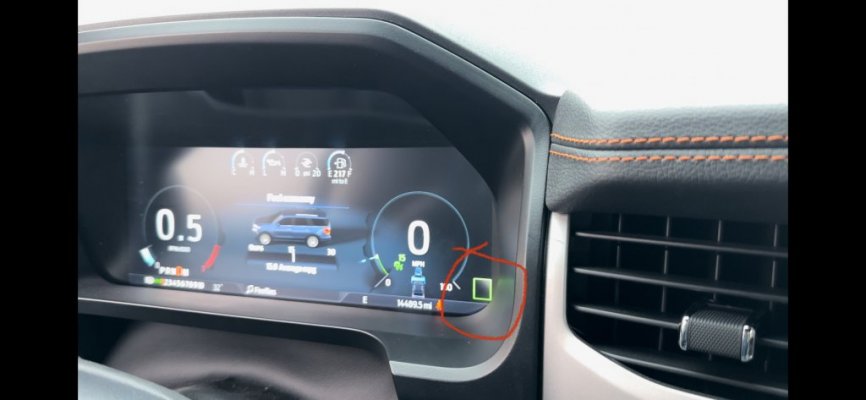
With speed recognition turned on in the settings, it sometimes displays an erroneous “speed” which is just a blank black box. If you hit that singular button on the steering wheel even when at a stop it will turn cruise on and set the cruise to 15 mph. When speed recognition is working correctly and you hit the same button it turns cruise on but does not set a speed, when at a stop.

Whether I accidentally hit the button or not, that is extremely dangerous. Ford has tried to put this fail safe in but there is a bug in the software that allows it to be set when at a stop. I wouldn’t accidentally hit the button probably if I didn’t have to wear gloves in the winter because the heated steering wheel does nothing.
 

Attachments

  • 716D47B3-D59E-48CD-869F-1131327A86E6.jpeg
    716D47B3-D59E-48CD-869F-1131327A86E6.jpeg
    53.7 KB · Views: 31

rd618

Full Access Members
Joined
Nov 1, 2021
Posts
745
Reaction score
389
Location
new york
I couldn’t replicate this. So I looked at the manual. This is actually well documented in the user manual. Including the speed setting and single button press and the need for the sensor to not detect a vehicle in front of it.
 

apex96

Full Access Members
Joined
Jul 11, 2021
Posts
350
Reaction score
254
Location
PA
1677353104984.jpeg
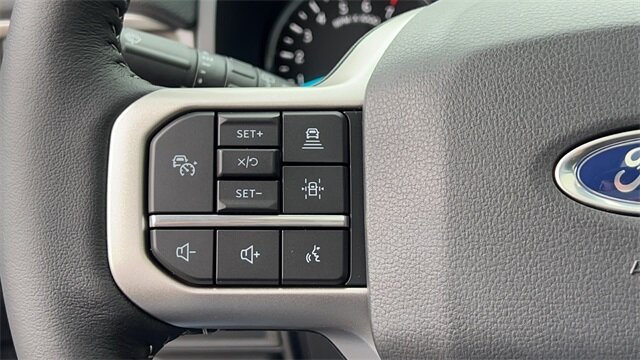
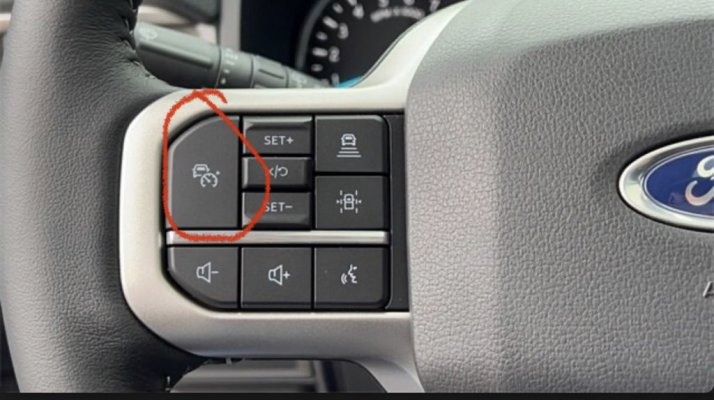
There are two buttons not one… large upper left one turns cruise on or off. The plus or minus buttons can both set cruise and the little middle button can cancel cruise. Gloves are not an excuse for hitting the button, take the extra time to ensure where you place your hands is where you want to.

Now if you’re using adaptive cruise this really may be the issue at hand. Here’s the write up on adaptive cruise for the 18-21 models. So this has been an option on these vehicles for awhile and does require the operator to be aware of the buttons they’re pressing.

Setting the Adaptive Cruise Speed When Your Vehicle is Stationary
1. Follow a vehicle to a complete stop.
2. Keep the brake pedal fully pressed.
3. Press RES+.
4. The set speed adjusts to 20 mph (30 km/h).
5. A green indicator light, the current gap setting and your set speed appear in the information display.

The steering wheel only gets warm not hot. On older models, 18-21 years, you could modify the code in forscan to increase the temp of the heating element. This may be an option in the forscan for newer models as well but you’d have to check the forscan section of the forums for better information on this.
 
Last edited:

mdecillis

Full Access Members
Joined
Dec 20, 2022
Posts
162
Reaction score
76
Location
Iselin, NJ
View attachment 76867
There are two buttons not one… large upper left one turns cruise on or off. The plus or minus buttons can both set cruise and the little middle button can cancel cruise. Gloves are not an excuse for hitting the button, take the extra time to ensure where you place your hands is where you want to.
Wrong! The button on the wheel (top left large button) turns on adaptive cruise control and sets the current speed you are going as the designated top speed. So one touch CAN turn it on but it should NOT work if you are going under the designated minimum speed to set it.

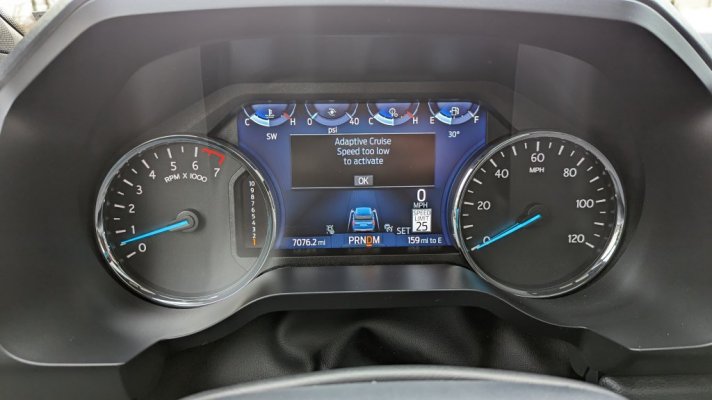
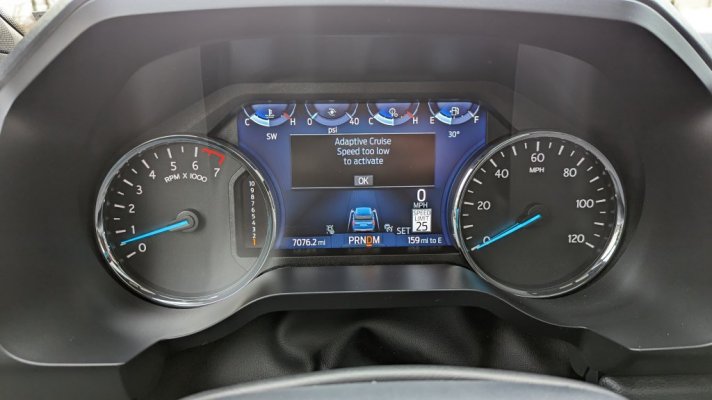
On my 2022 with the 12" screen and semi-digital gauge cluster it will NOT turn on and gives me this message.
 

Attachments

  • PXL_20230225_200644937.jpg
    PXL_20230225_200644937.jpg
    80.4 KB · Views: 31
Last edited:

apex96

Full Access Members
Joined
Jul 11, 2021
Posts
350
Reaction score
254
Location
PA
Wrong! The button on the wheel (top left large button) turns on adaptive cruise control and sets the current speed you are going as the designated top speed. So one touch CAN turn it on but it should NOT work if you are going under the designated minimum speed to set it.

On my 2022 with the 12" screen and semi-digital gauge cluster it will NOT turn on and gives me this message.
Not wrong, that button turns on or off the cruise control, in this case the adaptive cruise. To change between adaptive and regular cruise it’s done through the touchscreen.

If you have previously used the adaptive cruise you can accidentally touch the middle button to resume speed from a dead stop, when there is a vehicle in front of you… The point being that if you intervened by pressing the brakes, it will not re-engage until you press the resume button.

The OP stated that the incidents happened when there was another vehicle in front of them that moved and this is key to the issues at hand. In the video provided you can see the radar display a vehicle in front of them.

Now if you followed a vehicle to a stop, and then didn’t press the buttons or the brakes, then yes once they move it will try to go too or if they sit to long it will display a message.

Check pages 264-280.
 

mdecillis

Full Access Members
Joined
Dec 20, 2022
Posts
162
Reaction score
76
Location
Iselin, NJ
Not wrong, that button turns on or off the cruise control, in this case the adaptive cruise. To change between adaptive and regular cruise it’s done through the touchscreen.

If you have previously used the adaptive cruise you can accidentally touch the middle button to resume speed from a dead stop, when there is a vehicle in front of you… The point being that if you intervened by pressing the brakes, it will not re-engage until you press the resume button.

The OP stated that the incidents happened when there was another vehicle in front of them that moved and this is key to the issues at hand. In the video provided you can see the radar display a vehicle in front of them.

Now if you followed a vehicle to a stop, and then didn’t press the buttons or the brakes, then yes once they move it will try to go too or if they sit to long it will display a message.

Check pages 264-280.
I went out and tried it before I posted my first reply. You touch the big left button and it turns it ON (was completely off previous to hitting the button) and sets the SPEED to whatever speed you are driving at at the moment (as long as it's above the designated min speed) and you're set.

And I was merely referencing what you said (and I quoted it) that you can't accidently hit ONE button to turn it on.

And....no matter if there is a car in front of you or not, my truck does NOT allow me to set it if I'm below the min speed.

This is what happens in the OP's scenario in MY truck.
1. hit the big left button
2. receive message attached
3. take foot off brake (or foot may already be off brake) and truck starts rolling because at this point the cruise is CANCELED (see #2) but on and waiting for you to set a speed once you get above the min speed.

Maybe it is slightly different in a digital display and it's not programmed correctly.
 

Attachments

  • PXL_20230225_200644937.jpg
    PXL_20230225_200644937.jpg
    80.4 KB · Views: 11
OP
OP
K

KetMalice

Well-Known Member
Joined
Oct 19, 2022
Posts
70
Reaction score
22
Location
Oklahoma
I went out and tried it before I posted my first reply. You touch the big left button and it turns it ON (was completely off previous to hitting the button) and sets the SPEED to whatever speed you are driving at at the moment (as long as it's above the designated min speed) and you're set.

And I was merely referencing what you said (and I quoted it) that you can't accidently hit ONE button to turn it on.

And....no matter if there is a car in front of you or not, my truck does NOT allow me to set it if I'm below the min speed.

This is what happens in the OP's scenario in MY truck.
1. hit the big left button
2. receive message attached
3. take foot off brake (or foot may already be off brake) and truck starts rolling because at this point the cruise is CANCELED (see #2) but on and waiting for you to set a speed once you get above the min speed.

Maybe it is slightly different in a digital display and it's not programmed correctly.


So here is another video.


All I’m pressing is the large “Cruise On” button, I’m not setting anything. If there is not a vehicle in front of me it turns cruise on but does not set a speed. If there is a vehicle ~10-15 foot in front of me it turns cruise on and sets a speed of 15. Even when I’m at a complete stop. It should not do that. In a drive through if I hit that button and the car in front of me pulls away, when I let off of the brake it rapidly accelerates to 15. This is only at a stop when there is no speed limit sign it sees. Another issues I ran into while testing in the Walmart parking lot, it did exactly this, but then it actually saw a speed limit sign somewhere and changed to 25 and basically floored it.

To reiterate, if I’m at a stop, hit the large cruise on button when it says “45” with a car in front of me, it won’t set a speed until I hit set. It should not ever set a speed higher than what you are currently going.
 

Attachments

  • 8ED75FDA-5A18-484D-9BE7-2CBBD5247FD5.jpeg
    8ED75FDA-5A18-484D-9BE7-2CBBD5247FD5.jpeg
    100 KB · Views: 2

rd618

Full Access Members
Joined
Nov 1, 2021
Posts
745
Reaction score
389
Location
new york
So here is another video.


All I’m pressing is the large “Cruise On” button, I’m not setting anything. If there is not a vehicle in front of me it turns cruise on but does not set a speed. If there is a vehicle ~10-15 foot in front of me it turns cruise on and sets a speed of 15. Even when I’m at a complete stop. It should not do that. In a drive through if I hit that button and the car in front of me pulls away, when I let off of the brake it rapidly accelerates to 15. This is only at a stop when there is no speed limit sign it sees. Another issues I ran into while testing in the Walmart parking lot, it did exactly this, but then it actually saw a speed limit sign somewhere and changed to 25 and basically floored it.

To reiterate, if I’m at a stop, hit the large cruise on button when it says “45” with a car in front of me, it won’t set a speed until I hit set. It should not ever set a speed higher than what you are currently going.
Read your manual.
You are using this feature wrong.

The guidelines are set in the manual.
If you do not like it. You can disable the start stop assisted cruise control. It will then not allow you to set any speed while at a stop.
 

rd618

Full Access Members
Joined
Nov 1, 2021
Posts
745
Reaction score
389
Location
new york
Wrong! The button on the wheel (top left large button) turns on adaptive cruise control and sets the current speed you are going as the designated top speed. So one touch CAN turn it on but it should NOT work if you are going under the designated minimum speed to set it.

On my 2022 with the 12" screen and semi-digital gauge cluster it will NOT turn on and gives me this message.

There are specific guidelines the manual outlines to achieve cruise on and set a speed with a single button press. At least with the 15” screen models.
 
OP
OP
K

KetMalice

Well-Known Member
Joined
Oct 19, 2022
Posts
70
Reaction score
22
Location
Oklahoma
Read your manual.
You are using this feature wrong.

The guidelines are set in the manual.
If you do not like it. You can disable the start stop assisted cruise control. It will then not allow you to set any speed while at a stop.
I do see it’s intended to set the speed to 15 mph if you are at a stop and there is a car in front of you.

As a software engineer, allowing you to do this while you are obviously not on a road with one button press is absolutely bonkers. Its intention is for stop and go traffic. They are already differentiating between parking lots and roads with the smart speed thing. I don’t understand why they would allow that in a high pedestrian area.

I don’t however see how you can disable that one function, the stop and go part.
 
Last edited:

mwar99

Full Access Members
Joined
Jan 2, 2023
Posts
127
Reaction score
71
Location
NJ
Why are you hitting the cruise button in a drive thru lane?
 
Top