Ford, Are you Listening? 2018+ Change/Wish List

Disclaimer: Links on this page pointing to Amazon, eBay and other sites may include affiliate code. If you click them and make a purchase, we may earn a small commission.

mmaylock

Member
Joined
Sep 1, 2012
Posts
22
Reaction score
7
Location
Michigan
2018 Ford Expedition, Limited Short Wheelbase- Love my truck. One suggestion to Ford Engineers- I have a tendency to rest my left knee against the driver side door panel. Now with hot summer temperatures, (90's), the door panel makes a creaking sound if leaning my knee against the door panel and it does move slightly. Suggest reinforcing the door panel in this area.

I had the exact same issue. I'm a big guy - 6'4" 315 lbs. I picked up my 2018 Expy Limited in mid December. After only a couple weeks, the squeaking in the door panel started. It sounds petty, but imagine picking up your $75,000 truck and listening to a squeaky door panel. I tried like crazy to adjust the way I sit so my leg wouldn't rest on the door panel, but after only a few minutes, my leg went right back there. I took it in for service and was able to replicate the noise. I picked it up, and just a couple days later, the squeak was back.

I pinpointed the noise to the area where two surfaces meet. Unfortunately that area is also a flex point:
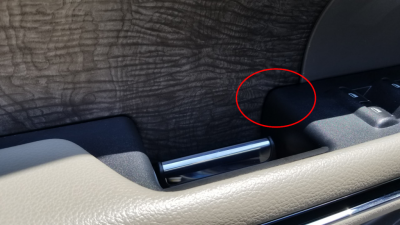
Drivers Door 1.png
Here's how I fixed it:

Push the simulated wood grain area outward and insert a business card
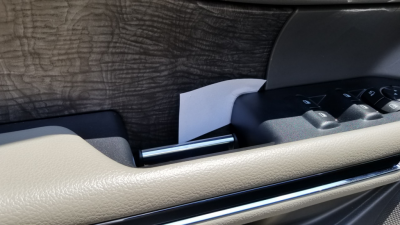
Drivers Door 2.png

Trace around the arm rest with a pencil and pull the card out
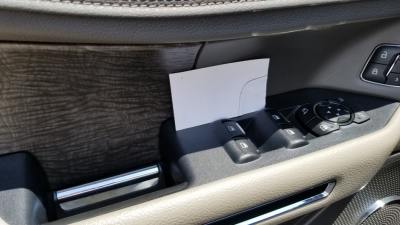
Drivers Door 3.png

Cut the little piece out but make it a bit smaller than your pencil line so it will not be visible when installed. User a black marker to color the edge of the piece you cut out.
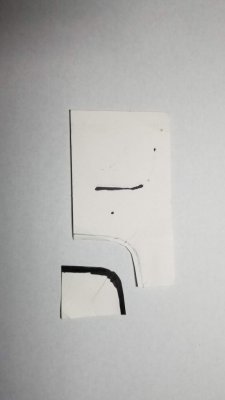
Door 5.jpg

To install it, push the wood grain area again to open up the slot a little. Once you get it started, use a credit card to push it beyond the exposed area.
UPDATE: When I went through this process and took these pictures, pushing the piece beyond the visible area did not eliminate the squeak. :( I think the trick is to insert the card vertically vs horizontally and make the piece thicker and/or perhaps a little larger. That said, I just jammed another full business card in the same slot. Solved but phugly...
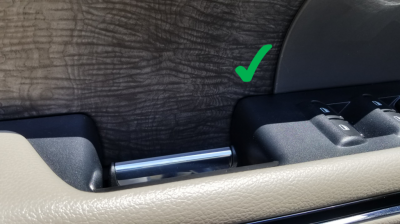
Door 4 checked.png

It takes about 10 minutes and saved me another trip to the dealer...

FWIW, I also tried lubricating the gap instead. It was ok at first but the noise came back...

Now I love my new truck... :)
 
Last edited:

Artie

Full Access Members
Joined
Jul 24, 2017
Posts
1,870
Reaction score
1,036
Location
Georgia
Not sure if this has been mentioned or not but I wish you could customize climate control settings for remote start. On the Navigator you either have ‘Auto’ or ‘last settings’. Auto has the ac on but not on ‘Max’ and drivers ventalated seat on. I’ll like to customize it to have it on max in front and back with both cooled seats on max as well.
 

Meeker

Full Access Members
Joined
Apr 3, 2016
Posts
296
Reaction score
180
Location
Calgary, AB, Canada
I have a comment about the vehicle settings - I might not be using this properly, but it seems "sub-optimal" to me...

First thing - I like to drive in Eco 90% of the time. Basically when I'm not towing. I would like a way to default the drive mode - I currently have to change the mode every time I start it up. Even remembering the last mode would be useful.

But, maybe there's a better way.

Second thing - when I hook up my travel trailer, it's a pain to get the truck set up to tow! Here's the steps:
- hit OK 3 or 4 times to clear all the notifications - "Trailer connected", "Cross-traffic detection disabled", others?
- "Select Trailer" - select the trailer I previously set up. Basically sets the brake output level, and Trailer Backup Assist if you configured it (I didn't).
- Dig down through the vehicle settings to disable the power liftgate. I've been smacked in the face a couple of times while hooking up the chains (ha ha very funny), and it doesn't clear my power tongue jack anyway so I need it in manual mode.
- Select Tow/Haul mode

Total button presses, probably around 50! I have to sit in the truck every time I switch from driving unhitched to towing the trailer for a few minutes before I can drive. OK, maybe a first-world problem, but there's some easy things Ford could do to make this a non-issue...

Best solution in my opinion:
- Let me record a "macro" and save 4 or more of them for rapid setup access at the top menu level.
- Select "Start recording a setup configuration" - then I go through the motions above.
- Select "Stop recording setup configuration" - then I get to name the configuration (e.g. like the Setup Trailer menu only it would work for other things, like going from my daily commute Eco mode to weekend warrior offroad mode, if I did such a thing).
- Also display the list of actions that got recorded. Maybe you can't edit them, but at least you could confirm it's what you wanted...
- And, if you start up and you went from no trailer connected to trailer connected (or vice versa), bring up the menu...

To me this would reduce the repetitive actions to just one menu selection per startup, way better than the current routine.

Your comments are appreciated...
 
OP
OP
gtnator

gtnator

Full Access Members
Joined
Sep 5, 2017
Posts
645
Reaction score
180
Location
CO
I have a comment about the vehicle settings - I might not be using this properly, but it seems "sub-optimal" to me...

First thing - I like to drive in Eco 90% of the time. Basically when I'm not towing. I would like a way to default the drive mode - I currently have to change the mode every time I start it up. Even remembering the last mode would be useful.

But, maybe there's a better way.

Second thing - when I hook up my travel trailer, it's a pain to get the truck set up to tow! Here's the steps:
- hit OK 3 or 4 times to clear all the notifications - "Trailer connected", "Cross-traffic detection disabled", others?
- "Select Trailer" - select the trailer I previously set up. Basically sets the brake output level, and Trailer Backup Assist if you configured it (I didn't).
- Dig down through the vehicle settings to disable the power liftgate. I've been smacked in the face a couple of times while hooking up the chains (ha ha very funny), and it doesn't clear my power tongue jack anyway so I need it in manual mode.
- Select Tow/Haul mode

Total button presses, probably around 50! I have to sit in the truck every time I switch from driving unhitched to towing the trailer for a few minutes before I can drive. OK, maybe a first-world problem, but there's some easy things Ford could do to make this a non-issue...

Best solution in my opinion:
- Let me record a "macro" and save 4 or more of them for rapid setup access at the top menu level.
- Select "Start recording a setup configuration" - then I go through the motions above.
- Select "Stop recording setup configuration" - then I get to name the configuration (e.g. like the Setup Trailer menu only it would work for other things, like going from my daily commute Eco mode to weekend warrior offroad mode, if I did such a thing).
- Also display the list of actions that got recorded. Maybe you can't edit them, but at least you could confirm it's what you wanted...
- And, if you start up and you went from no trailer connected to trailer connected (or vice versa), bring up the menu...

To me this would reduce the repetitive actions to just one menu selection per startup, way better than the current routine.

Your comments are appreciated...

I agree with both. Nice write up and great that you even proposed a solution.


Sent from my iPhone using Tapatalk
 

shane_th_ee

Full Access Members
Joined
Aug 31, 2017
Posts
880
Reaction score
676
Location
Seattle
- "Select Trailer" - select the trailer I previously set up. Basically sets the brake output level, and Trailer Backup Assist if you configured it (I didn't).
...
It also is used to track the miles you’ve towed each trailer... which is one of my favorite little features. It shows up when you select the trailer again under trailer information.
 

Meeker

Full Access Members
Joined
Apr 3, 2016
Posts
296
Reaction score
180
Location
Calgary, AB, Canada
It also is used to track the miles you’ve towed each trailer... which is one of my favorite little features. It shows up when you select the trailer again under trailer information.
Yes I like this feature too. Just have to remember to select the trailer every time you hook up! And unselect when you drive from the campsite for a day trip...
 

Artie

Full Access Members
Joined
Jul 24, 2017
Posts
1,870
Reaction score
1,036
Location
Georgia
I only have one trailer and it auto defaults to it when I connect the trailer and when I disconnect it automatically stops tracking the trailer. I don’t have to do any of those steps.
 

Meeker

Full Access Members
Joined
Apr 3, 2016
Posts
296
Reaction score
180
Location
Calgary, AB, Canada
I only have one trailer and it auto defaults to it when I connect the trailer and when I disconnect it automatically stops tracking the trailer. I don’t have to do any of those steps.
Hmmm - I'm going to try it this weekend. For some reason I thought you had to manually activate/deactivate the trailer.

Oh and one more thing - I discovered today that disabling the power lift gate doesn't disable the "ass-kick" unlock of the tailgate - waving your foot under the bumper, or walking by with the key, or hooking up chains will unlock it. Seems backwards to me, I'd rather disable that sensor than the actual power part. Or have a selection for both...
 

shane_th_ee

Full Access Members
Joined
Aug 31, 2017
Posts
880
Reaction score
676
Location
Seattle
I only have one trailer and it auto defaults to it when I connect the trailer and when I disconnect it automatically stops tracking the trailer. I don’t have to do any of those steps.
I spent 3 of the last 4 weeks with the truck adding mileage to the trailer odometer because it was still selected as an active trailer even though the wiring harness was disconnected. I thought it was curious and then I discovered that it was still set as the active trailer...
 

mssbf2011

Member
Joined
Mar 22, 2018
Posts
24
Reaction score
13
Location
Ohio
I spent 3 of the last 4 weeks with the truck adding mileage to the trailer odometer because it was still selected as an active trailer even though the wiring harness was disconnected. I thought it was curious and then I discovered that it was still set as the active trailer...

I have the exact same experience. Only indication is the display shows towing screen vs my default of digital speedometer. Seems like such a simple fix :disgust:
 

shane_th_ee

Full Access Members
Joined
Aug 31, 2017
Posts
880
Reaction score
676
Location
Seattle
I have the exact same experience. Only indication is the display shows towing screen vs my default of digital speedometer. Seems like such a simple fix :disgust:
Exactly! My wife's complaint about the towing screen as the default is what sent me diving into the menus where I discovered that the trailer was still selected. It was, however, a useful journey as I also discovered there's a SECOND checkbox for enabling/disabling trailer BLIS (unchecked by default) which is why my trailer BLIS wasn't working. I had just assumed the trailer was obstructing the sensors. And there's also a check box for selecting between towing and non-towing fuel economy when calculating the displayed Distance-to-Empty.
 

proeasy

Full Access Members
Joined
Mar 12, 2018
Posts
102
Reaction score
42
Location
Michgan
Make the third seat an option but keep the flat floor. Create an innovative storage area with the space used by the seat removal, for tools and essential etc
 

Artie

Full Access Members
Joined
Jul 24, 2017
Posts
1,870
Reaction score
1,036
Location
Georgia
I have the exact same experience. Only indication is the display shows towing screen vs my default of digital speedometer. Seems like such a simple fix :disgust:

Exactly! My wife's complaint about the towing screen as the default is what sent me diving into the menus where I discovered that the trailer was still selected. It was, however, a useful journey as I also discovered there's a SECOND checkbox for enabling/disabling trailer BLIS (unchecked by default) which is why my trailer BLIS wasn't working. I had just assumed the trailer was obstructing the sensors. And there's also a check box for selecting between towing and non-towing fuel economy when calculating the displayed Distance-to-Empty.

Idk, the navigator tow setting must different. I have a setting for tow/haul and it’s set to automatic. I don’t have a separate mileage til empty or a manual ‘tow/haul’ drive mode. It literally does it all for me when I plug the trailer in. In the trailer section I can have multiple ones saved on there so if I had a different trailer i’d select it and all the info (length, blind spot, etc) is already stored.
 

woody929

Active Member
Joined
Mar 2, 2018
Posts
27
Reaction score
12
Location
Texas
I have the exact same experience. Only indication is the display shows towing screen vs my default of digital speedometer. Seems like such a simple fix :disgust:

I’ve learned that once I have a trailer named something other than default it will auto select when connected. What I don’t understand is why it isn’t smart enough to turn that off when I disconnect the trailer.
 

Scott_Gaines

Member
Joined
Apr 20, 2018
Posts
6
Reaction score
17
Location
Riverside, CA
Is anybody else having a harder time getting the gas pumps to stay on during refueling?

I have to put downward force on the pump, once inserted, to keep the gas flowing. I didn't have to do this on my '16 Explorer Sport. But my 18 Expedition doesn't seem to like gas pumps.

It doesn't happen on every pump, but it happens way more often than I'd like.
 
OP
OP
gtnator

gtnator

Full Access Members
Joined
Sep 5, 2017
Posts
645
Reaction score
180
Location
CO
Offer the 2019 Stealth Package on the Platinum level trim!!!
 

Fordalways

Full Access Members
Joined
May 10, 2010
Posts
61
Reaction score
28
Location
North Central Texas
Is anybody else having a harder time getting the gas pumps to stay on during refueling?

I have to put downward force on the pump, once inserted, to keep the gas flowing. I didn't have to do this on my '16 Explorer Sport. But my 18 Expedition doesn't seem to like gas pumps.

It doesn't happen on every pump, but it happens way more often than I'd like.

I've not experienced that issue. Are you saying the pump prematurely shuts off unless you are pressing the fuel nozzle into the filler opening? Are these the pump handles that have the vapor capture collars? So for I haven't come across that type of pump handle on my travels.
 

Fordalways

Full Access Members
Joined
May 10, 2010
Posts
61
Reaction score
28
Location
North Central Texas
I have a comment about the vehicle settings - I might not be using this properly, but it seems "sub-optimal" to me...

First thing - I like to drive in Eco 90% of the time. Basically when I'm not towing. I would like a way to default the drive mode - I currently have to change the mode every time I start it up. Even remembering the last mode would be useful.

But, maybe there's a better way.

YES! This is exactly my frustration. Like you I normally want Eco mode for my day to day driving, but it must be selected on each engine start. Likewise, I tow a travel trailer, and am currently on an extended road trip. and as Meeker describes, it is like going through a preflight checklist on each engine start to clear all the reminder messages that the trailer is connected and to manually select Tow/Haul just like I have to always select Eco when not towing. I've also noticed that if the default trailer is enabled, but not connected, the dash defaults to the towing display.

There are apparently software settings that are unavailable to the user that sets the Navigator apart from the Expy as Artie mentioned. If the software is smart enough to recognize that a trailer is connected, it should be smart enough to preselect Tow/Haul, etc. I really like your suggestion to use macros to replicate the sequence of button presses.

The driver memory button panel could be used to allow those buttons to store 3 macros. The driver memory setup could be moved to the advanced settings on the dash display as these settings are normally used only once to assign seat/mirror/pedal/wheel positions to each fob.

And yes, as you also discovered, disabling the liftgate from the menu tree only disables the power operation. The liftgate still unlatches when the sensor detects motion such as hooking up the safety chains among all the other activities one might be doing near the rear bumper with fob in pocket. This was so annoying to me that I finally figured out how to disable the sensor without causing any undesired consequences.

If you crawl under the rear, you will find a cigarette pack sized box mounted in the bumper. it is located on the driver's side inside of the bumper housing just inboard of where the left frame rail ends. There is a plastic fastener that holds the cover closed over the interface box. Once open, you will see where the wiring harness plugs into it and also see an "antenna" that looks like a length of coax cable that is clipped to inside bottom of the plastic bumper cover. This antenna has a latch securing it to the interface box. Operate the latch to release the antenna from the box. I simply left the unplugged end inside the cover when I closed the cover and secured the fastener. Disconnecting the antenna, did not generate any messages. The power liftgate function still operates as normal from the fob, the button on the liftgate and the one up front.

I also try to leave the fob on the console when doing the hookup. This eliminates the horn honks when you hop out to lower the coupler on the ball. I always forget to do that when I'm doing an early morning escape from the campground and probably wake my neighbors.
 

Members online

No members online now.

Forum statistics

Threads
57,013
Posts
535,878
Members
54,708
Latest member
Landsbutter
Top