Ford pass remote start issue

Disclaimer: Links on this page pointing to Amazon, eBay and other sites may include affiliate code. If you click them and make a purchase, we may earn a small commission.

Tmg115

Well-Known Member
Joined
Oct 4, 2020
Posts
64
Reaction score
23
Location
Dfw
Greetings,

I am having an issue with my remote start feature on the Ford pass app. It seems like it only works half the time. When it doesn't work I get the spinning circle for a minute or two then a message saying the truck didn't start.

Is there a fix for this? I feel if I take it to the dealer they will just say they can't reproduce the problem.
 

DWs-TTEB

Full Access Members
Joined
Jul 19, 2020
Posts
746
Reaction score
449
Location
Evans, GA
I get that like every other time I use it to. I kill/close the app and retry normally 2nd attempt it works fine but sometimes a 3D attempt gets it.
 
OP
OP
Tmg115

Tmg115

Well-Known Member
Joined
Oct 4, 2020
Posts
64
Reaction score
23
Location
Dfw
I get that like every other time I use it to. I kill/close the app and retry normally 2nd attempt it works fine but sometimes a 3D attempt gets it.

Thanks for the reply. I will give that a shot.
 
OP
OP
Tmg115

Tmg115

Well-Known Member
Joined
Oct 4, 2020
Posts
64
Reaction score
23
Location
Dfw
I tried closing the app a bunch and that did not work.

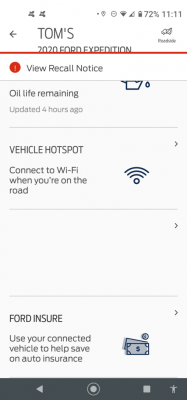
Another thing is the remote start does not work when the schedule a start disappears from my app. Probably tomorrow it will reapear and work again for a day or so.

Screenshot_20201210-231152.png
 
OP
OP
Tmg115

Tmg115

Well-Known Member
Joined
Oct 4, 2020
Posts
64
Reaction score
23
Location
Dfw
Well I tried deleting the app and reinstalling and it was a no go. Still no remote start
 
Joined
Nov 20, 2015
Posts
20
Reaction score
21
Location
Battle Creek
Sometimes mine doesn’t work either. I make sure my WiFi is off and it’s on cellular. Don’t know if that will help at all.


Sent from my iPad using Tapatalk
 
OP
OP
Tmg115

Tmg115

Well-Known Member
Joined
Oct 4, 2020
Posts
64
Reaction score
23
Location
Dfw
I was hoping this would be an easy fix but it looks like I will be having to make a warranty appointment at the dealer. Under 1k miles and my first problem. My first Ford is not off to a good start....
 

Alex Taylor

Well-Known Member
Joined
Oct 27, 2020
Posts
72
Reaction score
36
Location
Queen Creek, Arizona
Mine occasionally doesn’t work as well and I just use the key FOB to start it remotely. To be clear it works much more 90% than when it doesn’t.
 

Phillip White

Member
Joined
Dec 21, 2017
Posts
21
Reaction score
7
Location
Holbein
About four weeks ago there was a notification that FordPass was having server issues and to expect issues. Since then I too have had the same issues with responsiveness from the app. Scheduling also disappears from the app. One person suggested ensuring you are not on WiFi and that actually does seem to help from time to time but not all the time.
 

Lou Hamilton

Full Access Members
Joined
Nov 28, 2019
Posts
939
Reaction score
640
Location
Maryland
The amount of tech in these vehicles causes a slight draw on the battery. In some cases, various services stop working to preserve the battery. I have seen where the remote access via the app stops working if the battery gets too low. This is also the case for the unlock feature with the door handle and you need to use the drivers door only or the key fob.

Some members keep theirs on a trickle charger. The is not an option for me in my neighborhood so I deal with it and try to drive it some at least every other day.

I have experienced this more so in cold winter weather than warm summer weather.
 

PhoenixRizez

Well-Known Member
Joined
May 24, 2022
Posts
56
Reaction score
30
Location
Sunny South Florida
I know I’m replying to an old thread, but I had this exact same problem recently with my ‘22 Expy SPP. Remote start always works with the Key FOB, but it VERY RARELY worked through the Ford App; it almost always did the spinning circle in the App ‘trying’, but eventually it would give up. Someone mentioned WiFi as an issue in one of the posts, so I turned OFF the WiFi on my phone and tried the App again, and it started! Now, every time I want to remote start with the App, I turn off the phone’s WiFi first, and it starts every time. It’s a workaround we shouldn’t need to do, but at least it gets it started.
 

Rob6805

Full Access Members
Joined
Mar 25, 2021
Posts
818
Reaction score
532
Location
49735
I know I’m replying to an old thread, but I had this exact same problem recently with my ‘22 Expy SPP. Remote start always works with the Key FOB, but it VERY RARELY worked through the Ford App; it almost always did the spinning circle in the App ‘trying’, but eventually it would give up. Someone mentioned WiFi as an issue in one of the posts, so I turned OFF the WiFi on my phone and tried the App again, and it started! Now, every time I want to remote start with the App, I turn off the phone’s WiFi first, and it starts every time. It’s a workaround we shouldn’t need to do, but at least it gets it started.
Does it only have the issue when connected to your home or work wifi network? Can you start it when connected, for instance, to a restaurant guest network? If it is the former then those wifi networks are set to block a port that FordPass needs. Someone with a better knowledge than I regarding IT things should be able to provide more details.
 

nationalgallery

Full Access Members
Joined
Aug 20, 2022
Posts
244
Reaction score
176
Location
Virginia
I don't have the truck's wifi enabled (precaution against hacking), so all app communications and Sync updates are thru the truck's cellular. Remote start via app has never not worked for me (regardless or whether phone's wifi is on or off).
 

PhoenixRizez

Well-Known Member
Joined
May 24, 2022
Posts
56
Reaction score
30
Location
Sunny South Florida
Does it only have the issue when connected to your home or work wifi network? Can you start it when connected, for instance, to a restaurant guest network? If it is the former then those wifi networks are set to block a port that FordPass needs. Someone with a better knowledge than I regarding IT things should be able to provide more details.
For me, remote start works fine as long as WiFi is NOT connected; it doesn’t matter which WiFi, public or private, mine or others. What’s strange is that even when it’s connected to WiFi (& won’t remote start), it will still update the vehicle’s location, fuel, miles etc., so it’s definitely connecting. But it won’t remote start from the App if WiFi is on. It’s strange, but at least I got it to work with the phone WiFi off.
 

PhoenixRizez

Well-Known Member
Joined
May 24, 2022
Posts
56
Reaction score
30
Location
Sunny South Florida
I don't have the truck's wifi enabled (precaution against hacking), so all app communications and Sync updates are thru the truck's cellular. Remote start via app has never not worked for me (regardless or whether phone's wifi is on or off).
Does the other telemetry data update on the app, like vehicle location, fuel level, miles to empty, etc.? If not, then it would seem that the App is not connecting to the truck at all.
 

Rob6805

Full Access Members
Joined
Mar 25, 2021
Posts
818
Reaction score
532
Location
49735
For me, remote start works fine as long as WiFi is NOT connected; it doesn’t matter which WiFi, public or private, mine or others. What’s strange is that even when it’s connected to WiFi (& won’t remote start), it will still update the vehicle’s location, fuel, miles etc., so it’s definitely connecting. But it won’t remote start from the App if WiFi is on. It’s strange, but at least I got it to work with the phone WiFi off.
Oh wow. Super strange. Ford Pass has a help desk (800-392-3673). Maybe give them a call. Did you try uninstalling the app and reinstalling? All it needs is an internet connection. It shouldn't matter whether it's cellular or wifi.
 

PhoenixRizez

Well-Known Member
Joined
May 24, 2022
Posts
56
Reaction score
30
Location
Sunny South Florida
Oh wow. Super strange. Ford Pass has a help desk (800-392-3673). Maybe give them a call. Did you try uninstalling the app and reinstalling? All it needs is an internet connection. It shouldn't matter whether it's cellular or wifi.
Yeah, I thought it was strange too. I did try installing/uninstalling. And I tried deleting and re-adding my vehicle too. Thanks for the help desk #, I’ll see if they can figure it out.
 
Top