Ford SYNC Version & Update

Disclaimer: Links on this page pointing to Amazon, eBay and other sites may include affiliate code. If you click them and make a purchase, we may earn a small commission.

jcvanvorst

New Member
Joined
Apr 12, 2019
Posts
4
Reaction score
0
Location
SW Indiana
I have to say that I have never seen a website that SUCKS more than Ford.com. And the instructions there were horrible and incomplete. I managed to create the thumb drive for the 4.6 upgrade and after fumbling around with it this morning I managed to load it. (I didn’t see the instructions in this awesome thread until 5 minutes ago). I don’t know what all I gained with the upgrade. My first goal was for Sync to play better with my iPod. Before every time I started the car it indexes it forever and then the voice would come on saying “due to the number of tracks in your media device voice commands for tracks are not available for this device”! Irritating especially I was never interested in using voice commands anyway. But I think the upgrade at least stopped that and the device indexing goes much quicker. I would LOVE to have something like app play where I could use google earth on my iPhone as the navigation system, and things like Pandora. I will have to mess around with it some more and see what else is there. BTW my vehicle is 2014 Expedition EL Limited.
 
OP
OP
D

dcsang

Full Access Members
Joined
Sep 16, 2019
Posts
113
Reaction score
41
Location
New York
I have to say that I have never seen a website that SUCKS more than Ford.com. And the instructions there were horrible and incomplete. I managed to create the thumb drive for the 4.6 upgrade and after fumbling around with it this morning I managed to load it. (I didn’t see the instructions in this awesome thread until 5 minutes ago). I don’t know what all I gained with the upgrade. My first goal was for Sync to play better with my iPod. Before every time I started the car it indexes it forever and then the voice would come on saying “due to the number of tracks in your media device voice commands for tracks are not available for this device”! Irritating especially I was never interested in using voice commands anyway. But I think the upgrade at least stopped that and the device indexing goes much quicker. I would LOVE to have something like app play where I could use google earth on my iPhone as the navigation system, and things like Pandora. I will have to mess around with it some more and see what else is there. BTW my vehicle is 2014 Expedition EL Limited.
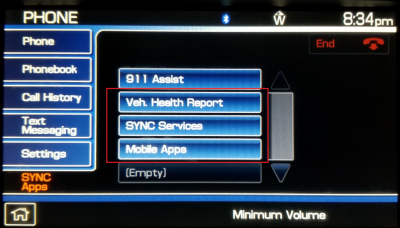
Which HU do you have? I posted a pic of my 2013 earlier on and determined that it was a Clarion that does not have WiFi and I cannot get the Mobile Apps to work with my Android device. I haven't had much time this week but I'll try to post a pic of the screens. The Vehicle Health Report and SYNC Services options both dial non-working numbers on my mobile, so if that's the requirement I'm apparently SOL.

I also tried connecting my mobile to WiFi while using the USB cable but the darn apps just won't work.

Congrats on getting that 4.6 update to work! Perhaps it'll be kinder to your HU than what I'm experiencing.
 
OP
OP
D

dcsang

Full Access Members
Joined
Sep 16, 2019
Posts
113
Reaction score
41
Location
New York
It appears that SYNC v4.6 is not fully functional with my 2013 head unit. The 'Veh. Health Report' and 'SYNC Services' both dial non-working numbers and 'Mobile Apps' just does not work. I'm contemplating a Kenwood or Pioneer replacement but that's a topic for another day. I appreciate the feedback and support!

1.png
 

BlueStangGT

Full Access Members
Joined
Jun 14, 2005
Posts
102
Reaction score
48
Location
Oklahoma
Thanks for the great ideas and info in this thread. I recently picked up a 14 Limited and will be running this gauntlet soon!
 

rwmorrisonjr

Full Access Members
Joined
Aug 26, 2012
Posts
389
Reaction score
123
Location
Memphis, TN
It appears that SYNC v4.6 is not fully functional with my 2013 head unit. The 'Veh. Health Report' and 'SYNC Services' both dial non-working numbers and 'Mobile Apps' just does not work. I'm contemplating a Kenwood or Pioneer replacement but that's a topic for another day. I appreciate the feedback and support!

View attachment 32764
Vehicle Health and Sync Services were discontinued in 2016 IIRC. I've never used the Mobile Apps with this head unit. I'd like it to default to the radio or last used input screen rather than the home screen.
 

Keaton Taylor

Member
Joined
Nov 20, 2019
Posts
16
Reaction score
0
Location
Ashland, KY
I just got my first Expy (2015 EL Platinum) and am trying to update my Sync unit but keep getting read errors over and over again. I'm using a Mac to do all of this (so that's different) and Stuffit Expander (as directed by the directions) still no dice.

I'm going to go grab one of those 32GB SanDisk ones you talked about up above and turn on hidden files to make sure there are no rogue files popping up in there from the unpacking of that Zip file.
 

rwmorrisonjr

Full Access Members
Joined
Aug 26, 2012
Posts
389
Reaction score
123
Location
Memphis, TN
I just got my first Expy (2015 EL Platinum) and am trying to update my Sync unit but keep getting read errors over and over again. I'm using a Mac to do all of this (so that's different) and Stuffit Expander (as directed by the directions) still no dice.

I'm going to go grab one of those 32GB SanDisk ones you talked about up above and turn on hidden files to make sure there are no rogue files popping up in there from the unpacking of that Zip file.

If you have access to a Windows machine (physical or virtual), it makes formatting easier. Make sure the drive is formatted in FAT32 (not ExFAT or HPFS or NTFS), then copy the file structure exactly as it is to the flash drive.
 

mossback

2017 Limited EL
Joined
Oct 9, 2017
Posts
359
Reaction score
176
Location
WA state
I just got my first Expy (2015 EL Platinum) and am trying to update my Sync unit but keep getting read errors over and over again. I'm using a Mac to do all of this (so that's different) and Stuffit Expander (as directed by the directions) still no dice.

I'm going to go grab one of those 32GB SanDisk ones you talked about up above and turn on hidden files to make sure there are no rogue files popping up in there from the unpacking of that Zip file.

Take a look at the file structure and make sure the SyncMyRide folder is actually present. For some reason when expanding the zip file on a mac it sometimes fails to make the folder. You'll see the file names with SyncMyRide/ in front of them, but not actually in a folder. Rename the files by removing the SyncMyRide/ in front and then move them into a SyncMyRide folder that you create.
 

BlueStangGT

Full Access Members
Joined
Jun 14, 2005
Posts
102
Reaction score
48
Location
Oklahoma
I finally got around to doing my Sync updates on both my 14 Expy Ltd. and 13 Escape SEL and things went fairly smoothly, but definitely required some patience. Through an online chat with Ford support I found that my Expy has Sync1 (and hadn't been updated since 2013, lol!) while my Escape has Sync2. One would think that the Sync versions would follow the model years in at least some way but apparently not with Ford... my 13 Escape has a newer version of Sync than 14 Expy. Wow.

Anyway... the Expy update for Sync w/ Nav was an upgrade all the way to ver. 4.X. I asked if I needed to do any intermediate upgrades and was told no so I proceeded to load up my USB drive. I'm using Windows, formatted the 16 gig 2.0 drive with FAT32, opened the downloaded zip file (which was 111 mb) in Windows Exploder, then dragged the files on to the drive for copying. I turned off my iPhone's Bluetooth (the instructions on the Ford site are all over the place depending on your version so I did this just in case it actually mattered for Sync1), fired up the Expy (the radio was already on) and plugged the drive into the port. Sync found the drive and thus the process began. It only took about 25 minutes or so and everything seems to be working... I did have to reconnect my iPhone to the unit, which was expected.

The Escape was different and took a LOT longer. While the process was basically the same as above, the downloaded zipped file was 562 mb. The process started normally with a reboot or two and then got to a section where the screen read "installing file... (X of 10)". It churned through the first 3 (of 10) pretty quickly but once it got to 4 it seemed that everything stopped. I waited for nearly an hour then finally called Ford tech support... turns out everything was fine I just needed to let it do its thing but patience isn't always my strong suit. It ended taking a couple of hours or so.
 

albertobb

New Member
Joined
Oct 24, 2020
Posts
3
Reaction score
0
Location
chile
Hello, thank you very much for posting your experience, I have looked for the info, and downloaded the driver (SYNC system will be updated to SYNC v4.6), with file name "DR3T-14D544-AG.zip", size of 110,929,188 bytes . I have not done the installation yet, I always try to document myself well before performing processes of this type and I find your laborious task carried out very useful. My truck is the 2011 Expedition Eddie Bauer Limited, I am looking at the sunroof repair shop, after they do that I will ask them for the update and see what changes, or what is gained with the update. According to that I see if I update Sync or install a new Soundstream VRN-DD7HB radio dvd gps. Again thank you very much, given the little information, these post are appreciated.
translated by Google
 

mgerity

New Member
Joined
Nov 15, 2021
Posts
4
Reaction score
1
Location
Phoenix, AZ
So I'm stuck trying to do this update. My problem is that my Sync system is so laggy that I cannot do anything at all. I have a 2013 with what appears to be SYNC I with MyFord Touch, although Ford's identification website conveniently has no screens that look like mine. I appear to have exactly what @dcsang has. Anyway, when I start the vehicle, I can use all of the hard buttons on each side of the screen, but the touch screen buttons are a different story. When I first start it up, I get to touch ONE touch screen button, it beeps, and then you have to wait......and wait....and wait, and finally you'll get the result of the screen button you touched. After that, you are done. The screen will not recognize any further touches at all. Hard buttons still work fine, but you're completely locked out of the touchscreen.

I assume a Master Reset might help, but it's impossible to do one. I can go to the Media screen, and my one-shot is to then touch the Settings screen button. 30 or so seconds later, I'll get the screen with the Master Reset option (along with the Install option to install the v4.6 that I have put on a jump drive), but of course, neither of these options is actually available, because my screen is now unresponsive. I also tried pulling fuses, namely 3, 28 and 39. That certainly stopped the screen from coming on, but when I replaced the fuses and started it again, nothing changed (it still knew exactly where it was playing in the song before pulling the fuses). Next up, I disconnected the battery, but that gives basically the same result--when I reconnect and start it up, nothing has changed--all of the radio stations are still programmed, it knows where it left off on the song, etc. Basically neither of those approaches seems to truly disconnect the system from power--must be some kind of aux battery or capacitor somewhere.

The result of all of this is that I simply cannot get to the two options that would likely provide a fix, namely Master Reset and Install to install my SYNC update. Hours of searching on the internet has been useless, because there are so many generations of SYNC, with so many different head units, in so many different models, that nothing I can find applies directly to my vehicle. Frustrating.

Anybody got any suggestions?
 

BlueStangGT

Full Access Members
Joined
Jun 14, 2005
Posts
102
Reaction score
48
Location
Oklahoma
Sounds like a trip to the dealer is in your future. If there’s no way to operate the device, my guess is you’ll need a new APIM.
 

mgerity

New Member
Joined
Nov 15, 2021
Posts
4
Reaction score
1
Location
Phoenix, AZ
UPDATE: I discovered that, if I wait about 15 minutes, I am then able to hit another touch screen button. So, push, wait, push, wait... painful.

Anyway, finally got to the master reset option and ran it. It appeared to complete the process, except that it didn't actually reset anything. Then did the update to 4.6, which appeared to run successfully (got a "success" message and everything), but nothing changed-- clearly still the old software afterwards.

So, off to the dealer I went. Haven't heard anything from them yet, but it's been Thanksgiving week.
 

welcome2vegas

Member
Joined
Oct 11, 2021
Posts
16
Reaction score
7
Location
NJ
I find the Sync on my 2014 very useless and will probably go the aftermarket head unit route. I have a Kenwood from my old TBSS that i’ll likely swap. Hate that the stock headunit doesn’t “talk” to my iphone and the interface is pretty bland lol
 

mgerity

New Member
Joined
Nov 15, 2021
Posts
4
Reaction score
1
Location
Phoenix, AZ
SECOND UPDATE: Dealer has confirmed it needs a new APIM. Quoted $1,550 out the door for the parts and installation.

Is that a fair price, and thoughts on whether I should do that?
 

HavasuMike

Full Access Members
Joined
Jan 25, 2018
Posts
102
Reaction score
19
Location
Lake Havasu City, AZ
My dealer said the same thing only it was $1000. Luckily, mine just started working again last week after 2 months of silence. Sometimes it's good to procrrastinate
 

mgerity

New Member
Joined
Nov 15, 2021
Posts
4
Reaction score
1
Location
Phoenix, AZ
I think I've decided that $1550 is too much to spend to just go back to 2013 technology. I'm going to explore an aftermarket unit. It looks like the chassis is a standard double-DIN, so fitment will be easy, it's just integration with steering wheel controls, backup camera, and the headrest screens that I would have to worry about.

Anybody else replaced the entire head unit with aftermarket, and were you able to get all that stuff integrated?
 

ToomaasV

New Member
Joined
Dec 19, 2022
Posts
1
Reaction score
0
Location
Czech Republic
Hello,
I have in my Ford Expedition (2011) version SYNC 1 with touchscreen and NAVI - V3.2 BG1T-14D544-AB
from https://www.ford.ie/support/sync-maps-updates#/ i received DR3T-14D544-AG.zip and Each time it tries to install ends with errors out with “possibly incompatible version OR out of space” (added video in the link)
https://drive.google.com/drive/folde...Zi?usp=sharing

I have tried master reset (from display) and soft reset (open/close/lock door/2mins/open/restart)....

Can anyone help me?
thx
 
Top