Ford updated software three times recently

Disclaimer: Links on this page pointing to Amazon, eBay and other sites may include affiliate code. If you click them and make a purchase, we may earn a small commission.

OP
OP
H

Hellwig

Full Access Members
Joined
Apr 6, 2022
Posts
615
Reaction score
347
Location
Virginia
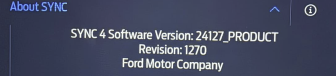
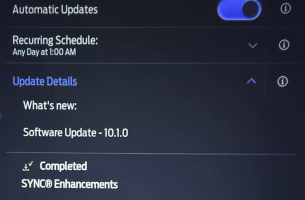
A couple weeks later now and my vehicle said "Update Available" again. I clicked "UPDATE" and it said "Downloading..." for some hours w/o completion and so I decided to set a Schedule for "after 1AM" and also set "Automatically Update" to ON. Well, this morning sez "Update Successful" and it's reported that this update to SYNC4 10.1.0 changed my truck's software from 24058 Revision 1197 to now 24127 Revision 1270. So am I now updated to latest?

Having read @rugedraw your posts about "can't predict when Ford will send updates" I guess I shouldn't be shocked that it took this long but still.

I had left Auto Update OFF because I WANT TO KNOW when updates appear and what they are and I like to check online if folks have probs and etc but it seems Ford is foiling me. In the end I remain disturbed that their system does not 1. ALERT me to the need for an update, and then 2. That it doesn't ADVISE me that the update has occurred successfully i.e. via email or app notification.

EDIT: Now I see on ford.com the following: "Important: If Automatic Updates and Notifications are off, your vehicle will not receive any updates. This means your vehicle will not receive any new features or critical updates via Software Updates." which may explain why it didn't Update when I first asked for same. Still, the display stayed at "Downloading..." and should have instead said TURN ME ON DAMMIT.

Looks like it is the latest sync update. I got my 24127_PRODUCT Revision 1270 on October 21st, 2024. There was a minor update on gateway software on December 5th, 2024 but the Sync version still keeps the same.
 

bb37

Staff member
Member Relations Specialist
Joined
Aug 14, 2017
Posts
420
Reaction score
291
Location
Indiana
Well, this morning sez "Update Successful" and it's reported that this update to SYNC4 10.1.0 changed my truck's software from 24058 Revision 1197 to now 24127 Revision 1270. So am I now updated to latest?
The 2024 that I just bought on Wednesday says version 2427 revision 1270 on the Sync 4 screen, but the software screen says 10.1.1.
 

rugedraw

Full Access Members
Joined
Aug 14, 2024
Posts
142
Reaction score
64
Location
Miami, FL
A couple weeks later now and my vehicle said "Update Available" again. I clicked "UPDATE" and it said "Downloading..." for some hours w/o completion and so I decided to set a Schedule for "after 1AM" and also set "Automatically Update" to ON. Well, this morning sez "Update Successful" and it's reported that this update to SYNC4 10.1.0 changed my truck's software from 24058 Revision 1197 to now 24127 Revision 1270. So am I now updated to latest?

Having read @rugedraw your posts about "can't predict when Ford will send updates" I guess I shouldn't be shocked that it took this long but still.

I had left Auto Update OFF because I WANT TO KNOW when updates appear and what they are and I like to check online if folks have probs and etc but it seems Ford is foiling me. In the end I remain disturbed that their system does not 1. ALERT me to the need for an update, and then 2. That it doesn't ADVISE me that the update has occurred successfully i.e. via email or app notification.

EDIT: Now I see on ford.com the following: "Important: If Automatic Updates and Notifications are off, your vehicle will not receive any updates. This means your vehicle will not receive any new features or critical updates via Software Updates." which may explain why it didn't Update when I first asked for same. Still, the display stayed at "Downloading..." and should have instead said TURN ME ON DAMMIT.


Was out on vaca and just saw this. According to Ford, Sync 24127 is the latest available for these trucks (my F150 is on the same version and this is also the latest version for many other Ford vehicle platforms). This is an APIM update and installs while the vehicle is on and running; not using the auto-updates schedule. When an update installs, you are SUPPOSED to get a notification on both your touchscreen and in the Fordpass app, but the system is less than perfect and this does not always happen.

Even if you have auto-updates turned off, if an OTA gets queued up for your truck, you will get the notification on your touchscreen about it. I have it turned off because I have a pending PCM update on my truck that Ford has tried to push to me a few times and I don't want it to wipe my tune. Because I update my truck myself, that is the only update I have pending so I keep auto-updates off because if I were to get sent an update, I know exactly which one it is and I don't want it.
 

tominwi

Full Access Members
Joined
Dec 26, 2024
Posts
138
Reaction score
61
Location
Up North
Thanks for that. I have always been, what, "suspicious?" of all software updates for any of my dozens/hundreds of such devices and typically have preferred not to do Auto Updating so that I can control and know exactly what is happening with them. Might have started with those early "firmware" updates where if the gizmo lost power while updating it could brick the thing.

Anyway thanks again--I may well turn OFF Auto-updating as you.

Your situation begs a question: Is it possible, if there are multiple updates awaiting our trucks, to pick/choose among them i.e. This one but not That one?
 

jjscsix

Full Access Members
Joined
Jul 22, 2023
Posts
273
Reaction score
119
Location
texas
Thanks for that. I have always been, what, "suspicious?" of all software updates for any of my dozens/hundreds of such devices and typically have preferred not to do Auto Updating so that I can control and know exactly what is happening with them. Might have started with those early "firmware" updates where if the gizmo lost power while updating it could brick the thing.

Anyway thanks again--I may well turn OFF Auto-updating as you.

Your situation begs a question: Is it possible, if there are multiple updates awaiting our trucks, to pick/choose among them i.e. This one but not That one?
Highly unlikely. Updates tend to add to previous updates.
 

rugedraw

Full Access Members
Joined
Aug 14, 2024
Posts
142
Reaction score
64
Location
Miami, FL
Thanks for that. I have always been, what, "suspicious?" of all software updates for any of my dozens/hundreds of such devices and typically have preferred not to do Auto Updating so that I can control and know exactly what is happening with them. Might have started with those early "firmware" updates where if the gizmo lost power while updating it could brick the thing.

Anyway thanks again--I may well turn OFF Auto-updating as you.

Your situation begs a question: Is it possible, if there are multiple updates awaiting our trucks, to pick/choose among them i.e. This one but not That one?

Just about every vehicle I have checked has multiple modules pending updates. Some more than others, but most have more than one. As far as picking and choosing: That is not an option. There does not seem to be a rhyme or reason as far as how they get sent OTA in terms of order or vehicle. There are certain updates that have to be installed in a certain sequence, and those will come in order via the OTA process, but you can receive updates for other modules that don't require a sequence in between the module updates that are sequential.
 

Left Coast Geek

Full Access Members
Joined
Aug 31, 2023
Posts
634
Reaction score
312
Location
Mid Left Coast
just fyi, those updates work best if you have a fast WIFI connection, or if you're in a strong AT&T cellular area. Weak internet connection == erratic updating. My house is in a cellular 'hole' but I recently added an outdoor directional WIFI access point that is focused on where the vehicles are parked 130 feet away, and all that stuff works much better now (its part of my existing WIFI network, with the same SSID and password). For some reason, the 3 access points inside the house don't seem to like to penetrate my 2" thick old growth redwood planked exterior walls so before i put in this outside AP, signals were very weak and erratic outside. For the curious nerds, I'm using Ubiquiti UniFi access points, the outdoor one is a U7 Outdoor, the indoor ones are ceiling mounted U6 LR.
 

tominwi

Full Access Members
Joined
Dec 26, 2024
Posts
138
Reaction score
61
Location
Up North
just fyi, those updates work best if you have a fast WIFI connection...
Where mine is parked (garage but several walls) Wi-Fi is spotty and I was able to rig a Powerline setup (D-Link) from my router to the garage where the receiving unit makes Wi-Fi to the vehicle. It's not very fast but "good enough".
 

rugedraw

Full Access Members
Joined
Aug 14, 2024
Posts
142
Reaction score
64
Location
Miami, FL
The whole WiFi for updates thing a placebo. Since Ford started pushing out OTA's in 2020 to the 2021 F150's and Mach E's, only two updates have been released that required WiFi to install, and one of those two updates was only sent out to F150's to address an issue that only affected those vehicles. The other WiFi required update was sent out to several vehicle platforms and that was to address an issue where a TCU update accidentally changed the country code in the TCU of US based vehicles to another country rendering the modem useless and making the vehicle excommunicado from the mothership, so WiFi was the only way to push it out.

The modem is required in the file verification process between the vehicle and the server, so even if you are connected to WiFi, the vehicle will download and verify the files using the TCU and not the WiFi antenna.
 

BigAl6030

New Member
Joined
Feb 21, 2025
Posts
1
Reaction score
0
Location
chicago
No update yet. My volume still fades in and out. I have been to the dealer 2 time still no update really ****** me off $75000 truck and can’t listen to music
 

rugedraw

Full Access Members
Joined
Aug 14, 2024
Posts
142
Reaction score
64
Location
Miami, FL
No update yet. My volume still fades in and out. I have been to the dealer 2 time still no update really ****** me off $75000 truck and can’t listen to music

Does it do it only while streaming music form your phone, or does it do it regardless of what the source of the audio is?
 

aksarben

Full Access Members
Joined
Nov 20, 2024
Posts
110
Reaction score
43
Location
Rockies
How do I know what version software I have and how do I get it updates?
 

jjscsix

Full Access Members
Joined
Jul 22, 2023
Posts
273
Reaction score
119
Location
texas
How do I know what version software I have and how do I get it updates?
What type of screen do you have? The broad answer is that you should have something in your menu about software updates and there is a place that shows what version you have. But we know nothing about what year vehicle you have and what screen.
 

rugedraw

Full Access Members
Joined
Aug 14, 2024
Posts
142
Reaction score
64
Location
Miami, FL
How do I know what version software I have and how do I get it updates?

The "about sync" page in the general settings in your touchscreen will tell you what Sync version you have. The average owner cannot see the total number of modules pending updates without FDRS or access to Ford's PTS website. Depending on the model year of your truck, the latest Sync version is either 23306 or 24127 according to Ford.
 

Attachments

  • SYNC4LatestLevelSummary.pdf
    413 KB · Views: 8

aksarben

Full Access Members
Joined
Nov 20, 2024
Posts
110
Reaction score
43
Location
Rockies
Thanks everyone, I will look into my settings to see what I have.
 
Top