JamusDemus
Active Member
So I was wondering what you guys have programmed using FORScan?
Disclaimer: Links on this page pointing to Amazon, eBay and other sites may include affiliate code. If you click them and make a purchase, we may earn a small commission.
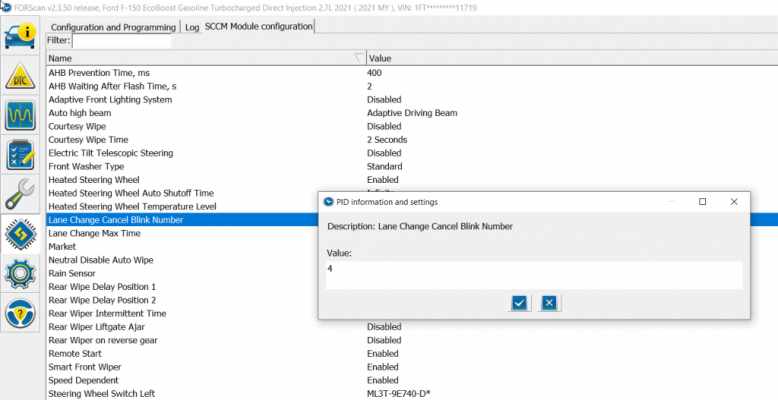
I changed mine to six flashes. I did mine via the Hexidecimal as-built method. Looking into this again (F-150 forums), looks like you can do it through the comfort mode.I did mostly the same things I did on my 2015 F-150.
* Disabled startup chimes
* Disabled double-horn honk when leaving with truck still running
* Disabled chimes - vehicle running with door open
* Changed tire circumference to fix slight speed offset due to wheel size difference
* Changed battery target state of charge from 80% to 95%
* Disabled all the seat belt minders
* Enabled engine/transmission temperature numbers above sweep gauges
I still want to change from 3 blinker activations when temporarily moving the turn signal to 7 activations, but I haven't found an option for that yet.

True but most people are too lazy to search. So, we just repeat and repeatWhole threads on this.
how? I can't find that in documents but eagerly need* Changed battery target state of charge from 80% to 95%
Look in the Forscan NOT AS Built sections. You can also search. It's there. I have not done it yet until I see if there are any side effects. Some things like Auto Start/Stop changes can cause some.how? I can't find that in documents but eagerly need
There's a reason Ford sets 80% on all their vehicles. So I have not changed it yet until I research some more.how? I can't find that in documents but eagerly need
For me, I do not drive but about 10-20 minutes and maybe 5 miles per day, so it makes good sense. If you drive at night a lot, probably not really needed as turning the headlights on overrides (to an extent) the battery-drain-if-at-or-near-target-state-of-charge behavior. If you drive an hour each way to work and back daily without a lot of ASS events, probably not as needed as it will get closer to the 80% target. On mine, short day trips meant it would frequently drop to <65% if I didn't drive for a few days resulting in some of the load shed kicking in. With it set to 95% target, mine usually sits around 87-92% unless I drive 3+ hours with the headlights on. As you said, do your research. Everyone's use case is different and Ford's settings are designed to hit the middle of the bell curve. The best research I did was getting my OBDLink MX+ set up with a good dashboard with 10-minute graph views of battery voltage and battery current and just watching it to see what it did under various conditions and accessory settings. Also watching charge state, battery days in service, and a few others helps you understand what YOUR battery is doing in YOUR vehicle during YOUR use cases. You cannot IMO reasonably set the target state of charge to something that will cause your vehicle to catch on fire, burn down, fall over, and sink into the swamp. But then, I've never been a blinking-12:00 type either, so there is that.There's a reason Ford sets 80% on all their vehicles. So I have not changed it yet until I research some more.
There are a few transmission memory modes available. Many close to the same year F150 codes work, some don't. Just make sure you backup before making any code changes, so you can put back the stock settings if the change fails. I find it better to use the new way of no codes, even though some features are not available. But this usually means your vehicle does not support the change or option. I have made quite a few changes on my Ex with great success.I have noticed that on most F-150's they have a Transmission memory mode - the logic remembers that the transmission was set to `Slippery` when driven last. Is this available in the Expeditions as a hidden feature? It's so convenient not to have to remember to change it!