
Strange problem doing over-the-air update

Disclaimer: Links on this page pointing to Amazon, eBay and other sites may include affiliate code. If you click them and make a purchase, we may earn a small commission.

Andy B

Full Access Members
Joined
Aug 25, 2016
Posts
338
Reaction score
161
Location
Redding, CT
My 2023 Limited SPP told me that there was an update, but that it had been postponed do to other operations. It gave me the option to "update now" so I tried that. When I returned the next morning it said the same thing. "postponed due to conflicting operation"

I am in range of WiFi and connected (checked).

Am I doing this wrong. The steps I took (as I got more stringent each try)
* Get the message
* Stop engine & prepare to exit but leave door closed
* Press the update and confirm buttons
* See a message that says update will commence in 120 seconds, 119, etc.....
* Exit vehicle and lock doors.

I feel like I am stuck in a loop. I have also tried letting it do it organically. (The next attempt will be tomorrow at 1:00 AM message).

I'm a little concerned at this point.
 

jfscheck

Active Member
Navy
Joined
May 24, 2026
Posts
28
Reaction score
13
Location
Severna Park, Maryland
I would suggest dealership in case something is amiss, I assume they/your course of action to disconnect the battery for a few MINUTES (5…) and reconnect and let it do it’s thing. I say be near the dealership in case it attempts a reload and get’s in a loop….
 

rugedraw

Full Access Members
Joined
Aug 14, 2024
Posts
165
Reaction score
70
Location
Miami, FL
My 2023 Limited SPP told me that there was an update, but that it had been postponed do to other operations. It gave me the option to "update now" so I tried that. When I returned the next morning it said the same thing. "postponed due to conflicting operation"

I am in range of WiFi and connected (checked).

Am I doing this wrong. The steps I took (as I got more stringent each try)
* Get the message
* Stop engine & prepare to exit but leave door closed
* Press the update and confirm buttons
* See a message that says update will commence in 120 seconds, 119, etc.....
* Exit vehicle and lock doors.

I feel like I am stuck in a loop. I have also tried letting it do it organically. (The next attempt will be tomorrow at 1:00 AM message).

I'm a little concerned at this point.

Message me the VIN and I can check why it is failing or failed.
 

Danm355

Well-Known Member
Joined
Mar 22, 2023
Posts
75
Reaction score
26
Location
Rochester, NY
The cause probably is not a fully charged battery. Mine was doing that too and I contacted Ford and they checked my VIN and said the battery was not fully charged. Since I seem to go through a battery about once a year which Ford paid for during the warranty I bought a new Diehard battery and the update went right through when I manually started it.
 

rugedraw

Full Access Members
Joined
Aug 14, 2024
Posts
165
Reaction score
70
Location
Miami, FL
The cause probably is not a fully charged battery. Mine was doing that too and I contacted Ford and they checked my VIN and said the battery was not fully charged. Since I seem to go through a battery about once a year which Ford paid for during the warranty I bought a new Diehard battery and the update went right through when I manually started it.

12v battery state of charge is why most OTA updates fail.
 

rugedraw

Full Access Members
Joined
Aug 14, 2024
Posts
165
Reaction score
70
Location
Miami, FL
Thanks. Sending now.

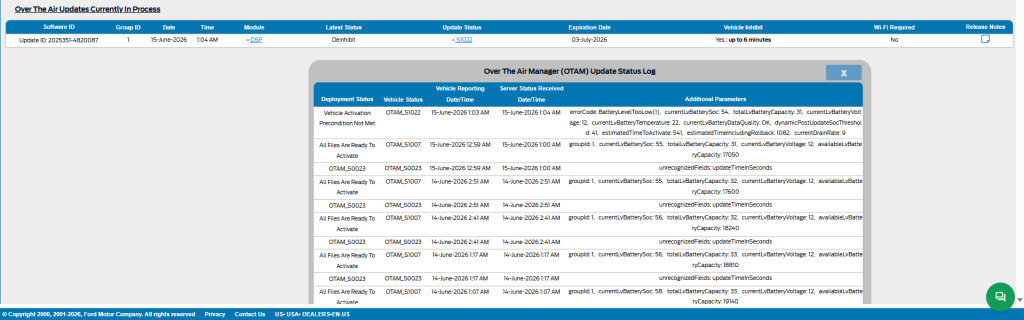
It's the 12v battery. SoC is being reported at 54% and battery capacity is also low at 31. Not sure if these trucks bring an H6 or an H7, but capactiy of an H6 tops at at 70 and an H7 os 80, so 31 is low either way. I would recommend you charge the 12v battery fully to 100% and try to install the update manually as soon as the battery is topped off.

1781552331372.png
 
OP
OP
Andy B

Andy B

Full Access Members
Joined
Aug 25, 2016
Posts
338
Reaction score
161
Location
Redding, CT
It's the 12v battery. SoC is being reported at 54% and battery capacity is also low at 31. Not sure if these trucks bring an H6 or an H7, but capactiy of an H6 tops at at 70 and an H7 os 80, so 31 is low either way. I would recommend you charge the 12v battery fully to 100% and try to install the update manually as soon as the battery is topped off.

View attachment 87352

Awesome. Thank you.
Headed out to put it on the charger right now!
 
OP
OP
Andy B

Andy B

Full Access Members
Joined
Aug 25, 2016
Posts
338
Reaction score
161
Location
Redding, CT
It's the 12v battery. SoC is being reported at 54% and battery capacity is also low at 31. Not sure if these trucks bring an H6 or an H7, but capactiy of an H6 tops at at 70 and an H7 os 80, so 31 is low either way. I would recommend you charge the 12v battery fully to 100% and try to install the update manually as soon as the battery is topped off.

View attachment 87352

Just an update and thanks.

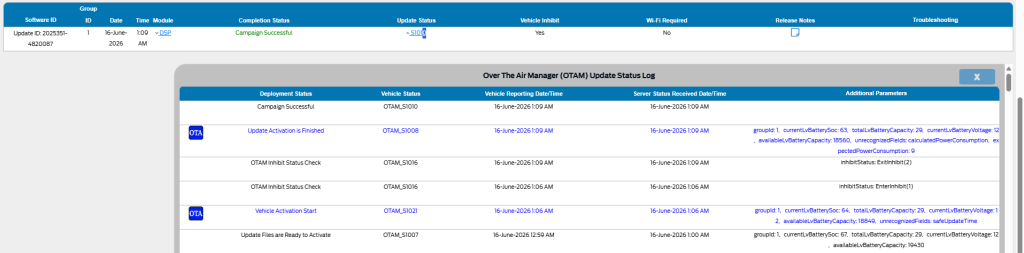
I put the charger on my Expy last night. This morning I came out and the update was completed. The battery was definitely the problem.

Do you have this graphic larger so I can read it? The copy posted is blurry.
 
OP
OP
Andy B

Andy B

Full Access Members
Joined
Aug 25, 2016
Posts
338
Reaction score
161
Location
Redding, CT
It's the 12v battery. SoC is being reported at 54% and battery capacity is also low at 31. Not sure if these trucks bring an H6 or an H7, but capactiy of an H6 tops at at 70 and an H7 os 80, so 31 is low either way. I would recommend you charge the 12v battery fully to 100% and try to install the update manually as soon as the battery is topped off.

View attachment 87352

PS: Does this chart say anything about the battery's health. Do I need a battery, or was it simply not fully charged?
 

rugedraw

Full Access Members
Joined
Aug 14, 2024
Posts
165
Reaction score
70
Location
Miami, FL
It's impossible to diagnose a batter remotely, but based on what your connected data shows, you battery needs to be tested and possibly replaced.

1781622964465.png

I see the OTA installed, but the battery SoC and capacity are still very low. If the battery in your truck is the same one it was built with, then it is probably time to replace it. It would need to be tested on the machine that tests all the cells; not the qucik test that gives you a read out in a minute. I would just replace it. These OEM batteries are garbage.

1781623025324.png
1781623174426.png
 
OP
OP
Andy B

Andy B

Full Access Members
Joined
Aug 25, 2016
Posts
338
Reaction score
161
Location
Redding, CT
It's impossible to diagnose a batter remotely, but based on what your connected data shows, you battery needs to be tested and possibly replaced.

View attachment 87357

I see the OTA installed, but the battery SoC and capacity are still very low. If the battery in your truck is the same one it was built with, then it is probably time to replace it. It would need to be tested on the machine that tests all the cells; not the qucik test that gives you a read out in a minute. I would just replace it. These OEM batteries are garbage.

View attachment 87358
View attachment 87359


Thanks again!
 
OP
OP
Andy B

Andy B

Full Access Members
Joined
Aug 25, 2016
Posts
338
Reaction score
161
Location
Redding, CT
Question: When you charged the battery, did you charge it directly on the battery terminal or at the BMS sensor?

Positive right on battery
Negative, after the BMS sensor (where the chassis ground attaches)

hope that's right.
 
OP
OP
Andy B

Andy B

Full Access Members
Joined
Aug 25, 2016
Posts
338
Reaction score
161
Location
Redding, CT
Ok, just wanted to make sure.....not sure if you knew about that.

Just to finish the story.... The charger got the update to install, but I just went out and bought a new battery. It's on the charger now and I'll install it tomorrow.

Thanks again.
 

rugedraw

Full Access Members
Joined
Aug 14, 2024
Posts
165
Reaction score
70
Location
Miami, FL
Just to finish the story.... The charger got the update to install, but I just went out and bought a new battery. It's on the charger now and I'll install it tomorrow.

Thanks again.

Again, jic you don't know, remember to reset the BMS system when you put the new battery in.
 

Mr Big

Full Access Members
Joined
May 29, 2023
Posts
1,039
Reaction score
593
Location
Tampa Bay, Florida USA
Just to finish the story.... The charger got the update to install, but I just went out and bought a new battery. It's on the charger now and I'll install it tomorrow.

Thanks again.
One issue about these BMS system Fords. If you don't drive your vehicle much, and it sits in the driveway for days, the battery will get low and the BMS will start disabling features. Since I don't drive but a road trip every 2 weeks, I condition the battery with a smart charger. Usually when I hook up the charger, the battery is 85% capacity. My Explorer did the same thing. I was constantly getting messages from Ford Pass to drive the vehicle. I could climb in it every week. But we have an EV and it's real cheap to drive it right now compared to gas.
 

SENC

Member
Joined
May 6, 2026
Posts
10
Reaction score
5
Location
SE NC
One issue about these BMS system Fords. If you don't drive your vehicle much, and it sits in the driveway for days, the battery will get low and the BMS will start disabling features. Since I don't drive but a road trip every 2 weeks, I condition the battery with a smart charger. Usually when I hook up the charger, the battery is 85% capacity. My Explorer did the same thing. I was constantly getting messages from Ford Pass to drive the vehicle. I could climb in it every week. But we have an EV and it's real cheap to drive it right now compared to gas.
You'd think with all the automated stuff on these vehicles today, it would be possible to add a button/feature to put the BMS in "storage mode". Would be so much more useful than auto stop/start.
 
Top