I updated my sync to the 3.19274 version (as per the cyanlabs instructions) and love the new look and feel. One of the added features was getting turn by turn navigation of android auto in the gauge cluster, but I'm not getting it. I saw that one of the members had it working. Is there something extra I need to do to get it working?


You are using an out of date browser. It may not display this or other websites correctly.
You should upgrade or use an alternative browser.
You should upgrade or use an alternative browser.
Disclaimer: Links on this page pointing to Amazon, eBay and other sites may include affiliate code. If you click them and make a purchase, we may earn a small commission.
byathread
Full Access Members
Need to be running Google maps and Android Auto. When a route is active, you go to Navigation/Compass in gauge cluster menu.
Wow .. that would be sweet. You look straight forward to the guage cluster and see navigation? Much safer than having to turn your head to the right and take your eyes off the road in front of you. That's almost like a heads up display.Need to be running Google maps and Android Auto. When a route is active, you go to Navigation/Compass in gauge cluster menu.
I hate to take my eyes off the road in front of me for more than a fraction of a second. Shit happens fast!
Yes. This actually always worked w/ standard navigation, not needing to manually update to 3.4. You don't need carplay or android auto either. Just start a route first on the main nav screen. The gauge cluster compass will then change to the route directions.Wow .. that would be sweet. You look straight forward to the guage cluster and see navigation? Much safer than having to turn your head to the right and take your eyes off the road in front of you. That's almost like a heads up display.
I hate to take my eyes off the road in front of me for more than a fraction of a second. Shit happens fast!
I did that but then when I go to Navigation/compass only the compass shows!Need to be running Google maps and Android Auto. When a route is active, you go to Navigation/Compass in gauge cluster menu.

Rancidlunchmeat
2019 XLT FX4
Anybody know what version finally gave us outside temperature in Google Maps? I noticed it last weekend, finally!
byathread
Full Access Members
Mine never did this. Can you post a photo please?Yes. This actually always worked w/ standard navigation, not needing to manually update to 3.4. You don't need carplay or android auto either. Just start a route first on the main nav screen. The gauge cluster compass will then change to the route directions.
byathread
Full Access Members
It started for me when I updated to 19274/3.4...Anybody know what version finally gave us outside temperature in Google Maps? I noticed it last weekend, finally!
byathread
Full Access Members
Just tried it at lunch here and that does work, go figure. Guess that is a testament to how often I use the native navigation!Mine never did this. Can you post a photo please?
Grey ghost
Full Access Members
Can you upgrade through your phone
byathread
Full Access Members
Nope...Can you upgrade through your phone
Follow the directions/read up here. The cyanlabs link is spot on.
https://www.expeditionforum.com/index.php?posts/378640
Piece of cake...
nobrainer
Active Member
any timeframe when this will be available through a standard update?

Lou Hamilton
Full Access Members
any timeframe when this will be available through a standard update?
Everything noted is that if you are on 3.0, there will not be a 3.4 upgrade. The reason is that it requires a reformat of the entire system and just ad "fix" or "added features" like most updates are.


Everything noted is that if you are on 3.0, there will not be a 3.4 upgrade. The reason is that it requires a reformat of the entire system and just ad "fix" or "added features" like most updates are.
What he said!
Only caveat is the later 4th Gen’s should be 3.3 from the factory. They should be able to go to 3.4 without a format.
Sent from my iPhone using Tapatalk Pro

Highlightreel
Well-Known Member
Anybody know what version finally gave us outside temperature in Google Maps? I noticed it last weekend, finally!
This must have been a Google Maps update when it updated a couple weeks ago, because I have the temp and I'm still running 3.0 and 19205.
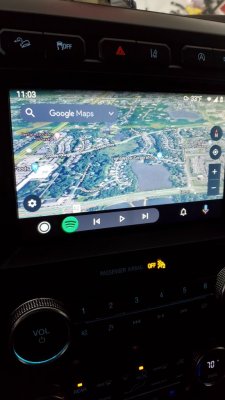
This must have been a Google Maps update when it updated a couple weeks ago, because I have the temp and I'm still running 3.0 and 19205.View attachment 34752
That is my understanding. Has nothing to do with Sync Version...at least 3.0 vs 3.4. Apple guy here...so harder for me to test it.
Sent from my iPhone using Tapatalk Pro
Skip Walton
Member
I use automatic updates thru my home WiFi.
View attachment 34823 View attachment 34823 I’m Wildly Confused.
So, on this thread and I believe on another firmware update thread, folks are talking about manually updating their firmware to “3.4”.
Now, I have my vehicle set to check for automatic updates.
1. why do it manually if your vehicle can do it for you without any effort?
2. How can there be an update already out there yet my unit isn’t picking it up?
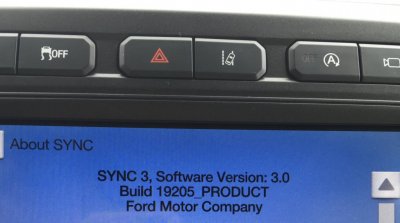
3. The infotainment unit still says 3.0 build such and such (see photo). Should I be doing something more proactive, or are some people just beta-testing the latest build?
Thanks!!
So, on this thread and I believe on another firmware update thread, folks are talking about manually updating their firmware to “3.4”.
Now, I have my vehicle set to check for automatic updates.
1. why do it manually if your vehicle can do it for you without any effort?
2. How can there be an update already out there yet my unit isn’t picking it up?
3. The infotainment unit still says 3.0 build such and such (see photo). Should I be doing something more proactive, or are some people just beta-testing the latest build?
Thanks!!
Lou Hamilton
Full Access Members
View attachment 34823 View attachment 34823 I’m Wildly Confused.
So, on this thread and I believe on another firmware update thread, folks are talking about manually updating their firmware to “3.4”.
Now, I have my vehicle set to check for automatic updates.
1. why do it manually if your vehicle can do it for you without any effort?
2. How can there be an update already out there yet my unit isn’t picking it up?
3. The infotainment unit still says 3.0 build such and such (see photo). Should I be doing something more proactive, or are some people just beta-testing the latest build?
Thanks!!
Updating from 3.0 to 3.4 is not as easy as a patch fix or feature addition like most other Builds have been under 3.0.
3.4 involves an entirely new root structure which entails a complete rebuild of the file system. this is an an easy task that can just be allied via a wifi or USB "Update".
This is why it is a manual upgrade and is not supported by Ford. It is a "hack" of the Sync 3 system not intended for users to do.
Similar threads

- Replies
- 46
- Views
- 3K
- Replies
- 29
- Views
- 4K

- Replies
- 2
- Views
- 1K
- Replies
- 6
- Views
- 719


