Sync 3 navigation

Disclaimer: Links on this page pointing to Amazon, eBay and other sites may include affiliate code. If you click them and make a purchase, we may earn a small commission.
getnbzi

Active Member
Joined
Apr 8, 2018
Posts
40
Reaction score
2
Location
maryland
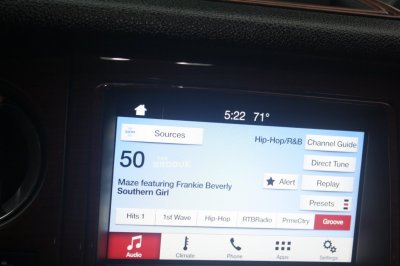
hi my sync 3 does not have navigation are there any updates for that? or does it require a new unit?IMG_0633.JPG
 

RogerD1959

2.5 Months Ltr, and Final Bill 22K+
Joined
Jun 5, 2019
Posts
138
Reaction score
29
Location
Fond du Lac, WI United States
Can you back off, zoom out, need to see the whole thing installed. Right now, its not looking like a Ford unit, or its a different kind. Need to figure that out. Also, if you know how to go into settings and pull up the SYNC, about screen, a photo of that will also help. Have you been to owner.ford.com to see if there are any updates? You need to register there, then plug in your vin, the Ford update server finds the file your vehicle needs. Anybody, can anything be done with Forscan to remedy this?
 

stewartsoda

Member
Joined
May 8, 2019
Posts
11
Reaction score
7
Location
Idaho
They sold Sync3 with and without navigation. Yours must have been the "without navigation" option. Nav was like a $800 option.
 

LokiWolf

Staff member
Moderator
Joined
Apr 2, 2016
Posts
3,971
Reaction score
2,834
Location
Richmond VA
Can you back off, zoom out, need to see the whole thing installed. Right now, its not looking like a Ford unit, or its a different kind. Need to figure that out. Also, if you know how to go into settings and pull up the SYNC, about screen, a photo of that will also help. Have you been to owner.ford.com to see if there are any updates? You need to register there, then plug in your vin, the Ford update server finds the file your vehicle needs. Anybody, can anything be done with Forscan to remedy this?

That is definitely Sync3, Non Nav. The Non Nav units have less space, so they are not able to be converted to Nav, without swapping the Unit. The easiest solution is Android Auto, CarPlay, or Waze via Applink. All require a direct wire connection via the USB hub.


Sent from my iPhone using Tapatalk Pro
 

LokiWolf

Staff member
Moderator
Joined
Apr 2, 2016
Posts
3,971
Reaction score
2,834
Location
Richmond VA
hi my sync 3 does not have navigation are there any updates for that? or does it require a new unit?View attachment 32701

Also, if you have a 2016, and want CarPlay you need to swap the hub to the 2017 version number.

Your Sync 3 version also needs to be 2.2 or later. 3.x is the current version. The X determined by what is available for your VIN and Serial number.


Sent from my iPhone using Tapatalk Pro
 
OP
OP
getnbzi

getnbzi

Active Member
Joined
Apr 8, 2018
Posts
40
Reaction score
2
Location
maryland
ok I had android auto but I didn't like the cable that's why I was asking
 

Dorzak

Full Access Members
Joined
Jan 28, 2018
Posts
450
Reaction score
123
Location
California
It is about $800-1200 net if you exchange your existing Sync 3. There is a guy who sells Sync 3 units salvaged. I had a coworker looking at upgrading his 2017 F-150 that didn’t have Sync 3 and we researched it a couple years ago. Personally that cable is worth a little irritation instead.
 

Mean_Dean

Well-Known Member
Joined
Jan 3, 2019
Posts
74
Reaction score
24
Location
Lilburn, GA
I have the navigation option but still use Android Auto with Waze, much better option plus I can use all the Google features for hand free, texts, calls, etc...
 

cullinan18

Full Access Members
Joined
Jun 27, 2017
Posts
152
Reaction score
53
Location
St. Charles, MO
I have nav on my 2017 and really am not a fan of it. It doesn't find as many locations as Google maps and the favorites is harder to navigate. I use a wireless vent charger and just use my phone for navigation. I sushi didn't like losing the climate control info when using android auto.
 

bobmbx

Full Access Members
Joined
Jun 11, 2017
Posts
1,200
Reaction score
627
Location
Virginia
I have nav on my 2017 and really am not a fan of it. It doesn't find as many locations as Google maps and the favorites is harder to navigate. I use a wireless vent charger and just use my phone for navigation. I sushi didn't like losing the climate control info when using android auto.
I don't have an android (I have an iPhone), and at least Carplay allows you to get back to the Sync apps, including climate. Its clunky, but it does work.
 

LokiWolf

Staff member
Moderator
Joined
Apr 2, 2016
Posts
3,971
Reaction score
2,834
Location
Richmond VA
You can get back to the Ford Screen in both Android Auto and CarPlay...


Sent from my iPad using Tapatalk Pro
 

LokiWolf

Staff member
Moderator
Joined
Apr 2, 2016
Posts
3,971
Reaction score
2,834
Location
Richmond VA
Sorry, for those that can’t google or watch YouTube Videos to use the functions they are complaining don’t exist.

There is a Tach looking icon or something like that on the Bottom right of the AA home screen. Press that and then I think you get an option for return to Sync. You can now access radio stations and climate control.

Have a great day!


Sent from my iPad using Tapatalk Pro
 

LokiWolf

Staff member
Moderator
Joined
Apr 2, 2016
Posts
3,971
Reaction score
2,834
Location
Richmond VA
CarPlay actually has a Ford Icon/App that take you back to Sync...


Sent from my iPad using Tapatalk Pro
 

cullinan18

Full Access Members
Joined
Jun 27, 2017
Posts
152
Reaction score
53
Location
St. Charles, MO
Loki,

If you were responding to my post, my complaint is that when I had Android Auto opened (I haven't used it in the past year), the top black bar indicating driver zone, ambient temp, and passenger temp displays were not visible when AA was used. Making temperature adjustments to the ac or heat was then just blind dial turns (unless the screen was switched back off AA and then switched back on).

If the comment wasn't to me, well have a good day.
 

LokiWolf

Staff member
Moderator
Joined
Apr 2, 2016
Posts
3,971
Reaction score
2,834
Location
Richmond VA
It was not at you specifically. It is 2 clicks. On CarPlay it is one. I adjust all the time without looking. 1 click to the left is down one, one click right is up. Just not a big deal for me to tell what temp I have adjusted to. The convenience of the integration in general far outweighs the 2 clicks to see the set temp.

Other Fords of this gen allow the HVAC to be in the right MFD via FORSCAN, and pop a temp wheel when you adjust the temp. The 15-17 Expy’s are missing a few control modules that make that programming easy, and so far it has not been found.

I use a ProClip mount that puts my phone just to the right of the screen. I use it for monitoring things via my BT OBDII adapter.


Sent from my iPhone using Tapatalk Pro
 
Top