Update all versions of Ford Sync 3 to the latest Sync 3.4

Disclaimer: Links on this page pointing to Amazon, eBay and other sites may include affiliate code. If you click them and make a purchase, we may earn a small commission.

MxRacer965

Full Access Members
Joined
Nov 3, 2019
Posts
266
Reaction score
163
Location
Hudsonville, MI
So, in lurking around this thread for a minute and reading and re-reading one question jumps out at me...how will doing this impact the ability to receive updates in the future? For example, the auto update feature or from the owner.ford.com web site? The site right now says I have an update available so I'm going to double check that I'm connected to WiFi to do auto update, but I also downloaded the update to a USB drive so I can use the ol' sneakernet to walk it over and update...
 

LokiWolf

Staff member
Moderator
Joined
Apr 2, 2016
Posts
3,971
Reaction score
2,837
Location
Richmond VA
So, in lurking around this thread for a minute and reading and re-reading one question jumps out at me...how will doing this impact the ability to receive updates in the future? For example, the auto update feature or from the owner.ford.com web site? The site right now says I have an update available so I'm going to double check that I'm connected to WiFi to do auto update, but I also downloaded the update to a USB drive so I can use the ol' sneakernet to walk it over and update...

The WiFi update feature is not enabled right now via Ford, unless they have turned it back on in the past month. That was confirmed by multiple sources who contacted Ford Support, including myself.

I have answered those questions, pretty sure more than once. You are welcome to do the update, or not, obviously your choice.

Ford has proven that they do not continue updates past a certain point. Because a format is needed to leave 3.0, most likely there will NEVER be an official Ford release to take those units to 3.4. So you will be stuck with small fixes and tweaks to 3.0, without any feature changes. The most recent being a tweak that fixes the GPS Data being sent to apps like Waze so that the GPS speedo is accurate(a fix also incorporated even in 19101 of 3.4). Most likely that is the update you have waiting. It also has other small fixes, but that is the major one.

Also, for clarity I said navigation in the UI(User Interface) was faster, not Navigation(Directions) was faster. General performance improvements were made in 3.4.

Here are the things CyanLabs mentions are improved/changed:


Here are some of the benefits of upgrading to Sync 3.4

Android Auto navigation on the small screen in the Dash Cluster / Speedo. (potentially car play aswell)

Much snappier and more responsive user interface

A nicer looking stock blue theme

Newest map data for SatNav

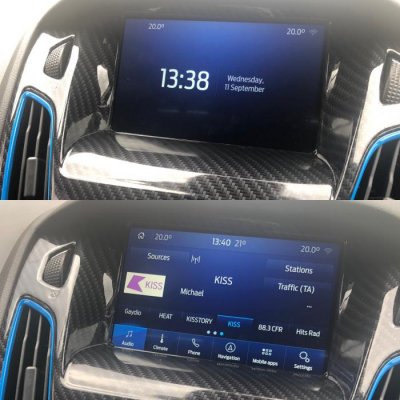
If you update your APIM firmware you can also get Radio logos and Calm Mode.


Sent from my iPhone using Tapatalk Pro

 

MxRacer965

Full Access Members
Joined
Nov 3, 2019
Posts
266
Reaction score
163
Location
Hudsonville, MI
The WiFi update feature is not enabled right now via Ford, unless they have turned it back on in the past month. That was confirmed by multiple sources who contacted Ford Support, including myself.

I have answered those questions, pretty sure more than once. You are welcome to do the update, or not, obviously your choice.

Ford has proven that they do not continue updates past a certain point. Because a format is needed to leave 3.0, most likely there will NEVER be an official Ford release to take those units to 3.4. So you will be stuck with small fixes and tweaks to 3.0, without any feature changes. The most recent being a tweak that fixes the GPS Data being sent to apps like Waze so that the GPS speedo is accurate(a fix also incorporated even in 19101 of 3.4). Most likely that is the update you have waiting. It also has other small fixes, but that is the major one.

Also, for clarity I said navigation in the UI(User Interface) was faster, not Navigation(Directions) was faster. General performance improvements were made in 3.4.

Here are the things CyanLabs mentions are improved/changed:


Here are some of the benefits of upgrading to Sync 3.4

Android Auto navigation on the small screen in the Dash Cluster / Speedo. (potentially car play aswell)

Much snappier and more responsive user interface

A nicer looking stock blue theme

Newest map data for SatNav

If you update your APIM firmware you can also get Radio logos and Calm Mode.


Sent from my iPhone using Tapatalk Pro

Sorry if you or anyone repeat anything that may have been posted before, that isn't my intent. But I didn't notice answers to the particular questions I had...maybe I asked them wrong, or I still am too new with owning a Ford (different lingo, etc than the Grand Cherokee Summit I am coming from after 9 years) to realize they were being answered.

That said I suppose my questions come from the stance of not even knowing WHAT Ford is updating with the Sync updates for 3.0 (or any of the lingo...like what the heck is a APIM and what does it do????). Are map updates included when they release an update? Is it just bug fixes?

I understand that a Ford approved 3.4 update won't be in the cards most likely. But what about map updates? How does going to 3.4 impact my ability to update maps in the future should I choose to? Hell, I don't even know how map updates are done today...only had the vehicle for a couple months...yet the latest release from Ford references using a 8GB memory stick or larger because there are map updates...???

In short I don't even have 2,500 miles on my '19 yet and have only had it a couple months. Last thing I want to do is blindly make an update without understanding the long term ramifications of doing so to an $85K vehicle - like will I be forever stuck on the current maps installed if I do this? What if Ford releases a bug fix for 3.0 and 3.4 but I can't update 3.4 because it isn't supported by Ford and CyanLabs is defunct or not interested in this anymore?
 

Lou Hamilton

Full Access Members
Joined
Nov 28, 2019
Posts
939
Reaction score
640
Location
Maryland
The WiFi update feature is not enabled right now via Ford, unless they have turned it back on in the past month. That was confirmed by multiple sources who contacted Ford Support, including myself.

...

Android Auto navigation on the small screen in the Dash Cluster / Speedo. (potentially car play aswell)

...


Sent from my iPhone using Tapatalk Pro
At this point, CarPlay Nav is NOT in the Dash Cluster / Speedo area (I'm assuming you mean the cluster directly in front of the driver behind the steering wheel, correct?

At least when using Waze...
 

LokiWolf

Staff member
Moderator
Joined
Apr 2, 2016
Posts
3,971
Reaction score
2,837
Location
Richmond VA
Lou, That was from CyanLabs. I have not seen that for myself.

I assume it is only for those with the new Digital dash. That is my assumption only.


Sent from my iPhone using Tapatalk Pro

 

LokiWolf

Staff member
Moderator
Joined
Apr 2, 2016
Posts
3,971
Reaction score
2,837
Location
Richmond VA
Sorry if you or anyone repeat anything that may have been posted before, that isn't my intent. But I didn't notice answers to the particular questions I had...maybe I asked them wrong, or I still am too new with owning a Ford (different lingo, etc than the Grand Cherokee Summit I am coming from after 9 years) to realize they were being answered.

That said I suppose my questions come from the stance of not even knowing WHAT Ford is updating with the Sync updates for 3.0 (or any of the lingo...like what the heck is a APIM and what does it do????). Are map updates included when they release an update? Is it just bug fixes?

I understand that a Ford approved 3.4 update won't be in the cards most likely. But what about map updates? How does going to 3.4 impact my ability to update maps in the future should I choose to? Hell, I don't even know how map updates are done today...only had the vehicle for a couple months...yet the latest release from Ford references using a 8GB memory stick or larger because there are map updates...???

In short I don't even have 2,500 miles on my '19 yet and have only had it a couple months. Last thing I want to do is blindly make an update without understanding the long term ramifications of doing so to an $85K vehicle - like will I be forever stuck on the current maps installed if I do this? What if Ford releases a bug fix for 3.0 and 3.4 but I can't update 3.4 because it isn't supported by Ford and CyanLabs is defunct or not interested in this anymore?

All excellent questions. Your initial tone appeared combative, sorry. Let’s get off on a better foot! I think first you need a good base on Ford and Sync.

Map updates are not Free from Ford, period, and in addition, they are slow! Ford does not do Map updates over the air or via owner.ford.com, those are OS(Operating System) updates only. The Map updates have to be purchased from a dealership pets counter, and regular price is $199. The USB drive you eventually get is tied to the Serial Number of Sync, and your VIN. It can only be used on one vehicle. The version are denoted by 1/4 and year. We are in 1-20, but the most current Map file I have seen is 1-18, which happens to be part of the 3.4 update. Which is just a fringe benefit, cause the files were found at the same time. Map versions are somewhat Sync version independent. That being said, I have only done 2 Map updates outside of the 3.4 updates. Both were on 3.0+ updated Units.

Fords are made up of many different modules that control everything. Examples:

BCM-Body Control Module
IPC-Instrument Panel Cluster
PCM-Powertrain Control Module
APIM-Accessory Protocol Interface Module

The APIM is the brains behind Sync, feeds it info, and sends info to other modules. When you do updates, that is what you are screwing with.

Hope that helps!


Sent from my iPhone using Tapatalk Pro

 

Lou Hamilton

Full Access Members
Joined
Nov 28, 2019
Posts
939
Reaction score
640
Location
Maryland
Lou, That was from CyanLabs. I have not seen that for myself.

I assume it is only for those with the new Digital dash. That is my assumption only.


Sent from my iPhone using Tapatalk Pro

Since I will no longer get the notices for updates, is CyanLabs the best place to check for them? I am at the most recent build (19274).

Thanks for all the work you have put into this aspect of ownership/modding. :)
 

Garrett

Full Access Members
Joined
Nov 23, 2017
Posts
506
Reaction score
167
Location
Kansas City
I may have missed it, but is there a link to step by step directions to perform the update?

can you revert back to factory 3.0 later if you want?
 
OP
OP
A

AAOO

Full Access Members
Joined
May 15, 2019
Posts
364
Reaction score
205
Location
USA
@MxRacer965

Accessory Protocol Interface Module (APIM) is the SYNC computer.

Updates over wifi have never worked and I've heard they aren't even pushing them right now.

We will post updates here when available or you can find most everything at the Russian site in the second post of this thread.

You can update your maps for free here: https://syncnavigation.com/ford/home (not sure how long they will be free)
 

LokiWolf

Staff member
Moderator
Joined
Apr 2, 2016
Posts
3,971
Reaction score
2,837
Location
Richmond VA
@MxRacer965

Accessory Protocol Interface Module (APIM) is the SYNC computer.

Updates over wifi have never worked and I've heard they aren't even pushing them right now.

We will post updates here when available or you can find most everything at the Russian site in the second post of this thread.

You can update your maps for free here: https://syncnavigation.com/ford/home (not sure how long they will be free)

That site is not free, never has been. $109 for download, $149 for USB. The prices have come down, but still not free. They didn’t use to offer the download option. And when they first launched it, it would send you to the contact a dealer for ordering after it verified you had an update available.

The average user will never check the Russian forums. Most people should not be doing updates straight off of there. A lot of what those guys are messing with is Beta, and on the bleeding edge.

Also, mentioned above that they are not pushing via WiFi currently. They did work at one time, went from 2.0 to 2.2 via WiFi on my Edge. Several others had success during that timeframe. That was a small update though. They have had constant issues with it, so they stopped pushing that way for now. They have some test groups doing it, but small subsets.


Sent from my iPad using Tapatalk Pro
 

LokiWolf

Staff member
Moderator
Joined
Apr 2, 2016
Posts
3,971
Reaction score
2,837
Location
Richmond VA
I may have missed it, but is there a link to step by step directions to perform the update?

can you revert back to factory 3.0 later if you want?

Do some reading. All info is found in this thread.


Sent from my iPad using Tapatalk Pro
 

LokiWolf

Staff member
Moderator
Joined
Apr 2, 2016
Posts
3,971
Reaction score
2,837
Location
Richmond VA
Since I will no longer get the notices for updates, is CyanLabs the best place to check for them? I am at the most recent build (19274).

Thanks for all the work you have put into this aspect of ownership/modding. :)

I have never waited for Ford to get updates. I realize I am a little more aggressive about it than others though. Ford is slow, and will hardly ever tell you anyway. Pay attention here, I am sure threads like this one will exist if there is another update.


Sent from my iPad using Tapatalk Pro
 
OP
OP
A

AAOO

Full Access Members
Joined
May 15, 2019
Posts
364
Reaction score
205
Location
USA
That site is not free, never has been. $109 for download, $149 for USB. The prices have come down, but still not free. They didn’t use to offer the download option. And when they first launched it, it would send you to the contact a dealer for ordering after it verified you had an update available.

The average user will never check the Russian forums. Most people should not be doing updates straight off of there. A lot of what those guys are messing with is Beta, and on the Edge.

Also, mentioned above that they are not pushing via WiFi currently. They did work at one time, went from 2.0 to 2.2 via WiFi on my Edge. Several others had success during that timeframe. That was a small update though. They have had constant issues with it, so they stopped pushing that way for now. They have some test groups doing it, but small subsets.


Sent from my iPad using Tapatalk Pro

It was free for my VIN. Think it might just apply to 4th gens. There is a thread on it here somewhere. Agree on the Russian site. We can post the install ready packaged updates here when they drop.
 

LokiWolf

Staff member
Moderator
Joined
Apr 2, 2016
Posts
3,971
Reaction score
2,837
Location
Richmond VA
It was free for my VIN. Think it might just apply to 4th gens. There is a thread on it here somewhere. Agree on the Russian site. We can post the install ready packaged updates here when they drop.

Nice! Maybe they are doing the free for a certain time past purchase thing! That is pretty cool for ya’ll!

What is the most current Data when you go to download? Newest I have seen is 1-18? Curious if they have one that is newer there.


Sent from my iPad using Tapatalk Pro
 
OP
OP
A

AAOO

Full Access Members
Joined
May 15, 2019
Posts
364
Reaction score
205
Location
USA
1-18 is what I downloaded a couple of months ago. Came from 1-16. Just checked and no new updates for my VIN/ESN.
 
Last edited:

MxRacer965

Full Access Members
Joined
Nov 3, 2019
Posts
266
Reaction score
163
Location
Hudsonville, MI
All excellent questions. Your initial tone appeared combative, sorry. Let’s get off on a better foot! I think first you need a good base on Ford and Sync.

Map updates are not Free from Ford, period, and in addition, they are slow! Ford does not do Map updates over the air or via owner.ford.com, those are OS(Operating System) updates only. The Map updates have to be purchased from a dealership pets counter, and regular price is $199. The USB drive you eventually get is tied to the Serial Number of Sync, and your VIN. It can only be used on one vehicle. The version are denoted by 1/4 and year. We are in 1-20, but the most current Map file I have seen is 1-18, which happens to be part of the 3.4 update. Which is just a fringe benefit, cause the files were found at the same time. Map versions are somewhat Sync version independent. That being said, I have only done 2 Map updates outside of the 3.4 updates. Both were on 3.0+ updated Units.

Fords are made up of many different modules that control everything. Examples:

BCM-Body Control Module
IPC-Instrument Panel Cluster
PCM-Powertrain Control Module
APIM-Accessory Protocol Interface Module

The APIM is the brains behind Sync, feeds it info, and sends info to other modules. When you do updates, that is what you are screwing with.

Hope that helps!


Sent from my iPhone using Tapatalk Pro

Not sure how I gave that impression, apologies! There are pluses and minuses of this communication medium I suppose...

Sounds like the update is similar then to what it was with the Jeep navigation system, which I did once in 9 years...when my parents bought it from me when I bought the Expedition :Big Laugh:

So, even if moving on to 3.4 map updates, should I choose to purchase them in the future, should still work is my understanding?

I see AAOO commented about some free map updates...wonder if they are free while the factory warranty is still active? I need to toss in my VIN and ESN to see...

Thanks, description of APIM helps. My Jeep didn't have anything like that; the newer ones probably do but mine had physical buttons for the various controls whereas starting in 2014 the system became more like the Sync that is in my current Expedition. I'm familiar with a bunch of the other terms, I bought a tune and tuner for my Grand Cherokee and the one before that I found a Nav DVD that would disable the nag screen on start up, so I'm certainly familiar with tweaking cars...just not this particular car...yet!
 
Top