Update all versions of Ford Sync 3 to the latest Sync 3.4

Disclaimer: Links on this page pointing to Amazon, eBay and other sites may include affiliate code. If you click them and make a purchase, we may earn a small commission.

LokiWolf

Staff member
Moderator
Joined
Apr 2, 2016
Posts
3,971
Reaction score
2,837
Location
Richmond VA
Federal safety guidelines that didn't think about a passenger that isn't driving being able to use the sync system...

Sent from my moto g(7) using Tapatalk

Never said it made sense...just stating the reason.


Sent from my iPhone using Tapatalk Pro

 

scottdm

Full Access Members
Joined
Dec 2, 2018
Posts
828
Reaction score
495
Location
Western PA
Discovered today while driving that when an album ends Sync will allow you to select a new artist/album from the USB drive as long as the album repeat button isn't selected. While it would be nice to select "New Search" while an album is playing, this is a doable workaround especially since you can skip to the end of the album with the steering wheel controls if needed. I'll likely revert back to the US region setting so that E911 will still be enabled.
 

ETC13

Full Access Members
Joined
Feb 20, 2019
Posts
174
Reaction score
64
Location
TN
Updated to the version 20021 without issue. Downgraded back to 19200 and then reformat and install of 20021 wih new maps.
 
Last edited:

dutchd1

Member
Joined
Apr 26, 2020
Posts
8
Reaction score
1
Location
Woodbridge, VA
I've done searches around the internet and on this forum but can't seem to find a solution to an issue since I upgraded from SYNC 3.0 to latest 3.4 from cyanlabs. This is on a 2018 Expedition MAX Limited

I have the following issues with the display brightness and mode:
1. Display doesn't go into night mode when headlights are turned on. Not sure if it will work if light are set to "Auto" until it's dark. (Just upgraded today - just traded in my 2011 Expedition for the 2018 Friday)

2. Even if display is set to Auto, Day, or Night the setting for Brightness is greyed out. Even it's "Info" button is greyed out. So I am unable to change brightness levels. I can switch between day and night manually with no issue.

Any advice would be appreciated. Could this possibly be something that has to be fixed in APIM or APIM needs an update?

And my apologies if this has been covered before.
 

ETC13

Full Access Members
Joined
Feb 20, 2019
Posts
174
Reaction score
64
Location
TN
I've done searches around the internet and on this forum but can't seem to find a solution to an issue since I upgraded from SYNC 3.0 to latest 3.4 from cyanlabs. This is on a 2018 Expedition MAX Limited

I have the following issues with the display brightness and mode:
1. Display doesn't go into night mode when headlights are turned on. Not sure if it will work if light are set to "Auto" until it's dark. (Just upgraded today - just traded in my 2011 Expedition for the 2018 Friday)

2. Even if display is set to Auto, Day, or Night the setting for Brightness is greyed out. Even it's "Info" button is greyed out. So I am unable to change brightness levels. I can switch between day and night manually with no issue.

Any advice would be appreciated. Could this possibly be something that has to be fixed in APIM or APIM needs an update?

And my apologies if this has been covered before.
No manual dim, but auto dims without issue when the headlights turn on automatically.

Sent from my moto g(7) using Tapatalk
 

Gumby

Full Access Members
Joined
Jun 5, 2019
Posts
496
Reaction score
238
Location
Beaumont, Alberta
I've done searches around the internet and on this forum but can't seem to find a solution to an issue since I upgraded from SYNC 3.0 to latest 3.4 from cyanlabs. This is on a 2018 Expedition MAX Limited

I have the following issues with the display brightness and mode:
1. Display doesn't go into night mode when headlights are turned on. Not sure if it will work if light are set to "Auto" until it's dark. (Just upgraded today - just traded in my 2011 Expedition for the 2018 Friday)

2. Even if display is set to Auto, Day, or Night the setting for Brightness is greyed out. Even it's "Info" button is greyed out. So I am unable to change brightness levels. I can switch between day and night manually with no issue.

Any advice would be appreciated. Could this possibly be something that has to be fixed in APIM or APIM needs an update?

And my apologies if this has been covered before.
I'm sure Loki will be in here eventually to post his insight, but did you try doing a Master Reset?
 

dutchd1

Member
Joined
Apr 26, 2020
Posts
8
Reaction score
1
Location
Woodbridge, VA
I've done searches around the internet and on this forum but can't seem to find a solution to an issue since I upgraded from SYNC 3.0 to latest 3.4 from cyanlabs. This is on a 2018 Expedition MAX Limited

I have the following issues with the display brightness and mode:
1. Display doesn't go into night mode when headlights are turned on. Not sure if it will work if light are set to "Auto" until it's dark. (Just upgraded today - just traded in my 2011 Expedition for the 2018 Friday)

2. Even if display is set to Auto, Day, or Night the setting for Brightness is greyed out. Even it's "Info" button is greyed out. So I am unable to change brightness levels. I can switch between day and night manually with no issue.

Any advice would be appreciated. Could this possibly be something that has to be fixed in APIM or APIM needs an update?

And my apologies if this has been covered before.
So it looks like I may have answered my own question this AM. I should have been more patient yesterday and waited until night.

This appears to be the behavior for SYNC display brightness control:
- Manual display brightness adjustments are disabled when the vehicle detects it is "daytime" (e.g. Even when you turn headlights on during the day I noticed the dash cluster doesn't dim as the light sensor detects it is still day.

- As soon as it gets dark and headlights come on (either through auto mode or manual on) the manual display brightness control for SYNC becomes enabled. I also noticed that the dash cluster then dims when lights are on (whether through auto on or manual on)

Thanks for replies.

Sent from my LM-G710 using Tapatalk
 

dutchd1

Member
Joined
Apr 26, 2020
Posts
8
Reaction score
1
Location
Woodbridge, VA
I'm sure Loki will be in here eventually to post his insight, but did you try doing a Master Reset?
Yes. I actually did a Master reset twice. Once after the update and then again when I noticed this "feature." But I think it may be intended behavior? I replied to my own post a few minutes ago.

Sent from my LM-G710 using Tapatalk
 

LokiWolf

Staff member
Moderator
Joined
Apr 2, 2016
Posts
3,971
Reaction score
2,837
Location
Richmond VA
That is correct.

Here is the scenario on the newer builds of 3.4.

Sync set in Auto, and it is bright outside: Regardless of headlight switches position, Sync and your dash will remain in daylight mode. You do not get the individual Brightness option in Sync, but it’s brightness is somewhat affected by the dash brightness buttons.

Sync set in Auto, and it is dark outside: If Headlight position is in any position other than off, Sync and your dash will enter Night mode. Both the master dash brightness AND the individual Sync brightness are in play. Think of the Sync brightness being adjusting one bulb, and the dash brightness as affecting the whole chandelier. If you dim the individual bulb, it will still lower with the master dimmer but start at a lower level in general. Or the opposite, you want the dash dimmer, but Sync brighter.

Also, remember you have different dash brightness setting for Day and Night. You have FAR more fine adjustment in Night mode.

As an example, I keep Day at full brightness so I can see if the sun is hitting wrong. I keep night at the 2nd or 3rd darkest level, to improve night sight. Generally I keep Syncs Night brightness setting at a about a quarter.

Hope that makes it clear as Mud!


Sent from my iPad using Tapatalk Pro
 

ETC13

Full Access Members
Joined
Feb 20, 2019
Posts
174
Reaction score
64
Location
TN
Where are folks getting 20022? I don't see it at cyanlabs.
Right under 2. Download the update....

Navigation Variants

North America (USA, Canada etc)
Sync Version: 20021 – Map Version: F9
Languages supported: English American, French Canadian, Spanish Mexican
Sync_3.4.20021_NA_Base_WithNav_F9_CYANLABS.zip
MD5: 9FA473867CD7DAD332EEBD28476EA037


Sent from my moto g(7) using Tapatalk
 

LokiWolf

Staff member
Moderator
Joined
Apr 2, 2016
Posts
3,971
Reaction score
2,837
Location
Richmond VA
Where are folks getting 20022? I don't see it at cyanlabs.

I referenced 20022 earlier in this thread, it was more like 20021 Version B. So the version of 20021 on Cyan is most current stable version I am aware of.


Sent from my iPhone using Tapatalk Pro

 

mmayo

Member
Joined
Sep 17, 2019
Posts
6
Reaction score
0
Location
Texas
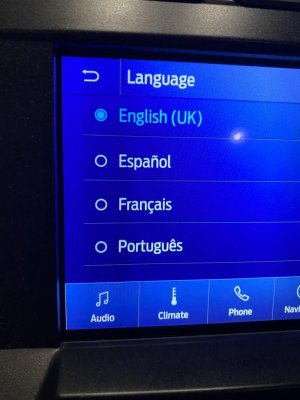
Just installed this (on my '18 Raptor) the only language options are English(UK), Espanol, French or Portugues? Where is American English?

I have done 2 hard resets..
 

wakeboarder

Full Access Members
Joined
Nov 16, 2019
Posts
811
Reaction score
468
Location
Fort Lauderdale, FL
Just installed this (on my '18 Raptor) the only language options are English(UK), Espanol, French or Portugues? Where is American English?

I have done 2 hard resets..

I haven’t done the switch yet. Just a thought. Did you accidentally install the European version?
 

mmayo

Member
Joined
Sep 17, 2019
Posts
6
Reaction score
0
Location
Texas
Don't believe so, map/gps is working for here in the US and i don't believe we can install the European version on our APMI due to lack of harddrive space.
 

mmayo

Member
Joined
Sep 17, 2019
Posts
6
Reaction score
0
Location
Texas
Figured out the issue. I had my APIM changed via forscan to where i could input Nav while driving. This is done by changing the region to UK. Side note, this disables sync's ability to call 911 when the airbags deploy.
 
Top