Update all versions of Ford Sync 3 to the latest Sync 3.4

Disclaimer: Links on this page pointing to Amazon, eBay and other sites may include affiliate code. If you click them and make a purchase, we may earn a small commission.

Joined
Nov 10, 2016
Posts
13
Reaction score
5
Location
Lancaster, PA
I believe 20282 just launched public so yes, you might be able to get that. But 3.4 versions have been accessible via cyanlabs for a long time. Ford could do hundreds of minor versions before releases a public version.

Ohh I see. So cyanlabs will be the same version, you just get it before ford released it. I am just picking up an 18 this coming saturday so I was looking into this. I currently have SYNC2 so nothing I could do until I got newer expedition. Does it make sense to still use cyanlabs or just use the ford website?

 

Gumby

Full Access Members
Joined
Jun 5, 2019
Posts
496
Reaction score
238
Location
Beaumont, Alberta
Ohh I see. So cyanlabs will be the same version, you just get it before ford released it. I am just picking up an 18 this coming saturday so I was looking into this. I currently have SYNC2 so nothing I could do until I got newer expedition. Does it make sense to still use cyanlabs or just use the ford website?
You can use cyan labs to get the updates. Of course it's always at your own risk and honestly some of the updates have their quirks. But I don't mind uploading the versions as they come available.
 

5280tunage

Full Access Members
Joined
Sep 17, 2019
Posts
1,875
Reaction score
1,154
Location
colorado
There is some risk to it, using CyanLabs, but ultimately under the covers it's using the same technology Ford uses to update vehicles. It's no different for example than using Beta software on a PC. You may run into issues, but one thing I've seen is that in general, when a major issue hits a minor version update, Ford releases a new minor version pretty quickly, you just have to watch the CyanLabs forums. If I see a lot of users complaining about a minor version, I just wait.
 

NewExpyDriver

Member
Joined
Jan 24, 2020
Posts
12
Reaction score
7
Location
USA
Anyone have a suggestion for my situation? Would trying to update with an older version have any impact? Also read on another forum someone who couldn't get an update to start with a USB was told to plug the USBin before turning the system on. The boot up of the system will force the upload to start. Not sure I want to do that without the advise of the resident experts here.
Thanks, Sammy
 

5280tunage

Full Access Members
Joined
Sep 17, 2019
Posts
1,875
Reaction score
1,154
Location
colorado
Yes, you can certainly do it from start up but before you shut down, do the forced reset twice, shut down, then try the start up.

Another though, and I didn't read back through your other posts, but are you doing a full format or the incremental upgrade, say from 3.4.x to 3.4.20282? The format will always take longer. But make sure you do the maps update if you're doing that.
 

mpc11

Well-Known Member
Joined
Dec 12, 2018
Posts
97
Reaction score
37
Location
MI
Anyone have a suggestion for my situation? Would trying to update with an older version have any impact? Also read on another forum someone who couldn't get an update to start with a USB was told to plug the USBin before turning the system on. The boot up of the system will force the upload to start. Not sure I want to do that without the advise of the resident experts here.
Thanks, Sammy

I don’t have a suggestion for a fix, but cyanlabs has a forum/ comment section on Their website. Cyanlabs was very good and quick in replying to a problem I had and posted there in the past.
 

NewExpyDriver

Member
Joined
Jan 24, 2020
Posts
12
Reaction score
7
Location
USA
I have a non navy version. I'm on 3.4 build 19200.. did the new download from the cyan lab updater as directed. No dice. There was no format needed for this that I'm aware of
 

rockymtnexpy

New Member
Joined
Jan 15, 2021
Posts
1
Reaction score
0
Location
Colorado
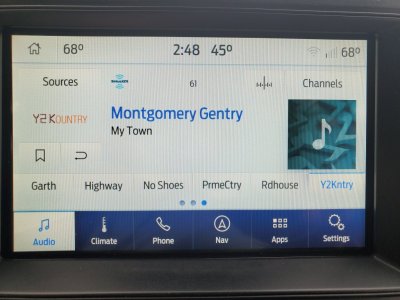
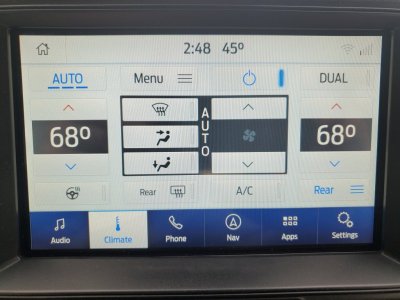
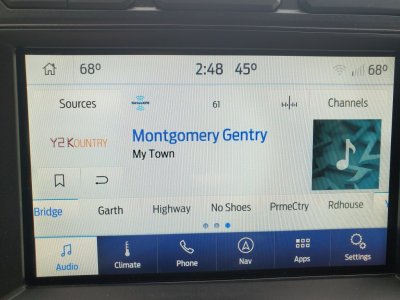
New member, longtime lurker. Wanted to see if anyone else has seen this issue. I'm currently on build 20282. I have a 2018 XLT FX4 and have done numerous Sync updates. A few builds ago, don't recall which one, I started seeing some weird behavior with my preset buttons. The issue only happens when I have the source of SiriusXM on. If you click away to another screen like Climate and then click back to Audio, the preset buttons are skewed and button on the far right is pushed nearly off the screen and a button from the previous screen is partially visible on the left. If you are on the first preset screen, there is just blank space before the first actual button. If you touch any of the preset buttons, they snap back to be in the correct alignment. It doesn't really cause any functional problems, just annoying. I've been waiting a few builds to see if it worked itself out, but hasn't so just checking if anyone else has seen this.
20210112_144837.jpg 20210112_144845.jpg
20210112_144854.jpg
 
Last edited:

MxRacer965

Full Access Members
Joined
Nov 3, 2019
Posts
266
Reaction score
163
Location
Hudsonville, MI
Just updated to 282 from 196. Took a bit longer than I thought it would, was starting to get a little nervous.

Had to download the new updater from the cyanlabs site...and Windows got pretty angry about it. Flagging it has malware, etc. Took some tinkering but I finally got it going.

Other than that it went smooth. Haven’t noticed anything different so far.
 

wakeboarder

Full Access Members
Joined
Nov 16, 2019
Posts
811
Reaction score
468
Location
Fort Lauderdale, FL
Just updated to 282 from 196. Took a bit longer than I thought it would, was starting to get a little nervous.

Had to download the new updater from the cyanlabs site...and Windows got pretty angry about it. Flagging it has malware, etc. Took some tinkering but I finally got it going.

Other than that it went smooth. Haven’t noticed anything different so far.
Any tips about getting it to work with windows. When I open the program it just shows a “checking for updates screen, then it goes away with no program coming up.
 

5280tunage

Full Access Members
Joined
Sep 17, 2019
Posts
1,875
Reaction score
1,154
Location
colorado
No issues with it on my win10 fully up to date machines. Usually you'll see issues with windows defender or AV. Have you tried running the executable as admin? Defender or an av product may have a firewall blocking things but usually they are stateful so the outbound request would be allowed back in.
 

wakeboarder

Full Access Members
Joined
Nov 16, 2019
Posts
811
Reaction score
468
Location
Fort Lauderdale, FL
No issues with it on my win10 fully up to date machines. Usually you'll see issues with windows defender or AV. Have you tried running the executable as admin? Defender or an av product may have a firewall blocking things but usually they are stateful so the outbound request would be allowed back in.

They released a new installer file today that ended up working. I had to tell windows and the AV to ignore it a couple of times.
 
Last edited:

MxRacer965

Full Access Members
Joined
Nov 3, 2019
Posts
266
Reaction score
163
Location
Hudsonville, MI
They released a new installer file today that ended up working. I had to tell windows and the AV to ihnore it a couple of times.

I had to disable AV entirely and right clicked and “Run as Administrator”. Until I did both I had issues with it running. Kept getting flagged.

I see they’ve been working to resolve that in the comments on the site. I was about to go spin up a Win 7 VM to get around the nanny features of Win 10.
 
Joined
Nov 10, 2016
Posts
13
Reaction score
5
Location
Lancaster, PA
Mine got flagged too but It went smoothly after I told windows it was not malware. Not sure what W10 build im on but it think its the latest.

Have you all done the calm screen and radio icons? Thinking if I want to do that or not. I have forscan and the module, just not sure I want to mess with it on my 18 Expedition.
 

LokiWolf

Staff member
Moderator
Joined
Apr 2, 2016
Posts
3,971
Reaction score
2,837
Location
Richmond VA
Mine got flagged too but It went smoothly after I told windows it was not malware. Not sure what W10 build im on but it think its the latest.

Have you all done the calm screen and radio icons? Thinking if I want to do that or not. I have forscan and the module, just not sure I want to mess with it on my 18 Expedition.

I do not recommend doing the firmware flash. It is not for the lighthearted. You miss a step, or it has issues...and you will brick it. They have made it a bit easier...but still honestly not worth it.


Sent from my iPad using Tapatalk Pro
 

LokiWolf

Staff member
Moderator
Joined
Apr 2, 2016
Posts
3,971
Reaction score
2,837
Location
Richmond VA
Yeah, The exe was not certified via Microsoft. That should be resolved in the newest version.


Sent from my iPad using Tapatalk Pro
 

MxRacer965

Full Access Members
Joined
Nov 3, 2019
Posts
266
Reaction score
163
Location
Hudsonville, MI
Yeah, The exe was not certified via Microsoft. That should be resolved in the newest version.


Sent from my iPad using Tapatalk Pro

I downloaded yesterday just after noon Eastern, so unless they have a even more recent install this still happens unfortunately.
 
Joined
Nov 10, 2016
Posts
13
Reaction score
5
Location
Lancaster, PA
Yeah think that's what mine said. Not a verified software so it flagged it but I was able to proceed and install as normal.

As for the firmware, I did read more into it and I am chickening out of it. I don't think the risk is worth the radio icons (which i don't listen too) or the calm screen, which i don't see the use for.
 

Lou Hamilton

Full Access Members
Joined
Nov 28, 2019
Posts
939
Reaction score
640
Location
Maryland
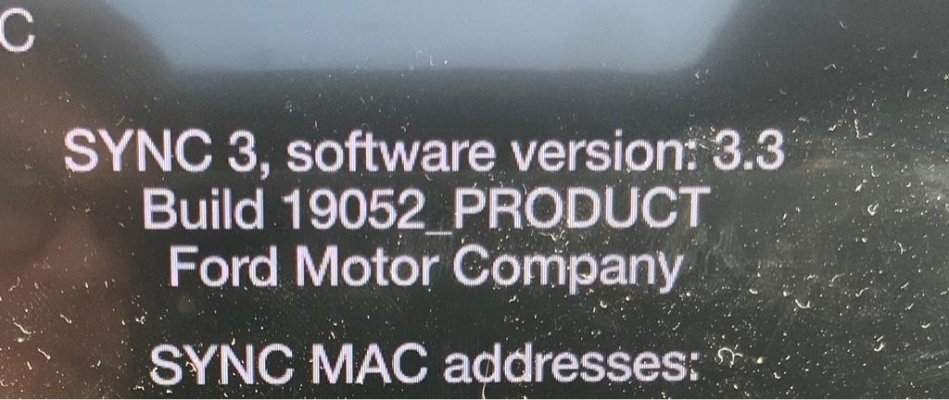
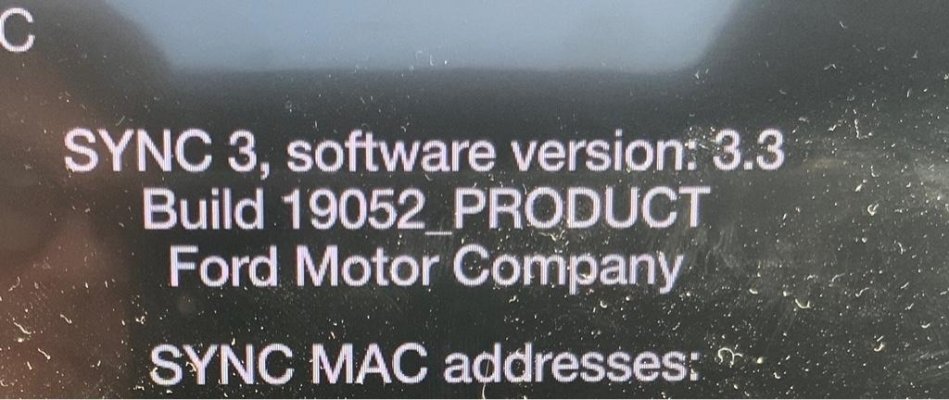
Anyone have theirs randomly downgrade?

I thought mine looked different this morning and looked at the ABOUT page. I did not touch anything and it seemed to be fine yesterday. Then again, most days it goes almost straight to CarPlay and I don’t see the normal Ford SYNC screen.

Mine is now at SYNC 3.3, Build 19052.

WTF!a7c9ecef3152b4d728a5354b995c88eb.jpg


Sent from my iPad using Tapatalk
 

LokiWolf

Staff member
Moderator
Joined
Apr 2, 2016
Posts
3,971
Reaction score
2,837
Location
Richmond VA
Anyone have theirs randomly downgrade?

I thought mine looked different this morning and looked at the ABOUT page. I did not touch anything and it seemed to be fine yesterday. Then again, most days it goes almost straight to CarPlay and I don’t see the normal Ford SYNC screen.

Mine is now at SYNC 3.3, Build 19052.

WTF!a7c9ecef3152b4d728a5354b995c88eb.jpg


Sent from my iPad using Tapatalk

Was over the Air updates turned on?


Sent from my iPhone using Tapatalk Pro
 
Top