techdude99
Full Access Members
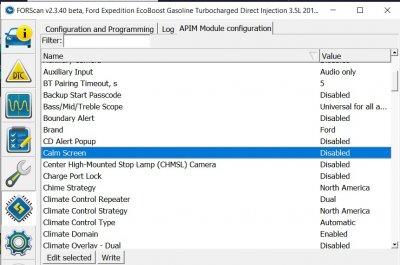
I see calm screen but can't find the radio logos. Does this require updating the APIM?
Last edited:


Disclaimer: Links on this page pointing to Amazon, eBay and other sites may include affiliate code. If you click them and make a purchase, we may earn a small commission.

It’s available in 21098Hey all, question for the group. I am at 20198 and have had no issues really. One black screen when starting the vehicle with Android auto connected, but just unplug the USB and it goes back to normal.
However, I just noticed it looks like the WebEx integration is gone. Anyone else notice this? I can't find anything on the Cisco site or on the android auto forums.
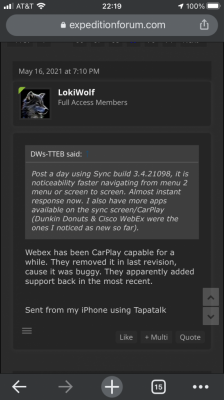

But that says carplay, I'm looking for Android auto. Maybe there's a difference?
I see WebEx on my 20198 install with my Galaxy S21.Hey all, question for the group. I am at 20198 and have had no issues really. One black screen when starting the vehicle with Android auto connected, but just unplug the USB and it goes back to normal.
However, I just noticed it looks like the WebEx integration is gone. Anyone else notice this? I can't find anything on the Cisco site or on the android auto forums.
Ok, you seem to know a lot about this. I’m still new to this car and learning how the updates work. I successfully updated to 21020 on my ‘20 LTD by USB from the Ford site. I’m unsuccessful at getting it logged by their link on the sync site - they are having problems.Completely normal. As long as the files continue to change names.
Sent from my iPhone using Tapatalk
Ok, you seem to know a lot about this. I’m still new to this car and learning how the updates work. I successfully updated to 21020 on my ‘20 LTD by USB from the Ford site. I’m unsuccessful at getting it logged by their link on the sync site - they are having problems.
But I have found a position to continue getting the updates by WiFi. So while I am on 21020 I am still getting updates to download and install. So far none have kicked me to 21098. If five or six updates aren’t pushing me to the next version what exactly is it doing? What does each update do if it’s still the same version number at the end?
It appears to be downloading a different file each time. Am I just slowly building towards 21098? The fact that the rev number is the same after each update puzzles me.
Thanks!
Thanks! It appears to have completed the updates. You were right, probably 8-10 files. The Sync site also logged my vehicle. Out of curiosity, it’s stopping at 21020. Is everyone who has downloaded 21098 only getting it from CyanLabs? Thanks!As long as the file names are changing, it is fine.
The over the air updates are now broken down in to 8-10 files. They are things like the GraceNote updates, Apps, Voices, and some appear to be getting the actual Nav database over the air. Look at the whole file name and make sure they are changing. If you are indeed getting the Nav update, that one will take a while!
Ford has REALLY upped their game on the over the air updates. They have improved the backend immensely.
Sent from my iPhone using Tapatalk
Yes, I DL'd it from CL.Thanks! It appears to have completed the updates. You were right, probably 8-10 files. The Sync site also logged my vehicle. Out of curiosity, it’s stopping at 21020. Is everyone who has downloaded 21098 only getting it from CyanLabs? Thanks!
No iOS that I've seen. You'll probably need to run Windows in a VM. I used Parallels for years.As someone who is hopelessly inundated in the Apple ecosystem, am I S.O.L. When it comes to using CyanLabs updating tool? Or is there a Mac OS or iOS version of this tool available? I didn’t see anything on the CyanLabs website indicating such.
Currently still running Sync 3.0, build 17276
As someone who is hopelessly inundated in the Apple ecosystem, am I S.O.L. When it comes to using CyanLabs updating tool? Or is there a Mac OS or iOS version of this tool available? I didn’t see anything on the CyanLabs website indicating such.
Currently still running Sync 3.0, build 17276


Yes, been running it for a while, no issues.I have a 2017 Exp with 3.0.19205 and I am getting ready to update to
3.4.21098 with navaigation. Has anybody installed this latest version
yet and how did it go?
The updater app that creates the files from CL, is only Windows based, hence the comments above.Not played with this in months. My screen indicates Sync 3.4 and Build 20136. And is the CyanLabs version. All ya need is the file(s) on a USB stick, no PC required to connect to the truck.
Have to look back in a couple of weeks when there more play time.
-- Chuck