odd system computer error

Disclaimer: Links on this page pointing to Amazon, eBay and other sites may include affiliate code. If you click them and make a purchase, we may earn a small commission.

powerboatr

Full Access Members
Joined
May 16, 2016
Posts
981
Reaction score
380
Location
North East Texas
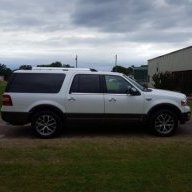
So this morning upon start up, the center stack display had a message that the system could nto communicate and error. this lasted about 3 minutes.
then out on the the road i had a gps with a line through it like you get in a parking a garage.
after about 15 miles it all cleared up.
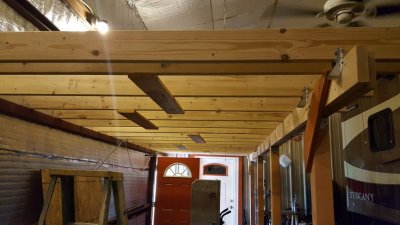
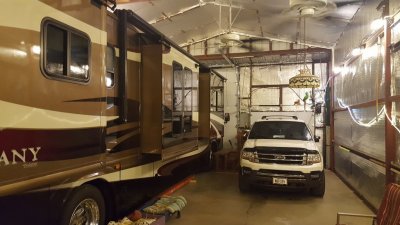
so was this caused by my vehicle being in a Faraday cage since friday afternoon?
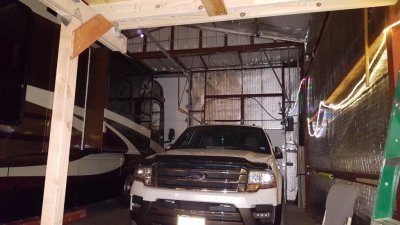
we recently enclosed the parking area with all steel and i am wondering if this caused the computer to loose its way. so when i got home and parked in the garage i turned the wifi back on and it picked up my home base wifi.
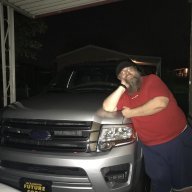
20180324_192214.jpg
 

Dorzak

Full Access Members
Joined
Jan 28, 2018
Posts
450
Reaction score
123
Location
California
Do you have the Sync 3? If so, might it have been trying to install the 3.0 update via Wi-Fi?
 

jeff kushner

Full Access Members
Joined
Nov 30, 2014
Posts
2,330
Reaction score
1,276
Location
North of Annapolis
I like your analogy to a Faraday cage, though many might not understand what you are talking about? I have not experienced the same issue however, Sync seems to need a line-of-sight to the sky to enable many of the features, at least initially.

Maybe someone like Loki can comment if Sync needs to connect b4 operating?

jeff
 

bobmbx

Full Access Members
Joined
Jun 11, 2017
Posts
1,200
Reaction score
627
Location
Virginia
You lost your link to the GPS satellites. It takes a few minutes to find the correct satellites for your earthly position. The GPS and WiFi systems are not connected to each other and use different antennae. Perfectly normal. You might find this occurring with regularity now due to your man-cave.
 

deweysmith

Full Access Members
Joined
Nov 8, 2017
Posts
574
Reaction score
206
Location
Montreal, QC
GPS signals are cached so you can quickly lock on to the nearest satellites. I would assume the GPS system in most cars is constantly "awake," and keeping track of which satellites it can use when it wakes up, for a quick signal lock. If it is impossible to get ANY signal for an extended period of time (12 hours or so), your system will completely lose track of which satellites and frequencies are nearby, and will have to start its search from scratch. 10-15 minutes seems like a long time to me but it does take a surprising amount of time (definitely minutes) to get a lock on enough satellites that you have an accurate enough location for navigation.

Cell phones avoid this problem by caching which satellites are nearby on the cell towers themselves so your phone doesn't have to waste time and battery looking for all possible satellites when there are only 3-5 of them in range at any one given time.
 
OP
OP
powerboatr

powerboatr

Full Access Members
Joined
May 16, 2016
Posts
981
Reaction score
380
Location
North East Texas
i left the wifi on last night so we shall see this afternoon.
it was reallllllly weird, gps and no screen except the message, not even the ford logo,
freaked me out.
we are also having to get a cell booster repeater....my phone will call out over wifi, but we are getting some odd feedback. missing calls is great , the spam robo calls have all but stopped
and may have to move my wifi antenae as we loose all signal right outside the door on the porch.
math is fun.
 

LokiWolf

Staff member
Moderator
Joined
Apr 2, 2016
Posts
3,971
Reaction score
2,834
Location
Richmond VA
Sounds like previous replies have pretty much got it.

Your Faraday Cage is exactly the phenomenon that you are fighting. Similar in concept at least.

WiFi will not help with the fix. It should take less time to get the GPS fix, but that assumes the truck is sitting still with a clear shot to the sky. If you are moving that time is extended.
 

jkayca

Full Access Members
Joined
Jul 25, 2017
Posts
185
Reaction score
67
Location
Ottawa, On
I garage my truck all the time and often the navigation starts up late due to no GPS reception. However, I've never seen the system display an error and not having the Ford logo show up seems to say something else is going on.
 
OP
OP
powerboatr

powerboatr

Full Access Members
Joined
May 16, 2016
Posts
981
Reaction score
380
Location
North East Texas
left wifi on for two days. today everything was dead on perfect and gps updated in less than 3 blocks.
not sure if leaving wifi on was the fix? but will be watching it closely in the coming weeks.
thinking now to get a HUGE tv and have movie night above the expy....
thinking popcorn and milk shake machine

20180403_192220.jpg

20180403_153258.jpg
 

bobmbx

Full Access Members
Joined
Jun 11, 2017
Posts
1,200
Reaction score
627
Location
Virginia
left wifi on for two days. today everything was dead on perfect and gps updated in less than 3 blocks.
not sure if leaving wifi on was the fix? but will be watching it closely in the coming weeks.
WiFi and GPS have no relationship. None. Curious...what do you mean by "leaving WiFi on"?

The time it takes the GPS system to "hook up" is directly related to the amount of time it was out of comms with the satellite array. The satellites are in orbit, and in constant motion. When you turn off your GPS (like a Garmin), the system records the ID of the satellites it was using. ( Our Sync GPS units are always "on", and are tracking the sats all the time.) When you power up, it seeks those satellites....and they may be on the other side of the planet. So the system then seeks the 3-4 strongest signals and then uses them to navigate with. As those sats move out of range, another sat in the constellation "arrives" and the system switches to it. You may never see that happen, but it happens all the time. That "boot search" takes several minutes, all dependent on sat signal strength and quality of the receiver.

IF you drive into a tunnel and lose the sats, when you drive out of the tunnel you hook up quite quickly because those 3 sats have not moved out of range yet.
 

LokiWolf

Staff member
Moderator
Joined
Apr 2, 2016
Posts
3,971
Reaction score
2,834
Location
Richmond VA
WiFi and GPS have no relationship. None.

Not correct. Sorry.

Most modern operating systems including iOS, Android, Windows, and MacOS use network based location data to help with location services and that assists with getting a GPS fix, because like you said knowing what sats to look for helps.

This is why when you use mapping software on an iPhone and WiFi is off it prompts to turn it on.

Since the OS on Sync 3 is based off of a Cell Phone OS, I am going to make the assumption that it can use the same tricks. If it can connect to WiFi when it powers up, then it can get a “rough fix”, so when it gets outside and starts to get satellite coverage it can zero in quicker.

I would have to dig deeper in to the code to confirm, but it is a good educated theory.
 

bobmbx

Full Access Members
Joined
Jun 11, 2017
Posts
1,200
Reaction score
627
Location
Virginia
Thats not right. Mapping software uses GPS data for your position only, and that comes directly from the satellites. Map-capable devices use cellular or WiFi for all other data (weather, traffic, the map itself, Points of Interest, etc), and integrates your position onto the map. Your position is reported up via cell or WiFi for other purposes (iOS traffic, Waze, Find My iPhone, advertisements, NSA, etc...). Your position is based on the triangulation of the satellites to your position. It all starts with your GPS receiver/antenna.

The GPS system can only determine where the receiving antenna is located; this means if you install an antenna a mile away from your house and run a wire to a receiver in your house, your location will be plotted as the location of the antenna, not you.

If you have Waze, put your phone in Airplane mode and drive around. You'll see your correct position displayed as you move because its coming from the satellites. You won't see other Wazers or warnings because they come from WiFi or cellular. If you drive far enough away from your starting position, you'll run off the map because Waze can't download any more map blocks (with the transmitter off, it'll never call for the next map block), but you'll still see your Waze icon displayed along with your speed on a featureless screen.

Being prompted by location services to turn on WiFi or cellular data is so it can send the first question to your device, which is "Where are you?", and then start sending your device the appropriate data like map data, traffic, ads, etc. Those location services have no idea where you are until your device tells them. And it gets that data from the GPS system.
 
Last edited:

LokiWolf

Staff member
Moderator
Joined
Apr 2, 2016
Posts
3,971
Reaction score
2,834
Location
Richmond VA
Thats not right. Mapping software uses GPS data for your position only, and that comes directly from the satellites. Map-capable devices use cellular or WiFi for all other data (weather, traffic, the map itself, Points of Interest, etc), and integrates your position onto the map. Your position is reported up via cell or WiFi for other purposes (iOS traffic, Waze, Find My iPhone, advertisements, NSA, etc...). Your position is based on the triangulation of the satellites to your position. It all starts with your GPS receiver/antenna.

The GPS system can only determine where the receiving antenna is located; this means if you install an antenna a mile away from your house and run a wire to a receiver in your house, your location will be plotted as the location of the antenna, not you.

If you have Waze, put your phone in Airplane mode and drive around. You'll see your correct position displayed as you move because its coming from the satellites. You won't see other Wazers or warnings because they come from WiFi or cellular. If you drive far enough away from your starting position, you'll run off the map because Waze can't download any more map blocks (with the transmitter off, it'll never call for the next map block), but you'll still see your Waze icon displayed along with your speed on a featureless screen.

You are mostly correct. Network location fix is used by every current modern OS.

Example: Vanilla Windows 10 machine just installed, no personal info, location services on, bring up mapping software, it will know where you are. No GPS. To further that, I have seen both Windows and Mac laptops pull location data from my iPhone via its Hotspot. How do I know it is pulling location data, because my location changes in browsers and mapping software. Again, the laptops have NO built in GPS.

Modern mobile devices use 3 methods for location, Network, Cell Towers, and GPS. All are used to increase accuracy and the speed of the Location fix.

Again, not a stretch that Sync 3 could use Network fix, since it is at its core Blackberry QNX, an OS designed for Mobile devices.
 

deweysmith

Full Access Members
Joined
Nov 8, 2017
Posts
574
Reaction score
206
Location
Montreal, QC
Again, not a stretch that Sync 3 could use Network fix, since it is at its core Blackberry QNX, an OS designed for Mobile devices.
This is correct.

Being prompted by location services to turn on WiFi or cellular data is so it can send the first question to your device, which is "Where are you?", and then start sending your device the appropriate data like map data, traffic, ads, etc. Those location services have no idea where you are until your device tells them.
This is not. Google, Apple, Garmin, and many other companies maintain databases of where Wi-Fi access points are located based on their MAC address and the approximate GPS location of other people that have previously connected to that access point. It can get your location within approximately 300m just from Wi-Fi alone.

You are correct in that GPS *only* tells you the position of the receiving antenna on the globe. You are correct about the satellite orbits and everything else like that as well. The reason Wi-Fi could help when the truck can't get a GPS lock is for the same reason it's so fast on your phone… your phone looks up on the cell tower (A-GPS, where the cell tower itself sends cached GPS satellite data) or with Apple/Google over the internet to ask it what satellites SHOULD be visible based on your (very rough) location and their orbits, and then it can lock to those signals much faster (saving battery and your time.)

Also, Wi-Fi position can be very, very accurate when there are many wireless networks in range. iPod Touch and non-LTE iPads are not equipped with GPS radios, but can usually obtain a location fix within a couple of meters with Wi-Fi alone, provided there's 3-5 networks around. It uses the same basic triangulation algorithm based on the signal strength and the known approximate location of the access point.

I also don't think Waze would work in Airplane Mode. My iPhone 8 disables GPS in Airplane Mode.
 

LokiWolf

Staff member
Moderator
Joined
Apr 2, 2016
Posts
3,971
Reaction score
2,834
Location
Richmond VA
This is correct.


This is not. Google, Apple, Garmin, and many other companies maintain databases of where Wi-Fi access points are located based on their MAC address and the approximate GPS location of other people that have previously connected to that access point. It can get your location within approximately 300m just from Wi-Fi alone.

You are correct in that GPS *only* tells you the position of the receiving antenna on the globe. You are correct about the satellite orbits and everything else like that as well. The reason Wi-Fi could help when the truck can't get a GPS lock is for the same reason it's so fast on your phone… your phone looks up on the cell tower (A-GPS, where the cell tower itself sends cached GPS satellite data) or with Apple/Google over the internet to ask it what satellites SHOULD be visible based on your (very rough) location and their orbits, and then it can lock to those signals much faster (saving battery and your time.)

Also, Wi-Fi position can be very, very accurate when there are many wireless networks in range. iPod Touch and non-LTE iPads are not equipped with GPS radios, but can usually obtain a location fix within a couple of meters with Wi-Fi alone, provided there's 3-5 networks around. It uses the same basic triangulation algorithm based on the signal strength and the known approximate location of the access point.

I also don't think Waze would work in Airplane Mode. My iPhone 8 disables GPS in Airplane Mode.

Also, for clarity, this is not just WiFi, wired devices take advantage of that also, but unlike above are limited to only one network worth of fix, so more rough but still works.
 
OP
OP
powerboatr

powerboatr

Full Access Members
Joined
May 16, 2016
Posts
981
Reaction score
380
Location
North East Texas
wifi ON is me telling sync to leave the wifi on in the truck while its parked at the house and do automatic updates..
i have zero idea what fixed it, BUT and this is a BIG but...today i backed out of the cage and gps was dead on. could have been easy, but it tracked in the neighborhood ok. My phone was not bluetoothed to the truck. .

and.....something updated, as the font on the cruise control speed setting looks different, as in crisper??? or i have lost my mind , which is possible
 
Top