SYNC 3 - which version are you at?

Disclaimer: Links on this page pointing to Amazon, eBay and other sites may include affiliate code. If you click them and make a purchase, we may earn a small commission.

AAOO

Full Access Members
Joined
May 15, 2019
Posts
364
Reaction score
205
Location
USA
Unless I go in there are take it out, no. I have no idea where it even is

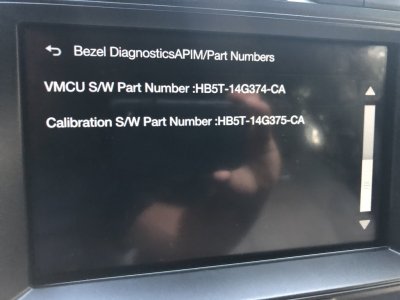
CD eject and right seek. Then end speaker test. Then click on the APIM info. Should be the top soft button. I’m interested in your part number as well. Trying to see if I can install 3.3 on my end of year 2018 build model.

My info attached.
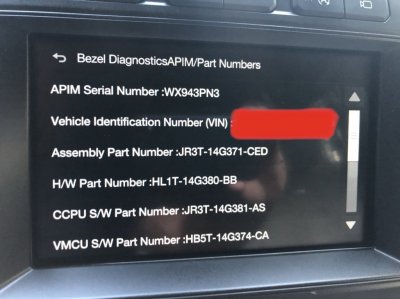
9D09FAA2-A342-4595-B33B-874FEC10528E.jpeg F994BDCB-E23F-48B7-B35E-75B512F57B1B.jpeg
 
Last edited:

AAOO

Full Access Members
Joined
May 15, 2019
Posts
364
Reaction score
205
Location
USA
Check this out...

https://sync3programming.com/Sync-3-APIM-Programming-for-FORScan-via-Email-by-DanMc85-p112322808

  • NOTE: It has been observed that some of the newer Sync 3 units (Late 2018/2019), that ship with software version 3.3+, have been changed enough that some users may experience issues when using them on some older vehicles that do NOT have a Smart Data Link Gateway Module for their CAN Bus communications or are running older module firmware. The running theory is that the newer APIMs seem to lack proper vehicle support of the older Common Global Electrical Architecture (CGEA) 1.2. The easiest way to spot one of these newer Generation 4 units, is that it will be missing the secondary gray USB port on the back of the APIM and the 14G370 part number will start with a J (or later) alphabet letter. Additionally, they will have a 7D0-09-xx memory block in their as-built programming... Purchase these units at your own risk, but these units may freeze or not power on/boot at all if installed in an unsupported vehicle.
 

AAOO

Full Access Members
Joined
May 15, 2019
Posts
364
Reaction score
205
Location
USA
I just emailed the owner of the website in the link and he said my APIM is 3.0 only. That sucks! my 9/2018 truck is already outdated. I'm guessing it goes off the H/W part number.
 

AAOO

Full Access Members
Joined
May 15, 2019
Posts
364
Reaction score
205
Location
USA
Tht does nothing on my 16...

All good. I figured out the info I needed. If you still want to see the hidden info you have to hold both buttons down longer. 10-20 seconds should do it with the acc power on.

Sequence. Get in truck. Hit start button without starting vehicle. Push cd eject and hold. Push right seek and hold. Wait 10-20 seconds while holding both buttons.
 

16plati

Full Access Members
Joined
Mar 22, 2019
Posts
1,356
Reaction score
453
Location
VA
All good. I figured out the info I needed. If you still want to see the hidden info you have to hold both buttons down longer. 10-20 seconds should do it with the acc power on.

Sequence. Get in truck. Hit start button without starting vehicle. Push cd eject and hold. Push right seek and hold. Wait 10-20 seconds while holding both buttons.
I’ll try pulling it with forscan
 

benyl

Full Access Members
Joined
Feb 24, 2018
Posts
153
Reaction score
61
Location
Calgary
Anyone have the 18093 files that they can share? I upgraded to the 19025 version and it all effed up now haha. Touch screen unresponsive.
 

AAOO

Full Access Members
Joined
May 15, 2019
Posts
364
Reaction score
205
Location
USA
Anyone have the 18093 files that they can share? I upgraded to the 19025 version and it all effed up now haha. Touch screen unresponsive.

Are you in a 2018 or 2019? Can you give us some info on how you tried to install 19205? I might be able to help with the files but want to make sure we are on the right path. I'm on 19205 and have had zero issues in my 2018.
 

Tom T

Full Access Members
Joined
Apr 5, 2019
Posts
144
Reaction score
38
Location
Dallas
just updated to 19205. Lets see if car play is really a bit faster....
 

Artie

Full Access Members
Joined
Jul 24, 2017
Posts
1,870
Reaction score
1,036
Location
Georgia
I know I’m really late to the party but my build is:

17279
 
OP
OP
Jeka

Jeka

Well-Known Member
Joined
Dec 7, 2017
Posts
76
Reaction score
42
Location
BC
Thanks for all who replied! Yesterday I picked up my Expedition from the dealer who fixed my lumbar support/massaging control buttons and updated Sync3 to 19149. As far as I know they haven’t replaced any components...
That’s weird that Ford website didn’t show any available updates for me... maybe because I’m in Canada :)
 

Squark

Full Access Members
Joined
Jan 8, 2019
Posts
213
Reaction score
160
Location
NC
My understanding is that 19149 is only (officially) available through dealers right now.
 

Highlightreel

Well-Known Member
Joined
May 10, 2019
Posts
84
Reaction score
45
Location
MN
I'm rocking the 18093. Just had oil changed at dealer and, I didn't ask, they didn't update. I logged into the site and it tells me no update available for me either.

Are there any changes to get excited about? (Android user)
 

benyl

Full Access Members
Joined
Feb 24, 2018
Posts
153
Reaction score
61
Location
Calgary
Update: APIM is getting replaced.


Sent from my iPhone using Tapatalk
 

Johhn14

Well-Known Member
Joined
Sep 15, 2019
Posts
48
Reaction score
16
Location
boston
Just got my 2019 Expedition Platinum and have been enjoying the forum here.

I’m a bit of a Sync rookie having had a Jeep previously. Seeing conflicting info as to whether we can expect 3.3 or 3.4 in our Expeditions or if we’re maxed out at 3.0 because of the hardware.

Can someone confirm?

I’m at 3.0 build 18093
 

Amacron

Active Member
Joined
Sep 24, 2014
Posts
42
Reaction score
17
Location
Louisville Ky
Just got my 2019 Expedition Platinum and have been enjoying the forum here.

I’m a bit of a Sync rookie having had a Jeep previously. Seeing conflicting info as to whether we can expect 3.3 or 3.4 in our Expeditions or if we’re maxed out at 3.0 because of the hardware.

Can someone confirm?

I’m at 3.0 build 18093
Interested in this as well. 2019 max build date 8/22/19
 
Top