

You are using an out of date browser. It may not display this or other websites correctly.
You should upgrade or use an alternative browser.
You should upgrade or use an alternative browser.
2011 Remote Start
- Thread starter Wes1
- Start date
Disclaimer: Links on this page pointing to Amazon, eBay and other sites may include affiliate code. If you click them and make a purchase, we may earn a small commission.
Straightshot7
Member
I need help with doing this remote start door bypass I just purchased a 2012 limited and I've tried to program it by the YouTube video
http://m.youtube.com/watch?v=fQHb0mU0rvI but when I enter bank 2 I only have 4 and 5 chirps no 7
http://m.youtube.com/watch?v=fQHb0mU0rvI but when I enter bank 2 I only have 4 and 5 chirps no 7
Straightshot7
Member
I figured it out finally instead of toggling through the each option 1-7 using the service button I figured out its the bake pedal
Ngirardi
New Member
You tube video posted earlier is a key instruction. Before you do this watch that video.
My added note is in our 2011 expedition el limited with sync and nav, the button was routed different than the photos here. My button was tucked away behind a few brackets. I was only able to find it by locating the green connector and following it down from there to feel for the button. I made note of the model and features because some threads seem to suggest different parts based on those features.
Doors closed requirement made it awkward as I couldn't reach the button from driver seat upright. I had to lay upside down over the seat and a helper to turn the key.
Hold brake down before key on, and through 10 second hold til 3 beeps. Once 3 beeps you can release all. Press button to cycle through banks, 5 honks = bank 2. Press brake pedal to cycle through items within bank, 7 honks = item 7 ("Door Ajar Input Entry Delay"). Press start button on fob 1 time to change setting. Turn off and remove key. All finished.
Enjoy.
My added note is in our 2011 expedition el limited with sync and nav, the button was routed different than the photos here. My button was tucked away behind a few brackets. I was only able to find it by locating the green connector and following it down from there to feel for the button. I made note of the model and features because some threads seem to suggest different parts based on those features.
Doors closed requirement made it awkward as I couldn't reach the button from driver seat upright. I had to lay upside down over the seat and a helper to turn the key.
Hold brake down before key on, and through 10 second hold til 3 beeps. Once 3 beeps you can release all. Press button to cycle through banks, 5 honks = bank 2. Press brake pedal to cycle through items within bank, 7 honks = item 7 ("Door Ajar Input Entry Delay"). Press start button on fob 1 time to change setting. Turn off and remove key. All finished.
Enjoy.
steveg_nh
Full Access Members
Should this work on a 2014 Expedition with Sync and Nav? I read a comment on another thread about possibly not having the button under the dash, and needing to do it through the CAN system, but never saw any confirmation if that. My truck is 3 weeks old but I HATE how the remote start works right now.
Thanks.
Thanks.
Last edited:
steveg_nh
Full Access Members
I tested tonight too, and noticed that just putting the key in the ignition shuts it off too. Will this change for the door,also fix that? I need to see if I can find the button under the dash.
Last edited:
steveg_nh
Full Access Members
[deleted by author] not needed
Last edited:
steveg_nh
Full Access Members
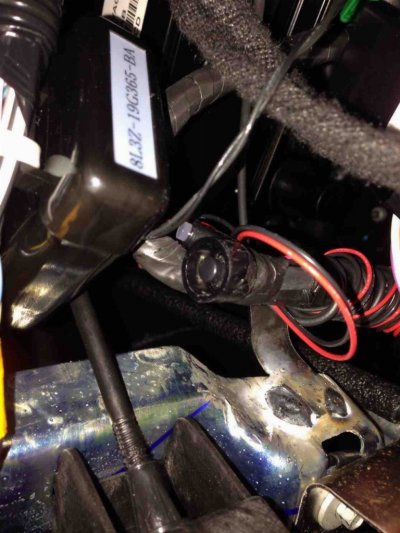
Well, for anyone interested, I can now confirm from personal experience that this does STILL work (as I thought it would) on a 2014. I just did it on my '14. Took more time to find the darn button and LED than to reprogram. First time, I just shut off the door open/key insert shutdown option. But then I said, what the heck, and set the runtime for 15 minutes from 10. Literally, this is EASY. My button was taped up next to the remote start box, just to the right of the power pedal height adjust button. I had to remove the kickplate trim under the steering wheel (3 7mm bolts) and then the trim plate that holds the power pedal button. I was able to reach through the hole in the sheet metal where the power pedal button goes to access the remote start programming button. I LOVE it now.
One thing I did read somewhere was that the remote start may be set up as a restricted MYKEY. I went through the MYKEY settings and confirmed mine was not. It's an admin key. Cool.
Now to find out if I can use that 5 button key. I'd love to get rid of the extra fob for the remote start.
One thing I did read somewhere was that the remote start may be set up as a restricted MYKEY. I went through the MYKEY settings and confirmed mine was not. It's an admin key. Cool.
Now to find out if I can use that 5 button key. I'd love to get rid of the extra fob for the remote start.
Last edited:
steveg_nh
Full Access Members
Thanks all, picked up a 14 EL Limited yesterday and just did this. Thanks Steve for help on the button location.
 you're welcome!
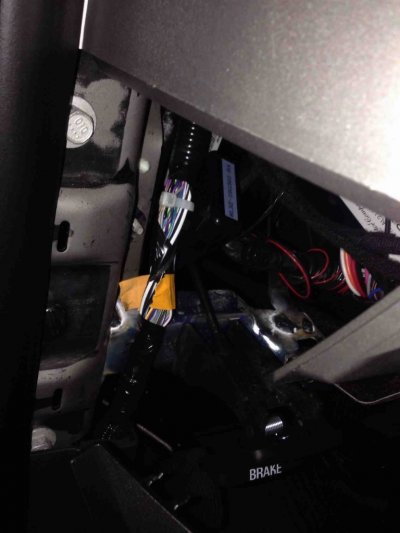
Thanks Guys, just did this to my '14 EL Limited this morning. Mine was installed at the factory and was taped in a bundle, basically behind the panel where the power pedals switch is. Had to remove both the panels in order to access.
Last edited:
steveg_nh
Full Access Members
Same exact spot on my non EL limited.
phantom697300
New Member
... "But then I said, what the heck, and set the runtime for 15 minutes from 10." ...
Is there list of other selectible options, such as Run Time to go with Door Open?
Just installed the 100 series remote start on a 2010 w/sync. Everything worked fine until I changed option 7 now I get 4 beeps which means tach not programmed. I switched option 7 back and unplugged entire system no change. Any ideas ?
steveg_nh
Full Access Members
Just installed the 100 series remote start on a 2010 w/sync. Everything worked fine until I changed option 7 now I get 4 beeps which means tach not programmed. I switched option 7 back and unplugged entire system no change. Any ideas ?
Bank 2, option 1 (tach mode) needs to be set to Tachless (the LED should be ON). I'm guessing you held the button too long to change the MYKEY/key in setting, and reset the system to defaults again, in which case tach mode is set to OFF right now.
Last edited:
Bank 2, option 1 (tach mode) needs to be set to Tachless (the LED should be ON). I'm guessing you held the button too long to change the MYKEY/key in setting, and reset the system to defaults again, in which case tach mode is set to OFF right now.
OK, I did reset all to the default settings per the "option programming chart" I have. However, it shows Learn Tach as Bank 1 option 1 (LED boxes are blank) and Bank 2 option 1 shows "Blind Crank" with default as ON.
Also,
Last night while trying to teach tach, I now get no response when pressing the remote and the pats seems to not learn remote ie security light never goes solid for 3-5sec. The trucks battery was low enough to not start and need a jump, so I am hoping that is why the learn feature stop working.
Thanks for your time.
David
Last edited:
steveg_nh
Full Access Members
OK, I did reset all to the default settings per the "option programming chart" I have. However, it shows Learn Tach as Bank 1 option 1 (LED boxes are blank) and Bank 2 option 1 shows "Blind Crank" with default as ON.
Also,
Last night while trying to teach tach, I now get no response when pressing the remote and the pats seems to not learn remote ie security light never goes solid for 3-5sec. The trucks battery was low enough to not start and need a jump, so I am hoping that is why the learn feature stop working.
Thanks for your time.
David
But you have to set bank 2 option 1 to tachless, then bank 1 option 1 doesn't matter. Is that how it's set? "Blink Crank" sounds the same as tachless, but sounds like your system might be a bit different than what we are all used to seeing here for a series 100. Here's what I have on programming options....
Attachments
Last edited:
Wording is similar. Your pdf closely matches my page 9 the PEPS instructions, mine are page 1 for the 100 series.
bank2 opt1 "Blind Crank" default is "ON" but bank2 opt4 "1press to start" default is "OFF" possibly this should be on ? I can't seem to get a PDF under 100KB but did a gif ?
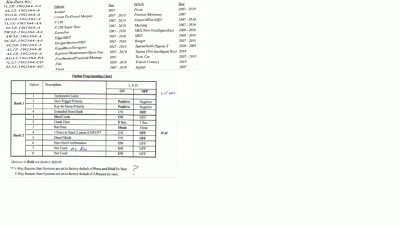
bank2 opt1 "Blind Crank" default is "ON" but bank2 opt4 "1press to start" default is "OFF" possibly this should be on ? I can't seem to get a PDF under 100KB but did a gif ?
Last edited:
steveg_nh
Full Access Members
Something is different about that kit, vs what I have and what most are talking about in this thread. It only goes up to the 2010 model year, vs 11+. I thought they were the same up to 14 so not sure what's different.
this is how all of my settings are, if it helps...see attached.
this is how all of my settings are, if it helps...see attached.
Attachments
Similar threads
- Replies
- 8
- Views
- 4K
- Replies
- 3
- Views
- 1K


- Replies
- 7
- Views
- 981
- Replies
- 0
- Views
- 553

