2015/2016

Disclaimer: Links on this page pointing to Amazon, eBay and other sites may include affiliate code. If you click them and make a purchase, we may earn a small commission.

gblakeb

Member
Joined
Apr 3, 2017
Posts
9
Reaction score
1
Location
TX
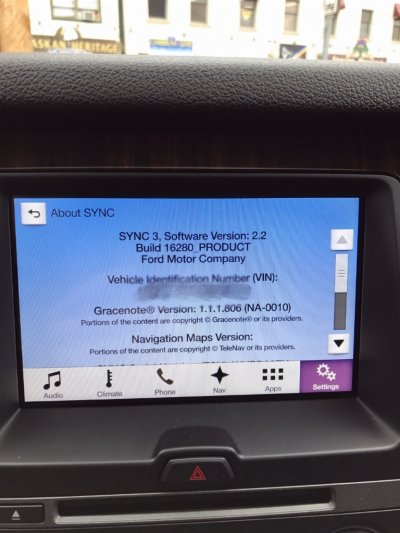
I am at Sync 3 2.2 now after using the non nav version. It requires using the usb update 2 times. I was able to successfully do it using a Mac. Now I just need to get the usb hub that provides CarPlay.
 
OP
OP
mdntblu

mdntblu

Full Access Members
Joined
Oct 10, 2007
Posts
106
Reaction score
18
Location
Corona, CA USA
I am at Sync 3 2.2 now after using the non nav version. It requires using the usb update 2 times. I was able to successfully do it using a Mac. Now I just need to get the usb hub that provides CarPlay.
Yeah my update1 fails and says I don't have enough space or something, even after doing a master reset. Weird. And you have a 2016 Exp Limited? Do you know the date of manufacture? Mine is sept 2015.
 

LokiWolf

Staff member
Moderator
Joined
Apr 2, 2016
Posts
3,971
Reaction score
2,834
Location
Richmond VA
I did find this post and wondering if maybe I can modify the files to make it install less and just do 3 stages. https://www.f150forum.com/f118/curr...auto-information-360660/index171/#post5135735
I would not modify the install. Talked to the guy who created it, he said switch USB drives. He has seen the USB 2.0 Drives work better vs USB 3.0. He also said to make sure you are doing a full format, not a quick before you copy the files to it. He has helped 100's do the update, I am at about 50.
 

LokiWolf

Staff member
Moderator
Joined
Apr 2, 2016
Posts
3,971
Reaction score
2,834
Location
Richmond VA
I am at Sync 3 2.2 now after using the non nav version. It requires using the usb update 2 times. I was able to successfully do it using a Mac. Now I just need to get the usb hub that provides CarPlay.
So, CarPlay did not work after the update. If so, that confirms the need for a new Hub. Did you look close at the Hub and whether it is easy to swap? The Edge was easy.
 

gblakeb

Member
Joined
Apr 3, 2017
Posts
9
Reaction score
1
Location
TX
Yeah my update1 fails and says I don't have enough space or something, even after doing a master reset. Weird. And you have a 2016 Exp Limited? Do you know the date of manufacture? Mine is sept 2015.
Mine was a September 2015.
 

gblakeb

Member
Joined
Apr 3, 2017
Posts
9
Reaction score
1
Location
TX
So, CarPlay did not work after the update. If so, that confirms the need for a new Hub. Did you look close at the Hub and whether it is easy to swap? The Edge was easy.
Looks pretty easy to pull out. Haven't tried yet, but I'm not expecting any problems. I already have the tools to do it.
 
OP
OP
mdntblu

mdntblu

Full Access Members
Joined
Oct 10, 2007
Posts
106
Reaction score
18
Location
Corona, CA USA
I would not modify the install. Talked to the guy who created it, he said switch USB drives. He has seen the USB 2.0 Drives work better vs USB 3.0. He also said to make sure you are doing a full format, not a quick before you copy the files to it. He has helped 100's do the update, I am at about 50.
So you think it's my flash drive? Hmmmm. That's weird. I'll have to find an older one. I actually don't know what version it is.
 

jeff kushner

Full Access Members
Joined
Nov 30, 2014
Posts
2,330
Reaction score
1,276
Location
North of Annapolis
So you think it's my flash drive? Hmmmm. That's weird. I'll have to find an older one. I actually don't know what version it is.

I know nothing about the update but I can confirm that flash drives/class 10 memory cards can make a huge difference when installing firmware. I recently bought a night vision scope and I compiled a guide for the new guys because so many were having firmware-update issues and one of the major causes of their problems has been verified to be crappy flash drives and/or memory cards!

good luck,

jeff
 
OP
OP
mdntblu

mdntblu

Full Access Members
Joined
Oct 10, 2007
Posts
106
Reaction score
18
Location
Corona, CA USA
I know nothing about the update but I can confirm that flash drives/class 10 memory cards can make a huge difference when installing firmware. I recently bought a night vision scope and I compiled a guide for the new guys because so many were having firmware-update issues and one of the major causes of their problems has been verified to be crappy flash drives and/or memory cards!

good luck,

jeff
Hmmmm but he's telling me that my 3.0 USB flash drive is probably causing the problem and to downgrade to a 2.0 USB version flash drive. I do know what you're talking about because if you own a GoPro or other type of cameras (drone's with buit-in cameras, etc) then we always have these issues.
 

jeff kushner

Full Access Members
Joined
Nov 30, 2014
Posts
2,330
Reaction score
1,276
Location
North of Annapolis
I think that it has to do with how the firmware/software was originally compiled....and he's right about doing the full formatting too. I've seen scope firmware issues disappear when the new owner has gone back, reformatted their card, copied the firmware over to it them do the install....all with no issues....so hopefully for you, that's all it is!

jeff
 
OP
OP
mdntblu

mdntblu

Full Access Members
Joined
Oct 10, 2007
Posts
106
Reaction score
18
Location
Corona, CA USA
I think that it has to do with how the firmware/software was originally compiled....and he's right about doing the full formatting too. I've seen scope firmware issues disappear when the new owner has gone back, reformatted their card, copied the firmware over to it them do the install....all with no issues....so hopefully for you, that's all it is!

jeff
I actually did reformat my flash drive and did ExFat this time since the readme doc said FAT32 or ExFat. So now I've tried both ways. Only thing I haven't tried is a different flash drive. I ordered some new ones from Amazon and should be here today.
 

LokiWolf

Staff member
Moderator
Joined
Apr 2, 2016
Posts
3,971
Reaction score
2,834
Location
Richmond VA
Like I said, got this from the guy that compiled the install, and he has helped MANY people. All of the in person installs I have done, I have used an older USB 2.0 16GB Flash Drive. Never had an issue. Mine is also formatted ExFAT.
 
OP
OP
mdntblu

mdntblu

Full Access Members
Joined
Oct 10, 2007
Posts
106
Reaction score
18
Location
Corona, CA USA
Like I said, got this from the guy that compiled the install, and he has helped MANY people. All of the in person installs I have done, I have used an older USB 2.0 16GB Flash Drive. Never had an issue. Mine is also formatted ExFAT.
Ok well I ordered some new 2.0 USB flash drives from Amazon this morning same day delivery!! Should be there when I get home.

This is what I ordered: http://a.co/8AJ2oAX
 
Last edited:
As an Amazon Associate we earn from qualifying purchases.
Top