2019 Rear Seat Entertainment Question

Disclaimer: Links on this page pointing to Amazon, eBay and other sites may include affiliate code. If you click them and make a purchase, we may earn a small commission.

Fizzy

Full Access Members
Joined
Dec 18, 2020
Posts
443
Reaction score
321
Location
Alberta, Canada
Have to say I'm really disappointed with the RSE system. I thought it would be better than the GMC offering, but it's not. Their system might be a single roof mounted screen, but at least it's controllable from the front screen.
 

techdude99

Full Access Members
Joined
Nov 25, 2019
Posts
367
Reaction score
140
Location
US
Same here. I was disappointed with the lack of Sync integration. If I had to do it over again, I would go aftermarket. Voxx makes some really nice RSE touch screen systems for less than the Ford OEM system. From the pics I found they integrate perfectly with the Expedition interior.
 

Fizzy

Full Access Members
Joined
Dec 18, 2020
Posts
443
Reaction score
321
Location
Alberta, Canada
Same here. I was disappointed with the lack of Sync integration. If I had to do it over again, I would go aftermarket. Voxx makes some really nice RSE touch screen systems for less than the Ford OEM system. From the pics I found they integrate perfectly with the Expedition interior.

We put a 128gb SD card in and it's full of movies and shows. I figure it'll get less annoying as the kids get older and can control it themselves. Right now it's a PITA trying to reach over from the passenger seat on road trips to change movies etc.

Also, are the wireless headphones on yours really hissy/quiet? Do you know if you can replace them with different wireless headphones? Or only wired?
 

techdude99

Full Access Members
Joined
Nov 25, 2019
Posts
367
Reaction score
140
Location
US
My daughter is 18 months and hates the headsets so we use the car speakers.

It's been a year since I tried the OEM headsets so let me get back to you after I find them. We have a wired pair that my wife uses when she's in the back. I'll ask her about the hiss and see if I can connect my Galaxy Buds to the back.

What format are your movies and how did you rip them?
 
Last edited:

aggiegrad05

Full Access Members
Joined
Nov 6, 2017
Posts
1,834
Reaction score
1,392
Location
North Texas
Same here. I was disappointed with the lack of Sync integration. If I had to do it over again, I would go aftermarket. Voxx makes some really nice RSE touch screen systems for less than the Ford OEM system. From the pics I found they integrate perfectly with the Expedition interior.
https://www.voxxelectronics.com/universal-seatback/?sku=AVXSB10UHD2
Those are the ones I bought. They are fabulous and are controlled from an app on my phone (or my wife's phone as she sits in the passenger seat). The only downside is they don't play nice with the Auto Start/Stop, so I had to buy an AS/S Eliminator and disable that "feature"...no biggie.

$1300 on Amazon and MUCH better than the factory RSE. And yes, if you didn't know they were aftermarket, you wouldn't know it; they integrate perfectly with the seats/interior.
 

techdude99

Full Access Members
Joined
Nov 25, 2019
Posts
367
Reaction score
140
Location
US
...Also, are the wireless headphones on yours really hissy/quiet? Do you know if you can replace them with different wireless headphones? Or only wired?

I was able to connect my Galaxy Buds via Bluetooth to Monitor A and listen to a video. There was no hiss.

I found one of the original RSE RF headsets. There is an audible hiss in the background that starts around 50% volume and increases as the volume goes up.
 

techdude99

Full Access Members
Joined
Nov 25, 2019
Posts
367
Reaction score
140
Location
US
We put a 128gb SD card in and it's full of movies and shows...

I've tried a 64GB and 128GB SD card formatted in exFAT and FAT32. In both instances, I can only see the first video out of 28. All the files are less than 700MB each. I'm waiting to hear back from Voxx Intl support but I'd like to figure it out myself.

I tried again with Handbrake to rip the all DVD's to the M4V format, but the RSE still only recognizes the first one. I moved them over to a 64GB USB drive with the same result. What do I need to update to get the system to recognize the rest of the files?
 

techdude99

Full Access Members
Joined
Nov 25, 2019
Posts
367
Reaction score
140
Location
US
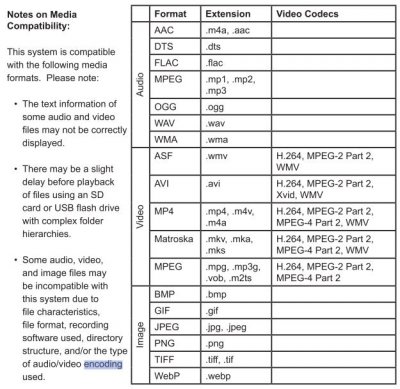
Fizzy - You mentioned in another thread that the manual specifies the encoding method, so here's the table for reference. I'll give it a shot and post back tomorrow or when I have time to try again.

encoding.JPG
 

techdude99

Full Access Members
Joined
Nov 25, 2019
Posts
367
Reaction score
140
Location
US
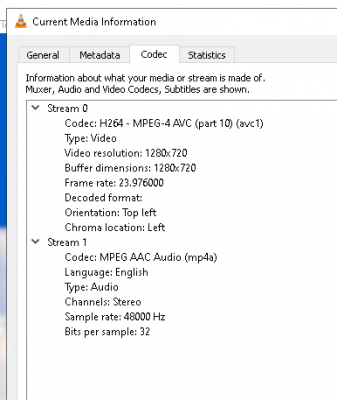
Fizzy - I confirmed the videos are M4V encoded with H.264 so I'm REALLY curious about the format and codec you utilized. Have a good night :)
 

Fizzy

Full Access Members
Joined
Dec 18, 2020
Posts
443
Reaction score
321
Location
Alberta, Canada
I was able to connect my Galaxy Buds via Bluetooth to Monitor A and listen to a video. There was no hiss.

I found one of the original RSE RF headsets. There is an audible hiss in the background that starts around 50% volume and increases as the volume goes up.

That's awesome - so any bluetooth headset should work. I'll be tossing the factory ones into the firepit this weekend!
 

Fizzy

Full Access Members
Joined
Dec 18, 2020
Posts
443
Reaction score
321
Location
Alberta, Canada
Fizzy - I confirmed the videos are M4V encoded with H.264 so I'm REALLY curious about the format and codec you utilized. Have a good night :)

Odd... all my media is converted to the following format, and they all load when I put the SD card in directly to the drivers side RSE screen (no USB):

I'm using the mp4 container, not m4v.

upload_2021-5-11_0-0-3.png
 

Fizzy

Full Access Members
Joined
Dec 18, 2020
Posts
443
Reaction score
321
Location
Alberta, Canada
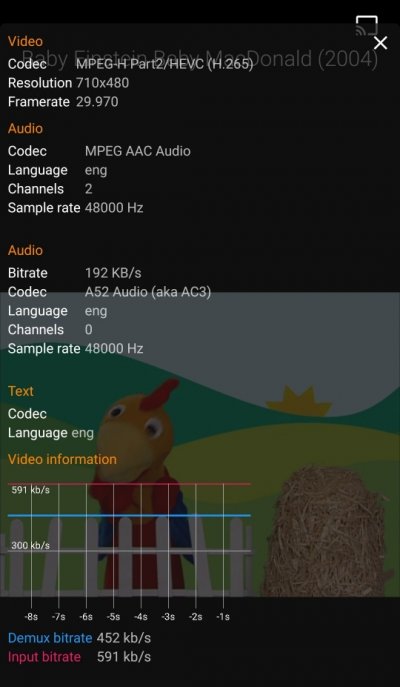
I can hardly make it out... but are you using H265?

Edit: Yeah, you're using H265. There's no way these units can cope with that codec. Hell, even some laptops struggle with that.

Use H264. You'll end up with bigger files, but the compression isn't so extreme and doesn't require a powerful CPU.
 
Last edited:

techdude99

Full Access Members
Joined
Nov 25, 2019
Posts
367
Reaction score
140
Location
US
I encoded two of the same DVD's with DVD Ripper using the MP4 container and H264 codec. The file size tripled, but I can view both MP4's in the Ford/Voxx RSE using an exFAT formatted USB stick. I'll transfer everything to a SD Card when I'm done and try some of the other approved codecs to see if I can get the size down.

Fizzy - Thank you for the assist. I didn't realize H265 was an option in the software so (with the change) I'm good for now!
 

Fizzy

Full Access Members
Joined
Dec 18, 2020
Posts
443
Reaction score
321
Location
Alberta, Canada
I encoded two of the same DVD's with DVD Ripper using the MP4 container and H264 codec. The file size tripled, but I can view both MP4's in the Ford/Voxx RSE using an exFAT formatted USB stick. I'll transfer everything to a SD Card when I'm done and try some of the other approved codecs to see if I can get the size down.

Fizzy - Thank you for the assist. I didn't realize H265 was an option in the software so (with the change) I'm good for now!

Nice! Yeah, 264 isn't as compact, but then that means you don't need such a powerful machine to uncompact it in realtime whilst watching.

You can trim down the image quality, resolution, audio quality etc to dial it into a compromise between file size and quality.

Personally, I just got a 128gb SD card and tossed around 100 movies on. Plenty to keep our kids quiet (kinda) on road trips!
 

techdude99

Full Access Members
Joined
Nov 25, 2019
Posts
367
Reaction score
140
Location
US
Thanks!

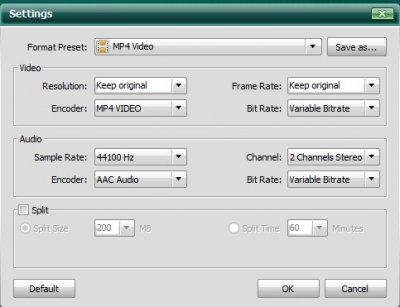
I played around with the settings and was able to reduce the file size from 2GB to 388MB with the following options selected:

Screenshot 2021-05-11 142231.jpg

I should have plenty of room to spare for music and movies when I'm done switching to a 128GB exFAT SD Card.
 
Last edited:

Midnight451

Active Member
Army
Joined
Jun 12, 2020
Posts
33
Reaction score
10
Location
Chicago
I was only able to connect Bluetooth headphones to monitor A. Were you able to connect to monitor B?

I have a feeling only the infered headphone will work for that.
 

techdude99

Full Access Members
Joined
Nov 25, 2019
Posts
367
Reaction score
140
Location
US
I was only able to connect Bluetooth headphones to monitor A. Were you able to connect to monitor B?

I have a feeling only the infered headphone will work for that.
It's been a while since I've been in the site and I just noticed your post.

You're probably right. I believe that the RSE can only connect to one Bluetooth device a time so you're likely limited to a single headrest.

The IR and wired headsets obviously work on the passenger (B) side but I never tried Bluetooth or see any reference to it in the manual for this scenario.

I'll check it out and post back.
 

Members online

No members online now.

Forum statistics

Threads
57,013
Posts
535,878
Members
54,708
Latest member
Landsbutter
Top