

For those interested in installing dash cams -
I installed a Viofo dash cam that was in my wife's old car in our new 2025 Expedition platinum. The nice thing about this setup is it is a nice, clean, hardwired installation and turns on when you start the car, senses when you've turned it off and will record for a while while you are parked (or whatever way you want to set it).
Everything needed:
Viofo Mini 2 (my recommendation, there are a lot out there, if you want one that has a rear view camera, Viofo has those two that still work with the wiring kit) - https://a.co/d/07CHuUgY
Samsung 128GB micro SD card (my recommendation) - https://a.co/d/0bufYzmf
"Micro 2" fuse taps - https://a.co/d/02newLOV (just order one, there's 10 in the pack you get)
Wiring kit - https://a.co/d/0evzDWef
10mm socket and ratcheting socket wrench
13mm socket
Wire crimpers (or pliers)
You need to go to the passenger side foot well and get to the fuse panel that is under a piece of trim. Pull back the rubber door gasket and pull off the whole piece that is part of the door sill (it's just held in with some clips). Ours says "PLATINUM" on it. Once it's out you'll find the fuse panel.
Get out a little screwdriver or ideally a trim removal tool and remove the cover over the handle on the A-pillar. Unscrew the two 10mm bolts and pull the A-pillar trim down enough to where you'll be able to run the USB cable down it to the fuse panel.
Up at the rear view mirror, the black plastic trim just pulls down and away a little bit from the rear view mirror mount and windshield. Just get it down enough to where you can run the USB cable through it.
For our car, I put the camera to the left of the black plastic trim, up close to the edge of the windshield to get a good view of everything and so that we can tap the ! icon which will save video we do not want overwritten (if someone cuts you off or you get into an accident/etc). I used an alcohol wipe to clean the spot on the window, let it dry for a minute, and adheared the camera mount to the glass. Then I ran the USB cable that is in the wiring kit from it, through the black plastic trim around the rear view mirror, tucked it up in the header panel, down the A-pillar, and down to the fuse box.
For the fuses, you need a constant 12v source plus an accessory 12v (when the car is on). If you're looking at the fuse panel, I used two 5 amp fuses with the tap kit, the red one needs to connect to the constant 12v source which is at the very bottom left (fuse #20 - Headlamp module) and then the yellow (accessory) connection goes up to the right a little bit tapped into fuse #52 (trailer brake switch) from this diagram - https://fuseboxinfo.com/.../6172-ford-expedition-2025-fuses You need to take out the original 5amp fuse and put it in your tap in the slots that are closest to the fuse box once it's re-inserted, then a fuse that is in the kit in the slots that are meant for your new connection. Crimp your red wire to the fuse #20 tap and yellow wire to the #52 tap, then I used the 13mm socket wrench to loosen the nut that is right there and pinched my black wire under it when I re-tightened it.
I zip tied the excess wire into a little bundle and just shoved it into that corner and put the trim and rubber gasket back on, and that's it for the installation.
You can then go through the setup steps of the system to set the time and other preferences. To access the videos, you can either connect your phone via the Viofo app to the camera to download the videos or I normally just take the micro-SD card out and copy the videos to my computer.
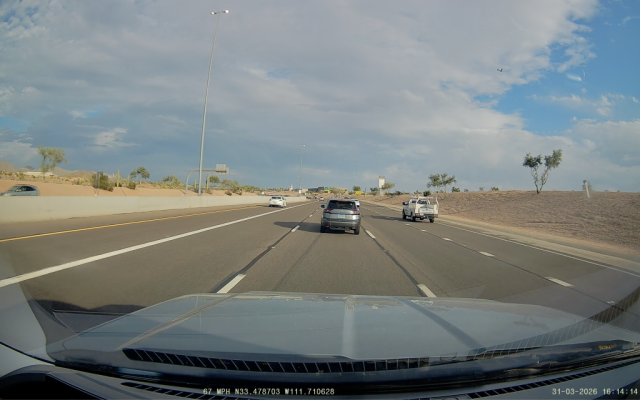
I installed a Viofo dash cam that was in my wife's old car in our new 2025 Expedition platinum. The nice thing about this setup is it is a nice, clean, hardwired installation and turns on when you start the car, senses when you've turned it off and will record for a while while you are parked (or whatever way you want to set it).
Everything needed:
Viofo Mini 2 (my recommendation, there are a lot out there, if you want one that has a rear view camera, Viofo has those two that still work with the wiring kit) - https://a.co/d/07CHuUgY
Samsung 128GB micro SD card (my recommendation) - https://a.co/d/0bufYzmf
"Micro 2" fuse taps - https://a.co/d/02newLOV (just order one, there's 10 in the pack you get)
Wiring kit - https://a.co/d/0evzDWef
10mm socket and ratcheting socket wrench
13mm socket
Wire crimpers (or pliers)
You need to go to the passenger side foot well and get to the fuse panel that is under a piece of trim. Pull back the rubber door gasket and pull off the whole piece that is part of the door sill (it's just held in with some clips). Ours says "PLATINUM" on it. Once it's out you'll find the fuse panel.
Get out a little screwdriver or ideally a trim removal tool and remove the cover over the handle on the A-pillar. Unscrew the two 10mm bolts and pull the A-pillar trim down enough to where you'll be able to run the USB cable down it to the fuse panel.
Up at the rear view mirror, the black plastic trim just pulls down and away a little bit from the rear view mirror mount and windshield. Just get it down enough to where you can run the USB cable through it.
For our car, I put the camera to the left of the black plastic trim, up close to the edge of the windshield to get a good view of everything and so that we can tap the ! icon which will save video we do not want overwritten (if someone cuts you off or you get into an accident/etc). I used an alcohol wipe to clean the spot on the window, let it dry for a minute, and adheared the camera mount to the glass. Then I ran the USB cable that is in the wiring kit from it, through the black plastic trim around the rear view mirror, tucked it up in the header panel, down the A-pillar, and down to the fuse box.
For the fuses, you need a constant 12v source plus an accessory 12v (when the car is on). If you're looking at the fuse panel, I used two 5 amp fuses with the tap kit, the red one needs to connect to the constant 12v source which is at the very bottom left (fuse #20 - Headlamp module) and then the yellow (accessory) connection goes up to the right a little bit tapped into fuse #52 (trailer brake switch) from this diagram - https://fuseboxinfo.com/.../6172-ford-expedition-2025-fuses You need to take out the original 5amp fuse and put it in your tap in the slots that are closest to the fuse box once it's re-inserted, then a fuse that is in the kit in the slots that are meant for your new connection. Crimp your red wire to the fuse #20 tap and yellow wire to the #52 tap, then I used the 13mm socket wrench to loosen the nut that is right there and pinched my black wire under it when I re-tightened it.
I zip tied the excess wire into a little bundle and just shoved it into that corner and put the trim and rubber gasket back on, and that's it for the installation.
You can then go through the setup steps of the system to set the time and other preferences. To access the videos, you can either connect your phone via the Viofo app to the camera to download the videos or I normally just take the micro-SD card out and copy the videos to my computer.
As an Amazon Associate we earn from qualifying purchases.


