Help Installing Alarm/Remote Start in 97 Expedition

Disclaimer: Links on this page pointing to Amazon, eBay and other sites may include affiliate code. If you click them and make a purchase, we may earn a small commission.

mikescl11

Member
Joined
Mar 2, 2014
Posts
8
Reaction score
0
Location
my house
I need a little bit of help from some of the Alarm and Remote Start Masters around this forum, I'd really appreciate it! Might even help others

I recently bought a 1997 Ford Expedition Eddie Bauer 5.4L and want to put an alarm in it so I bought an AutoPage C3+RS730LDC 4-Channel 5+Button Chrome LCD Alarm with Remote Car Stater. The Expedition already has an aftermarket remote start installed in it that I plan to remove to use this new system.
I have installed many stereos but never an alarm and when I saw all of the wires this thing comes with, I realized I might have a problem. Considered paying someone else to do it but nobody is willing to so I’m sticking with the original plan of doing it myself but need help as to which wires go where.

Any and all Help would be great!


Heres what I’ve got so far, PLEASE correct me if i have something wrong and help me with the wires i don’t know. My connection choice or question will be after each —>


6 PIN HEAVY GAUGE WIRING CONNECTIONS:
*Violet Wire—Starter Output—> Red/Light Blue(+) wire at Ignition Switch Harness
*Red Wire (2) — +12V Power Input—> Yellow(+) and Light Green/Purple(+) wires at Ignition switch harness
*Yellow Wire – Ignition 1 Output—> Blue/Light Green(+) wire at Ignition switch harness
*PINK Wire – Ignition 2 Output—> Red/Black(+) wire at Ignition switch harness
*Brown Wire –Accessory Output(Heater /AC Output)—> Gray/Yellow(+) wire OR Black/Light Green(+) Wire at Ignition switch harness????? There are two wires but the Autopage system only asks for one so which one do i use?

5 PIN WIRE HARNESS:
*RED / WHITE WIRE –PARKING LIGHT RELAY INPUT ——> do nothing with
*WHITE WIRE — PARKING LIGHT RELAY OUTPUT—> Brown(+) wire at the Headlight switch
*BLACK WIRE — SYSTEM GROUND ---> Ground to Chassis
*BROWN WIRE – (+) 2A SIREN OUTPUT –—> Red wire on Siren
*RED WIRE — SYSTEM POWER (+12V CONSTANT) — —> Yellow(+) wire at Ignition switch harness

3 PIN DOOR LOCK CONNECTOR:
*GREEN WIRE - (-)Lock Pulse (+) Unlock Pulse —> ???
*RED WIRE - Not Used —> ???
*BLUE WIRE - (-)Unlock Pulse (+) Lock Pulse —> ???


20 PIN WIRE CONNECTORS:
*H6/1 BROWN/BLACK WIRE: 200 mA (-) Ground Output When Running—> Ground to Chassis?
*H6/2 GRAY/BLACK WIRE: 200 mA (-) Second Starter Output.—> Not Used
*H6/3 PINK WIRE – (-) 200mA Programmable Output—> ???
*H6/4 WHITE / BLUE WIRE – (-) Instant Start & Turn Off Input–—> ???
*H6/5 WHITE WIRE – (-) 200mA Dome Light Control Output –—> Black/Light Blue wire in passenger kick panel
*H6/6 BROWN / WHITE WIRE – (-) 200mA Programmable Output Horn Output – —> Dark Blue wire in steering column harness
*H6/7 BLACK/GREEN WIRE – (-) 200mA Channel 4—> ???
*H6/8 BLACK/WHITE WIRE – (-) Neutral Safety Switch Input or (-) Enable Switch Input –—> Ground to Chassis?
* H6/9 ORANGE/WHITE WIRE – 200mA Grounded Output when Disarmed - N.O. Disable—> Ground to Chassis?
*H6/10 WHITE/RED WIRE - Tachometer Signal Connector ——> Not Used
*H6/11 BLUE/BLACK WIRE – (-) 200mA Accessory 2 Output –—> Ground to Chassis?
* H6/12 WHITE/GREEN WIRE – (-) Diesel Wait To Start Input—> Not Used
* H6/13 YELLOW WIRE – (-) 200mA Ignition 3 Output –—> Not Used
* H6/14 GREEN WIRE – Negative Door Switch Sensing Input (Zone 3) ——> ???
* H6/15 GRAY WIRE – (-) 200mA Channel 3 Output –—> Not Used
* H6/16 BLUE WIRE – Ground Instant Trigger Input (Zone 2) –—> Ground to Chassis?
* H6/17 WHITE/VIOLET WIRE – Positive Safety Shut Down Input –—> Light Green wire at switch above break pedal
*H6/18 VIOLET WIRE – Positive Door Switch Sensing Input (Zone 3)–—> ???
* H6/19 WHITE/BLACK WIRE – Negative Safety Shut Down Input – Hood trigger Input—> Connect to Hood Trigger provided
*H6/20 ORANGE WIRE – (-) 200mA Grounded Output When Armed –—> Ground to Chassis?


Here is the link to the install manual: http://remotelystartedmn.com/admin_files/PDF/C3-RS-730install1.pdf

 
B

bedrck46

I would suggest that you get a copy of the

Ford workshop manual on DVD. Can be obtained from seller "morpheousking" on e-bay. Cost about $15.00 Much better than Clymer, Haynes or Chilton and also includes wiring diagrams

Don't waste your money on a Clymer, Haynes or Chilton Manual.
It is well worth the $15.00 just make sure you get the DVD for your year as the seller has different DVD's for different years

This DVD will have the factory wiring diagrams also showing the connector pin layout and location You may find this to be very helpful
 
OP
OP
M

mikescl11

Member
Joined
Mar 2, 2014
Posts
8
Reaction score
0
Location
my house
I would suggest that you get a copy of the

Ford workshop manual on DVD. Can be obtained from seller "morpheousking" on e-bay. Cost about $15.00 Much better than Clymer, Haynes or Chilton and also includes wiring diagrams

Don't waste your money on a Clymer, Haynes or Chilton Manual.
It is well worth the $15.00 just make sure you get the DVD for your year as the seller has different DVD's for different years

This DVD will have the factory wiring diagrams also showing the connector pin layout and location You may find this to be very helpful


says the DVD will only work with windows pc and I have a Mac :/
 
B

bedrck46

yep you need a windows PC sorry Find a nice cheap laptop the DVD is the Ford Factory manual
 

FordandPolaris

Full Access Members
Joined
Feb 7, 2012
Posts
2,246
Reaction score
265
Location
Saint Cloud, MN
yep you need a windows PC sorry Find a nice cheap laptop the DVD is the Ford Factory manual

Do you by chance have the wiring diagrams for the PATS, etc.? I have seen you post some before but not sure which ones you do and don't have.

Otherwise a Chilton manual would have some wiring diagrams. I can try and scan them from my copy but not sure how well it will turn out.

EDIT: I just looked through them and they do not really cover the systems you need. But that's what 20 bucks gets you. Did the alarm come with instructions on what each of the wires is to match up to?
 
Last edited:
OP
OP
M

mikescl11

Member
Joined
Mar 2, 2014
Posts
8
Reaction score
0
Location
my house
Do you by chance have the wiring diagrams for the PATS, etc.? I have seen you post some before but not sure which ones you do and don't have.

Otherwise a Chilton manual would have some wiring diagrams. I can try and scan them from my copy but not sure how well it will turn out.

EDIT: I just looked through them and they do not really cover the systems you need. But that's what 20 bucks gets you. Did the alarm come with instructions on what each of the wires is to match up to?

the system just came with whats in this link, i understand where some of the wires go and other I'm not 100% on. http://remotelystartedmn.com/admin_files/PDF/C3-RS-730install1.pdf

 

stamp11127

Full Access Members
Joined
Mar 10, 2012
Posts
6,207
Reaction score
1,246
Location
Temple, Georgia
I looked through the manual and have a few questions for you.
1) What are you gaining with this system if you already have a remote start installed?
2) How long are the harnesses? Are you going to lengthen any of them?
3) Do you have a dvm or test light?
4) How are you planning on splicing into the existing wires?

If I'm able I'll look at the manual more sometime over the weekend and see what I come up with.
Make all "needed" ground connections to chassis ground. Some of the wires are ground outputs that aren't needed/used.
 
Last edited:

tojohnso

Full Access Members
Joined
Mar 11, 2013
Posts
256
Reaction score
26
Location
USA
yep you need a windows PC sorry Find a nice cheap laptop the DVD is the Ford Factory manual

He doesn't need to do that. Just get VMWare Fusion and install a copy of windows (not XP as it's not going to be supported by Microsoft).
 
OP
OP
M

mikescl11

Member
Joined
Mar 2, 2014
Posts
8
Reaction score
0
Location
my house
I looked through the manual and have a few questions for you.
1) What are you gaining with this system if you already have a remote start installed?
2) How long are the harnesses? Are you going to lengthen any of them?
3) Do you have a dvm or test light?
4) How are you planning on splicing into the existing wires?

If I'm able I'll look at the manual more sometime over the weekend and see what I come up with.
Make all "needed" ground connections to chassis ground. Some of the wires are ground outputs that aren't needed/used.


1)I'm gaining the alarm/motion sensor, i have neighbor that likes to bump into my car in the past when she parks and then act like nothing happened ( we have cameras and have footage of her doing this) so it'll be nice to stop that plus anyone else trying to mess with the truck.
2) without measuring them id say about 3ft and i'll only lengthen any that don't reach to wherever they need to go.
3)just bought a test light
4)i have some quick splicers that i will either ruse or i will poke a hope in the existing wire and run the alarm wire through that hole

if no one knows the exact wire on the truck that i need for each wire on the alarm then can someone tell me where each wire on the alarm should go, like point me in the right direction and once i know where each wire goes then maybe i can find out which wire it is in the truck.
(Example of what I'm asking: keep in mind i have no clue if what i put below is correct.
3 PIN DOOR LOCK CONNECTOR:
*GREEN WIRE - (-)Lock Pulse (+) Unlock Pulse —> ??? **connect this wire to the + wire on the door lock.
*RED WIRE - Not Used —> ??? **dont connect this wire.
*BLUE WIRE - (-)Unlock Pulse (+) Lock Pulse —> ??? **connect this wire to the + wire on the door unlock.)

thanks
 

stamp11127

Full Access Members
Joined
Mar 10, 2012
Posts
6,207
Reaction score
1,246
Location
Temple, Georgia
Your going to need the wiring diagrams first to study, then to plan the "attack".
You want to know where your going to tap into the harness before jumping in. If you don't you'll end up with a mess.
Butt connectors, to me, are not the way to go. Strip, tin, solder then heat shrink is the only professional way to do this. Think about it, do you see any butt connectors in the factory harness?
I'll try to look at this tonight for you.

Have you looked at what the current system is and how the connections were made? If you can get the wiring schematic for it you can use it as a guide for some of the connections or if the connections are proper tie into that harness since the wires are already there. But if "Bubba" installed it with masking or duct tape I'd redo the entire setup.
 
Last edited:
OP
OP
M

mikescl11

Member
Joined
Mar 2, 2014
Posts
8
Reaction score
0
Location
my house
Your going to need the wiring diagrams first to study, then to plan the "attack".
You want to know where your going to tap into the harness before jumping in. If you don't you'll end up with a mess.
Butt connectors, to me, are not the way to go. Strip, tin, solder then heat shrink is the only professional way to do this. Think about it, do you see any butt connectors in the factory harness?
I'll try to look at this tonight for you.

Have you looked at what the current system is and how the connections were made? If you can get the wiring schematic for it you can use it as a guide for some of the connections or if the connections are proper tie into that harness since the wires are already there. But if "Bubba" installed it with masking or duct tape I'd redo the entire setup.

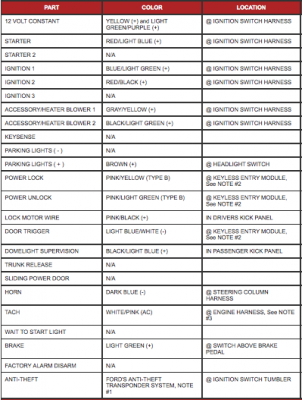
I have yet to check out the current remote start and connections because I don't want to have my dash ripped apart for a week, I'd like to get in there and get it all done at one time. Last week it was warm out and now tonight we are getting snow so I'm not sure how soon I will be able to get in there and look at the connections. Here is what I could find as far as the wires in my truck, hope this helps.

Thanks
Screen Shot 2014-03-23 at 3.09.11 PM.png
 

stamp11127

Full Access Members
Joined
Mar 10, 2012
Posts
6,207
Reaction score
1,246
Location
Temple, Georgia
I'm going to be an ass for a bit but I don't pay attention to those. I go by the factory wiring diagrams/books - for the reason I can see the circuit and it's logic, location of connectors, ground points etc. As posted earlier get the dvd on the wiring. I would expect at least 10 pages would cover what we need to look at.
Also i don't remember if the 97's have the GEM, you don't want to back feed on that.
 
Last edited:
OP
OP
M

mikescl11

Member
Joined
Mar 2, 2014
Posts
8
Reaction score
0
Location
my house
I'm going to be an ass for a bit but I don't pay attention to those. I go by the factory wiring diagrams/books - for the reason I can see the circuit and it's logic, location of connectors, ground points etc. As posted earlier get the dvd on the wiring. I would expect at least 10 pages would cover what we need to look at.
Also i don't remember if the 97's have the GEM, you don't want to back feed on that.


Alright, I will work on getting the dvd and get back too you once its here

Thanks
 
OP
OP
M

mikescl11

Member
Joined
Mar 2, 2014
Posts
8
Reaction score
0
Location
my house
I'm going to be an ass for a bit but I don't pay attention to those. I go by the factory wiring diagrams/books - for the reason I can see the circuit and it's logic, location of connectors, ground points etc. As posted earlier get the dvd on the wiring. I would expect at least 10 pages would cover what we need to look at.
Also i don't remember if the 97's have the GEM, you don't want to back feed on that.

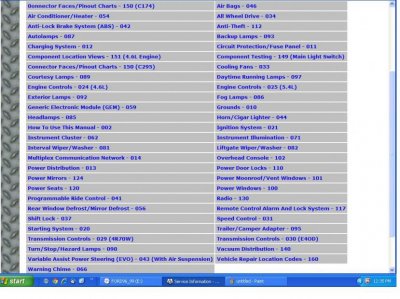
here are the diagrams i have to choose from. which ones do you need to help me install this system?

Thanks
diagrams.jpg
 

stamp11127

Full Access Members
Joined
Mar 10, 2012
Posts
6,207
Reaction score
1,246
Location
Temple, Georgia
I'll look at my discs sometime tomorow afternoon and let you know. It wouldn't hurt to start looking at the starting/charging circuit, power door locks and power distribution. Let us know how well you understand the diagrams so we can tailor the dialog accordingly.
 

stamp11127

Full Access Members
Joined
Mar 10, 2012
Posts
6,207
Reaction score
1,246
Location
Temple, Georgia
I've loaded my discs and have started reading the install manual. Two things are noted:

1) "Some vehicles have a factory installed transponder immobilizer system that can severely complicate the installation. There is a possibility that this system cannot be installed on some immobilizer-equipped vehicles." They don't specifically say Ford so we will see.

2) "Do not use conventional crimp lock, bullet on any wiring. Poor wiring, i.e. taped joints will possibly introduce unreliability into the alarm system and may result in false alarms or incorrect operation. We suggest soldering all connection points." - Soldering / heat shrink tubing is the only way to go.

How are your soldering skills? Do you have the correct tools for doing this - wire stripper(automatic type), dikes, soldering iron, 60/40 solder, heat gun?

If not, hold off on getting them until after it is determined that the system will work on Fords.

Things to consider:
1) Where are you going to mount the siren? Should be facing a direction so that it doesn't fill with water or gets blasted from road debris. Also keep in mind once the location is determined, where the wiring is going to be run.
2) Where are you placing the valet switch. Avoid a place that will be in the way if you need to remove any trim. You want ease of access but not in the way.
3) Location of LED status indicator - same considerations as #2
4) Shock sensor location - same considerations as #2

More to come - stay tuned....
 
Last edited:
OP
OP
M

mikescl11

Member
Joined
Mar 2, 2014
Posts
8
Reaction score
0
Location
my house
I've loaded my discs and have started reading the install manual. Two things are noted:

1) "Some vehicles have a factory installed transponder immobilizer system that can severely complicate the installation. There is a possibility that this system cannot be installed on some immobilizer-equipped vehicles." They don't specifically say Ford so we will see.

2) "Do not use conventional crimp lock, bullet on any wiring. Poor wiring, i.e. taped joints will possibly introduce unreliability into the alarm system and may result in false alarms or incorrect operation. We suggest soldering all connection points." - Soldering / heat shrink tubing is the only way to go.

How are your soldering skills? Do you have the correct tools for doing this - wire stripper(automatic type), dikes, soldering iron, 60/40 solder, heat gun?

If not, hold off on getting them until after it is determined that the system will work on Fords.

Things to consider:
1) Where are you going to mount the siren? Should be facing a direction so that it doesn't fill with water or gets blasted from road debris. Also keep in mind once the location is determined, where the wiring is going to be run.
2) Where are you placing the valet switch. Avoid a place that will be in the way if you need to remove any trim. You want ease of access but not in the way.
3) Location of LED status indicator - same considerations as #2
4) Shock sensor location - same considerations as #2

More to come - stay tuned....


This is the first time i have ever looked at a wiring diagram like these. That said, the more i study them the more i start to understand what i am looking at but as much detail that anyone can give me in helping install this thing would be great.
I have all of the tools to solder and am okay at it, just had planned to use the other connectors as the would be easier in the area to work in but starting to sound like ill be soldering everything. lol

1)siren is going under the hood somewhere, haven't figured out where yet but i will run the wire through the rubber grommet in the firewall.
2) & 3) are already installed and the wires are already ran under the dash to where i will keep the system.
4)i plan to put the sensor on the steering column


thanks
 

stamp11127

Full Access Members
Joined
Mar 10, 2012
Posts
6,207
Reaction score
1,246
Location
Temple, Georgia
At the front of the printed OEM service books there are pages that describe the various conventions used throughout the manual. Wouldn't hurt to familiarize yourself with those becore tearing into this. Just need to find them in the digital version.
 
Top