

You are using an out of date browser. It may not display this or other websites correctly.
You should upgrade or use an alternative browser.
You should upgrade or use an alternative browser.
Obd2 for iphone
- Thread starter J Ski
- Start date
Disclaimer: Links on this page pointing to Amazon, eBay and other sites may include affiliate code. If you click them and make a purchase, we may earn a small commission.


what obd2 adapters work with iPhone? I have FORScan but need a reliable adapter to work with my iPhone 6 to disable hyper flash
Those really are 2 different questions. The iPhone has nothing to do with programming with FORSCAN. The iPhone only runs FORSCAN lite and it can make no changes.
You have to use FORSCAN with a full license on a Windows machine to make changes.
I use an OBDLink MX BT for my programming with my laptop. With the BT connection I can still use my WiFi in the laptop for access to my home network.
I use a Kiwi3 for my iPhone for FORSCAN Lite, Dash Command, and OBD Doctor. It is fast, but does not work with the full FORSCAN, as far as the last time I checked.
I ended up buying a obd2 that has a usb plug for my laptop. I only need it to turn off bulb out indicator.Those really are 2 different questions. The iPhone has nothing to do with programming with FORSCAN. The iPhone only runs FORSCAN lite and it can make no changes.
You have to use FORSCAN with a full license on a Windows machine to make changes.
I use an OBDLink MX BT for my programming with my laptop. With the BT connection I can still use my WiFi in the laptop for access to my home network.
I use a Kiwi3 for my iPhone for FORSCAN Lite, Dash Command, and OBD Doctor. It is fast, but does not work with the full FORSCAN, as far as the last time I checked.
I ended up buying a obd2 that has a usb plug for my laptop. I only need it to turn off bulb out indicator.
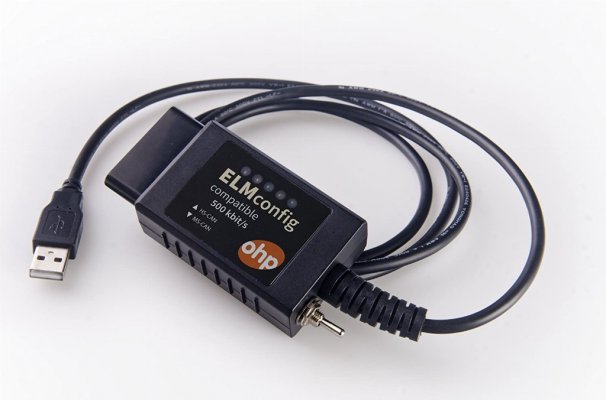
Which one? They are not all created equal. It must support MSCan, most do not.

chuck s
Full Access Members
- Joined
- Dec 20, 2006
- Posts
- 1,990
- Reaction score
- 753
As an Amazon Associate we earn from qualifying purchases.
Yep, with the switch in the down position.
Thts the one!Yep, with the switch in the down position.
chuck s
Full Access Members
- Joined
- Dec 20, 2006
- Posts
- 1,990
- Reaction score
- 753
When connected the Forscan screen prompts informed me where to put the switch for what I wanted to change. Simple.
-- Chuck
-- Chuck
Was it easy getting the extended license to download and work?When connected the Forscan screen prompts informed me where to put the switch for what I wanted to change. Simple.
-- Chuck
Was it easy getting the extended license to download and work?
Have to create a forum account. Then go fill out and request.

ExpeditionAndy
Full Access Members
If I recalled it took a day or two for them to approve the account. When I went back to renew the license it was automatic.Was it easy getting the extended license to download and work?
Yeah just got approved on their forum yesterday, and I was able to get a verification key today. Just need to download it onto my laptop when I get home tomorrow morning and hopefully it won't give me any issues doing thatIf I recalled it took a day or two for them to approve the account. When I went back to renew the license it was automatic.
ExpeditionAndy
Full Access Members
It downloaded and installed very easily for me. There are a couple of FAQs that you want to make sure to read as the the software itself isn't very intuitive.Yeah just got approved on their forum yesterday, and I was able to get a verification key today. Just need to download it onto my laptop when I get home tomorrow morning and hopefully it won't give me any issues doing that
To turn off the hyper flash for the front turn signals change:
726-13-01 0101 0000 43 Front lamp outage on (hyper flash)
change the 0101 to 0000
How about rear?It downloaded and installed very easily for me. There are a couple of FAQs that you want to make sure to read as the the software itself isn't very intuitive.
To turn off the hyper flash for the front turn signals change:
726-13-01 0101 0000 43 Front lamp outage on (hyper flash)
change the 0101 to 0000
ExpeditionAndy
Full Access Members
Rear Lamp Outage Disable BdyCMHow about rear?
726-14-01 xXxX xxxx xx 0 (Disabled) 1 (Enabled)
Change xXxX to x0x0
Awesome info, will update tomorrow to let you know how it wentRear Lamp Outage Disable BdyCM
726-14-01 xXxX xxxx xx 0 (Disabled) 1 (Enabled)
Change xXxX to x0x0
ExpeditionAndy
Full Access Members
I got both of those from @LokiWolf I used the one for the front but I have not used the one for the tail lights as mine have resistors. I though about unplugging them and trying it but haven't done it yet.Awesome info, will update tomorrow to let you know how it went
If you have power running boards, when you recet the BdyCM it will turn your Running boards off so just be aware of that.
Well obd2 won’t connect with any of my USB ports now I’m stuckIf I recalled it took a day or two for them to approve the account. When I went back to renew the license it was automatic.
ExpeditionAndy
Full Access Members
You may have to install a driver for your particular USB device. See if the OBD2 has a driver that you can download and install and then try it again.Well obd2 won’t connect with any of my USB ports now I’m stuck
Well obd2 won’t connect with any of my USB ports now I’m stuck
What OS?
Similar threads


- Replies
- 0
- Views
- 856
- Replies
- 0
- Views
- 1K
- Replies
- 1
- Views
- 823
- Replies
- 4
- Views
- 1K

