

You are using an out of date browser. It may not display this or other websites correctly.
You should upgrade or use an alternative browser.
You should upgrade or use an alternative browser.
Special Service Message 53419 - 2022-2024 Expedition XLT & Limited - Various Driver Assistance Warning Messages, Invalid Data/Lost Communications DTCs
- Thread starter HazBeen
- Start date
Disclaimer: Links on this page pointing to Amazon, eBay and other sites may include affiliate code. If you click them and make a purchase, we may earn a small commission.
FormerFordLover
Member
Sorry not trying to be a pain. When I click on it there I get: 
CFLfordguy
Member

CFLfordguy
Member
Straight from the ford support site
FormerFordLover
Member
Thank you CFL!
Last edited:
md883
Member
Let me know what you hear about options from your lawyer. I have an appointment with our local Ford dealership in a few weeks. The message is going to be, "take care of this and get us in a new vehicle, or we can pursue legal means." They aren't going to care about this until it starts to cost them money (and maybe not even then).Thank you CFL! I just called a lawyer to get the process started. Enough is enough!!
Last edited:
FormerFordLover
Member
Your local dealership will not care. They will claim it is an issue with Ford corporate and not their problem. But you need to document every attempt to get it fixed. You will need to prove you have given them multiple attempts to fix the issue.
Last edited:
md883
Member
Oh I know they won't. My real interest is in the loss of the value of the vehicle. I'm going to ask for a trade-in and see what they value it at. My suspicion is that they either won't take it because it's not a vehicle that they can turn around and sell because it has a million active alerts and codes OR they'll give me some massive undervaluing of the trade-in value. At that point, I'll have claim to sue because of an actual loss (not "I'm suing to get you to fix this" but "I'm suing because you have cost me money in the value of my purchase").Your local dealership will not care. They will claim it is an issue with Ford corporate and not their problem. But you need to document every attempt to get it fixed. You will need to prove you have given them multiple attempts to fix the issue for the lawyer to be able to do anything.
FormerFordLover
Member
My dealership is not interested in a trade in until the errors are fixed.
Last edited:
CFLfordguy
Member
They ordered me a new IPMA but I have no confidence that will fix the issue.
FormerFordLover
Member
It will for about a week. Make them buy it immediately after replacing it.
CFLfordguy
Member
Anyone got there vehicle with this issue fixed yet?
CFLfordguy
Member
I encourage anyone with this issue to file a complaint with the nhtsa
CFLfordguy
Member
Anyone have this issue resolved by chance?
FormerFordLover
Member
I think you know the answer to this pal.
This SSM APPLIES to 2022-2024 Expeditions equipped with FORD CO-PILOT360™ (DBCBB: Standard on XLT Trim vehicles) and FORD CO-PILOT360™ ASSIST+ (DBCBC: Standard on Limited Trim vehicles).
This SSM DOES NOT APPLY to 2022-2024 Expeditions equipped with FORD CO-PILOT360™ACTIVE 2.0 (DBCAM: Standard on Platinum Trim vehicles) and DOES NOT APPLY to FORD CO-PILOT360™ASSIST 2.0 (DBCBA: Standard on King Ranch Trim vehicles).
SSM 53419 2023-2024 Escape/Corsair, 2022-2024 Expedition - Various Driver Assistance Feature Warning Messages Displayed In The Instrument Panel Cluster (IPC), Various Invalid Data/Lost Communication Diagnostic Trouble Codes (DTCs) Stored In Various Modules
Some 2023-2024 Escape/Corsair vehicles equipped with driver assistance features with minor feature code DBCAB for Escape and minor feature code DBCBC for Corsair and 2022-2024 Expedition vehicles equipped with driver assistance features with minor feature codes DBCBB and DBCBC may exhibit driver assistance feature warning messages displayed in the IPC. Additionally, some modules may store invalid data/lost communication related DTCs. The image processing module A (IPMA) should not store these DTCs. To confirm a vehicle is built with a certain minor feature code, review the build information by double-clicking the vehicle identification number (VIN) in the upper left corner in the Professional Technician System (PTS). This condition may be due to the software in the IPMA, causing it to not communicate on the network. To restore communication and functionality, download and run the IPMA - Image Processing Module A (IPMA) Recovery app in the Ford Diagnosis and Repair System (FDRS) scan tool. Once IPMA communication has been restored, download and run the IPMA - Image Processing Module (IPMA) Alignment app, recheck DTCs and confirm that all warning messages are cleared from the IPC. If these steps correct the condition, release the vehicle back to the customer. Advise the customers that a permanent repair to prevent recurrence is expected to be available to dealers by the end of April 2025 and schedule a service visit at this time. This software update is also expected to be delivered to vehicles over-the-air (OTA) starting in May 2025. Software will update automatically if vehicle connectivity is enabled in the vehicle's settings. If the IPMA still does not communicate on the network after performing the recovery app, continue with normal diagnosis. Refer to the Workshop Manual (WSM), Section 419-07 > Lane Keeping System > Diagnosis and Testing.
Interesting - April has arrived and left as has May (both 2025). October 2025 has arrived and left and these issues STILL persist on my 2024 Expedition XLT Max.
I’m now being told the “fix” should be in the dealers by March 2026 and should be pushed “OTA” by end of March. It’s unfortunate that the folks at FoMoCo have no problem pushing this junk out the back door with, what seems to be, a total lack of concern for the customer who spends north of $70K for these vehicles.
Time will tell…but I’m not holding my breath.
I’m now being told the “fix” should be in the dealers by March 2026 and should be pushed “OTA” by end of March. It’s unfortunate that the folks at FoMoCo have no problem pushing this junk out the back door with, what seems to be, a total lack of concern for the customer who spends north of $70K for these vehicles.
Time will tell…but I’m not holding my breath.
md883
Member
Newest update is SSM 54350 that has this date. I assume it will come and go and they will push it out another six months.I’m now being told the “fix” should be in the dealers by March 2026 and should be pushed “OTA” by end of March.
Related - I'm wondering if anyone has had any successful conversations with a lawyer yet? I've had a few that passed because it either 1) fell outside Lemon Law timeline (TX) or 2) since they've said they are "fixing it", legal means wouldn't help here (only if they denied there was an issue and refused to fix it).
My argument has been financial because I essentially have a vehicle that is worth significantly less because it is without all of the driver's safety features and the dealership has said they will not take it as a trade in because of the issue. But that has fallen on deaf ears.
FormerFordLover
Member
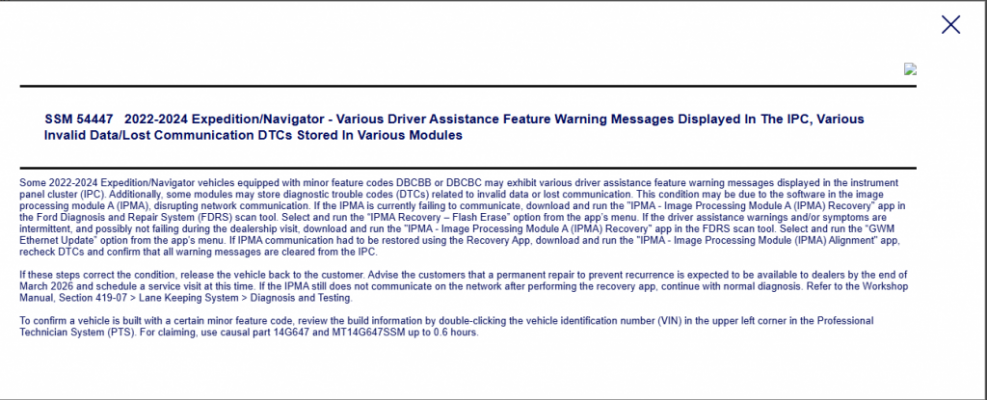
Looks like they updated the SSM number again... Posting it here for posterity. Same mirage fix timing.
CFLfordguy
Member
Now moved out to May 2026! Woohoo

Similar threads
- Replies
- 9
- Views
- 6K
- Replies
- 1
- Views
- 2K
- Replies
- 5
- Views
- 2K
- Replies
- 0
- Views
- 2K

