SYNC 3 - which version are you at?

Disclaimer: Links on this page pointing to Amazon, eBay and other sites may include affiliate code. If you click them and make a purchase, we may earn a small commission.

Lou Hamilton

Full Access Members
Joined
Nov 28, 2019
Posts
939
Reaction score
640
Location
Maryland
this.

Does it change the look and feel? Does it add a ball massage option?

I have not looked at the 2020's in person yet, but a video review on YouTube has a SYNC display that has a very flat look to it. I don't know if it is v3.2+, but it certainly doesn't look like mine where there is the bluish grey coloring and each icon has its own "button". This video looked like they were just the icon graphic on a grey background. No fake button outlines.

Take my description for what its worth.
 

Johhn14

Well-Known Member
Joined
Sep 15, 2019
Posts
48
Reaction score
16
Location
boston
2020's have 3.4. They also switched the traditional dual USB ports in the front console (the ones next to the charging mat) with a USB C and traditional combo.

Great video as reference for both the Sync interface and USB change - . The backseat still has traditional USB everywhere.

Aside - would love to switch out my 2019 USB's to match this. Haven't been able to find a part number yet.
 

Fozzy

Full Access Members
Joined
Sep 5, 2019
Posts
1,199
Reaction score
1,161
Location
Riverton
2020's have 3.4. They also switched the traditional dual USB ports in the front console (the ones next to the charging mat) with a USB C and traditional combo.

Great video as reference for both the Sync interface and USB change - . The backseat still has traditional USB everywhere.

Aside - would love to switch out my 2019 USB's to match this. Haven't been able to find a part number yet.

When you do, please post. I would like to do the same. USB-C is finally here to stay.


Sent from my iPhone using Tapatalk
 

Jace

Full Access Members
Joined
Feb 24, 2018
Posts
206
Reaction score
95
Location
Utah
When you do, please post. I would like to do the same. USB-C is finally here to stay.


Sent from my iPhone using Tapatalk
I'd be game as well. USB C is my hero.
 

Lou Hamilton

Full Access Members
Joined
Nov 28, 2019
Posts
939
Reaction score
640
Location
Maryland
I just upgraded my SYNC to 3.4. Followed the instructions at the F-150 forum (https://www.f150forum.com/f118/upgrade-sync-3-v3-0-v3-4-instructions-458828/) and had no issues.

One scare was after the first USB finished, it gives an error message that says it cannot find the upgrade package. I panicked. However, I put in the second USB and everything continued without an issue. The third USB upgrades 3.4 from Build 19200 to 19274.

It erased a couple settings (had to re-pair my phone via BT, enable 911 Assist), but overall everything remained the same -- car hotspot name did not get erased).

I have not driven anywhere yet, but the 5-10 minutes that I was in my car playing around seemed ok.

One thing I wish they would do was allow further customization such as color choices. I would prefer a black or dark gray over the default blue, especially with my black interior.
 

Lou Hamilton

Full Access Members
Joined
Nov 28, 2019
Posts
939
Reaction score
640
Location
Maryland
UPDATE:

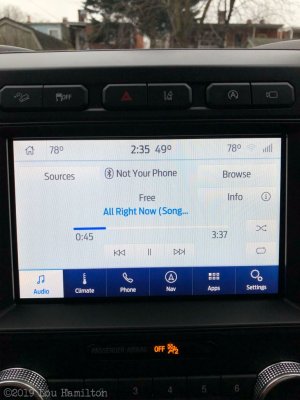
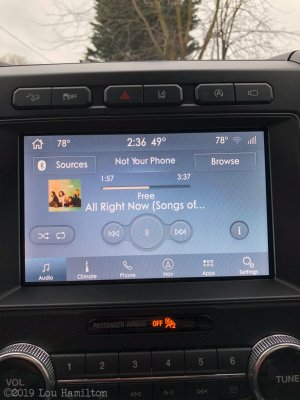
After reading through some threads and playing around, you can change the themes. I currently have mine changed to the Lincoln Black Label setting. Although temporary, I need to figure out how to make it permanent since it resets to the default theme every time the car get turned off. I have attached the default 3.4 theme and the alternate Lincoln Black Label theme. As you can see, it give it the darker look that I am aiming for.

_.jpg
_-2.jpg
 

Fozzy

Full Access Members
Joined
Sep 5, 2019
Posts
1,199
Reaction score
1,161
Location
Riverton
UPDATE:

After reading through some threads and playing around, you can change the themes. I currently have mine changed to the Lincoln Black Label setting. Although temporary, I need to figure out how to make it permanent. I have attached the default 3.4 theme and the alternate Lincoln Black Label theme. As you can see, it give it the darker look that I am aiming for.View attachment 33805 View attachment 33806

I like the Lincoln look. Does it hangs the ford emblem to the Lincoln one?


Sent from my iPhone using Tapatalk
 

Lou Hamilton

Full Access Members
Joined
Nov 28, 2019
Posts
939
Reaction score
640
Location
Maryland
I like the Lincoln look. Does it hangs the ford emblem to the Lincoln one?


Sent from my iPhone using Tapatalk

I don't know since it resets itself if I turn off ignition. I think you can keep the Ford and just change the theme based on the APIM that needs changed. I'm trying to see if there is any other way to do this besides ForScan.
 

Meeker

Full Access Members
Joined
Apr 3, 2016
Posts
296
Reaction score
180
Location
Calgary, AB, Canada
CD eject and right seek. Then end speaker test. Then click on the APIM info. Should be the top soft button. I’m interested in your part number as well. Trying to see if I can install 3.3 on my end of year 2018 build model.

My info attached.

View attachment 31577 View attachment 31578
I cannot get this to work on my 2018 XLT with Nav, no matter what I try. Sync 3.0 build 17276... Are there other ways to get into the diagnostic screen?
 

Lou Hamilton

Full Access Members
Joined
Nov 28, 2019
Posts
939
Reaction score
640
Location
Maryland
I cannot get this to work on my 2018 XLT with Nav, no matter what I try. Sync 3.0 build 17276... Are there other ways to get into the diagnostic screen?

Most important is make sure you are in radio/audio mode. If you don't have a CD eject button, use this method.

Method 2 = turn on radio, then hold seek forward on steering wheel + seek forward on FCIM for ~10 seconds.

To make the change permanent, you need to use an ODB module and run ForScan on a Windows machine. Both of which I do not have... (Well, the Windows machine I have is very old. I've been using Mac since around 2009.)
 
Last edited:

AAOO

Full Access Members
Joined
May 15, 2019
Posts
364
Reaction score
205
Location
USA
I don't know since it resets itself if I turn off ignition. I think you can keep the Ford and just change the theme based on the APIM that needs changed. I'm trying to see if there is any other way to do this besides ForScan.

You can only make it stick in ForScan.
 

Meeker

Full Access Members
Joined
Apr 3, 2016
Posts
296
Reaction score
180
Location
Calgary, AB, Canada
Most important is make sure you are in radio/audio mode. If you don't have a CD eject button, use this method.

Method 2 = turn on radio, then hold seek forward on steering wheel + seek forward on FCIM for ~10 seconds.

To make the change permanent, you need to use an ODB module and run ForScan on a Windows machine. Both of which I do not have... (Well, the Windows machine I have is very old. I've been using Mac since around 2009.)
Thanks! This did the trick. Now to figure out which ID is the one that matters, and whether it's locked to 3.0 or can be upgraded (I assume it's 3.0-only but want to verify)...

UPDATE: a video at one of the aftermarket sites indicated that mine is a "2017" module so that's that.
 
Last edited:

texevora

Well-Known Member
Joined
Nov 30, 2017
Posts
77
Reaction score
39
Location
DFW
Anyone else experiencing issues extracting/unzipping the zipped update file from Ford? I've tried downloading the zipped update file from Ford multiple times, used 2 different unzipping programs (native Windows and WinZip), and they all keep kicking out an error on the JR3T-14G381-AS.tar.gz file (even if i'm just unzipping to a different folder on my HD, so it's not a USB flash drive issue).
 

29twonine

Full Access Members
Joined
Apr 27, 2018
Posts
165
Reaction score
54
Location
Colorado
Anyone else experiencing issues extracting/unzipping the zipped update file from Ford? I've tried downloading the zipped update file from Ford multiple times, used 2 different unzipping programs (native Windows and WinZip), and they all keep kicking out an error on the JR3T-14G381-AS.tar.gz file (even if i'm just unzipping to a different folder on my HD, so it's not a USB flash drive issue).
Yeah, I was just coming on here to check this out. I've done the same thing with multiple unzipping programs and none of them will unzip the zip file.
 

Lou Hamilton

Full Access Members
Joined
Nov 28, 2019
Posts
939
Reaction score
640
Location
Maryland
Yeah, I was just coming on here to check this out. I've done the same thing with multiple unzipping programs and none of them will unzip the zip file.

I use WINRAR to unpackage the compressed files. That will give you the SuncMyRide folder and the other files that you need. They will go in the root file of the USB stick, i.e., don't put them into a folder on the USB drive.
 

st381183

Full Access Members
Joined
Mar 7, 2018
Posts
263
Reaction score
125
Location
New Mexico
I just upgraded my sync3 from 17xxx build to 19205 build and upgraded the maps. Went without a hitch. Winrar is a great unpacking software and I used that to open the zip files.
 

Fozzy

Full Access Members
Joined
Sep 5, 2019
Posts
1,199
Reaction score
1,161
Location
Riverton
Did you do the firmware? Is this only available with Forscan. The thread is kinda confusing.


Sent from my iPhone using Tapatalk
 

st381183

Full Access Members
Joined
Mar 7, 2018
Posts
263
Reaction score
125
Location
New Mexico
Go to ford.com and search sync update. You put in your info to login or register. There will be instructions on how to upgrade the firmware. You download to the computer, unzip the file, put everything on a thumb drive and put the thumb drive in one of the front usb slots, the system does the rest. Important that the rig stays engine running until the update is completed. Disable “auto engine off”. Takes about 40 minutes. Cycle vehicle completely off, restart and firmware is upgraded. The Ford site has pretty good instructions from how to download, set up the thumb drive, and what to expect when in the truck. Maps update is basically the same but the files take about 2 hours to download due to large size and about an hour with the motor running to transfer into the nav system from the thumb drive. I erased all other data from the thumb drive and had only the files ford stated on the thumb drive. Make sure you format the thumb drive to exFAT32, not “FAT32”.
 

Lou Hamilton

Full Access Members
Joined
Nov 28, 2019
Posts
939
Reaction score
640
Location
Maryland
Did you do the firmware? Is this only available with Forscan. The thread is kinda confusing.


Sent from my iPhone using Tapatalk

I did not do the firmware upgrade. I went straight to the other steps in order to get to v3.4. I'm a techy geek, so that kind of stuff excites me. :)
 
Top