

You are using an out of date browser. It may not display this or other websites correctly.
You should upgrade or use an alternative browser.
You should upgrade or use an alternative browser.
SYNC 3 - which version are you at?
Disclaimer: Links on this page pointing to Amazon, eBay and other sites may include affiliate code. If you click them and make a purchase, we may earn a small commission.
Go to ford.com and search sync update. You put in your info to login or register. There will be instructions on how to upgrade the firmware. You download to the computer, unzip the file, put everything on a thumb drive and put the thumb drive in one of the front usb slots, the system does the rest. Important that the rig stays engine running until the update is completed. Disable “auto engine off”. Takes about 40 minutes. Cycle vehicle completely off, restart and firmware is upgraded. The Ford site has pretty good instructions from how to download, set up the thumb drive, and what to expect when in the truck. Maps update is basically the same but the files take about 2 hours to download due to large size and about an hour with the motor running to transfer into the nav system from the thumb drive. I erased all other data from the thumb drive and had only the files ford stated on the thumb drive. Make sure you format the thumb drive to exFAT32, not “FAT32”.
Thanks,
I went to SMR and logged in. It says I have not updates. Do you know if you put the SMR and Autointall folder on the USB drive? or break the contents out separately? That is not very clear on the F-150 forum. I did this years ago with my 16' F-150 to get car play and changed out the USB hub and it worked great until I sold it. Just can't remember how this folder system works. I have all the files extracted and ready to go, I think. Thanks

Lou Hamilton
Full Access Members
BTW, after doing the upgrade, you can go back to the owner.ford.com website for the SYNC update and upload a file after the update. This is supposed to let the "mothership" know what version you are on.
After upgrading to v3.4 and trying to upload the xml file showing what version I was on, I get an error that the file is not valid. It worked fine when I did my initial v3.0 upgrade to the most recent build. But it is not working for the v3.0 to v3.4 upgrade.
Just an FYI. If anyone has got this to work, please let me know. I have tried different browsers and computers without success.
After upgrading to v3.4 and trying to upload the xml file showing what version I was on, I get an error that the file is not valid. It worked fine when I did my initial v3.0 upgrade to the most recent build. But it is not working for the v3.0 to v3.4 upgrade.
Just an FYI. If anyone has got this to work, please let me know. I have tried different browsers and computers without success.
BTW, after doing the upgrade, you can go back to the owner.ford.com website for the SYNC update and upload a file after the update. This is supposed to let the "mothership" know what version you are on.
After upgrading to v3.4 and trying to upload the xml file showing what version I was on, I get an error that the file is not valid. It worked fine when I did my initial v3.0 upgrade to the most recent build. But it is not working for the v3.0 to v3.4 upgrade.
Just an FYI. If anyone has got this to work, please let me know. I have tried different browsers and computers without success.
When I did the bootleg update in my 16. I was never able to get it to upload to SMR or auto update after the install. Tech told me it was because my unit was never allowed this update by Ford officially. But if you had a later 17’ they rolled out an official update for CarPlay. Maybe this will be the same until Sync my ride says we can update, if at all. I have a early build 19’ with 3.0 sync. Updating right now. Fingers are crossed.
Sent from my iPhone using Tapatalk

armoredsaint
Full Access Members
i have a july 2019 build, checked the owner website and it said no updates to load. so i assume i am up to date?
what differences are there if i can update it?
what differences are there if i can update it?
Lou Hamilton
Full Access Members
Got it to work!!! Now I need to get the Forscan program and hub. I want the Lincoln screen. Thanks.
Sent from my iPhone using Tapatalk
Awesome!
My son had a Windows laptop that he just gave me. He uses his desktop mostly for school programming. He thought he would use this hybrid laptop/tablet but never liked it.
Updating Windows 10 and then will load ForScan. ODBII module was just ordered too.

Happy days are coming with the Lincoln Sync theme. Now @Artie can't be the only guy on here with a fancy screen. LOL!!!

Meh, let me know when you get a fancy illuminated grill ornament lolAwesome!
My son had a Windows laptop that he just gave me. He uses his desktop mostly for school programming. He thought he would use this hybrid laptop/tablet but never liked it.
Updating Windows 10 and then will load ForScan. ODBII module was just ordered too.
Happy days are coming with the Lincoln Sync theme. Now @Artie can't be the only guy on here with a fancy screen. LOL!!!
Lou Hamilton
Full Access Members
Meh, let me know when you get a fancy illuminated grill ornament lol
OUCH!!!
OUCH!!!
https://www.americantrucks.com/putc...VEfDACh0hDQrJEAQYBCABEgJ5cPD_BwE&gclsrc=aw.ds
Here you go. Saved you $20K
Sent from my iPhone using Tapatalk
Lou Hamilton
Full Access Members
https://www.americantrucks.com/putco-f-150-luminix-led-front-emblem-92602.html?utm_content=AT Exterior - Emblem|Putco&T5_Var4=T542788&utm_campaign=ATF+F150+Vehicle+Medium&dialogtech=ppc&utm_source=google-pla&utm_medium=shopping&T5_Var2=shopping&T5_Var3=orange&intl=0&gclid=EAIaIQobChMIj8S0scvv5gIVEfDACh0hDQrJEAQYBCABEgJ5cPD_BwE&gclsrc=aw.ds
Here you go. Saved you $20K
Sent from my iPhone using Tapatalk
You had to show me that...


This thread was painful to read!
Looks like I need to pay attention to the Gen4 area more so I can cut down on the MIS information a bit about Sync 3.
Yes, if you are running 3.3 or above you can use the USB Hub with the USB C.
3.4 can be done on any Sync 3 system without doing the Firmware or having a new APIM using the Format Tool.
This is the process you should be following and files you should be downloading.
https://cyanlabs.net/tutorials/update-ford-sync-3-2-2-3-0-to-version-3-4-all-years-3-4-19200/
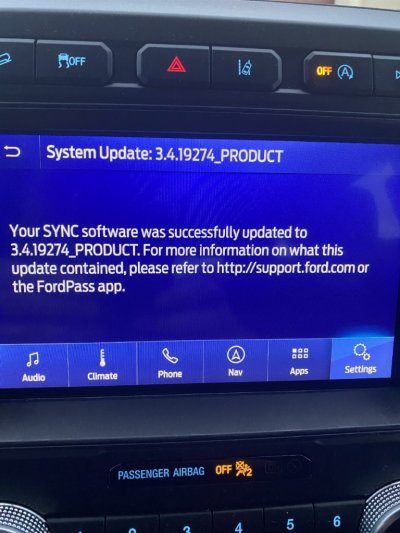
I am up to 9 systems now. 2(My 16 Edge, and My 17 Expy) were done prepping all the files manually several Months ago. The other 7 using the AIO’s from Cyan Labs. I highly suggest going to 3.4 19274 after going to 3.4. It is FAR less buggy.
Just to be clear, there is a risk of bricking your APIM, and this is AT YOUR OWN RISK.
Sent from my iPhone using Tapatalk Pro
Looks like I need to pay attention to the Gen4 area more so I can cut down on the MIS information a bit about Sync 3.
Yes, if you are running 3.3 or above you can use the USB Hub with the USB C.
3.4 can be done on any Sync 3 system without doing the Firmware or having a new APIM using the Format Tool.
This is the process you should be following and files you should be downloading.
https://cyanlabs.net/tutorials/update-ford-sync-3-2-2-3-0-to-version-3-4-all-years-3-4-19200/
I am up to 9 systems now. 2(My 16 Edge, and My 17 Expy) were done prepping all the files manually several Months ago. The other 7 using the AIO’s from Cyan Labs. I highly suggest going to 3.4 19274 after going to 3.4. It is FAR less buggy.
Just to be clear, there is a risk of bricking your APIM, and this is AT YOUR OWN RISK.
Sent from my iPhone using Tapatalk Pro
Last edited:
BTW, after doing the upgrade, you can go back to the owner.ford.com website for the SYNC update and upload a file after the update. This is supposed to let the "mothership" know what version you are on.
After upgrading to v3.4 and trying to upload the xml file showing what version I was on, I get an error that the file is not valid. It worked fine when I did my initial v3.0 upgrade to the most recent build. But it is not working for the v3.0 to v3.4 upgrade.
Just an FYI. If anyone has got this to work, please let me know. I have tried different browsers and computers without success.
This will not work unless owner.ford.com shows you as needing to update, or upgrade pending.
You can do the check for update via WiFi and it will also check in and submit the version. Not sure how Ford’s system is going to handle the version being higher than it is officially released to be at, only time will tell.
Sent from my iPhone using Tapatalk Pro
That’s funny!https://www.americantrucks.com/putco-f-150-luminix-led-front-emblem-92602.html?utm_content=AT Exterior - Emblem|Putco&T5_Var4=T542788&utm_campaign=ATF+F150+Vehicle+Medium&dialogtech=ppc&utm_source=google-pla&utm_medium=shopping&T5_Var2=shopping&T5_Var3=orange&intl=0&gclid=EAIaIQobChMIj8S0scvv5gIVEfDACh0hDQrJEAQYBCABEgJ5cPD_BwE&gclsrc=aw.ds
Here you go. Saved you $20K
Sent from my iPhone using Tapatalk
https://www.americantrucks.com/putco-f-150-luminix-led-front-emblem-92602.html?utm_content=AT Exterior - Emblem|Putco&T5_Var4=T542788&utm_campaign=ATF+F150+Vehicle+Medium&dialogtech=ppc&utm_source=google-pla&utm_medium=shopping&T5_Var2=shopping&T5_Var3=orange&intl=0&gclid=EAIaIQobChMIj8S0scvv5gIVEfDACh0hDQrJEAQYBCABEgJ5cPD_BwE&gclsrc=aw.ds
Here you go. Saved you $20K
Sent from my iPhone using Tapatalk
BURN!
This thread was painful to read!
Looks like I need to pay attention to the Gen4 area more so I can cut down on the MIS information a bit about Sync 3.
Yes, if you are running 3.3 or above you can use the USB Hub with the USB C.
3.4 can be done on any Sync 3 system without doing the Firmware or having a new APIM using the Format Tool.
This is the process you should be following and files you should be downloading.
https://cyanlabs.net/tutorials/update-ford-sync-3-2-2-3-0-to-version-3-4-all-years-3-4-19200/
I am up to 9 systems now. 2(My 16 Edge, and My 17 Expy) were done prepping all the files manually several Months ago. The other 7 using the AIO’s from Cyan Labs. I highly suggest going to 3.4 19274 after going to 3.4. It is FAR less buggy.
Just to be clear, there is a risk of bricking your APIM, and this is AT YOUR OWN RISK.
Sent from my iPhone using Tapatalk Pro
Should we start a new thread so this is easier to find?
Should we start a new thread so this is easier to find?
I personally don’t think that is needed. We have a similar thread in the Gen3 area.
Plus plenty of people already following this one.
Completely up to ya’ll.
Sent from my iPhone using Tapatalk Pro
You should pin it in both forums. I have zero reason to look at 3rd Gen posts.
Sent from my iPhone using Tapatalk
Never said you should. I really have no reason to look at Gen4, but there are MANY common issues between the 2, especially us 15-17 owners. 16-17’s have Sync 3. 15-17 have EB 3.5’s, albeit 1st Gen.
Yet I came across this thread because another user asked me to take a look, because I know Sync and FORSCAN pretty well.
Just wanted to clear some things up. Just wish I’d have seen it sooner, could have made it easier sooner.
Cheers!
Sent from my iPhone using Tapatalk Pro
st381183
Full Access Members
Thanks for the links! I’m a chicken, a cheap chicken and I think I’ll stick to Ford’s official updates for now. Especially as I really don’t know the ramifications and nuts and bolts of what I’m doing and potentially bricking an expensive and critical module and system is beyond my comfortable risk level.Never said you should. I really have no reason to look at Gen4, but there are MANY common issues between the 2, especially us 15-17 owners. 16-17’s have Sync 3. 15-17 have EB 3.5’s, albeit 1st Gen.
Yet I came across this thread because another user asked me to take a look, because I know Sync and FORSCAN pretty well.
Just wanted to clear some things up. Just wish I’d have seen it sooner, could have made it easier sooner.
Cheers!
Sent from my iPhone using Tapatalk Pro
Similar threads
- Replies
- 3
- Views
- 1K
- Replies
- 0
- Views
- 2K
- Replies
- 0
- Views
- 3K
- Replies
- 12
- Views
- 11K
Latest posts
-
another Transmission recall, NHTSA 26V402
- Latest: 99WhiteC5Coupe
-

-

Members online
Total: 4,556 (members: 6, guests: 4,550)