Newby Confusion Questions

Disclaimer: Links on this page pointing to Amazon, eBay and other sites may include affiliate code. If you click them and make a purchase, we may earn a small commission.

Snoozdoc

Member
Joined
Feb 29, 2020
Posts
20
Reaction score
1
Location
Michigan
Hi. New to forum but have read a lot.
Just received my 2019 Expy Plat + tow pkg. I read the wntire manual even before I closed the deal. But I’m still confused by a few things:

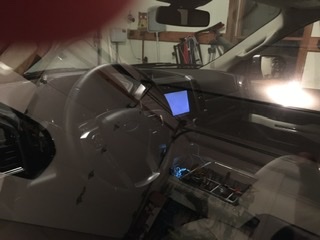
1. It seems that when I shut down in garage the instrument panel shuts down within seconds, but ambient lighting and Infotainment LCD stay powered for 5-10 minutes. There’s nothing ON the screen, but you can tell it’s still powered (and sucking juice). If I lock-up, this isn’t an issue. But I don’t really want to have to lock doors in my own garage.

2. Battery voltage gauge. Is there one? I’d much rather see that then turbo boost. Any idea how to get that up top instrument display?

3. Auto-stop menu. So there are 2 different places to turn off annoying engine auto stop/start. I imagined that unchecking the little box in the multifunction display between the tach and speedo would permanently shut that feature off, whereas the physical button was just effective for the immediate journey but not retained. Are they just redundant?

4. Must I really plug phone in every time I want to use Apple CarPlay? And, in addition, go through menus to disable CarPlay every time I want to use non-CarPlay Apps like Ford+Alexa for example?

I have more, but I’m new here and don’t want to ask too much right off the bat :)

Thank You in advance!!!

FC911540-A902-446C-8308-9948837EBDEE.jpeg
 

aggiegrad05

Full Access Members
Joined
Nov 6, 2017
Posts
1,833
Reaction score
1,390
Location
North Texas
Hi. New to forum but have read a lot.
Just received my 2019 Expy Plat + tow pkg. I read the wntire manual even before I closed the deal. But I’m still confused by a few things:

1. It seems that when I shut down in garage the instrument panel shuts down within seconds, but ambient lighting and Infotainment LCD stay powered for 5-10 minutes. There’s nothing ON the screen, but you can tell it’s still powered (and sucking juice). If I lock-up, this isn’t an issue. But I don’t really want to have to lock doors in my own garage.

2. Battery voltage gauge. Is there one? I’d much rather see that then turbo boost. Any idea how to get that up top instrument display?

3. Auto-stop menu. So there are 2 different places to turn off annoying engine auto stop/start. I imagined that unchecking the little box in the multifunction display between the tach and speedo would permanently shut that feature off, whereas the physical button was just effective for the immediate journey but not retained. Are they just redundant?

4. Must I really plug phone in every time I want to use Apple CarPlay? And, in addition, go through menus to disable CarPlay every time I want to use non-CarPlay Apps like Ford+Alexa for example?

I have more, but I’m new here and don’t want to ask too much right off the bat :)

Thank You in advance!!!

View attachment 34717

1) yep, that’s just the way it is

2) there is no voltage gauge

3) there is no way to permanently disable auto start/stop unless you buy a defeat device (auto stop Eliminator is one, I think)

4) yes. Ford doesn’t offer wireless CarPlay yet, so that’s the way it goes.

I understand none of those answers were what you’d hoped they’d be, but hey, at least you can feel good about knowing you weren’t missing anything.
 

John I

Well-Known Member
Joined
Jan 1, 2020
Posts
88
Reaction score
45
Location
CA
Welcome to the Forum. I am a relative newbie myself, and it’s been very helpful. I can help you with question #3. The Auto Start/Stop setting on the multifunction display and the physical button on the dash serve the same purpose- to disable the A.S.S., until the next time you start the engine. Then it is enabled again, which is the default.
I thought I might grow accustomed to it, but after 2 months I broke down and ordered the A.S.S. Eliminator yesterday.

I type too slow!
 
OP
OP
S

Snoozdoc

Member
Joined
Feb 29, 2020
Posts
20
Reaction score
1
Location
Michigan
Thanks Guys!

At least I know that I’m not alone on these ponderous issues.

Regardless, She’s a joy to Drive and I look forward to just becoming familiar with all the quirks and forget my QX80!
 

MxRacer965

Full Access Members
Joined
Nov 3, 2019
Posts
266
Reaction score
163
Location
Hudsonville, MI
1. It seems that when I shut down in garage the instrument panel shuts down within seconds, but ambient lighting and Infotainment LCD stay powered for 5-10 minutes. There’s nothing ON the screen, but you can tell it’s still powered (and sucking juice). If I lock-up, this isn’t an issue. But I don’t really want to have to lock doors in my own garage.

2. Battery voltage gauge. Is there one? I’d much rather see that then turbo boost. Any idea how to get that up top instrument display?

3. Auto-stop menu. So there are 2 different places to turn off annoying engine auto stop/start. I imagined that unchecking the little box in the multifunction display between the tach and speedo would permanently shut that feature off, whereas the physical button was just effective for the immediate journey but not retained. Are they just redundant?

4. Must I really plug phone in every time I want to use Apple CarPlay? And, in addition, go through menus to disable CarPlay every time I want to use non-CarPlay Apps like Ford+Alexa for example?

View attachment 34717

1. Mine doesn't stay powered for 5-10 minutes. I didn't time it but it can't be more than a minute. I can only assume the vehicle doesn't know if you are getting in or out and lights things up in preparation for start up...

3. You have a few options to permanently disable. You can get a device that plugs into the ODBII port, you can use FORSCAN, or buy a tune. I bought the start/stop button memorizer from 4D Tech. Works great.

4. Wireless CarPlay is a rarity due to the technology required for it to function. The amount of data transferred is too much for Bluetooth alone. As a result wireless CarPlay relies on a local WiFi connection as well. This requires the vehicle to have the proper technology to support it; on board router, etc. There is a article from Crutchfield that I referenced not too long ago that details the challenges and expense of wireless CarPlay. If I recall wireless CarPlay is also quite power hungry. So if you are going to plug in anyway....why bother with the hassles of wireless?
 

dlcorbett

Full Access Members
Air Force
Joined
Mar 26, 2014
Posts
3,082
Reaction score
1,149
Location
tx
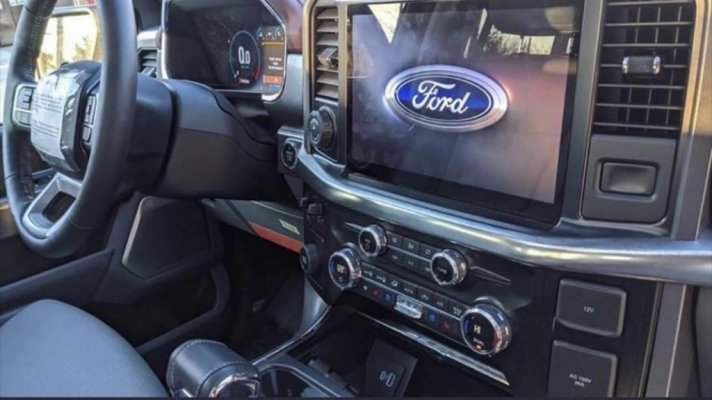
Wireless carplay/android auto should be available by time the new f150 comes out, so it may hit the expy by mcr. Btw the new f150 interiors have been leaked so i wonder if thats what the expys gettin.
 

aggiegrad05

Full Access Members
Joined
Nov 6, 2017
Posts
1,833
Reaction score
1,390
Location
North Texas
Wireless carplay/android auto should be available by time the new f150 comes out, so it may hit the expy by mcr. Btw the new f150 interiors have been leaked so i wonder if thats what the expys gettin.

Looks fairly similar except a much larger screen and a fully digital gauge cluster. Looks really good!!

b67e8ebec63d5857364a8918479bdb90.jpg
 

wakeboarder

Full Access Members
Joined
Nov 16, 2019
Posts
811
Reaction score
468
Location
Fort Lauderdale, FL
2. Battery voltage gauge. Is there one? I’d much rather see that then turbo boost. Any idea how to get that up top instrument display?

View attachment 34717

I'm not sure how to display it in the normal screens.

You can view battery voltage in the ET screen. It doesn't help you while you are driving, but if you are ever interested in your voltage while the car is not running.

Press and hold the OK button while car is off. Press and release the start button. Wait for ET to show up in the bottom right corner of the speedometer cluster. Acknowledge both notifications. Scroll through and one of the values is the battery voltage.

You can also change a correction factor for the mileage calculation. See attached link.

https://www.f150forum.com/f118/fix-inaccurate-mpg-display-2-minutes-421912/

This may be how one of my co-workers gets 30 mpg in his 3.5L Ecoboost F150.
 

Dice Roll

Full Access Members
Joined
Dec 19, 2019
Posts
833
Reaction score
359
Location
Craps Table
Years back I saw a volt meter that plugged into a cigarette lighter like is on the dash. Could be an option for you.
 
OP
OP
S

Snoozdoc

Member
Joined
Feb 29, 2020
Posts
20
Reaction score
1
Location
Michigan
Thanks Again!!! Great information!! The voltage isn’t a major deal, but I just thought it should be a standard gauge. Turbo-boost seems less relevant.

sometimes if I stop at post-office to check PO Box I’ve noticed if i get out with engine running and don’t lock doors, she beeps at me twice. (I have turned off auto-lock). It’s very slightly annoying. Again, not a big deal, but I don’t understand why it’s doing that. Perhaps to “remind me” that the engine is still on.
 

AKentPhoto

Full Access Members
Joined
Jan 23, 2020
Posts
508
Reaction score
309
Location
New Orleans
Perhaps to “remind me” that the engine is still on.

Correct, and that the key has left the vehicle. This comes in handy when the key is in your wife's purse and like a gentleman you drop her at the door and go to park.

Quick random question. Sorry, I know I'm still a poser waiting for my truck to get built. Can you lock the doors without the key? Sounds dumb but my wife's Infiniti won't let you lock the doors without the key! Quite annoying when I drop her off somewhere...
 

aggiegrad05

Full Access Members
Joined
Nov 6, 2017
Posts
1,833
Reaction score
1,390
Location
North Texas
Correct, and that the key has left the vehicle. This comes in handy when the key is in your wife's purse and like a gentleman you drop her at the door and go to park.

Quick random question. Sorry, I know I'm still a poser waiting for my truck to get built. Can you lock the doors without the key? Sounds dumb but my wife's Infiniti won't let you lock the doors without the key! Quite annoying when I drop her off somewhere...
Yes. Using the keypad on the door; just tap the 7/8 and 9/0 buttons at the same time and the doors will lock.

You can also use the FordPass app on your phone (or your Apple Watch).
 
OP
OP
S

Snoozdoc

Member
Joined
Feb 29, 2020
Posts
20
Reaction score
1
Location
Michigan
I haven’t tried it yet, but the vehicle still has physical lock buttons on each door so I imagine you can go very old-school and just lock the doors by hand

So many Choices!!!
 
OP
OP
S

Snoozdoc

Member
Joined
Feb 29, 2020
Posts
20
Reaction score
1
Location
Michigan
I’m going to check again tomorrow. I haven’t noticed it much anymore. Maybe it was doing some sort of update because it became engaged with my home wifi once it was in the garage. One of Life’s Mysteries!!
 
Top