

How to replace the positive battery terminal on 1st gen Expedition (2002) without new cables

Disclaimer: Links on this page pointing to Amazon, eBay and other sites may include affiliate code. If you click them and make a purchase, we may earn a small commission.

Dudeth

Full Access Members
Joined
Feb 7, 2017
Posts
103
Reaction score
14
Location
Central Arkansas
I couldn't really find much about this when I was looking for info so I thought I would post what I did when my positive terminal end needed replaced. I did not want to spend the money on new cables.

You will need:

Heavy Duty large marine battery terminal end( I got mine from wallyworld)
Utility / Razor knife
Wire brush or wire wheel
Bolt cutters or cutting wheel


-Disconnect your cables from the battery.
-With your utility knife cut/scrape the heat shrink wrapping/glue off of positive terminal in front of where the 2 positive wires join and connect to the terminal end. I cut a circle all the way around where I wanted to leave the heat shrink on and cut the heat shrink off to that boundary.
-Cut the terminal end off. Cut as close to the vertical piece of the terminal end as possible so that you still have some of the crimp left that holds the 2 wires together.
-Clean what's left of the crimped piece that holds the 2 wires together with a wire brush or wire wheel to get remaining heat shrink / glue. Get it nice and clean and shiny.
-Attach the heavy duty terminal end to the cable and tighten it down all the way so the crimp/wire is in there good and tight.
-Attach terminals to battery
-Done

This worked great for me.
 
Last edited:
Ted Rund

Member
Joined
Mar 12, 2020
Posts
17
Reaction score
1
Location
Us
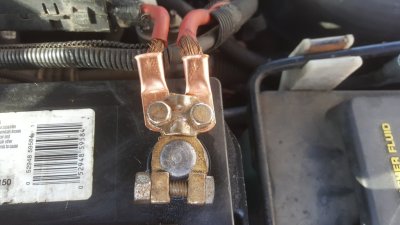
Similar situation today. Battery not charging loose cables. My two red positive cables pulled out from the positive terminal clamp.

Solution. Went to Autozone, purchased two copper crimp-on cable lugs, Duralast DL06060, and crimped them onto the ends of both red cables. Next, I used the two bolts holding down the pos clamp bridge, on both sides, to screw down the new copper cable lugs. Problem solved for $4.
 

DWhitley

Member
Joined
Oct 14, 2017
Posts
21
Reaction score
4
Location
Etna, Ca
I did the OP meathod myself about 2 months ago on mine. I am curious though if anyone has experience/opinion on a style of connector that has the point that presses into the cable without needing to strip it? Seemed to have merit even though it would not be for me as I will be replacing again soon to allow for an accessory fuse block as well as a relay block for added accessories in the vehicle. Personally I despise tapping into circuits if it can be avoided to reduce Gremlins appearing in the future by providing dedicated fused circuits and the relays provide only one tap to power off items without the key on to preserve the battery.

Sent from my SM-G965U using Tapatalk
 
OP
OP
Dudeth

Dudeth

Full Access Members
Joined
Feb 7, 2017
Posts
103
Reaction score
14
Location
Central Arkansas
I did the OP meathod myself about 2 months ago on mine. I am curious though if anyone has experience/opinion on a style of connector that has the point that presses into the cable without needing to strip it? Seemed to have merit even though it would not be for me as I will be replacing again soon to allow for an accessory fuse block as well as a relay block for added accessories in the vehicle. Personally I despise tapping into circuits if it can be avoided to reduce Gremlins appearing in the future by providing dedicated fused circuits and the relays provide only one tap to power off items without the key on to preserve the battery.

Sent from my SM-G965U using Tapatalk

I agree, tapping into circuits would definitely not be the preferred method. But the penetration type connector might workout fine.
 
OP
OP
Dudeth

Dudeth

Full Access Members
Joined
Feb 7, 2017
Posts
103
Reaction score
14
Location
Central Arkansas
Similar situation today. Battery not charging loose cables. My two red positive cables pulled out from the positive terminal clamp.

Solution. Went to Autozone, purchased two copper crimp-on cable lugs, Duralast DL06060, and crimped them onto the ends of both red cables. Next, I used the two bolts holding down the pos clamp bridge, on both sides, to screw down the new copper cable lugs. Problem solved for $4.

Nice! "Two bolts holding down the pos clamp bridge". You meant on a new terminal end? Didn't see you mention a new one. Good solution too!
 

Ted Rund

Member
Joined
Mar 12, 2020
Posts
17
Reaction score
1
Location
Us
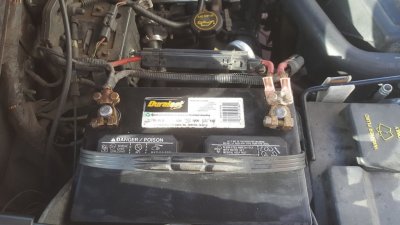
If a photo is worth a thousand words, then....

On the right, in the closeup, you can see the new copper lugs crimped onto the red battery cables. The lugs are then bolted onto the OLD pos battery terminal. Voila. If things get loose on the negative side, I will do the same.

Best

20200313_170145.jpg

20200313_170137.jpg
 
Top