Displaying speed limit in Instrument Cluster

Disclaimer: Links on this page pointing to Amazon, eBay and other sites may include affiliate code. If you click them and make a purchase, we may earn a small commission.

scottdm

Full Access Members
Joined
Dec 2, 2018
Posts
828
Reaction score
495
Location
Western PA
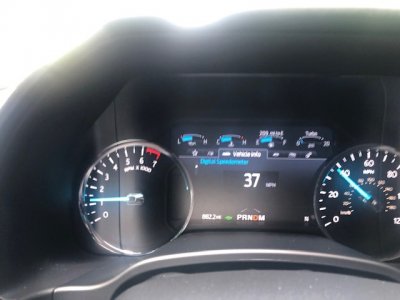
Hoping someone smarter than me has figured out how to display the posted speed limit on the Instrument cluster via Forscan or a specific build of Sync and can share what's required. I am only able to get the speed limit to display in the Expedition's IP when the Navigation/Compass screen is selected and a route is active. The picture below is from my 2020 F350, and is what I'm trying to accomplish if possible in my 2018 Expy. The F350 always shows the posted speed limit when the digital speedometer is selected even if no route is active on the Navigation system.

F350 has Sync 3.4 version 19274
Expy has Sync 3.4 version 20021
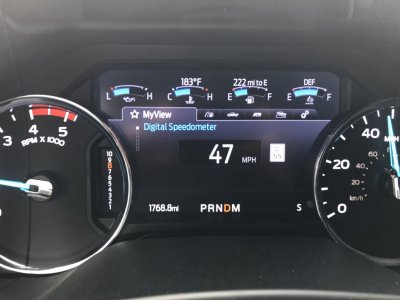
IMG_0544.jpg
 
Last edited:

Fozzy

Full Access Members
Joined
Sep 5, 2019
Posts
1,199
Reaction score
1,161
Location
Riverton
Are you sure the speed limit sign in the screen is not part of the new copilot 360 that can read the speed limit signs? My wife’s 2020 Aviator does the same thing. And if the cruise control is on it will automatically set the speed to the speed limit signs. You can also turn it off in the vehicle settings under the adaptive cruise. My Expy only knows the speed with the map data.


Sent from my iPhone using Tapatalk
 

wakeboarder

Full Access Members
Joined
Nov 16, 2019
Posts
811
Reaction score
468
Location
Fort Lauderdale, FL
I am not aware of anything. Does the f350 allow you to toggle that speed limit on and off? If so, you could check the Forscan IPC settings before and after.
 
OP
OP
scottdm

scottdm

Full Access Members
Joined
Dec 2, 2018
Posts
828
Reaction score
495
Location
Western PA
Are you sure the speed limit sign in the screen is not part of the new copilot 360 that can read the speed limit signs? My wife’s 2020 Aviator does the same thing. And if the cruise control is on it will automatically set the speed to the speed limit signs. You can also turn it off in the vehicle settings under the adaptive cruise. My Expy only knows the speed with the map data.


Sent from my iPhone using Tapatalk

To my knowledge, Copilot 360 hasn't made it to the SuperDuty yet. The SuperDuty still has a manual foot activated parking brake, and to support full speed adaptive cruise like the Expy has, the vehicle needs an electronic parking brake. I suspect it is still using GPS map data to display the speed limit sign in the cluster vs. using camera sign recognition since it doesn't change to reduced speed limits in construction zones, etc. I also checked the cruise settings in my F350, and it only lets you select "normal" or "adaptive" but doesn't have any selections about the speed limit signs.
 

18XLT

Member
Joined
Apr 22, 2019
Posts
22
Reaction score
20
Location
Detroit
This is simply a feature left off of our expensive expeditions.
My fiancé has a ‘19 nautilus that does this as well.

the same way we can’t simply even see what song is playing on our dash either.
 

carymccarr

Full Access Members
Joined
Aug 11, 2019
Posts
1,749
Reaction score
390
Location
Earth
This is simply a feature left off of our expensive expeditions.
My fiancé has a ‘19 nautilus that does this as well.

the same way we can’t simply even see what song is playing on our dash either.

Or have more than 18 presets. Or combine station sources. Or move from one preset group to the next with steering wheel button. Or sync climate control for the vehicle. Or use ANY of the native XM apps once a phone is plugged in.

Very odd limitations.
 

Going_Going_Gone

Full Access Members
Joined
Aug 31, 2018
Posts
574
Reaction score
328
Location
Phoenix
Is this feature present on the Platinum Expeditions? If the same display (panel) is used in the Platinum and the Limited, then hopefully someone can figure out how to add it to the Limited IP. To me it makes no sense to only these "useful" things only in the highest trim level--better to sell more mid-range models than to not sell more of the highest level models because they're priced out of reach for many.
 

Fozzy

Full Access Members
Joined
Sep 5, 2019
Posts
1,199
Reaction score
1,161
Location
Riverton
Is this feature present on the Platinum Expeditions? If the same display (panel) is used in the Platinum and the Limited, then hopefully someone can figure out how to add it to the Limited IP. To me it makes no sense to only these "useful" things only in the highest trim level--better to sell more mid-range models than to not sell more of the highest level models because they're priced out of reach for many.

I have a platinum and can’t get it to show up. Someone with a 2020 needs to chime in if they have it or not.


Sent from my iPhone using Tapatalk
 
OP
OP
scottdm

scottdm

Full Access Members
Joined
Dec 2, 2018
Posts
828
Reaction score
495
Location
Western PA
Talked with Clusters by Livnitup (https://www.clustersbylivnitup.com/) and he confirmed this feature is a firmware issue in the cluster vs. a Forscan or Sync related issue. Would need a 2020 owner to confirm if the speed limit displays next to the digital speedometer in the cluster like on the 2020 Super Duty. If so, he would need an image file from a 2020 to be able to offer this update to the firmware.
 

scotthere

Well-Known Member
Joined
Jun 27, 2020
Posts
56
Reaction score
33
Location
Orlando
That is a cool feature, but it would be better if it displayed the speeding fine rate in $$.

Sent from my SM-N975U1 using Tapatalk
 

AAOO

Full Access Members
Joined
May 15, 2019
Posts
364
Reaction score
205
Location
USA
I just want the temperature, time, and date somewhere on the main cluster. Feel like I’m in 1920 not 2020.
 

utmeep

Well-Known Member
Joined
Jun 11, 2020
Posts
45
Reaction score
50
Location
USA
I just want the temperature, time, and date somewhere on the main cluster. Feel like I’m in 1920 not 2020.

Agreed! Every car I've owned, except for this Ford had both the time and temp! Ford is just plain lazy.
 

Flexpedition

Full Access Members
Joined
May 26, 2015
Posts
1,339
Reaction score
665
Location
midwest
Do any Fords in the US have "traffic sign recognition" ? I know overseas (Europe, Australia, etc) its nearly a Ford standard. I have another Ford that displays the speed limit sign, but the data is via navigation somehow, not the front facing camera. On the turnpike the speed limit is 75, but on the dash a speed limit 74 sign is displayed. So weird.
 

flying68

Full Access Members
Joined
Sep 17, 2019
Posts
132
Reaction score
66
Location
Wichita, KS
Do any Fords in the US have "traffic sign recognition" ? I know overseas (Europe, Australia, etc) its nearly a Ford standard. I have another Ford that displays the speed limit sign, but the data is via navigation somehow, not the front facing camera. On the turnpike the speed limit is 75, but on the dash a speed limit 74 sign is displayed. So weird.
The 74 is an error in the navigation database. Had several spots that showed up like that on my old Explorer.
 

Fozzy

Full Access Members
Joined
Sep 5, 2019
Posts
1,199
Reaction score
1,161
Location
Riverton
Do any Fords in the US have "traffic sign recognition" ? I know overseas (Europe, Australia, etc) its nearly a Ford standard. I have another Ford that displays the speed limit sign, but the data is via navigation somehow, not the front facing camera. On the turnpike the speed limit is 75, but on the dash a speed limit 74 sign is displayed. So weird.

Not a Ford, but close enough. My wife’s new Aviator has CoPilot plus that can read the signs. The new Mustang E will have CoPilot 2.0 that can also read the signs and see the edge of the road. Auto accelerate and stop. Things like that.


Sent from my iPhone using Tapatalk
 

Members online

Forum statistics

Threads
57,016
Posts
535,899
Members
54,714
Latest member
Budman55
Top