You don't tell us what phone you're using. I'm using an iPhone and therefore I am using CarPlay. The only time I get dings is when I receive notifications is a text message is received or when the navigation system or Waze dings and I using either for guidance. Phone calls are not dings but a ring tone not of my choosing.
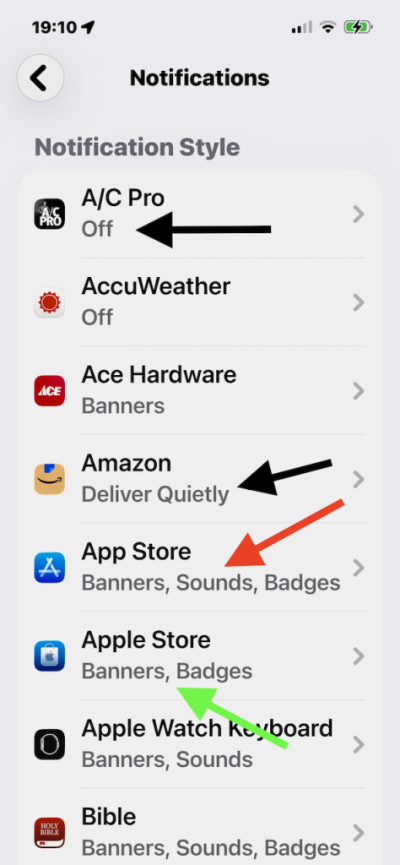
If you're using and iPhone the got to Settings > Notifications and scroll to the bottom and look at Notification Style. Notice in the attached graphic that anything that says Off or Deliver Quietly does not deliver any kind of notification. Notice that App Store (red arrow) has Banners, Sounds, and Badges turned on and these will give you a ding and put a message on your iPhone screen which does not transfer to the CarPlay screen when it dings. The Apple Store (green arrow) just shows Banners and Badges and these only display on your iPhone screen and do not produce any sound and will not display.
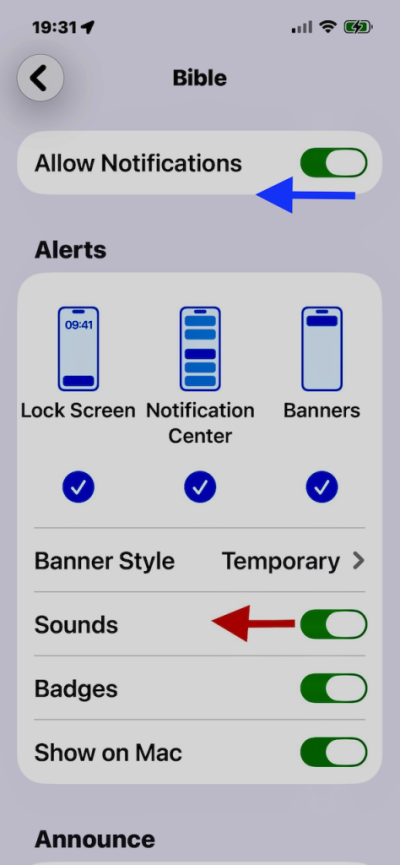
In the second graphic, I've clicked on my Bible App on the notifications screen. To kill the sounds, just move the Sounds slider to the left. If you don't want to allow any notifications, slide the Allow Notifications to the left and it will kill any notifications.